我们将不再继续开发我们的插件
我们要感谢大家的支持!
自 2014-10-15 00:00 起,开发版本将不再提供
版本:1.01
Bukkit:1.7.2 R0.3(需要 TrainCarts v1.54+)
简介
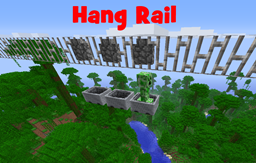
Hang Rail 附加组件是 TrainCarts 的一个请求,我也很喜欢。然而,它有点“与众不同”,无法直接放入 Train Carts 中(否则会导致所有使用铁栏杆作为视觉装饰的用户出现错误)。因此,您可以将此附加组件与 TrainCarts 一起安装,以添加悬挂在铁栏杆上的矿车。
除此之外,轨道现在位于矿车上方而不是下方,矿车的运动物理特性没有变化。您可以转弯、上下坡,甚至可以制作 X 形交叉和 T 形分叉。通过利用(新的)TrainCarts 轨道 API,所有内容都能与其他类型的轨道完美融合。
安装
安装 TrainCarts,然后将此附加组件的 jar 文件添加到 plugins 文件夹中。它将自动注册新可用的轨道类型。
使用方法
通过在水平线上放置铁栏杆,您可以创建轨道。要让矿车进入这些轨道,请在其下方 2 格处放置一条普通轨道连接到它。当矿车离开普通轨道时,它会进入悬挂轨道并停留在那里。无需设置任何命令或权限:只需放置轨道即可完成。
TrainCarts 告示牌可以放置在轨道顶部,即在轨道上放置一个方块(如石头、草、木头等),并在其上附着告示牌。所有告示牌,包括车站、刷怪器等,均可正常使用。路径查找也支持悬挂轨道。
如何显示上方的悬挂方块?
您可以将矿车内显示的方块更改为此方块。在这种情况下,使用以下两个命令:
/train setblock cobblewall
/train blockoffset 48
同样,使用方块变换告示牌:
[train]
blockchanger 48
cobblewall
示例
车站和告示牌的使用

带有曲线的水平线

斜坡

X 形交叉(8 轨道)

指标
此插件会向 MCStats.org 发送服务器数量和依赖统计信息。您可以在 PluginMetrics/config.yml 文件中选择退出(全局)。
链接
We will no longer continue development of our plugins
We would like to thanx everyone for the support!
Development builds are no longer available after 15-10-2014 00:00
Version: 1.01
Bukkit: 1.7.2 R0.3 (requires TrainCarts v1.54+)
Introduction
The Hang Rail add-on was a TrainCarts request that I liked as well. However, it was a bit too 'different' to just put it in Train Carts (causing everyone that used iron bars as visual styling to get bugs). For that reason, you can install this add-on next to TrainCarts to add minecarts suspended on iron bars.
Other than that the rail is now not below the minecart but above it, there is no change in minecart movement physics. You can make turns, go up and down and can even make X-crossings and T-splits. Everything blends in with other rail types by utilizing the (new) TrainCarts rail API.
Installation
Install TrainCarts and then add the jar file of this add-on to the plugins folder as well. It will automatically register the new available rail type.
Usage
By placing iron bars in a horizontal line you can create tracks. To get a minecart on these tracks, place a normal track leading to it 2 blocks below it. When the minecart leaves the tracks it goes onto the hang rail and stays there. There are no commands or permissions you have to set up: just place the rails and you're done.
TrainCarts signs can be placed on top of the rail, that is, place a block (such as stone, grass, wood, etc.) on top of the rail and attach signs to it. All signs, including stations, spawners, etc, function. Path finding also supports hangrails.
How to show that suspension block above?
You can change the block displayed in the Minecart to be this block. In this case, use the two commands:
/train setblock cobblewall
/train blockoffset 48
Similarly, with a blockchanger sign:
[train]
blockchanger 48
cobblewall
Examples
Stations and sign usage
Horizontal line with some curves
Slopes
X-crossing (8-track)
Metrics
This plugin sends server count and dependency statistics to MCStats.org. You can (globally) opt out in the PluginMetrics/config.yml file.
Links

 插件
 插件
 插件

 插件
 插件

 插件
评论 0
登录后参与评分
还没有评论,来抢沙发吧