TeleportEffects 是一个 Bukkit 插件,它会拦截每次传送并重新安排其执行时机,同时在起点和终点生成一些粒子效果。
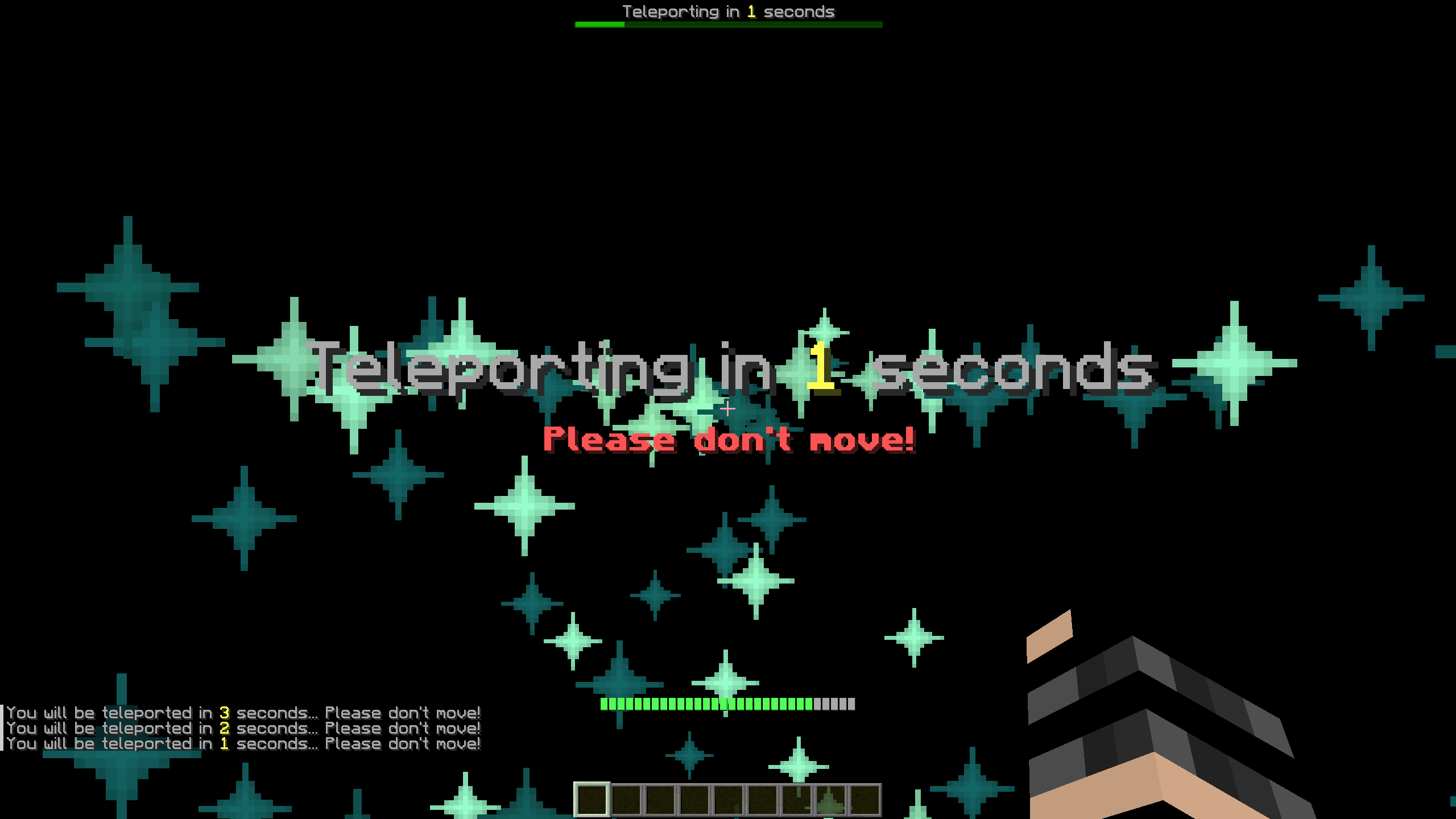
在继续之前,本页面仅对该插件进行了简要介绍。如果您需要更详细的说明,建议您查阅 GitHub Wiki 页面。
命令
该插件仅提供一个命令:/toggleteleporteffects
/toggleteleporteffects
权限:teleporteffects.toggle
别名:[toggleteleporte, togglete, tte]
在实际服务器中测试 TeleportEffects 后,大多数人觉得视觉效果或性能影响方面最令人困扰的就是这些效果本身。尽管这在一定程度上违背了该插件的主要功能之一,但我们仍然实现了 ToggleTeleportEffects 命令,它的作用正是如此:它会为使用该命令的玩家隐藏由该插件生成的所有效果。此选项针对每个用户单独保存,这意味着您无需在每次登录时都执行该命令。
权限
teleporteffects.bypass:拥有此权限的所有用户将自动绕过传送冷却时间。建议将此权限授予管理员或工作人员。
teleporteffects.toggle:执行 /toggleteleporteffects 命令所需的权限。
配置
每次传送都由四个阶段的粒子生成组成。每个阶段都由 config.yml 中的某些参数定义,更改这些参数将会改变各个阶段的呈现效果。
Stage1(第一阶段)
Stage1 是首先出现的阶段。该阶段持续总持续时间的 1/3,因此默认为 1 秒。
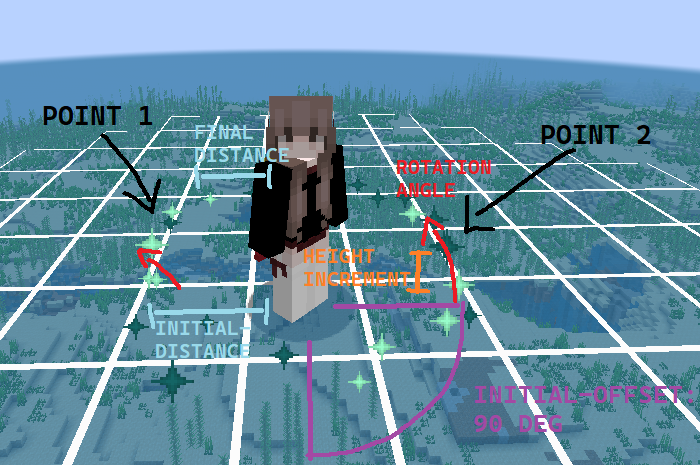
X 点 将均匀分布在圆周上,该圆周的半径为 initial-distance,并从玩家眼睛位置开始沿 initial-offset 度进行平移。然后,在每个刻(即两次迭代之间的时间间隔),这些粒子将以 rotation-angle 的角度旋转,其高度将在前一次值的基础上增加 +height-increment 个方块,并且它们会向玩家靠近。经过 1/3 持续时间后,粒子将达到 final-distance 的距离,停止生成,并开始进入 Stage2。
Stage2(第二阶段)
Stage2 紧随 Stage1 之后,从第一阶段结束的位置直接开始。该阶段持续总持续时间的 2/3,因此默认为 2 秒。
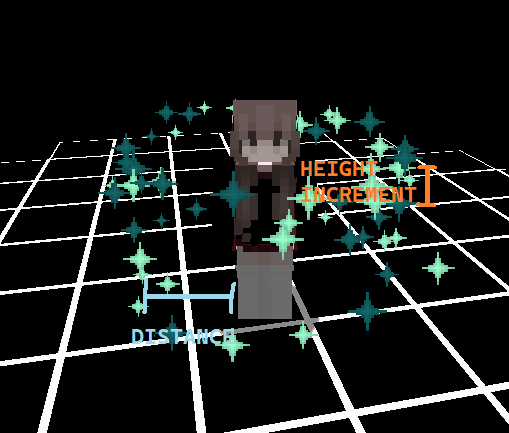
因此,此阶段直接继承自 Stage1 中粒子的最后位置,并从此处开始在该水平线上方和下方生成粒子,与上一次迭代的距离为 height-increment 个方块。所有其他选项均从第一阶段继承并延续,但请注意,在这种情况下,final-distance 实际上指的是相对于玩家的初始和最终距离。
Stage3(第三阶段)
与前两个阶段是顺序执行不同,第三个阶段与 Stage2****同时发生。这意味着它在总持续时间的 1/3 之后开始,并且具有与第二个阶段相同的持续时间。然而,如前所述,Stage3 并非在玩家周围生成粒子,而是在传送目的地生成粒子。
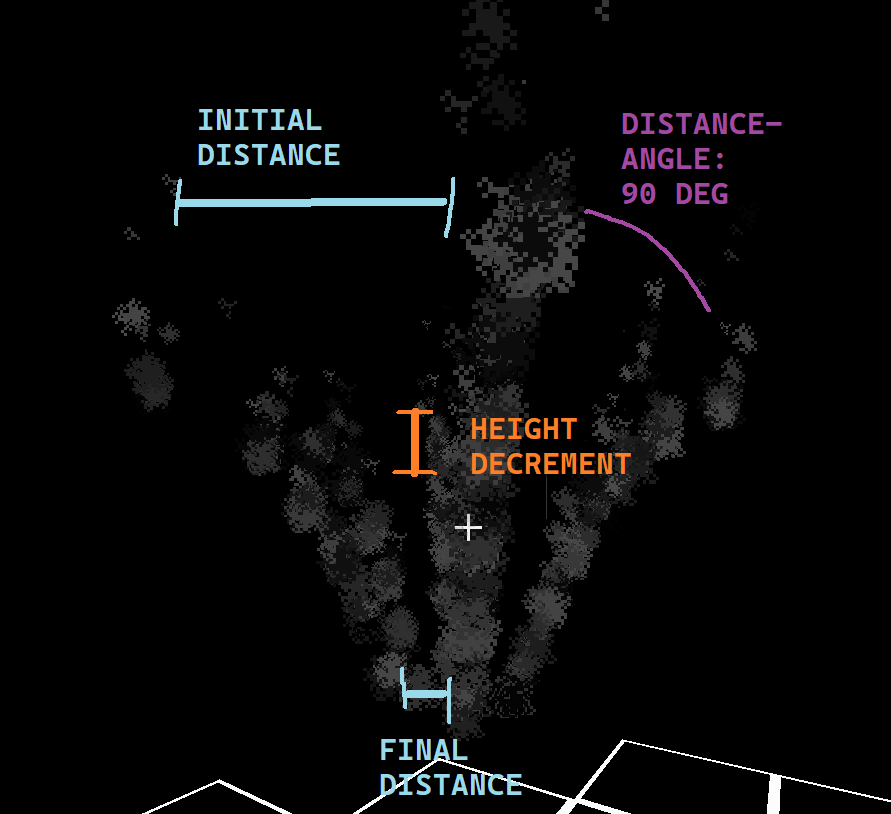
Stage3 开始在高于最终目的地 2.5 个方块的位置以圆形半径生成粒子。它会在半径为 initial-distance 个方块的圆周上生成 360° / distance-angle 个点。然后,这些粒子将在每个刻(即两次迭代之间的时间间隔)下降 height-decrement 个方块,直到它们到达距离目的地 final-distance 个方块的位置。此时,Stage4 将开始。
Stage4(第四阶段)
Stage4 是最后一个且相对不重要的阶段。它直接关联到 Stage3 的结束,但它发生在传送完成后(即超过持续时间秒数之后)。
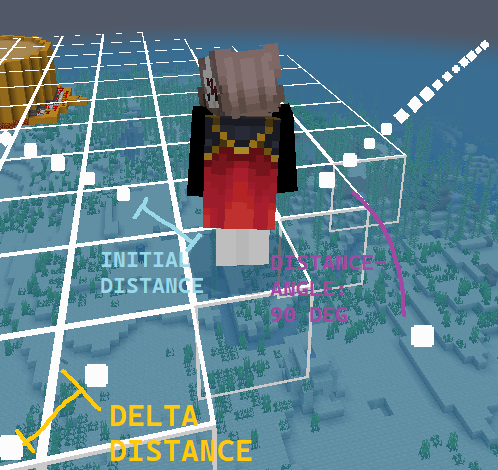
因此,Stage4 的粒子将在玩家脚底以圆形半径生成,类似于 Stage3 的粒子,使用与前一阶段相同数量的点。它们将沿直线移动,直到经过 stage4-duration 秒后,这些粒子将被移除。
API
TeleportEffects 是一个相对较小的插件,有些人可能希望将其集成到他们自定义的核心模组(例如 FactionCore)或他们的传送插件中。无论如何,实现这一目标都非常简单。
如需进一步了解如何使用 TeleportEffects API 以及有关该插件的更多信息,请查看 GitHub 页面上的 Wiki。
TeleportEffects is a Bukkit plugin that intercepts every teleportand re-schedules it while creating some particle effects on the start and destination points.
Before continuing, this page is a presentation with minimal information of the plugin. If you want a more complete explanation, you are encouraged to check out the GitHub Wiki page.
Commands
The plugin offers only one command: /toggleteleporteffects
/toggleteleporteffects
Permission: teleporteffects.toggle
Aliases: [toggleteleporte, togglete, tte]
Having tested TeleportEffects on a real server, what most people found annoying (for visual or performance reasons) were the effects themselves. Even though this kind of defeats one of the main features of the plugin, the ToggleTeleportEffects command was implemented, and it does exactly that: it hides every effect created from the plugin for the player that uses it. This option is saved for every user, meaning that it is not required to execute the command at every login.
Permissions
teleporteffects.bypass: All the users that have this permission will automatically bypass the teleport cooldown. This is advised for admin or staff users.
teleporteffects.toggle: The permission required to execute the command /toggleteleporteffects.
Configuration
Every teleport is composed of four stages of particles spawning. Each one of them is characterized by some of the parameters of the config.yml and changing these, will change the stages themselves.
Stage1
The Stage1 is the first stage that appears. This stage lasts for 1/3 of the total duration, so, by default, 1 seconds.
X points will be equally divided along a circle that will be translated by initial-offset degrees starting from the position of the player eyes and of radius initial-distance. Then, every tick (duration between an iteration and another), those particles will be rotated by rotation-angle, their height will be +height-increment blocks from their previous value, and they will be closer to the player. After 1/3 duration seconds, the particles will have reached final-distance, they will stop spawning and Stage2 will begin.
Stage2
Stage2 will be the followup to Stage1, starting off right from where the first stage finished. This stage lasts for 2/3 of the total duration, so, by default, 2 seconds.
So, this stage takes directly from Stage1 the last position of the particles and from there it starts spawning particles both above and below that level, at height-increment blocks of distance from the previous iteration. All the other options are inherited and continued from the first stage, but do note that in this case final-distance will actually be the initial and final distance from the player.
Stage3
While the previous two stages are sequential, the third stage happens simultaneously as the Stage2. This means that it starts after 1/3 of the total duration, and it has the same duration as the second stage. However, Stage3 spawns particles not around the player, as previously seen, but at the teleport destination.
The Stage3 starts spawning particles 2.5 blocks higher than the final destination in a circular radius. It will spawn 360° / distance-angle points at a radius of initial-distance blocks. Then, these particles will descent by height-decrement blocks every tick (duration between an iteration and another) until they reach the final-distance distance in blocks from the destination location. At that point, Stage4 will commence.
Stage4
Stage4 is the last and less important stage. It is directly linked to Stage3 ending, but it happens after the teleporthappened (so past the duration seconds).
So, Stage4 particles will be spawned at the player's feet in a circular radius, similar to Stage3 particles, using the same numbers of points as the previous stage. They will move in a straight line until stage4-duration seconds will have passed, then they will be removed.
API
TeleportEffects is a relatively small plugin, and some may want to integrate it in their custom mode core (for example a FactionCore) or in their teleportation plugin. In any case, achieving this goal is trivial.
To further know how to use TeleportEffects API and more information about the plugin, check out the Wiki at the GitHub page.
 插件
 插件
 插件

 插件
 插件

 插件

评论 0
登录后参与评分
还没有评论,来抢沙发吧