
默认行为
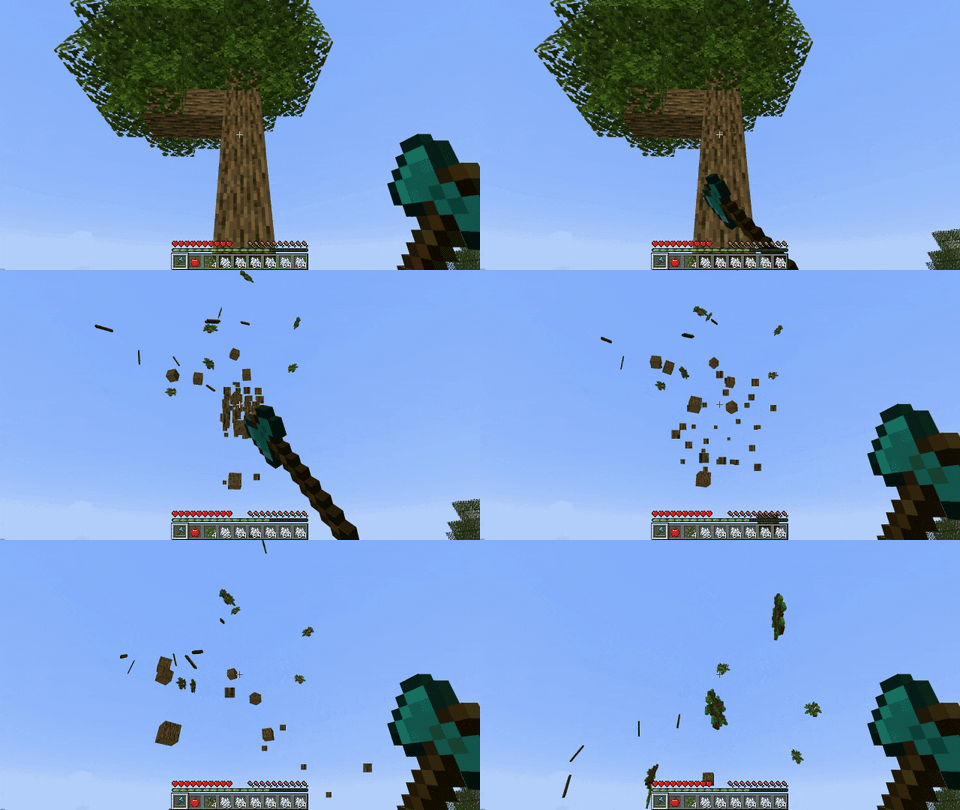
单棵树木检测
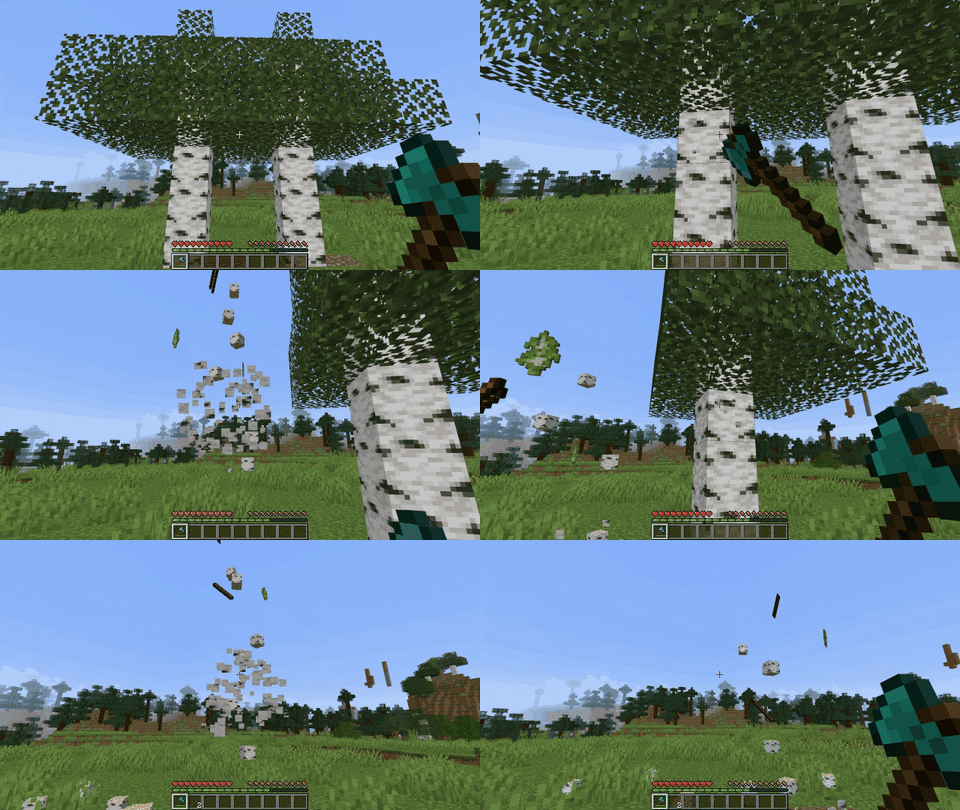
高级结构检测
完全可配置
游戏内配置
通过自动检测树木特征,可以在几秒钟内配置自定义树木
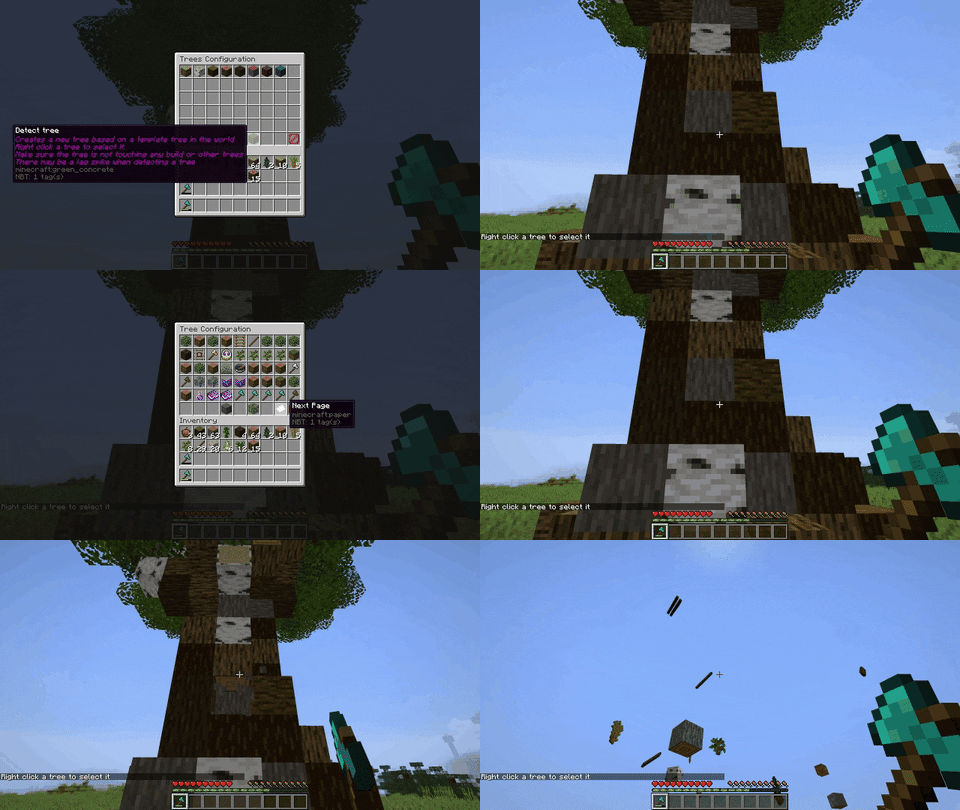
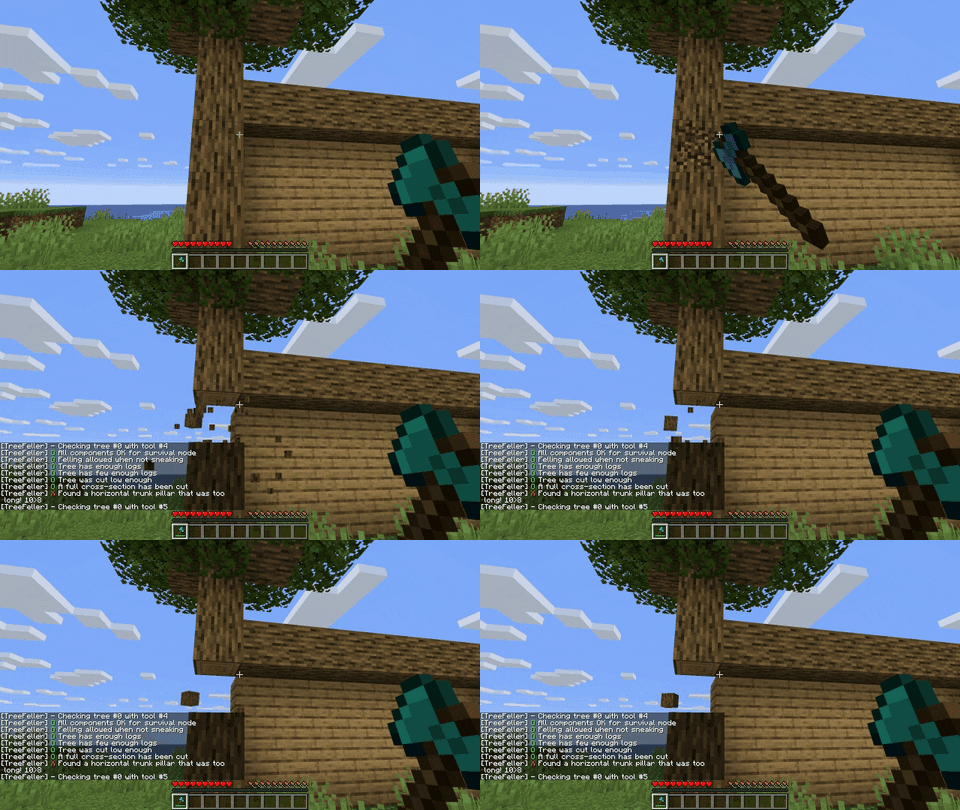
丰富的调试信息
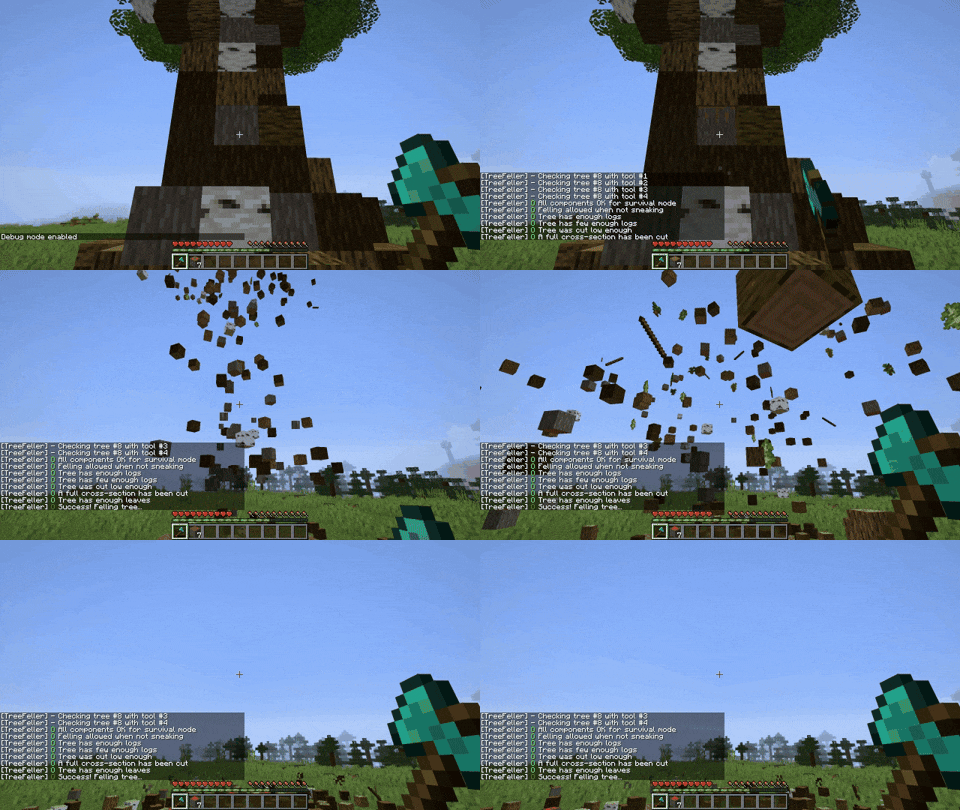
- 可以使用任意方块组合为树叶和原木来配置自定义树木
- 可以配置自定义工具的名称、耐久度、附魔等更多属性
- 几乎所有配置选项都可以针对每棵树或每件工具进行自定义
- 工具或树木可以配置为仅在特定世界、一天中的特定时间、特定游戏模式等条件下生效!
即插即用
默认配置能够可靠地砍伐所有原版树木,同时不会干扰玩家建造的结构。
许多用户请求的功能:
- 每棵树或每件工具的权限可定制
- 全局冷却以及基于工具或树木的冷却
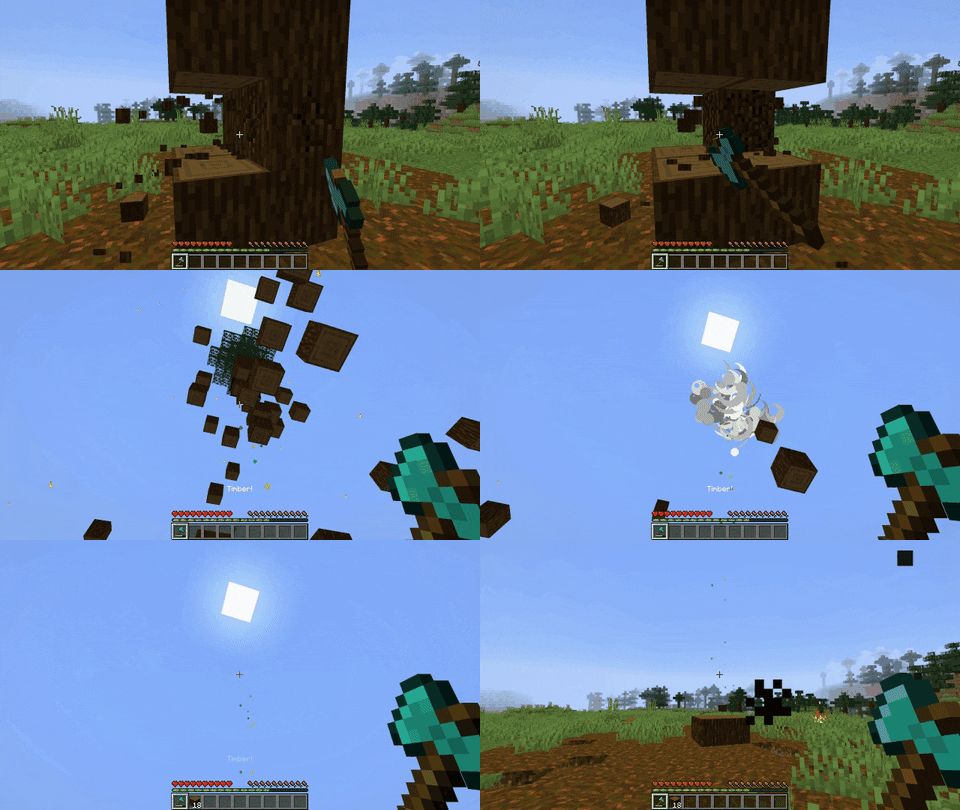
- 树木砍伐动画
- 高级倒树效果
- 特效(粒子、声音和爆炸)
- /treefeller reload 命令
- 以及更多功能!
与以下插件兼容:
- McMMO Classic
- McMMO
- EcoSkills
- MMOCore
- Zrip’s Jobs Reborn
- CoreProtect
- GriefPrevention
- WorldGuard
- Towny
- Ore Regenerator
- Drop2Inventory
- 以及更多!
常见问题解答 (FAQ)
它支持自定义树木吗?
是的
只要原木相连,伐木器就具备检测和砍伐任何形状和大小的树木的能力。
默认配置是针对原版树木设置的。如果你拥有非常大的树木,或者具有多种或不匹配的原木/树叶类型的树木,你可能需要将自己的树木添加到配置文件中。
许多自定义树木生成不当,包含对角线连接或持久存在的树叶。
如果是这种情况,你可能需要启用 ignore-leaf-data(忽略树叶数据)、diagonal-leaves(对角线树叶)和 player-leaves(玩家放置的树叶)。
故障排除?
如果你无法让某些功能正常工作:
- 确保你使用的是最新版本
- 运行 /treefeller debug 并尝试砍伐一棵树。
- 检查服务器控制台中的启动日志
如果你无法确定问题所在,我很乐意在 Discord 或 GitHub 上提供帮助。请确保提供配置文件、启动日志以及来自 /treefeller debug 的调试信息。
技巧/趣味事实
你可以使用伐木器来采集矿石
添加以矿石作为树干且禁用树叶的“树木”:
- [COAL_ORE, COAL_ORE, {required-leaves: 0, leaf-detect-range: 0, leaf-break-range: 0, max-height: 256}]
为每种镐子添加工具,并将 allowed-trees 设置为 ORE
- {type: IRON_PICKAXE, allowed-trees: ORE}
将斧头的 allowed-trees 设置为 LOG
- {type: IRON_AXE, allowed-trees: LOG}
对于更具体的配置,allowed-trees 应设置为树木索引列表,例如 [0, 1, 2, 3, 4, 5] 表示定义的前 6 棵树木
(你可能还需要将 max-height 设置得更高)
你可以定义多个相同类型的工具或树木
如果你想要实现 OR 行为,这将非常有用。在此示例中,金斧必须具有保护 I 或效率 II:
tools:
- {type: GOLDEN_AXE, required-enchantments: {unbreaking: 1}}
- {type: GOLDEN_AXE, required-enchantments: {efficiency: 2}}
工具和树木按顺序进行检查
如果一个物品匹配两个工具,则始终使用第一个匹配的工具。
例如:
- {type: IRON_AXE, required-enchantments: {unbreaking: 1}}
- {type: IRON_AXE, required-enchantments: {unbreaking: 2}, effects: [explosion]}
永远不会发生爆炸,因为具有保护 II 的铁斧也匹配第一个工具。
命令
配置
在更新伐木模组时,请确保添加任何缺失的配置选项,因为它们不会自动添加
(参见 config.yml)
Default Behavior
Individual Tree Detection
Advanced Structure Detection
Fully Configurable
In-game Configuration
Custom trees can be configured in seconds by auto-detecting the tree's features
Extensive Debugging info
- Configure custom trees with any combination of blocks for its leaves and logs
- Configure custom tools with custom name, durability, enchantments, and more
- Almost any configuration option can be customized for each tree or tool
- Tools or trees can be configured to only work in specific worlds, times of day, gamemodes, and more!
Plug-and-play
The default configuration will reliably cut down all vanilla trees, while not disturbing player-made structures.
Many user-requested features:
- Customizable permissions for each tree or tool
- Global and tool or tree-based cooldowns
- Tree felling animation
- Advanced falling trees
- Effects (particles, sounds, and explosions)
- /treefeller reload
- And more!
Compatibility with the following plugins:
- McMMO Classic
- McMMO
- EcoSkills
- MMOCore
- Zrip’s Jobs Reborn
- CoreProtect
- GriefPrevention
- WorldGuard
- Towny
- Ore Regenerator
- Drop2Inventory
- And more!
FAQ
Does it work with custom trees?
Yes
The tree feller is fully capable of detecting and cutting down trees of any shape and size, provided that the logs are connected.
The default config is configured for vanilla trees. If you have very large trees or trees with multiple or mismatched wood or leaf types, you may have to add your own trees to the config.
Many custom trees are generated improperly, containing diagonally connected or persistent leaves.
If this is the case, you may have to enable ignore-leaf-data, diagonal-leaves, and player-leaves.
Troubleshooting?
If you can't get something to work:
- Make sure you’re using the latest version
- Run /treefeller debug and try to cut down a tree.
- Check the startup logs in the server console
If you are unable to pinpoint the problem, I’m happy to help on discord or GitHub. Make sure to provide the config, startup logs, and the debug information from /treefeller debug
Tips/Fun Facts
You can use the tree feller for ores
Add trees using ore for the trunk and with leaves disabled:
- [COAL_ORE, COAL_ORE, {required-leaves: 0, leaf-detect-range: 0, leaf-break-range: 0, max-height: 256}]
Add tools for each pickaxe with allowed-trees set to ORE
- {type: IRON_PICKAXE, allowed-trees: ORE}
Set allowed-trees for the axes to LOG
- {type: IRON_AXE, allowed-trees: LOG}
Fore more specific configuration, allowed-trees should be set to a list of tree indexes, such as [0, 1, 2, 3, 4, 5] for the first 6 trees defined
(you may need to set max-height higher as well)
You can define more than one tool or tree of the same type
This is useful if you want OR behavior. In this example, a golden axe must have either unbreaking 1 or efficiency 2:
tools:
- {type: GOLDEN_AXE, required-enchantments: {unbreaking: 1}}
- {type: GOLDEN_AXE, required-enchantments: {efficiency: 2}}
Tools and trees are checked in order
If you have an item that matches two tools, the first one will always be used.
For example:
- {type: IRON_AXE, required-enchantments: {unbreaking: 1}}
- {type: IRON_AXE, required-enchantments: {unbreaking: 2}, effects: [explosion]}
An explosion will never occur, as an iron axe with unbreaking 2 also matches the first tool.
Commands
Configuration
When you update the tree feller, make sure to add any missing configuration options, as they will not be automatically added
(See config.yml)

下载 Thizzy'z Tree Feller
需要联机服务器吗?
稳定流畅、一键部署,几分钟即可和朋友联机开服
最低仅需 8 元/月 即可畅快联机
下载 Thizzy'z Tree Feller
需要联机服务器吗?
稳定流畅、一键部署,几分钟即可和朋友联机开服
最低仅需 8 元/月 即可畅快联机
下载 Thizzy'z Tree Feller
需要联机服务器吗?
稳定流畅、一键部署,几分钟即可和朋友联机开服
最低仅需 8 元/月 即可畅快联机
下载 Thizzy'z Tree Feller
需要联机服务器吗?
稳定流畅、一键部署,几分钟即可和朋友联机开服
最低仅需 8 元/月 即可畅快联机
下载 Thizzy'z Tree Feller
需要联机服务器吗?
稳定流畅、一键部署,几分钟即可和朋友联机开服
最低仅需 8 元/月 即可畅快联机
下载 Thizzy'z Tree Feller
需要联机服务器吗?
稳定流畅、一键部署,几分钟即可和朋友联机开服
最低仅需 8 元/月 即可畅快联机
下载 Thizzy'z Tree Feller
需要联机服务器吗?
稳定流畅、一键部署,几分钟即可和朋友联机开服
最低仅需 8 元/月 即可畅快联机
下载 Thizzy'z Tree Feller
需要联机服务器吗?
稳定流畅、一键部署,几分钟即可和朋友联机开服
最低仅需 8 元/月 即可畅快联机
下载 Thizzy'z Tree Feller
需要联机服务器吗?
稳定流畅、一键部署,几分钟即可和朋友联机开服
最低仅需 8 元/月 即可畅快联机
下载 Thizzy'z Tree Feller
需要联机服务器吗?
稳定流畅、一键部署,几分钟即可和朋友联机开服
最低仅需 8 元/月 即可畅快联机
- 在默认配置中增加了对杨树的支持
关于这个资源的讨论、问题反馈与使用心得
还没有讨论,来发第一帖吧
你是这个资源的作者?登录后可认领此资源。
相似资源
 插件

使床在所有维度中爆炸的模组
 插件
重新定义服务器上的生物运输方式。使用高度可定制的口袋道具,安全地捕获、存储和释放任何实体。
 插件
为 Armor Poser 模组添加兼容性
 插件

SkyBlock、OneBlock、Boxed、SkyGrid、AcidIsland、CaveBlock、Poseidon、StrangerRealms——以及更多!这些只是由 BentoBox 支持的基于岛屿的游戏模式之一。来自原版 ASkyBlock 的作者。
 插件
AbAcc AbAcc 是一款适用于 Minecraft 服务器的管理插件,可简化玩家作弊检测与举报管理工作。工作人员可以发起并管理对可疑玩家的检查流程,并在检查完成后将其释放。
 插件
在 Minecraft 中加入“最后一击”、“第二次机会”和“最后喘息”机制!从高处坠落时,你将拥有 0.5 HP 而不是直接死亡;当生命值较低时,增强你的能力。
评论 0
登录后参与评分
还没有评论,来抢沙发吧