TigerReports by MrTigreroux
1.7+ Spigot 插件
支持 MySQL 和 BungeeCord
支持 Vault 聊天前缀和后缀
通过安装 TigerReportsSupports 插件实现 Discord 支持
描述
TigerReports 是一款高度可配置且功能详细的插件,用于管理玩家举报。它通过一个简单的 /report 命令工作,该命令会记录大量数据并显示在工作人员 GUI(一个箱子)中。
运行机制
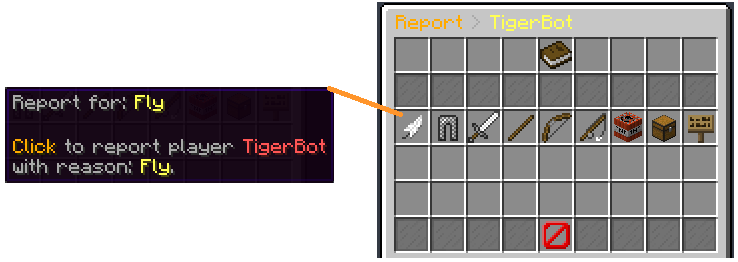
玩家可以举报在线和离线玩家(具体取决于配置),举报时有冷却时间和最少字符数限制。如果未指定任何理由,将打开一个 GUI(箱子)以选择默认理由之一(这些理由是可在配置中修改的)。
当举报发送后,在线的工作人员会通过一条可点击的消息收到警报,点击后会打开菜单。
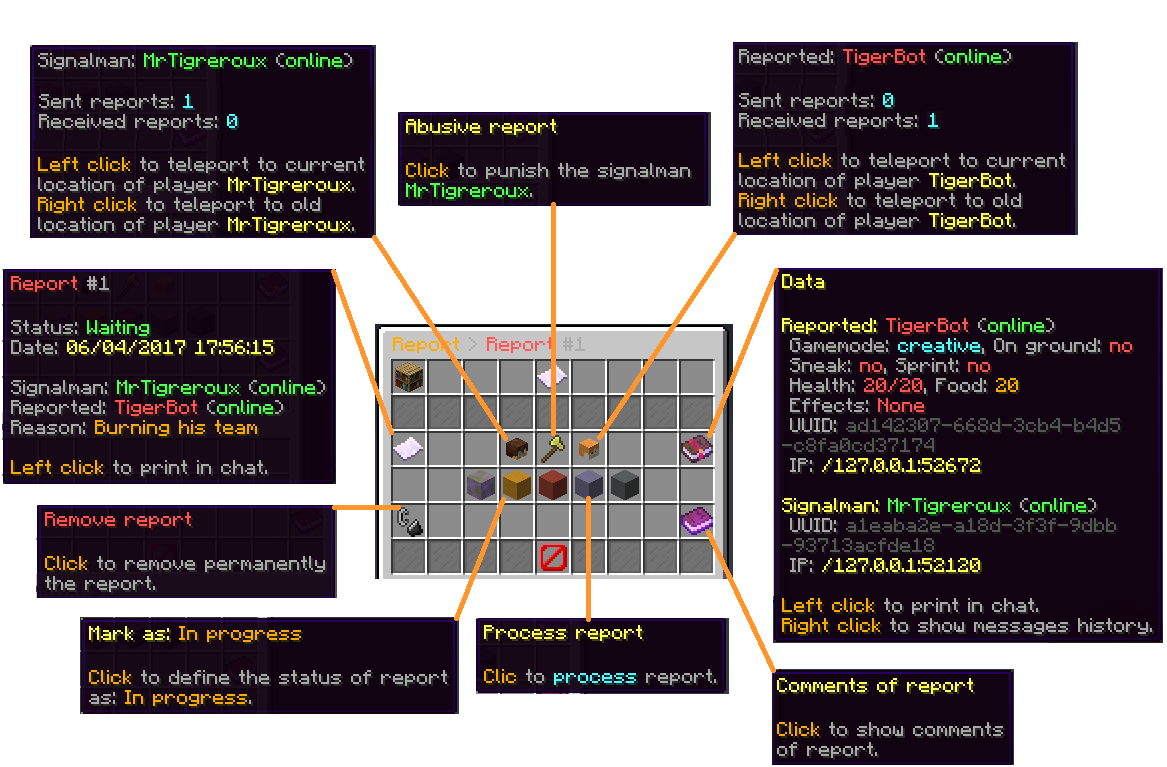
此菜单允许:
- 传送 到举报者和被举报玩家在举报期间及当前的位置。
- 如果是恶意举报,可以对其进行 惩罚,惩罚有配置的冷却时间(使用此惩罚时,举报会被标记为虚假)。
- 查看被举报玩家的 高级数据,如游戏模式、生命值、效果等。
- 将 举报状态 标记为:等待中、进行中、重要或已完成。
- 归档 举报(从主菜单中移除,但保留在数据库中)。
- 彻底 删除 举报。
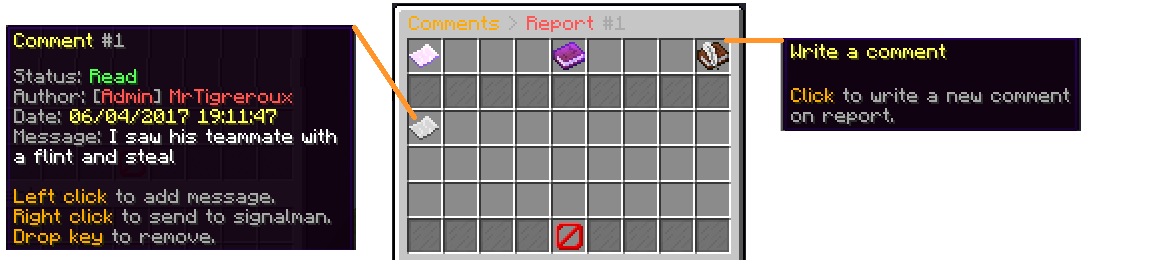
- 撰写和查看工作人员对举报的 评论。
- 查看举报参与者在此前发布的 消息历史记录。
当工作人员将举报标记为“已完成”时,他们可以留下评价:属实、不确定或虚假。
只要未被高级工作人员归档或删除,举报就会显示在主菜单中。
图片
理由菜单:
举报菜单:
评论菜单:
配置
插件可以在 config.yml 文件中进行配置。
你可以 在这里 查看所有可修改的参数列表及其功能说明。
默认的 config.yml 设置 在这里。
消息
消息 默认为法语,但所有消息都可以在 messages.yml 文件中进行修改。
为什么? 因为我是法国人,我不希望插件的默认消息出现糟糕的英语语法,但我仍然在下面编写了一套基础的英语消息,如果你没有时间或动力自己翻译的话。
它们会在每个新版本发布后更新。
如果你运行的是 1.16+ Spigot 服务器,你可以在 messages.yml 文件中使用 &#FFFFFF 或 &x&F&F&F&F&F&F 格式来设置十六进制颜色,其中 #FFFFFF 对应 & 符号,需与 Config: ColorCharacter 中的设置一致。
重要提示: 如果你使用的是 Minecraft 1.8 或更低版本,你必须使用 ANSI 编码保存 messages.yml 文件,否则必须使用 UTF-8 编码。
如果消息没有变化,意味着你使用了错误的编码格式。
此外,你不能在文件的第一行放置注释(#Message)。如果你这样做,消息将不会被加载。
更新你的消息
如果你最近将 TigerReports 更新到了最新版本,你可以使用以下在线工具更新你的消息(在 messages.yml 文件中):

默认消息
点击下方的语言,然后按 CTRL 和 A 键全选所有消息,接着复制/粘贴它们(CTRL 和 C 然后 CTRL 和 V)。
(感谢分享这些翻译的人们,他们的昵称位于文件顶部)
English
Français
Español
中文
Русский
Tiếng Việt
Nederlands
Polskie
Deutsch
Italiano
命令
你可以 在这里 查看所有可用命令。
权限
你可以 在这里 查看所有可用权限。
安装
TigerReports 是一个不依赖 Minecraft 版本的插件。它旨在在所有 高于或等于 1.7 的 Spigot 版本上运行。
TigerReports 的安装是标准的:
- 停止你的 Spigot 服务器。
- 下载并将
TigerReports.jar 文件放入服务器的 plugins 文件夹中。
- 启动你的服务器。
就这样,你现在可以编辑 ./plugins/TigerReports 文件夹中的所有你想修改的内容,保存更改并通过 /reports reload 命令应用到服务器上。某些功能/消息需要重启服务器才能生效。
如果你有一个 BungeeCord 网络:
你需要在每个 Spigot 服务器的 config.yml 文件(位于文件底部)中配置一个 MySQL 数据库,并保留 BungeeCord 选项为启用状态。
(你不需要将 TigerReports.jar 放入 BungeeCord 网络服务器的 plugins 文件夹中)
我建议你:
- 根据需要编辑
messages.yml 和 config.yml 文件。
- 在一个服务器上检查一切是否正常。
- 选中 TigerReports 文件夹(在你的服务器 plugins 文件夹内),然后按住
CTRL 键并选中 TigerReports.jar。
- 现在你可以复制这两个文件,并将它们粘贴到你每个 Spigot 服务器的相应位置。
如果你想要 Discord 支持:
按照该插件介绍页面中的说明安装 TigerReportsSupports 插件(在 Installation 部分)。
常见问题
BungeeCord(仅限)命令无法由 Spigot 插件为玩家执行,因此你不能在 config.yml 文件的 PunishCommands 中配置一个 BungeeCord 命令。但是,玩家仍然可以执行这些命令,因此你可以向工作人员发送一条 tellraw 消息,解释他需要点击该消息以执行 BungeeCord 命令。
你可以使用在线 tellraw 生成器,例如 这个。
在 config.yml 文件中为 PunishCommands 放置的命令示例:
'-CONSOLE tellraw _Staff_ {"text":"[Apply the punish command]","clickEvent":{"action":"run_command","value":"/bungeebancommand _Reported_ 5d Fly"}}'
(注意:你必须在命令的开头和结尾加上 ',因为 tellraw 命令中包含 ")
如果你遇到卡顿/希望最小化插件对服务器性能的影响:
你可以考虑:
- 设置较高的
Config: MenuUpdatesInterval 值
- 禁用
Config: CollectSkulls
- 设置较小的
Config: MessagesHistory 值
- 设置较小的
Config: MaxReports 值
- 如果你经常对同一玩家有多份报告,则启用
Config: StackReports
- 禁用
Config: ChatReport 功能
- 为
Config: CommandsHistory 设置较小或空的列表
- 启用
Config: ReportOnline
服务条款
请通过遵守以下指示来尊重我的工作:
- 不要声称此插件是你的。
- 不要在此网站或其他网站上分发或出售此插件,只需重定向到此页面即可。
- 未经引用我和通知我(MrTigreroux),不得复制部分或全部源代码。
以上就是全部内容,感谢阅读此页面。
如果你想查看源代码,该插件托管在 GitHub 上。
如果遇到任何错误或有任何建议,请在这里告诉我:
我会尽快回复。
请记住,我是免费制作此插件以帮助那些不知道如何创建自己插件的人,点赞或反馈将非常感激。 :)
TigerReports by MrTigreroux
1.7+ Spigot plugin
MySQL & BungeeCord support
Vault chat prefixes and suffixes support
Discord support by installing TigerReportsSupports plugin
Description
TigerReports is a highly configurable and detailed plugin to manage player reports. It works with a simple command /report which registers many data that is displayed in a staff GUI (a chest).
Operation
Players can report online and offline players (it depends on the config) with a cooldown and a minimum amount of characters. If they don't specify any reason, a GUI (chest) is opened to select one of the defaults (configurable) reasons.
When a report is sent, online staff is alerted by a clickable message that opens a menu.
This menu allows to:
- Teleport to current and older (during the report) location of the reporter and the reported players.
- Punish if it's an abusive report with a cooldown of configured time (the report is marked as false when this punishment is used).
- See advanced data like gamemode, health, effects, and more of the reported player.
- Mark the report status as: Waiting, In progress, Important or Done.
- Archive the report (removed from the main menu but kept in the database).
- Delete the report definitively.
- Write and see comments from the staff on the report.
- See messages history of participants of the report posted before the report.
When a staff marks a report as Done, he can leave an appreciation between: true, uncertain and false.
The report is displayed in the main menu until an advanced staff archives or deletes it.
Pictures
Reason menu:
Report menu:
Comments menu:
Config
The plugin can be configured in config.yml file.
You can see a list of all parameters that can be modified and a description of what they do here.
The default config.yml settings are here.
Messages
Messages are by default in French but all can be modified in messages.yml file.
Why? Because I'm French I don't want the default messages of the plugin to have bad english but I nevertheless wrote a base of english below if you don't have the time/motivation to translate them by yourself.
They are updated after all new versions.
If you run a 1.16+ Spigot server, you can set hex colors in messages.yml file with &#FFFFFF or &x&F&F&F&F&F&F format for #FFFFFF hex color with & set for Config: ColorCharacter in config.yml file.
Important: If you use Minecraft 1.8 or less, you must encode messages.yml file with ANSI, else you must encode it with UTF-8.
If messages are not changed, it means that you encoded with wrong format.
Also, you can't put a comment (#Message) at first line of the file. If you do it messages will simply not be implemented.
Update your messages
If you recently updated TigerReports to the latest version, you can update your messages (in messages.yml file) with this online tool:
Default messages
Click on your language below, then press CTRL and A keys to select all the messages and then copy/paste them (CTRL and C then CTRL and V).
(thanks to people who shared these translations, their pseudo is at the top of the file)
English
Français
Español
中文
Русский
Tiếng Việt
Nederlands
Polskie
Deutsch
Italiano
Commands
You can see all available commands here.
Permissions
You can see all available permissions here.
Installation
TigerReports is a plugin which doesn't depend on the Minecraft version. It is meant to work on all versions of Spigot higher or equal to 1.7.
Installation of TigerReports is standard:
- Stop your Spigot server.
- Download and put TigerReports.jar file in plugins folder of your server.
- Launch your server.
That's it, you can now edit all that you want in ./plugins/TigerReports folder, save your changes and apply them on the server by reloading with /reports reload command. Some features/messages need a restart of the server to be updated.
If you have a BungeeCord network:
You have to configure a MySQL database in config.yml file (at the bottom of the file) of each of your Spigot servers and leave the BungeeCord option enabled.
(You don't have to put TigerReports.jar in the plugins folder of the BungeeCord network server)
I recommend you to:
- Edit messages.yml and config.yml files to your needs.
- Check that all is good on one server.
- Select TigerReports folder (in plugins folder of your server), then hold
CTRL key and select TigerReports.jar.
- You can now copy both files and paste them on each of your Spigot servers.
If you want the Discord support:
Install the TigerReportsSupports plugin following instructions in the presentation page of that plugin (in Installation section).
Common issues
The BungeeCord (only) commands cannot be executed by a Spigot plugin for a player, therefore you can't configure a BungeeCord command in PunishCommands in config.yml file. However, a player can still execute them, therefore you can send a tellraw to the staff member, explaining him that he has to click on the message to execute the BungeeCord command.
You can use an online tellraw generator like this one.
Example of a command put for PunishCommands in config.yml file:
'-CONSOLE tellraw _Staff_ {"text":"[Apply the punish command]","clickEvent":{"action":"run_command","value":"/bungeebancommand _Reported_ 5d Fly"}}'
(Note: you must put ' at the beginning and at the end of the command because the tellraw command contains ")
If you experience some lags/want to minimize the impact of the plugin on the server performance:
You can consider:
- setting a high value for
Config: MenuUpdatesInterval
- disabling
Config: CollectSkulls
- setting a small value for
Config: MessagesHistory
- setting a small value for
Config: MaxReports
- enabling
Config: StackReports if you frequently have several reports for a same player
- disabling
Config: ChatReport feature
- setting a small or empty list for
Config: CommandsHistory
- enabling
Config: ReportOnline
Terms of Service
Please respect my work respecting these directions:
- Do not claim this plugin as yours.
- Do not distribute or sell this plugin on this site or another, just redirect to this page.
- Do not copy part or all of source code without quoting me and notifying me (MrTigreroux).
And that's all, thank you for reading this page.
If you want to look at sources, the plugin is on GitHub.
If you encounter any bug or have suggestions, let me know them here:
I will answer as soon as possible.
Please keep in mind that I made this plugin for free to help people who don't know how to create their own plugin, a like or feedback is highly appreciated. :)


 插件

 插件
 插件
 插件
 插件
 插件
评论 0
登录后参与评分
还没有评论,来抢沙发吧