
Tobi Motd 是一款简单的 MOTD 插件(类似于 server.properties 中的设置,但此插件在玩家登录之后显示)
要更改 MOTD,请打开 Tobi Motd
目录下的 config.yml 文件。要使用 MOTD 代码,只需将它们添加到相应行中即可。示例:
MOTD : '欢迎 %NAME%,当前时间为 %TIME%'
如果我登录时世界时间(非真实时间)为 17:15,则会显示为
欢迎 rosaage,当前时间为 17:15
新代码在主机上无法使用!
新闻:
小修复
最新版本:2.9!
命令:
/motd - 显示 motd
/setmotd - 在游戏中设置 motd
/tm - 重新加载配置(在手动更新 config.yml 后)
/tm help - 帮助菜单
/tm timer - 编辑计时器设置。阅读 /tm help 获取更多信息
/TobiGUI - 打开 TobiGUI(内置的 TobiMotd 配置编辑器)
计时器:
我不确定大家是否都了解这一点,但插件中内置了一个计时器。
当计时器倒计时结束时,会向所有玩家显示一条消息。
你将无法看到倒计时的过程。
以下是关于配置文件的说明:
- 「计时器消息」是计时器倒计时结束后将显示的消息
(如果你设置了多条消息,插件将随机选择其中一条进行显示。) - 计时器的分钟、秒和刻(ticks)。这些数值设定了每次发送消息之间的间隔时间。
(20 刻等于 1 秒)各项数值会累加,例如如果“计时器秒数”设为 60,
而“计时器分钟数”设为 1,则消息将每 2 分钟显示一次。 - 控制台输出的设置非常容易理解,它仅用于决定该消息是否应广播至控制台。
- 当然,要使用此计时器功能,必须将其启用状态设为 true,否则计时器根本不会运行。
权限(SuperPermissions)- 如果你是 OP,则不需要权限
tobimotd.reload - 用于重载 Tobi Motd
tobimotd.set - 用于在游戏中设置 Motd
tobimotd.TobiGUI - 用于打开 TobiGUI
tombimotd.timer - 用于使用 /tm timer
Motd 代码:(重要!区分大小写!)
%B% - 粗体文本(新增!)
%M% - 魔法文本(新增!)- 尚未测试,不确定其作用。
%I% - 斜体文本(新增!)
%UL% - 下划线文本(新增!)
%ST% - 删除线文本(新增!)
%D% - 默认(新增!)- 移除所有颜色和格式。
%S% - 空格(仅用于 /setmotd,因为它不支持普通空格)</del> - 不再需要!
%NAME% - 玩家名称(非昵称)
%TIME% - 24 小时制时间:17:35
%VERSION% - Bukkit 版本
%NL% - 换行(通常不需要,但如果因某些原因无法显示多行,请尝试此选项)
%WORLD% - 玩家加入时所在的服务器世界名称
%ONLINE% - 显示所有在线玩家,以逗号分隔
%PAMOUNT% - 显示在线玩家数量(包括你自己)
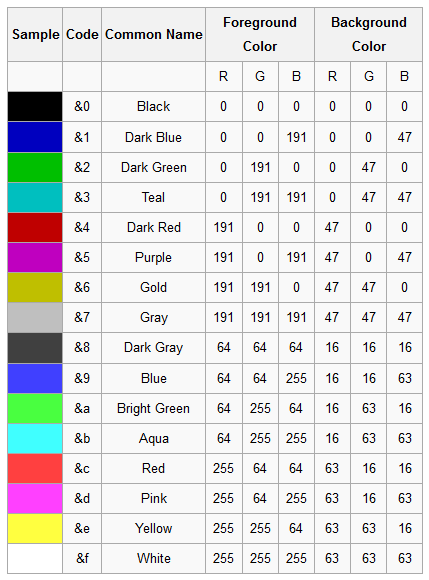
以及颜色(详见下方的颜色表)
示例 motd:
示例 motd MOTD:'&4This is my &emotd'
将变为:This is my motd
致谢:
escape - 消息和 Pail
theguynextdoor - 颜色及其他
Semirotta - Logo
tommykins20 - 部分编码工作
以及插件开发论坛中所有帮助我解决小问题的其他人。
捐赠
新增! - 有了新的捐赠按钮,现在它与“概览”、“文件...”等在同一行。
颜色代码
Tobi Motd is a simple Motd plugin (Like the one in the server.propeties but this one
comes up after you are logged on)
To change the motd open the config.yml file in the Tobi Motd
directory. To use the motd codes you simply add them in the line. Example:
MOTD : 'Welcome %NAME%, The time is now %TIME%'
would if i logged in when the world time (not real time) was 17.15 become
Welcome rosaage, The time is now 17:15
The New codes won't work in console!
News:
Small fixes
Newest Version: 2.9!
Commands:
/motd - to show the motd
/setmotd - to set the motd ingame
/tm - to reload the config (after manual update of config.yml)
/tm help - Help menu
/tm timer - edit timer settings.. read /tm help for more info
/TobiGUI - Open TobiGUI (Buildt in config editor for TobiMotd)
The Timer:
I'm not sure if everyone knows about it but there is a timer in the plugin.
The timer will when it has counted down show a message to everyone.
You will not see the countdown.
Some info about the config:
- The Timer Message is the message that will display when the timer has counted down
(If you have more then one the plugin will choose one at random.) - Timer Minuets, Seconds and ticks. These set how long it will be between each message.
(20 Ticks is one second) And Will be added together so if the Timer Seconds is on 60, and
Timer Minutes is one 1 the message will display every 2 minutes. - Output to console is very easy to understand, It's basically if the message should be broadcast to the console or not.
- And of course to use this Timer Enabled has to be true, if not the timer won't even run.
Permissions (SuperPermissions) - If you are OP you don't need permissions
tobimotd.reload - needed to reload Tobi Motd
tobimotd.set - Needed to set the Motd ingame
tobimotd.TobiGUI - Needed to open TobiGUI
tombimotd.timer - Needed to use /tm timer
Motd Codes: (Important! Case Sensetive!)
%B% - Bold Text (New!)
%M% - Magic Text (New!) - Haven't tested yet not sure what it does.
%I% - Italic Text (New!)
%UL% - Underlined Text (New!)
%ST% - Striked trough Text (New!)
%D% - Default (New!) - Removes all colors/Formatting.
%S% - Space (only for the /setmotd wich doesn't support normal space)</del> - Not needed anymore!
%NAME% - The player's name (Not nick)
%TIME% - The time in 24h format: 17:35
%VERSION% - Bukkit version
%NL% - Make a new line (Usually you don't need this, but if for some reason it won't use multiple lines try this)
%WORLD% - The name of the world the player is in when he joins
%ONLINE% - Shows all online players separated by comma
%PAMOUNT% - Shows the number of online players (including you)
And Colors (look below for color table)
Example motd:
The sample motd MOTD: '&4This is my &emotd'
Will Become: This is my motd
Credits:
escape - The message, and Pail
theguynextdoor - Colors, + more
Semirotta - The logo
tommykins20 - Some coding stuff
And all the others in the plugin development forum for helping me with minor problems.
Donate
New! - Got new donate button, it's now on the same line as Overview, Files...
Colors Codes

下载 Tobi Motd
下载 Tobi Motd
下载 Tobi Motd
下载 Tobi Motd
下载 Tobi Motd
下载 Tobi Motd
下载 Tobi Motd
下载 Tobi Motd
下载 Tobi Motd
下载 Tobi Motd
小型修复
关于这个资源的讨论、问题反馈与使用心得
还没有讨论,来发第一帖吧
你是这个资源的作者?登录后可认领此资源。
相似资源
 插件
自定义你的Minecraft头像!
 插件
专为 Velocity 打造的自制聊天插件,功能丰富——支持跨服群组/全局/私聊消息,并集成 LibertyBans 的禁言功能。
 插件
一个高度兼容、功能完善且稳定的 TPA 模组
 插件

允许基岩版(Geyser)玩家使用自定义铁砧和锻造台配方。
 插件
适用于旧版版本的近距离语音聊天
 插件
一个功能丰富、完全动画化的箱子插件,适用于 Paper 1.21.x,支持 IA、Vault、PlaceholderAPI 和 Citizens
评论 0
登录后参与评分
还没有评论,来抢沙发吧