
〚 ⤓ Modrinth / ⤓ Spigot / ⤓ Jenkins Dev Builds / Source on GitHub / Javadocs / Discord 〛
TrainCarts 简介
Minecraft 中的火车!自动化的地铁网络、过山车、缆车、滑雪缆车或游乐园设施。TrainCarts 全部都能实现,支持自定义模型、动画、通过告示牌进行自动化操作,并提供一个庞大的 API 以支持能够带来更多功能的插件扩展!
此插件需要 BKCommonLib
加入我们的 Discord 服务器获取帮助:
请勿在旧版 Minecraft 中使用非常旧的版本。TrainCarts 和 BKCommonLib 的最新发布版向后兼容旧版 Minecraft。
WIKI
前往 了解如何使用此插件。
自定义列车
使用 Attachment Editor 可以自定义列车的外观。在 Blockbench 中创建自定义车厢模型,并在游戏内乘坐它们。通过将模型的多个部分作为独立的(盔甲架)物品模型添加,可以实现大型模型。TrainCarts 会为你进行动画处理,并将各部分作为一个整体移动。
在进入此功能之前推荐阅读:Custom Item Models in 1.9 and Up
游戏内地图编辑器
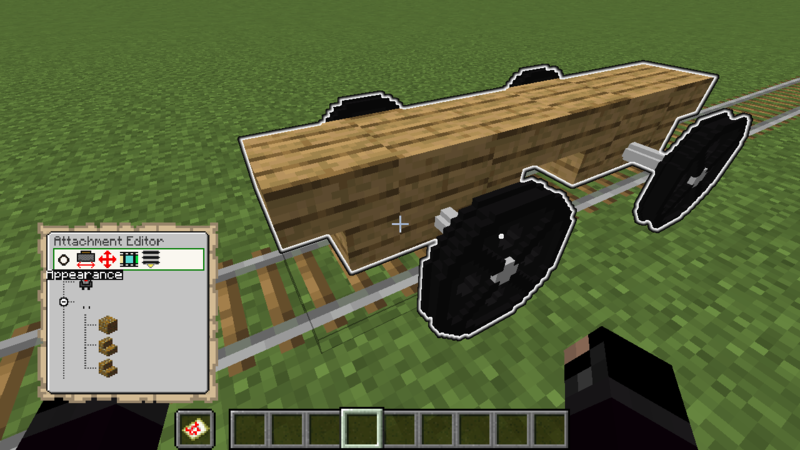
动画
对于喜欢自定义游乐设施的爱好者来说,列车完全可以进行动画化。这意味着你可以拥有开合的门、旋转的车厢,甚至创造出像摩天轮、旋转飞椅和旋转木马这样的游乐园设施!
演示资源包
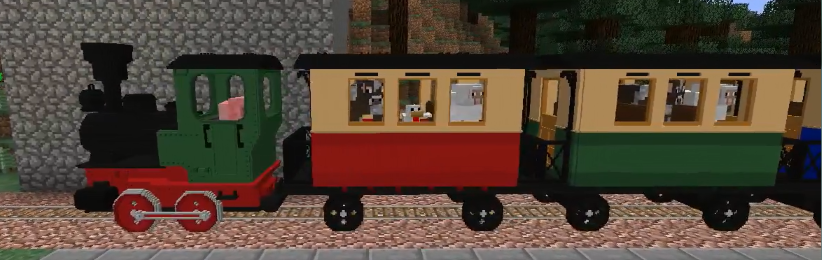
TrainCarts 提供了一个演示资源包供你下载,其中包含了一些火车和过山车车厢模型。即使你不深入使用 Blockbench,也可以先用这些模型进行尝试。
机车和车厢由 Nullblox 制作。Maxi 制作了不同颜色的过山车车厢。
你可以从此处下载 zip 文件,或使用网页上显示的 server.properties 配置:packs.traincarts.net
使用说明
生成列车
新模型绑定在金镐的耐久度值上。你可以使用以下方法生成这些列车:
- Spawn Sign
- Train Spawn Chest Item:
/train chest [name] - 在附件编辑器中创建。你可以使用
/train model search查找可用的物品
可生成的以下列车名称
- loco - 生成不带动画的机车
- carr / carg / carb - 生成不带动画的红/绿/蓝车厢
- loco_anim - 生成带有车轮和活塞动画的机车
- carr_anim / carg_anim / carb_anim - 生成带有车轮动画的红/绿/蓝车厢
- ferris - 带动画的摩天轮,使用动画 'spin' 控制它(警告:非常卡顿)
- spinner - 带动画的旋转游乐设施,有 3 种可控动画('spin', 'turn' 和 'arm')
- rolr / rolg / rolb - 4 座过山车车厢
保存的列车配置
提取
资源包 zip 文件在 assets/traincarts/saved_train_properties/tcdemo.yml 中包含了保存的列车配置。 当在 server.properties 中配置了资源包时,TrainCarts 会自动检测此文件,其中的列车将在 /savedtrain list 等命令下可用。
如果由于某些原因此机制不起作用(例如你正在合并资源包等):
- 手动提取此 tcdemo.yml 并将其放置在
plugins/Train_Carts/savedTrainModules/tcdemo.yml - 运行
/train globalconfig reload --savedtrainproperties
通常你不需要这样做。
物理系统
列车不仅仅遵循一条直线或受限于 Minecraft 自身的矿车物理规则。它们通过重力物理、轨道切换和追踪铁轨的车轮进行实时模拟。
新的速度限制
可以让列车以比通常每秒刻 0.4 格更快的速度移动。嗖!默认(可配置)的最大速度限制为每秒刻 5 格(300公里/小时!)。
保持区块加载
可以将列车设置为保持区块加载。这样它们就充当移动的区块加载器,使自身及其周围一小块区域保持加载和动画状态。这样它们就可以自主运行,无论附近是否有玩家。
服务员
当前方有另一列列车或占用的 mutex zone 时,使列车自动减速或完全停止。可以设置加速度和/或减速度,使列车真实地停止和启动以避免障碍物。
➦Wiki
属性
有许多其他属性可以改变列车的行为,并且还在不断增加。
- 倾斜、重力和摩擦力:创建逼真的过山车体验,或完全关闭这些效果
- 碰撞:更改生物是否自动进入,或者玩家与列车发生碰撞时会发生什么
- 玩家进出:玩家是否可以上下车
- 更改乘客的视距(仅限 Paper 服务器)
- 标签:为列车设置标签并通过列车网络进行路由,或在途中对其执行特殊操作
告示牌动作
沿铁轨放置的告示牌用于让列车执行各种操作。更改列车属性、发射列车、创建车站或自动切换道岔。通过可扩展的 API,可以实现任何功能。
➦Wiki
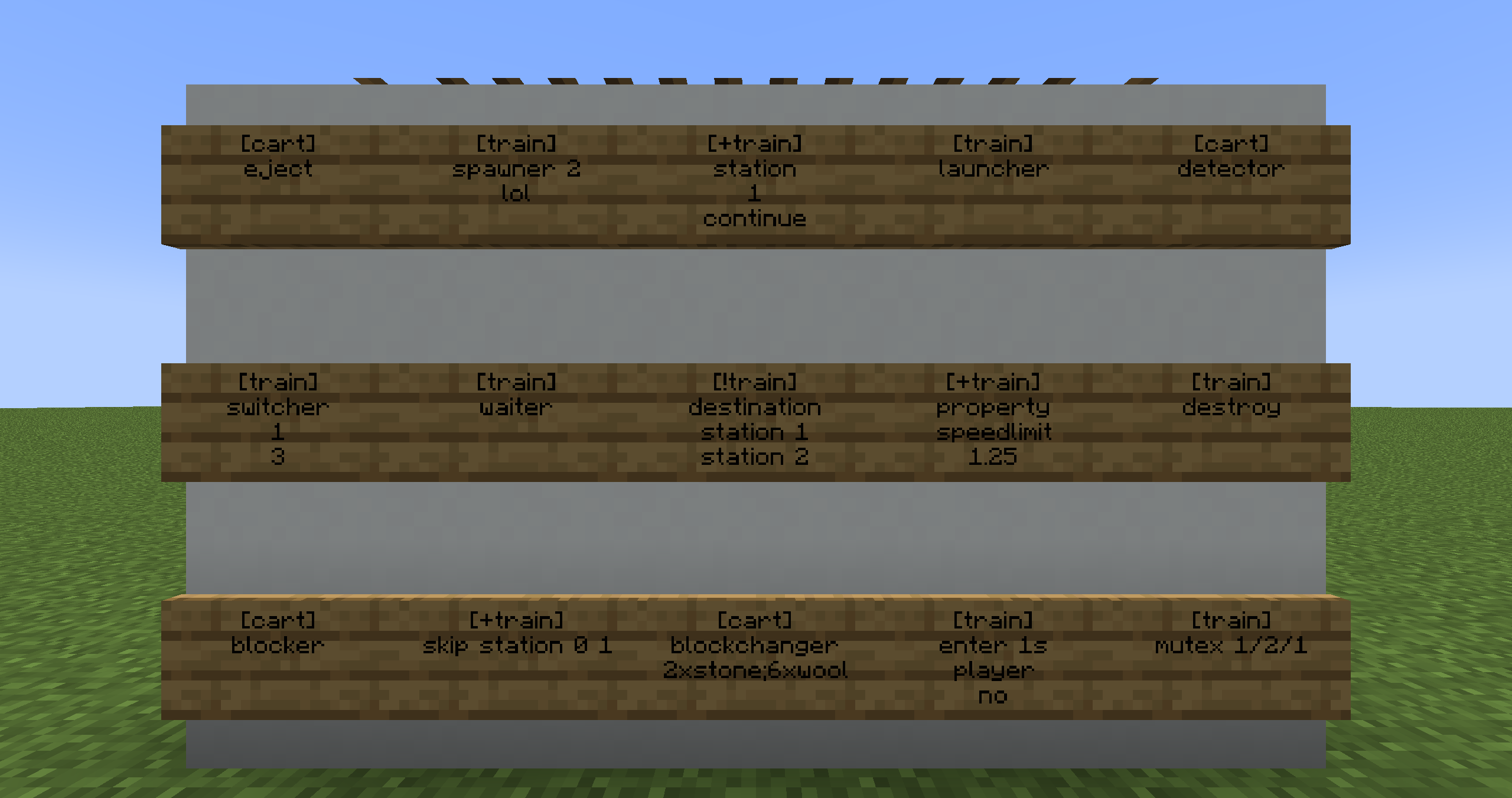
寻路
让您的列车网络在 Minecraft 世界中活起来,列车会自动前往世界各地的目的地。
➦Wiki
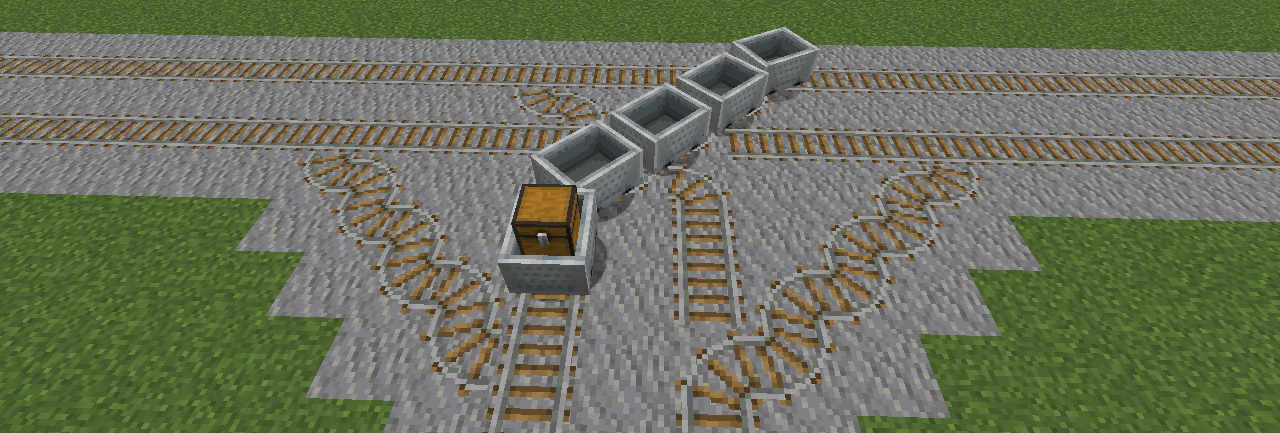
命令
所有可以通过告示牌动作完成的操作,以及更多功能,也可以通过命令来完成。
➦Wiki
选择器支持
使用 @ptrain 选择器将列车的玩家乘客作为参数传递给其他(非 TrainCarts)命令。或使用 @train 同时对多列列车执行操作。列车可以通过立方体区域、距离、设定属性等多种方式进行选择。
➦Wiki
特色展示

此插件使用 Cloud Command Framework 来处理命令
如果您对 TrainCarts 的命令自动补全、建议和帮助菜单的质量印象深刻,并希望在自己的插件中实现类似功能,请查看 Incendo 开发的 Cloud!
附加组件
TrainCarts 提供了一个 API,允许第三方扩展此插件。主要新增了对新轨道类型、新附件类型和自定义动作告示牌的支持。
- TC-Hangrail:列车悬挂在铁栅栏下方以及其他类型方块的下方/上方 (由 TeamBergerhealer 制作)
- TC-Coasters:无需实际轨道方块即可在空中铺设的轨道 (由 TeamBergerhealer 制作)
- SmoothCoasters:Minecraft 客户端 Fabric 模组,安装后可平滑盔甲架动画并改善第一人称视角
- TCTicketShop:通过告示牌交互购买列车票 (由 DefinitlyEvil 制作)
- LightAPI:为内置的光照附件提供动力。(对于 MC 1.17.1 及以下版本请使用此 分支)
- TCJukebox:使用 MCJukebox 为列车内的玩家播放音乐 (由 melerpe 制作)
- TC-Portals:以逼真的方式在不同服务器之间传送列车 (由 J0schlZ 制作)
- TC-Destinations:跨服务器的列车目的地分页显示及便捷的点击式命令 (由 J0schlZ 制作)
- TrainCartsDestinationSelector:添加可点击的告示牌,让玩家选择列车目的地
- Traincarts AdvancedSigns:添加额外的告示牌类型,特别适用于过山车体验
- TCAnimatronics:配合 TrainCarts 告示牌播放 Animatronics 动画
常见问题
当某些玩家乘坐列车时,列车会出现故障,玩家的矿车卡住不动
NoCheatPlus 认为玩家在作弊,因为矿车以非预期的方式移动。矿车被传送到有效状态,从而导致这些奇怪的故障。要修复此问题,请在 NoCheatPlus 配置中将以下选项设置为 false:
checks:
  moving:
    vehicle:
        enforcelocation: false
我使用的是 Minecraft 1.16,玩家可以通过按下 Shift 键从我设置的 playerexit=false 的列车中退出
遗憾的是,Minecraft 客户端存在一个 bug,导致服务器无法取消玩家从载具中退出的操作。升级到 Minecraft 1.17+ 将修复此问题。另请参阅:SPIGOT-5891
当附近有玩家时,列车能到达目的地;如果没有人在附近,它们就无法到达。
启用列车的 keep chunks loaded(保持区块加载)属性。
我创建了一个自动刷怪装置,但列车堆积在附近的某个地方
启用列车的 keep chunks loaded(保持区块加载)属性。否则,当没有玩家靠近时,列车会在原地卸载。
当我离开列车时,列车消失了
如果您的服务器上安装了 CraftBook,此插件实际上可以做到这一点。请在 CraftBook 配置 中将其关闭。
捐赠
如果你真的很喜欢我的作品,并且想要回馈一些支持,欢迎通过下方的按钮使用 PayPal 向我捐赠小额金额。非常感谢! :)
〚 ⤓ Modrinth / ⤓ Spigot / ⤓ Jenkins Dev Builds / Source on GitHub / Javadocs / Discord 〛
About TrainCarts
Trains in Minecraft! Automated metro networks, rollercoasters, gondolas, ski-lifts or amusement park rides. TrainCarts does it all with support for custom models, animations, automation with signs and a large API that supports add-ons that can do even more!
This plugin requires BKCommonLib
Join our discord server for help:
Please do not use very old versions with older versions of Minecraft. The latest release of TrainCarts and BKCommonLib are backwards-compatible with older Minecraft versions.
WIKI
Discover how to use this plugin over at
Custom Trains
With the Attachment Editor you can customize the appearance of your trains. Create custom cart models in Blockbench and ride inside them in-game. Large models are possible by adding multiple sections of a model as separate (Armorstand) item models. TrainCarts will do the animating for you and move the parts as a whole.
Recommended reading before going into this: Custom Item Models in 1.9 and Up
Ingame Map Editor
Animations
For custom ride enthusiasts, trains can be fully animated. This means you can have doors that open and close, carts that spin around, or even create theme park rides like Ferris wheels, spinners and merry-go-rounds!
Demo Resource Pack
TrainCarts has a demo resource pack that you can download that includes a couple of train and rollercoaster cart models. You can already play around with these without having to delve into Blockbench yourself
The locomotive and carriages were made by Nullblox. Maxi made the different color rollercoaster carts.
You can download the zip file from here or use the server.properties configuration shown on the webpage: packs.traincarts.net
Usage Instructions
Spawn the trains
The new models are bound to durability values of the golden pickaxe. You can spawn these trains using:
- Spawn Sign
- Train Spawn Chest Item:
/train chest [name] - Create it in the attachment editor. You can find the items to use with
/train model search
The following train names can be spawned
- loco - Spawns locomotive without animations
- carr / carg / carb - Spawns red/green/blue carriages without animations
- loco_anim - Spawns locomotive with animated wheels and pistons
- carr_anim / carg_anim / carb_anim - Spawns red/green/blue carriages with animated wheels
- ferris - Animated Ferris wheel, use animation 'spin' to control it (WARNING: VERY LAGGY)
- spinner - Animated spinning ride with 3 controllable animations ('spin', 'turn' and 'arm')
- rolr / rolg / rolb - Rollercoaster carts with 4 seats
Saved Train Configurations
Extracting
The pack zip file includes saved train configurations at assets/traincarts/saved_train_properties/tcdemo.yml. When the resource pack is configured in server.properties this file is automatically detected by TrainCarts and the trains inside are made available under /savedtrain list and such.
If for some reason this mechanism doesn't work (because you are merging resource packs or such):
- Extract this tcdemo.yml yourself and place it at
plugins/Train_Carts/savedTrainModules/tcdemo.yml - Run
/train globalconfig reload --savedtrainproperties
Normally you don't have to do this.
Physics
Trains don't just follow a line or are limited by Minecraft's own Minecart physics. They are simulated in real-time with gravity physics, rail switching and wheels that track the rails.
New Speed Limits
It is possible to make trains move much faster than the usual 0.4 blocks per tick. Zoom! The default (configurable) maximum speed limit is 5 blocks per tick (300kph!).
Keep Chunks Loaded
Trains can be set to keep chunks loaded. Then they act as moving chunk loaders, keeping themselves and a small area around them loaded and animated. This way they can run autonomously, no matter if no players are nearby.
Waiter
Make trains automatically slow down or stop completely when another train or occupied mutex zone is up ahead. An acceleration and/or deceleration can be set to make trains stop and start realistically to avoid obstacles.
➦Wiki
Properties
There are lots of other properties to change the train's behavior, and more are added all the time.
- Banking, gravity and friction: create realistic rollercoaster rides, or turn it off entirely
- Collision: change whether mobs enter automatically, or what happens when a player collides with a train
- Player enter and exit: Whether players can get in or out of your train
- Change view distance of the occupants (Paper server only)
- Tags: tag a train and route it through the train network, or do special things to it along the way
Sign Actions
Signs placed along the rails are used to make the trains do things. Change train properties, launch trains, create stations or automatically switch junctions. With an extendable API anything is possible.
➦Wiki
Path Finding
Make your train network come alive with trains that automatically travel to destinations all over your Minecraft world.
➦Wiki
Commands
Everything that can be done with sign actions, and more, can also be done using commands.
➦Wiki
Selector Support
Use the @ptrain selector to use the player passengers of a train as an argument in other (non-TrainCarts) commands. Or use @train to perform actions on multiple trains at once. Trains can be selected by cuboid, distance, set properties and many more.
➦Wiki
Featured
This plugin uses the Cloud Command Framework for handling commands
If you're impressed by the quality of TrainCarts' command auto-completions, suggestions and help menu and want this in your plugin, check out Cloud by Incendo!
Addons
TrainCarts exposes an API that allows third parties to extend the plugin. Primarily it adds support for new rail types, new attachment types and custom action signs.
- TC-Hangrail: Trains floating below iron fences and also below/above other kinds of blocks (by TeamBergerhealer)
- TC-Coasters: Rails in the air without requiring actual rails blocks (by TeamBergerhealer)
- SmoothCoasters: Minecraft Client Fabric mod that, if installed, smoothens armor stand animations and improves the first-person camera view
- TCTicketShop: Use sign interaction to buy train tickets (by DefinitlyEvil)
- LightAPI: Powers the built-in Light attachment. (Use this fork for MC 1.17.1 and below)
- TCJukebox: Plays music for players inside the train using MCJukebox (by melerpe)
- TC-Portals: Teleport trains between servers in a realistic way (by J0schlZ)
- TC-Destinations: Cross-server train destination pagination and helpful clickable commands (by J0schlZ)
- TrainCartsDestinationSelector: Adds clickable signs so players can select train destinations
- Traincarts AdvancedSigns: Adds additional sign types, particularly useful for rollercoaster rides
- TCAnimatronics: Play Animatronics animations with a TrainCarts sign
FAQ
When some players ride a train, the train glitches out and the player's cart gets stuck in position
NoCheatPlus thinks the player is cheating, because the cart is moving in unintended ways. The cart is teleported back to a valid state causing these strange glitches. To fix this, set the following to false in the NoCheatPlus configuration:
checks:
  moving:
    vehicle:
        enforcelocation: false
I'm on Minecraft 1.16 and players can get out of my playerexit=false train by pressing shift
Sadly, the Minecraft client had a bug in it where the server could not cancel players exiting from vehicles. Updating to Minecraft 1.17+ will fix this again. See also: SPIGOT-5891
When players are near, trains reach their destinations. With no one near, they don't.
Enable the keep chunks loaded property of the train.
I created an auto-spawner but trains are piling up somewhere closeby
Enable the keep chunks loaded property of the train. Trains will otherwise unload in the same spot when no player is near.
When I exit a train, the train disappears
If you have CraftBook installed on the server, this plugin can actually do exactly that. Turn it off in the CraftBook Configuration.
Donate
If you really like my work and want to give something in return, feel free to donate something small to me over PayPal using the button down below. Thank you! :)

下载 TrainCarts
需要联机服务器吗?
稳定流畅、一键部署,几分钟即可和朋友联机开服
最低仅需 8 元/月 即可畅快联机
下载 TrainCarts
需要联机服务器吗?
稳定流畅、一键部署,几分钟即可和朋友联机开服
最低仅需 8 元/月 即可畅快联机
下载 TrainCarts
需要联机服务器吗?
稳定流畅、一键部署,几分钟即可和朋友联机开服
最低仅需 8 元/月 即可畅快联机
下载 TrainCarts
需要联机服务器吗?
稳定流畅、一键部署,几分钟即可和朋友联机开服
最低仅需 8 元/月 即可畅快联机
下载 TrainCarts
需要联机服务器吗?
稳定流畅、一键部署,几分钟即可和朋友联机开服
最低仅需 8 元/月 即可畅快联机
下载 TrainCarts
需要联机服务器吗?
稳定流畅、一键部署,几分钟即可和朋友联机开服
最低仅需 8 元/月 即可畅快联机
下载 TrainCarts
需要联机服务器吗?
稳定流畅、一键部署,几分钟即可和朋友联机开服
最低仅需 8 元/月 即可畅快联机
下载 TrainCarts
需要联机服务器吗?
稳定流畅、一键部署,几分钟即可和朋友联机开服
最低仅需 8 元/月 即可畅快联机
下载 TrainCarts
需要联机服务器吗?
稳定流畅、一键部署,几分钟即可和朋友联机开服
最低仅需 8 元/月 即可畅快联机
下载 TrainCarts
需要联机服务器吗?
稳定流畅、一键部署,几分钟即可和朋友联机开服
最低仅需 8 元/月 即可畅快联机
- [ ! ] 已修复 由于客户端错误导致列车在 26.3 版本中随机出现异常(临时解决方案)
- [ ! ] 已修复 观察者座位锁定模式 / 站立模式,并进行了一些通用改进
- [ ! ] 已修复 “点击”优化周围的一些奇怪行为
- [+] 新增 命令选择器和过滤器,用于查看列车的 MSPT 使用情况(物理刻)
- [+] 新增 方块碰撞的列车选择器(常见的卡顿原因)
- [˄] 性能提升 通过以更优化的顺序对列车进行刻更新(按顺序更新附近列车),略微提升了性能
关于这个资源的讨论、问题反馈与使用心得
还没有讨论,来发第一帖吧
你是这个资源的作者?登录后可认领此资源。
相似资源
 插件
重新定义服务器上的生物运输方式。使用高度可定制的口袋道具,安全地捕获、存储和释放任何实体。
 插件

使床在所有维度中爆炸的模组
 插件
为 Armor Poser 模组添加兼容性
 插件

SkyBlock、OneBlock、Boxed、SkyGrid、AcidIsland、CaveBlock、Poseidon、StrangerRealms——以及更多!这些只是由 BentoBox 支持的基于岛屿的游戏模式之一。来自原版 ASkyBlock 的作者。
 插件

创建用户友好的菜单以前往不同的世界
 插件
一个高度兼容、功能完善且稳定的 TPA 模组
评论 0
登录后参与评分
还没有评论,来抢沙发吧