? Timber - Minecraft 中高效的伐木体验
Timber 是一款轻量且强大的插件,允许玩家使用任意斧头砍伐整棵树,让你的 Minecraft 世界中资源收集更快、更顺畅、更有趣。
非常适合希望在不破坏原版平衡的前提下提升游戏体验的生存服务器。
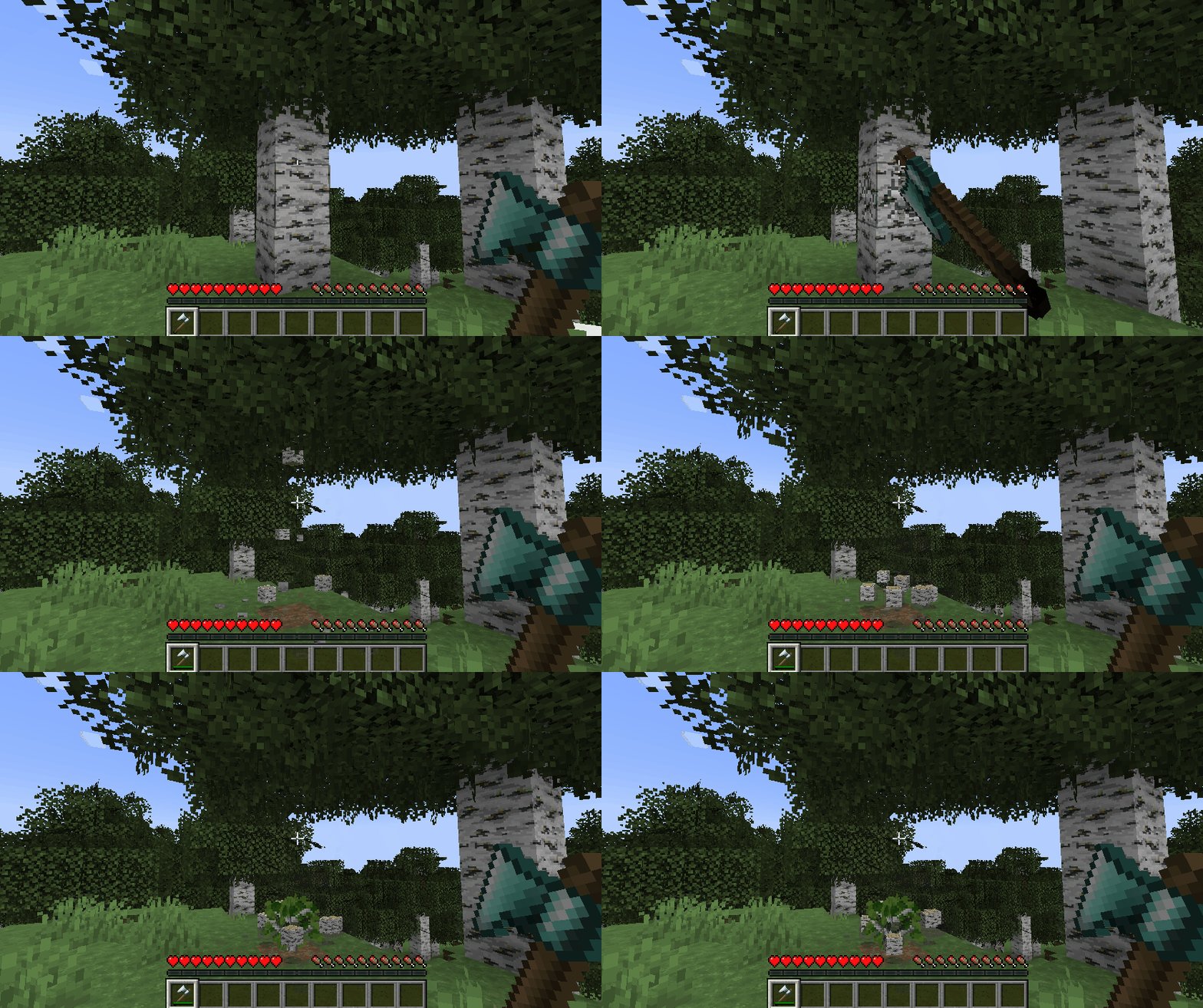
✨ 功能特性
- 瞬间砍伐整棵树
- 支持任意斧头
- 支持按玩家开启/关闭功能
- 基于权限的使用控制
- PlaceholderAPI 集成
- 排行榜支持(追踪顶尖玩家)
- 兼容流行的生存类插件
- 轻量级且性能优化
- 管理员图形界面,配置便捷
? 支持的插件
Timber 可与流行的服务器插件无缝集成:
- WorldGuard -- 防止在受保护区域内砍树
- PlaceholderAPI -- 提供用于统计和状态追踪的占位符
- mcMMO -- 完全兼容伐木升级系统
- Quests -- 允许砍树进度计入任务目标
- AuraSkills -- 支持技能进阶系统
? PlaceholderAPI 支持
Timber 提供了多种占位符,用于统计数据和玩家状态追踪。
? 玩家占位符
占位符 描述
%timber_status% 显示该玩家是否启用了砍树功能 (true /
false)
%timber_chopedtrees% 显示该玩家已砍伐的树木数量
? 排行榜占位符
占位符 描述
%timber_top_1% 砍树数量排名第一的玩家
%timber_top_1_amount% 第一名玩家砍伐的树木数量
%timber_top_2% 排名第二的玩家
%timber_top_2_amount% 第二名玩家砍伐的树木数量
%timber_top_3% 排名第三的玩家
%timber_top_3_amount% 第三名玩家砍伐的树木数量
你可以使用任何排行榜位置的数字,例如:
%timber_top_5%
%timber_top_10_amount%
示例:
榜首玩家: %timber_top_1%
你的树木: %timber_chopedtrees%
状态: %timber_status%
?️ 安装指南
- 将插件
.jar 文件上传至服务器的 /plugins 文件夹
- 重启服务器
- 如有需要,请配置插件
⚠ 注意:此插件不是模组。如果你正在寻找 TreeTimber 模组,请点击此处下载:模组链接
? 命令
? 用户命令
命令 描述
/timber 打开玩家设置菜单
? 管理员命令
需要权限:
timber.admin
命令 描述
/timber admin 打开管理员配置 GUI
/timber reload 重载插件配置
? 权限说明
权限 描述
timber.capitate 允许玩家砍伐整棵树
timber.useparticle 启用砍树时的粒子效果
timber.admin 授予访问管理员 GUI 和重载命令的权限
⚙️ 配置亮点
服务器管理员可以控制:
- 基于权限的访问控制
- 粒子效果的使用
- 玩家开关支持
- 与保护插件的兼容性行为
- 排行榜追踪系统
更多自定义选项即将推出 ?
? 为什么选择 Timber?
Timber 的设计宗旨是保持:
它在增强游戏体验的同时,并未改变 Minecraft 的核心机制。
? 开发状态
⚠ 这不是 Timber 的最终版本!
更多令人兴奋的功能正在规划中:
- 高级配置选项
- 更多 PlaceholderAPI 统计数据
- 额外的集成支持
- 性能改进
- 扩展的 GUI 设置
欢迎提出建议和反馈 ?
? 支持与社区
加入我们的 Discord 服务器以获取支持、更新信息和提交建议:
? Timber - Efficient Tree Felling in Minecraft
Timber is a lightweight and powerful plugin that allows players to
fell entire trees using any axe, making resource collection faster,
smoother, and more enjoyable in your Minecraft world.
Perfect for survival servers that want to improve gameplay quality
without breaking vanilla balance.
✨ Features
- Chop entire trees instantly
- Works with any axe
- Per-player enable / disable support
- Permission-based usage control
- PlaceholderAPI integration
- Leaderboard support (Top players tracking)
- Compatible with popular survival plugins
- Lightweight and optimized performance
- Admin GUI for easy configuration
? Supported Plugins
Timber integrates smoothly with popular server plugins:
- WorldGuard -- Prevents tree felling inside protected regions
- PlaceholderAPI -- Provides placeholders for stats and status
tracking
- mcMMO -- Fully compatible with woodcutting leveling systems
- Quests -- Allows tree chopping progress to count toward quest
objectives
- AuraSkills -- Supports skill progression systems
? PlaceholderAPI Support
Timber provides multiple placeholders for statistics and player status
tracking.
? Player Placeholders
Placeholder Description
%timber_status% Shows whether tree felling is
enabled for the player (true /
false)
%timber_chopedtrees% Shows how many trees the player has
chopped
? Leaderboard Placeholders
Placeholder Description
%timber_top_1% Player ranked #1 by chopped trees
%timber_top_1_amount% Trees chopped by the #1 player
%timber_top_2% Player ranked #2
%timber_top_2_amount% Trees chopped by the #2 player
%timber_top_3% Player ranked #3
%timber_top_3_amount% Trees chopped by the #3 player
You can use any leaderboard position number, for example:
%timber_top_5%
%timber_top_10_amount%
Example:
Top player: %timber_top_1%
Your trees: %timber_chopedtrees%
Status: %timber_status%
?️ Installation
- Upload the plugin
.jar file into your /plugins folder
- Restart your server
- Configure the plugin if needed
⚠ Note: This plugin is not a mod. If you are looking for the
TreeTimber mod, download it here: mod link
? Commands
? User Commands
Command Description
/timber Opens the player settings menu
? Admin Commands
Requires permission:
timber.admin
Command Description
/timber admin Opens the admin configuration GUI
/timber reload Reloads plugin configuration
? Permissions
Permission Description
timber.capitate Allows players to chop entire trees
timber.useparticle Enables particle effects while chopping
timber.admin Grants access to admin GUI and reload command
⚙️ Configuration Highlights
Server owners can control:
- Permission-based access
- Particle effects usage
- Player toggle support
- Compatibility behavior with protection plugins
- Leaderboard tracking system
More customization options coming soon ?
? Why Choose Timber?
Timber is designed to stay:
- Fast
- Clean
- Compatible
- Survival-friendly
- Easy to configure
It enhances gameplay without changing Minecraft's core mechanics.
? Development Status
⚠ This is not the final version of Timber!
More exciting features are planned:
- Advanced configuration options
- More PlaceholderAPI stats
- Additional integrations
- Performance improvements
- Expanded GUI settings
Suggestions and feedback are always welcome ?
? Support & Community
Join our Discord server for support, updates, and suggestions:


 插件

 插件

 插件
 插件
 插件
 插件
评论 0
登录后参与评分
还没有评论,来抢沙发吧