TrustButton – 适用于 Paper 和 Purpur 的动态路径与区域切换系统(Minecraft 1.20+)
TrustButton 引入了一套简洁而强大的系统,允许服务器管理员创建特殊的按钮,用于开启或关闭自定义路径或区域。当玩家与 Trust Button 交互时,插件会隐藏或恢复选定的方块,并广播一条全局消息。这为冒险地图、任务、谜题、跑酷捷径以及基于事件的游戏机制创造了动态的游戏体验。
概述
Trust Button 是由管理员创建的自定义按钮。每个按钮都可以链接到一组方块,这些方块会在点击按钮时消失或重新出现。该系统完全可配置,重启后数据持久化,并且专为在运行 Java 17 或更高版本的 Paper 和 Purpur 服务器上流畅工作而设计。
该插件还包含一个管理 GUI,提供对所有已注册的 Trust Buttons 的完全控制。
主要功能
- 使用
/trustbutton create <name> 创建自定义 Trust Buttons
- 使用
/trustbutton areacreate <name> <block> 定义可切换的区域
- 激活时方块消失,停用时方块返回
- 激活和停用时的全局消息通知
- 支持 HEX 颜色代码的全可配置消息
- 数据存储在
data.yml 中,具有持久性
- 安全的事件处理,防止物品被盗或被意外破坏
- 所有命令均支持 Tab 补全
- 适用于 Minecraft 1.20 及以上的 Paper 和 Purpur 服务器
管理 GUI
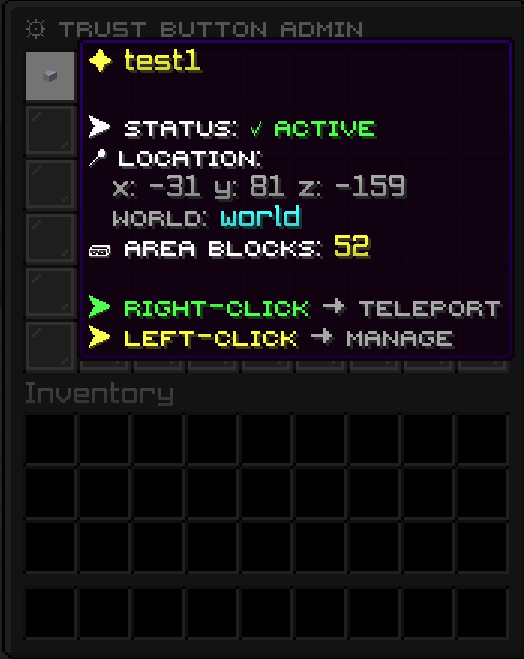
执行命令 /trustbutton admin 可以打开一个管理 GUI,显示世界中放置的所有 Trust Buttons。
GUI 中的每个按钮条目包括以下功能:
- 左键点击:打开详细的按钮菜单,提供删除和查看坐标等选项
- 右键点击:瞬间将管理员传送至该按钮的位置
- 可视化列表:显示所有已注册的按钮,便于快速导航
这使得跨多个世界管理大量按钮变得轻松易行。
命令
/trustbutton create <name>
给予管理员一个特殊的 Trust Button 物品。
/trustbutton areacreate <name> <block>
给予与选定按钮关联的区域定义方块。
/trustbutton admin
打开显示所有 Trust Buttons 的管理 GUI,并提供传送和管理选项。
/trustbutton reload
重载插件配置。
所需权限:trustbutton.admin
配置
该插件包含一个简洁明了的 config.yml,允许您自定义以下内容:
- 激活和停用消息
- HEX 颜色格式设置
- 一般行为设置
所有按钮数据、方块位置和切换状态都存储在 data.yml 中,并在服务器重启后保持持久化。
使用场景
TrustButton 非常适合希望拥有交互式世界机制的服务器,包括:
- 带有隐藏或限时路径的冒险地图
- 可开启和关闭的跑酷捷径
- 地牢谜题和任务触发器
- 秘密入口和隐藏房间
- 服务器活动的基于事件的开关
- 需要与世界互动的角色扮演(RP)机制
兼容性
- Minecraft 1.20+
- Java 17+
- PaperMC 和 Purpur
TrustButton 旨在轻量、稳定,并易于集成到任何需要交互式世界元素的服务器环境中。
TrustButton – A Dynamic Path and Area Toggle System for Paper and Purpur (Minecraft 1.20+)
TrustButton introduces a clean and powerful system that allows server administrators to create special buttons which toggle a custom path or area on and off. When a player interacts with a Trust Button, the plugin hides or restores selected blocks and broadcasts a global message. This creates dynamic gameplay moments that fit perfectly into adventure maps, quests, puzzles, parkour shortcuts, and event-based mechanics.
Overview
A Trust Button is a custom button created by an admin. Each button can be linked to a set of blocks that will vanish or reappear when the button is clicked. The system is fully configurable, persistent across restarts, and designed to work smoothly on both Paper and Purpur servers running Java 17 or higher.
The plugin also includes an admin GUI that provides full control over all registered Trust Buttons.
Key Features
- Create custom Trust Buttons using /trustbutton create <name>
- Define toggleable areas using /trustbutton areacreate <name> <block>
- Blocks disappear when activated and return when deactivated
- Global messages for activation and deactivation
- Fully configurable messages with HEX color support
- Persistent storage in data.yml
- Safe event handling to prevent item stealing or accidental breaking
- Tab completion for all commands
- Works on Paper and Purpur for Minecraft 1.20 and above
Admin GUI
The command /trustbutton admin opens a management GUI that displays all Trust Buttons placed in the world.
Each button entry in the GUI includes:
- Left-click: Opens a detailed button menu with options such as delete and view coordinates
- Right-click: Instantly teleports the admin to the button's location
- Visual list of all registered buttons for quick navigation
This makes it easy to manage large numbers of buttons across multiple worlds.
Commands
/trustbutton create <name>
Gives the admin a special Trust Button item.
/trustbutton areacreate <name> <block>
Gives area-defining blocks linked to the selected button.
/trustbutton admin
Opens the admin GUI showing all Trust Buttons, with teleport and management options.
/trustbutton reload
Reloads the plugin configuration.
Permission required: trustbutton.admin
Configuration
The plugin includes a clean and simple config.yml that allows you to customize:
- Activation and deactivation messages
- HEX color formatting
- General behavior settings
All button data, block locations, and toggle states are stored in data.yml and persist after server restarts.
Use Cases
TrustButton is ideal for servers that want interactive world mechanics, including:
- Adventure maps with hidden or timed paths
- Parkour shortcuts that open and close
- Dungeon puzzles and quest triggers
- Secret entrances and hidden rooms
- Event-based toggles for server activities
- Roleplay mechanics that require world interaction
Compatibility
- Minecraft 1.20+
- Java 17+
- PaperMC and Purpur
TrustButton is designed to be lightweight, stable, and easy to integrate into any server environment that needs interactive world elements.


 插件

 插件
 插件
 插件
 插件
 插件
评论 0
登录后参与评分
还没有评论,来抢沙发吧