
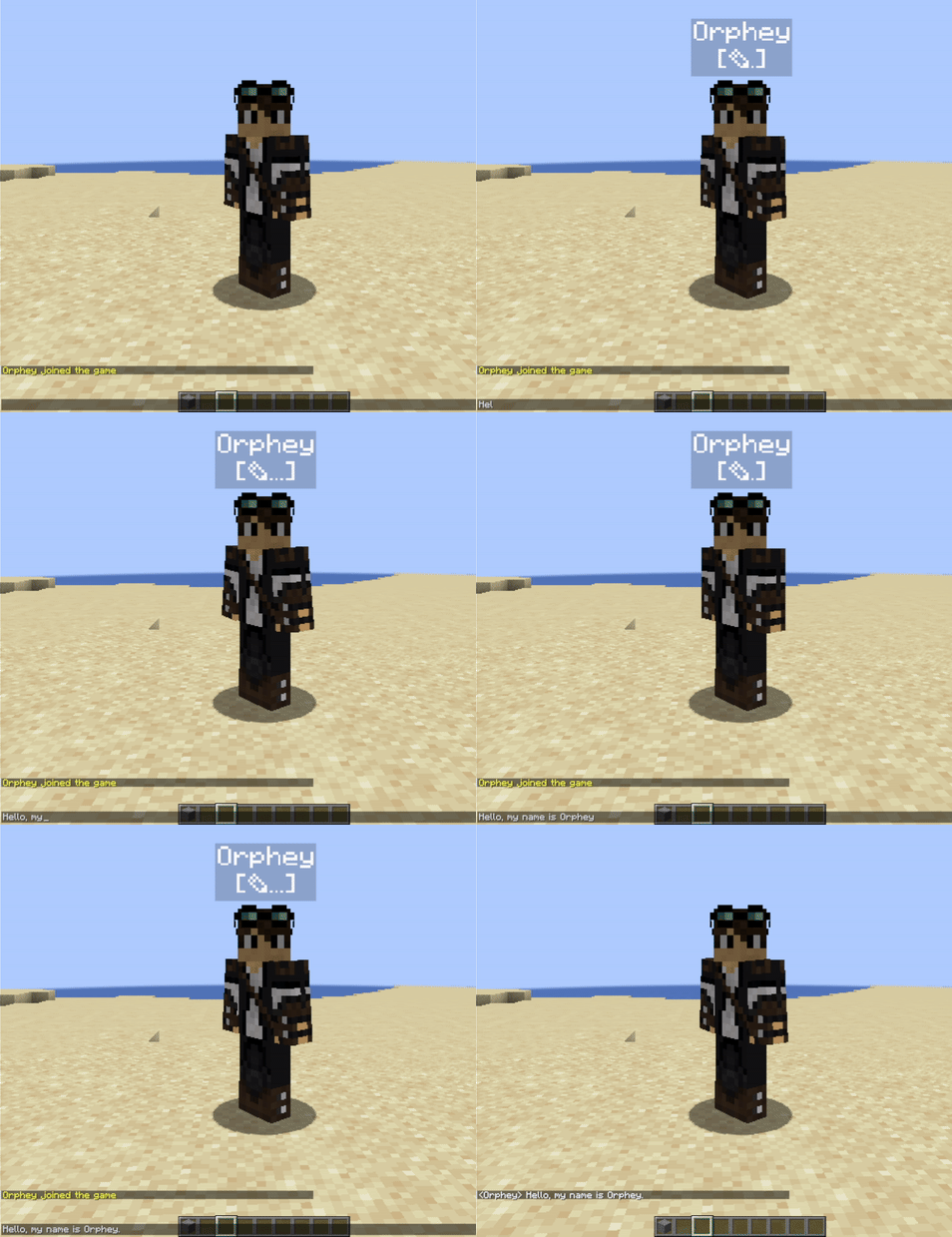

让你的服务器玩家看到有人在聊天框中正在输入。
服务器管理员应在服务器上安装此插件。然后,所有安装了 TypingInChat 客户端模组 的玩家在聊天界面中按键时都会看到视觉提示。
没有安装客户端模组的玩家将只能看到其他玩家的提示,而看不到自己的。
功能
- 动画效果且高度可定制。外观由服务器管理员定义。
- 支持权限控制,可为特定用户或组显示或隐藏提示。
- 未安装客户端模组的玩家也能看到提示。
- 基于数据包和文本显示实体实现。
- 文本显示实体绑定在玩家身上。
自定义示例
彩色指示器,启用缩进,禁用文字阴影:GIF
全部使用彩色,无缩进,启用文字阴影:GIF
默认颜色,隐藏玩家名称:GIF
安装
你需要将 typinginchat-spigot.jar 放入服务器的 plugins 文件夹中。此外,你还需要安装 packetevents 2.6.0 和 HologramAPI 1.6.0 或更高版本。
配置
你可以通过 config.yml 更改 TIC 指示器的外观。
config.yml
# 显示玩家显示名称
show-names: true
# 打字图标的缩进样式
icon-indentation: true
# 全息图可见半径
view-range: 16
# 透过方块可见
visible-through-blocks: false
# 用于打字动画的 UNICODE 字符或文本
typing-char: "✎"
# 颜色自定义
names-color: "#ffffff"
typing-icon-color: "#ffffff"
background-color: "#000000"
# 范围从 0 到 255
background-transparency: 50
# 文字字体的阴影轮廓
text-shadow: false
# 使用 /tic reload 命令应用更改
权限
tic.display - 允许玩家拥有 TIC 指示器。默认为 true,但你可以将其从玩家或组中移除。
tic.admin - 用于 /typinginchat reload 命令所需的权限。
相关
客户端模组的链接
(仅适用于希望显示自己正在打字的玩家):
TypingInChat-Mod


Enable your server players to see when someone actively writing in chat.
Server admins should install this plugin on their server. Then everyone who install TypingInChat client side mod will have visual indication while they are mashing keys in chat interface.
Players who do not have client-side mod will only see other player's indicators and will not have their own.
Features
- Animated and highly customizable. Looks defined by server admins.
- Permissions support to show or hide indication for specific users or groups.
- Visible for players that don't have clientside mod.
- Based on packets and text-display entities.
- Text-displays are attached to players.
Customization Examples
Colored indicator, indentation enabled, text-shadow disabled: GIF
Colored everything, no indentation, text-shadow enabled: GIF
Default colors, player name hidden: GIF
Installation
You need to put typinginchat-spigot.jar into server plugins folder. Also, you need to have packetevents 2.6.0 and HologramAPI 1.6.0 or newer installed.
Configuration
You may change TIC indicators appearance with config.yml.
config.yml
#Show player display names
show-names: true
#Indentation style of typing icon
icon-indentation: true
#Hologram visibility radius
view-range: 16
#Hologram visibility through blocks
visible-through-blocks: false
#UNICODE character or text for typing animation
typing-char: "✎"
#Color customization
names-color: "#ffffff"
typing-icon-color: "#ffffff"
background-color: "#000000"
#From 0 to 255
background-transparency: 50
#Shadow outline of text font
text-shadow: false
#use /tic reload command to apply changes
Permissions
tic.display - allows player to have tic indication. True by default, but you can remove it from players or groups.
tic.admin - required for /typinginchat reload command usage.
Related
Link for client-side mode
(required only for players who want to show when they typing in chat):
TypingInChat-Mod
评论 0
登录后参与评分
还没有评论,来抢沙发吧