
Ultimate SkyGrid - 更新日志 - 服务器列表 - 支持者
- 重要提示 - 在世界中放置过多的箱子可能会导致填充器崩溃。在填充箱子时会进行大量的运算/变量计算/随机数生成,这相当消耗性能。
- 版本 0.2.3 已发布!请参阅更新日志。
- 由于距离上一次更新已经过了很长时间,如果您当前正在运行或计划运行服务器,请私信联系我。
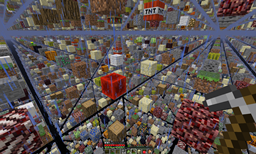
这是另一个基于 SethBling 想法的 SkyGrid 插件。
ProsperCraft 为早期版本的这个插件制作了一部视频系列。在这里查看吧!在他的服务器列表中可以找到他的服务器信息。
不要害怕留下反馈、建议或批评。
功能:
- 您可以选择在主世界中生成下界和常规方块,或者仅生成常规方块。
- 原版 Minecraft 中可能实现的一切,使用此地图都可以实现。
- 箱子可能包含贵重材料。如果您将主世界设置为仅生成常规方块,下界物品将仅在下界 SkyGrid 中生成。
- 本插件附带一个配置文件,允许您设置各种选项以使您的世界独一无二。
- 推荐用于硬核生存模式(Hardcore-Survival)的服务器设置
- 更多图片位于描述上方的“图片”标签页中。
- 来自 0.1.9 版本的 NetherSkyGrid 和 EndSkyGrid 选项。
- 每种类型的世界都有各自的 /usg home。如果您不在 SkyGrid 中,它将默认跳转至主世界。否则,您将前往您当前所在的 SkyGrid 世界类型的家。
来自 uSkyblock 团队的通知:
对于还不知道的人,uSkyblock 团队已经修改了配置文件,使其可以利用 UltimateSkyGrid 插件的世界生成器。这样您可以设置一个独立的服务器(通过 BungeeCord),拥有网格世界以及 uSkyblock 的所有功能。
有关如何设置的更多信息可以在这里找到。
权限:
- UltimateSkyGrid.sethome
- UltimateSkyGrid.home
- UltimateSkyGrid.reload
命令:
- /usg - 使用此命令并配合三个关键词之一,可以访问插件中包含的命令。
- /usg sethome
- /usg home
- /usg reload - 这将重新加载插件,无需重启服务器即可更新配置。
与 Multiverse Core 配合使用:
安装 Multiverse Core 后,只需将 UltimateSkyGrid 的 jar 文件拖入 Bukkit 服务器的 plugins 文件夹中。
输入 /mv create SkyGrid normal -g UltimateSkyGrid 这将生成您的世界。要前往该世界:只需输入 /mv tp SkyGrid
与编辑 bukkit.yml 配合使用:
本插件在 plugin.yml 文件中具有 load: startup 标记。这将允许您将其分配为主世界的默认生成器。
打开 bukkit.yml 并在所有内容下方写入:
worlds:
  world:
    generator: UltimateSkyGrid
  world_nether:
    generator: UltimateSkyGrid
  world_the_end:
    generator: UltimateSkyGrid
需要注意的是,在 yml 文件中请勿使用制表符(Tab)进行缩进。我相信 bukkit.yml 是使用双空格设置的。因此请确保每个缩进比前一个多 2 个空格。注意:确保此插件的 config.yml 中 World_Name: 的值与您使用 SkyGrid 生成器的世界名称相匹配。
示例:
worlds:(换行)
(空格)(空格)world:(换行)
(空格)(空格)(空格)(空格)generator:(空格)UltimateSkyGrid
重要提示
- 对于 0.1.5 及更高版本:重要的是,与此插件关联的 config.yml 文件中的 World_Name: (此处填写世界名称) 必须完全正确。区分大小写。如果您的配置文件中没有此值,则说明您使用的是 0.1.4 或更早版本的配置。请删除或更改当前配置文件的名称,当重新加载服务器时,它应该会生成一个最新的配置文件。或者,您可以从 jar 包内部复制 config.yml 并覆盖 /plugins/UltimateSkyGrid 文件夹中的那个文件。
另一条通知
- 由于生成器使用 worldheight 的方式,如果您将末地高度和下界高度设置为与世界高度不同的值,将会出现 arrayOutOfBounds 异常。因此,目前请使用相同的高度来避免此问题,直到我找到一个可行的解决方案(如果有的话)。
Ultimate SkyGrid - Change Log - SERVER LIST - SUPPORTERS
- IMPORTANT - Putting too many chests in the world may cause the populator to crash. There is a lot of arithmetic/variables/random numbers that happen when populating chests, it's fairly intensive.
- Version 0.2.3 released! See change log.
- As it's been quite a long time since the update before this last one, send me pm's if you currently are running or planning to run a server.
Yet another SkyGrid plugin based off SethBling's idea.
ProsperCraft made a video series of this plugin for an earlier version. Check it out here! Find his server info in the server list.
Don't be afraid to leave feedback, suggestions or criticisms.
Features:
- You have the option of putting Nether and normal blocks in main world or you can just do normal.
- Everything that's possible in vanilla Minecraft should be possible with this map.
- Chests may contain valuable materials. If you set your main world to only spawn normal blocks. Nether items will be in the nether skygrid only.
- This plugin comes with a config file that allows you to set various options to make your world unique.
- Recommended for use in a Hardcore-Survival mode server setup
- More images located in the image tab above this description.
- NetherSkyGrid and EndSkyGrid options from 0.1.9.
- Each type of world has its own /usg home. If you arnt in skygrid it'll default to the main world. Otherwise you will goto the home of the current skygrid world type you are in.
A note from uSkyblock's Team:
For the people that don't know it yet, the uSkyblock team, have altered the config so that it can make use of the world generator of UltimateSkyGrid plugin. This way you can setup a separate server (bungee) with a grid world and all the features of uSkyblock.
More info can be found here how to set this up.
Permissions:
- UltimateSkyGrid.sethome
- UltimateSkyGrid.home
- UltimateSkyGrid.reload
Commands:
- /usg - using this command with one of three keywords will access the commands included in the plugin.
- /usg sethome
- /usg home
- /usg reload - this reloads the plugin, updating your configurations without the need to restart the server.
Use with Multiverse Core:
With Multiverse core installed simply drag the UltimateSkyGrid jar file into your plugins folder of your bukkit server.
Type /mv create SkyGrid normal -g UltimateSkyGrid This will generate your world. To get there: simply type /mv tp SkyGrid
Use with editing bukkit.yml:
This plugin has the load: startup designation in the plugin.yml file. This will allow you to assign it as your default generator to your main world.
Open bukkit.yml and below everything write:
worlds:
  world:
    generator: UltimateSkyGrid
  world_nether:
    generator: UltimateSkyGrid
  world_the_end:
    generator: UltimateSkyGrid
It is important to note in yml files not to use tab to indent. I believe bukkit.yml is set up on double spaces. so make sure each indent is only 2 spaces more than the previous one. Note: Make sure the value for World_Name: in the config.yml for this plugin matches the name of the world that your using the skygrid generator in.
Example:
worlds:(enter)
(spacebar)(spacebar)world:(enter)
(spacebar)(spacebar)(spacebar)(spacebar)generator:(spacebar)UltimateSkyGrid
IMPORTANT
- For 0.1.5 and newer: It is important that your config.yml file associated with this plugin have the World_Name: (WorldNamehere) exactly right. Case sensitive. If your config file doesn't have this value in it. You have the 0.1.4 or before config. Either delete or change the name of your current config file and when you reload your server it should generate an up to date one. Alternatively you can copy the config.yml from inside the jar and overwrite the one in the /plugins/UltimateSkyGrid folder.
ANOTHER NOTE
- Because of the way the generator uses worldheight, if you set the end height and nether height to different values than your world height, you'll get an arrayOutOfBounds exception. So for now use all the same heights to combat this, until I figure out a working solution, if there is one.
下载 Ultimate SkyGrid
下载 Ultimate SkyGrid
下载 Ultimate SkyGrid
下载 Ultimate SkyGrid
下载 Ultimate SkyGrid
下载 Ultimate SkyGrid
下载 Ultimate SkyGrid
下载 Ultimate SkyGrid
下载 Ultimate SkyGrid
下载 Ultimate SkyGrid
- v0.2.31 - 修改了下界刷怪笼以包含骷髅,用于凋零骷髅。
- v0.2.3 - 更改了一些关于下界的硬编码概率,并添加了新命令 /usg reload
- v0.2.26 - 为多种不同的方块变体进行了更新。新增树木类型、新花朵、羊毛变体、紫珀、不同的“石头”(如花岗岩等),使其与 1.9.2 版本保持同步
- v0.2.1 - 将传送代码改为运行任务而非检查当前系统时间。希望那些有延迟卡顿的玩家能感受到差异。
- v0.2.0 - 修复了多个物品未在箱子里生成的问题。
- v0.1.91 - 更改了一行代码,确保从配置文件中获取正确的世界高度变量。
- v0.1.9 - 如果你现在在创建下界或末地世界时使用此生成器,它将相应地选择方块。请参阅更新日志
- v0.1.81 - 更改了玻璃的最大高度(如果配置文件中该选项为 true),以防止玩家初次传送时窒息。
- v0.1.8 - 应请求,我在配置文件中添加了一个布尔值,允许你在方块之间生成玻璃而不是空气。
- v0.1.7 - 在配置文件中添加了箱子配置选项。请参阅更新日志页面。
- v0.1.6 - 在配置文件中添加了 BlockGroups。你可以将任意你希望的方块添加/移除到任意组中,以获得期望的世界效果。
- v0.1.5 - 仙人掌现在可以在沙子上生成。更改了插件初始化配置文件的方式,以便重新加载时不会自动使用默认值。更多信息请参见更新日志页面。
- v0.1.4hotfix - 修正了一个错误,阻止控制台尝试使用 home 和 sethome 命令。
- v0.1.4 - 添加了命令和权限,更多信息请参见更新日志页面。此外还在箱子里添加了仙人掌。
- v0.1.3 - 在箱子里添加了树苗和刷怪蛋。
- v0.1.2 - 应请求,我在配置文件中添加了方块概率,并编写了详尽的解释说明如何使用它,以及每个组中各个方块的列表。
- v0.1.1 - 重新上传,因为 plugin.yml 被排除在了 jar 包之外。
- v0.1.1 - 从箱子里移除了一些可能的物品。
确保所有世界的高度相同。我仍在配置文件中保留这些选项,因为我计划在未来某个时间点修复此问题。如果世界高度不相等,你将无法生成除正常世界以外的其他世界,并会出现错误。
在世界中放置过多的箱子可能导致填充器崩溃。当填充箱子时会发生大量的算术运算/变量/随机数计算,这相当耗费资源。
关于这个资源的讨论、问题反馈与使用心得
还没有讨论,来发第一帖吧
你是这个资源的作者?登录后可认领此资源。
相似资源
 插件

Bukkit 世界管理插件。
隐藏的洛拉克司会自动种植留在地面上的树苗。
 插件

这是一个自定义开发的区域插件。它非常适合用作激动人心的结局,因为 Minecraft 世界边界会通过多个阶段不断缩小!
 插件

移除所有只能通过分支挖矿找到的矿石,同时保留所有可以通过洞穴探索和野外探索找到的矿石
 插件
让刷资源变得更容易、更有趣
 插件

ReTerraForged 地形,支持灵活设置,为所有维度提供 94 个奇幻生物群系、33 座带家具的中世纪建筑以及包含自定义生物的试炼地牢。无需资源包。
评论 0
登录后参与评分
还没有评论,来抢沙发吧