
寻找最新的开发构建版本?你可以在这里找到它们!
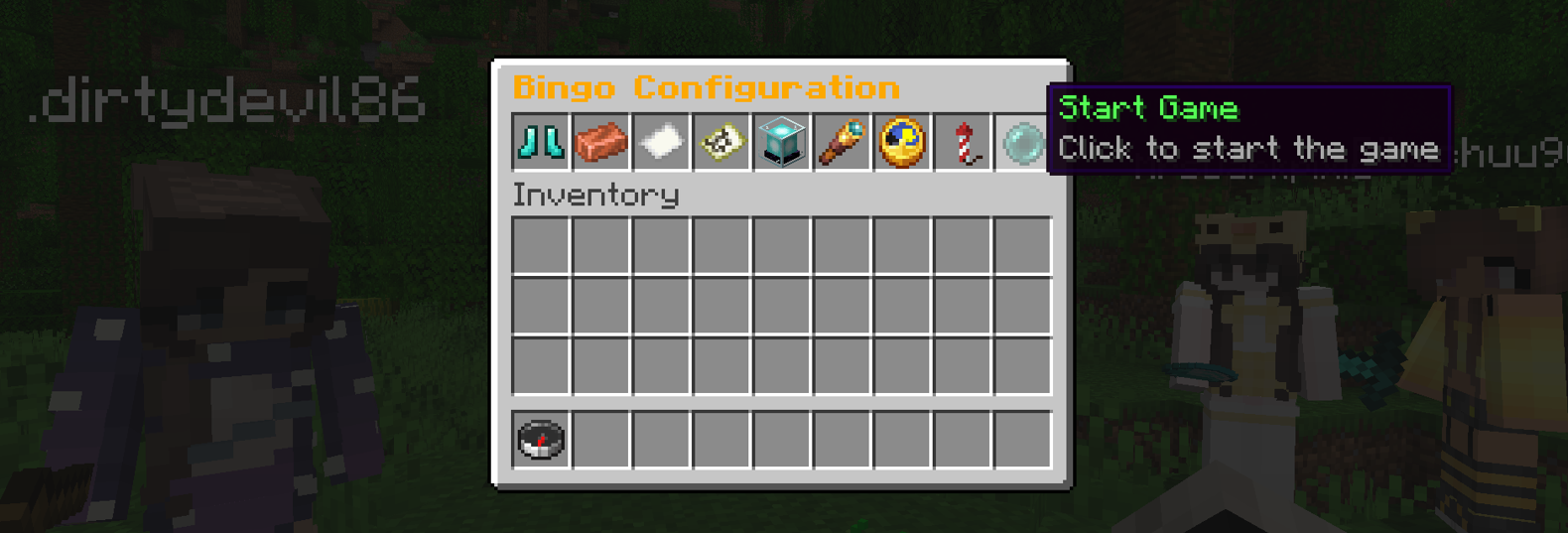
Ultimate Bingo 为你的 Minecraft 社区提供无尽的娱乐,并提供多种多样的游戏配置选项,以鼓励探索并考验你的生存技能。 通过易于使用的图形用户界面(GUI)或游戏内的配置告示牌,为你的玩家轻松设置和启动游戏!玩家可以选择以下选项:
游戏模式
极速竞速 (Speed Run)
每当你在卡片上勾选一项物品时,你的饥饿度、生命值、饱和度和火箭(如果启用了飞行套装)都会得到恢复,让你能够继续快速完成你的宾果卡。
传统模式 (Traditional)
老式宾果游戏,勾选物品即可完成游戏。在这种模式下,你需要关注自己的饥饿度和生命值!
酿造冲刺 (Brew Dash)
每当你在宾果卡上勾选一项物品时,对手会受到负面效果的影响。这包括饥饿、中毒、缓慢坠落等。效果的持续时间取决于卡片难度;每个基础效果持续 20 秒,普通难度为 40 秒,困难难度为 60 秒。通过勾选一个物品来清除你的负面效果。
团队模式 (Teams)
将你的玩家分成最多 3 个队伍:黄色、红色和蓝色。每个队伍共享一张宾果卡,并与其它队伍竞争。玩家可以通过站在对应颜色的羊毛上来选择想要的队伍——设置你的宾果出生点,提供这些颜色羊毛方块供玩家站立以选择队伍。没有站在这些颜色方块上的玩家将被随机分配一个队伍颜色。
组队模式 (Group)
所有玩家共享一张宾果卡,并共同努力勾选物品。你的小组能多快达成宾果?
随机模式 (Random)
无法决定玩什么?为什么不使用随机模式让插件为你选择。
卡片难度与大小
简单、普通或困难模式会改变用于生成宾果卡的分布算法。选择小(3x3)、中(4x4)或大(5x5)尺寸的卡片,来展开你史诗般的宾果对战!
难度和卡片大小也都提供了随机选项,以帮助混合你的宾果游戏体验。
物品难度分为 5 个类别:简单、普通、困难、极端和不可能。当选择卡片难度时,这将决定从每个组中提取多少物品。插件目前提取如下:
简单卡片:15 个简单,15 个普通 中等卡片:5 个简单,10 个普通,10 个困难,5 个极端 困难卡片:5 个普通,10 个困难,10 个极端,5 个不可能
然后对这些物品进行洗牌,并按顺序取出物品来填满卡片。
卡片类型
唯一卡片 (Unique Card)
所有玩家获得一张独特的卡片。插件会提取一个略大于所选卡片大小的物品列表,将其打乱,并为每个玩家生成一张独特的卡片。这样做是为了确保玩家拥有相似的卡片,但顺序对每个玩家来说完全不同。
相同卡片 (Identical Card)
所有玩家收到完全相同的卡片。在这种模式下,没有任何输掉游戏的借口!
随机 (Random)
与其他设置一样,你也可以选择随机的卡片类型。看到这里是不是有点趋势了?
胜利条件
凭借单行和整张卡片选项,战斗注定是史诗级的。正如你所猜到的,这也带有随机模式。在玩单行时,可以是水平、垂直或对角线。
揭示卡片
启用此模式后,每当一名玩家勾选一项物品时,其他所有玩家都会被告知该物品是什么。如果不启用,则使用更隐晦的“已勾选一项物品”消息。启用此功能还将允许玩家打开他们的宾果卡,点击望远镜并查看当前正在玩宾果游戏的任何玩家的宾果卡。
时间限制
想要确保有一些疯狂且快速的乐趣吗?为什么不尝试限时游戏。选择 5、10、15、20、30、40、50 或 60 分钟的游戏。如果在此期间没有人完成胜利条件,游戏 simply 结束。或者为什么不尝试无限制时间游戏,玩家在游玩 20、40 和 60 分钟后会获得速度提升。
玩家初始装备
游戏套装有助于让你的游戏更加史诗级,并适应各种各样的玩家。在游戏开始时选择一个套装来装备给所有玩家。
裸装套装 (Naked Kit)
顾名思义,这个套装给你的玩家一个完全空的背包。非常适合那些喜欢徒手砍第一棵树并希望磨练装备(和宾果卡)的玩家。

新手套装 (Starter Kit)
不喜欢砍树?这个套装会给你的玩家一些基本必需品,让他们更快地起步——尽管它们全都是木制的。真恶心。

船只套装 (Boat Kit)
稍微高端一点,配备了低级附魔的铁制装备、盾牌、船、床和制作箱——你可以准备好直接投入探索了!

飞行套件
这是速度跑图玩家的终极装备。附魔满级的下界合金装备、鞘翅以及三级火箭——你能多快完成宾果?在速度跑图模式下使用飞行套件时,每当你勾选卡片上的一项内容,你的火箭就会补充至满组(一组64个)。

安装与使用插件
由于团队模式使用了黄色、红色和蓝色羊毛方块——建议在地板上铺设大面积的各队伍颜色区域,以便玩家在游戏开始时轻松选择自己的队伍颜色。
游戏还配备了通过告示牌和按钮配置及启动游戏的功能。这需要由 OP(管理员)进行设置。为了让游戏完全可配置,请放置 8 个告示牌和一个按钮——这些可以是任意类型的告示牌和任意类型的按钮。 面向告示牌时,使用 /bingo set 命令来设置每个告示牌,后跟告示牌类型。例如,要设置一个游戏模式告示牌,请注视一个告示牌并输入 /bingo set GameMode。你可以配置以下告示牌和按钮:
请注意:如果你希望允许玩家使用告示牌和按钮配置游戏,请务必赋予他们 shantek.ultimatebingo.signs 权限节点。
CardSize(卡牌尺寸): 在小、中、大卡牌之间切换
CardType(卡牌类型): 在唯一卡牌或相同卡牌之间切换
Difficulty(难度): 在简单、普通或困难难度之间切换
GameMode(游戏模式): 在包含的游戏模式之间切换
Loadout(初始装备): 更改玩家的初始装备套件
RevealCards(显示卡牌): 切换是否在勾选时显示物品
TimeLimit(时间限制): 设置游戏的时间限制
WinCondition(胜利条件): 在全填满卡牌或单行之间切换
StartButton(开始按钮): 按下此按钮将以选定的设置启动游戏
想要移除或移动某个告示牌?你可以使用 /bingo remove 命令,后跟要移除的告示牌/按钮的名称来实现。请注意,这些名称区分大小写。
命令
/bingo - 供所有玩家加入现有游戏或获取替换卡牌的 GUI。
/bingo gui - 由管理员/模组人员用于设置和启动新的宾果游戏。
/bingo reload - 由 OP 用于重新加载配置文件。
/bingo info - 所有玩家均可访问。提供当前宾果配置的概览。
/bingo set * - 用于在世界中激活游戏配置告示牌/按钮。
/bingo remove * - 用于在世界中移除游戏配置告示牌/按钮。
权限
shantek.ultimatebingo.start - 允许玩家配置和启动宾果游戏。
shantek.ultimatebingo.stop - 授予停止活动宾果游戏的权限。
shantek.ultimatebingo.settings - 能够向宾果卡牌配置中添加/移除物品
shantek.ultimatebingo.signs - 允许玩家与告示牌和按钮交互以配置和启动游戏
Placeholder API 排行榜支持
随着排行榜功能的添加,也加入了 Placeholder API 支持。这非常适合设置记分板全息图。使用以下占位符轻松在你的排行榜上显示前 10 名玩家:
%ultimatebingo_overall_?_name%
%ultimatebingo_overall_?_score%
将 ? 替换为你想要显示的位置。例如,如果你想显示第一名玩家的姓名和分数,你将使用以下占位符:
%ultimatebingo_overall_1_name% - %ultimatebingo_overall_1_score%
外部链接
许可证
根据 GNU 通用公共许可证 v3.0 分发。
本项目基于 Elmer Lion 的 Mega Bingo
Looking for the latest dev builds? You can find them here!
Ultimate Bingo offers endless entertainment for your Minecraft community with a whole variety of game configuration on offer to encourage exploration and test your survival skills. With an easy-to-use GUI or in game config signs, setting up and starting games a breeze for your players! Players can choose from the following options:
Game Modes
Speed Run
Every time you tick off an item on your card, your hunger, health, saturation and rockets (if the flying kit is enabled) are restored allowing you to continue speed running your bingo card.
Traditional
Old school bingo, tick off items to complete the game. You need to watch your hunger and health in this mode!
Brew Dash
Every time you tick an item off of your bingo card, your opponents are dealt a negative effect. This can range from things like hunger, poison, slow falling etc. The duration of this effect depends on the card difficulty; 20 seconds for each, 40 seconds for normal and 60 seconds for hard. Clear your negative effect by ticking off an item.
Teams
Split your players in up to 3 teams; yellow, red and blue. Each team has a shared bingo card and races to beat the other teams. Players can select their desired team by standing on the matching colour wool - set up your bingo spawn to offer these colour wool blocks for players to stand on to choose their team. Anyone not on those colour blocks will be randomly assigned a team colour.
Group
All players share a single bingo card and work together to tick off items. How quick can your group get bingo?
Random
Can't decide what to play? Why not use the random mode to let the plugin choose for you.
Card Difficulty & Size
Easy, Normal or Hard modes change the distribution used to generate your bingo cards. Choose between a Small (3x3), Medium (4x4) or Large (5x5) card to battle out your epic bingo games!
Both difficulty and card size also come with a Random option to help mix up your bingo games.
Item difficulty is split into 5 categories: Easy, normal, hard, extreme and impossible. When selecting the card difficulty, this determines how many items are pulled from each group. The plugin currently pulls the following:
Easy card: 15 easy, 15 normal Medium card: 5 easy, 10 normal, 10 hard, 5 extreme Hard card: 5 normal, 10 hard, 10 extreme, 5 impossible
The items are then shuffled and then the items are taken in order to fill up a card.
Card Type
Unique Card
All players are given a unique card. The plugin pulls a list of items slightly larger than the selected card size, shuffles them and generates a unique card for each player. This is done to ensure players have similar cards but the order is completley different for every player.
Identical Card
All players receive the exact same card. No excuses for losing in this mode!
Random
As with the other settings, you can also roll with a random card type. Seeing a bit of a trend here?
Win Condition
With single row and full card options, the battles are sure to be epic. And you guessed it, this also comes with a random mode. When playing single row, this can be in a horizontal, vertical or diagonal line.
Reveal Cards
With this mode enabled, every time a player ticks an item off all the other players are told what the item is. Without it enabled, it uses a more cryptic "ticked off an item" message instead. Enabling this will also allow players to open their bingo card, click the spyglass and see the bingo card of anyone playing the current bingo game.
Time Limit
Want to ensure you have some insane and fast fun? Why not try a timed game. Select from 5, 10, 15, 20, 30, 40, 50 or 60 minute games. If no one completes the win condition in this time, the game simply ends. Or why not try the Unlimited Time games, where players receive a speed boost after 20, 40 and 60 minutes of game play.
Player Load-out
Game kits help make your games more epic and cater to a wide variety of players. Select a kit to equip to all players at the start of the game.
Naked Kit
This kit as the name implies gives your players an entirely empty inventory. Perfect for those players who enjoy punching that first tree and want to grind their gear (and bingo card).
Starter Kit
Not a fan of punching trees? This kit will give your players the essentials to get up and running a little quicker - although, they're all wood. Yuck.
Boat Kit
A little more high end, equipped with low level enchanted iron gear, shield, boat, bed and crafting cupboard - you're ready to jump straight in to exploring!
Flying Kit
The ultimate gear for those speed runs. Max enchanted Netherite gear, elytra and level 3 rockets - How fast can you get bingo? When using the flight kit in speed run mode, your rockets are topped back up to a full stack every time you tick an item off your card.
Installing and using the plugin
As the team mode uses yellow, red and blue wool blocks - It's recommended to place large sections of each team colour on the ground to allow your players to easily select their team colour at the start of the game.
The game also comes with the ability to configure and start games using signs and a button. This needs to be set up by an OP. To allow a game to be fully configurable, please down 8 signs and a button - these can be any signs and any button. While looking at the sign, use the /bingo set command to set each sign, followed by the sign type. For example, to set up a game mode sign, look at a sign and type /bingo set GameMode. You can configure the following signs and buttons:
Please note: If you want to allow your players to configure games using the signs and button, be sure to give them the shantek.ultimatebingo.signs permission node.
CardSize: Toggles between small, medium and large cards
CardType: Toggles between unique or identical cards
Difficulty: Toggles between easy, normal or hard difficulty
GameMode: Toggles between the included game modes
Loadout: Changes the initial kit loadout for players
RevealCards: Toggles items being revealed as they're ticked off
TimeLimit: Sets the time limit for the game
WinCondition: Toggles between full card or single row
StartButton: Pressing this button will start a game with the selected settings
Want to remove or relocate a sign? You can do so by using the /bingo remove command, followed by the name of the sign/button to remove. Please note, these are case sensitive.
Commands
/bingo - GUI for all players to join an existing game or get a replacement card.
/bingo gui - Used by an admin/mod to set up and start a new bingo game.
/bingo reload - Used by an op to reload the config file.
/bingo info - Accessible to all players. Gives you a rundown of the current bingo config.
/bingo set * - Used to activate a game config sign/button in your world.
/bingo remove * - Used to remove a game config sign/button in your world.
Permissions
shantek.ultimatebingo.start - Allows players to configure and start Bingo games.
shantek.ultimatebingo.stop - Grant access to stop an active bingo game.
shantek.ultimatebingo.settings - Ability to add/remove items from the bingo card config
shantek.ultimatebingo.signs - Allow players to interact with signs and buttons to configure and start games
Placeholder API Leaderboard Support
With the addition of a leaderboard, placeholder api support has also been added. This is ideal for setting up a scoreboard hologram. Easily display the top 10 players on your leaderboard using the following placeholders:
%ultimatebingo_overall_?_name%
%ultimatebingo_overall_?_score%
Replace ? with the position you with to display. For example, if you wanted to show the name and score of first place, you'd use the following placeholders:
%ultimatebingo_overall_1_name% - %ultimatebingo_overall_1_score%
External Links
License
Distributed under the GNU General Public License v3.0.
This project is based on Mega Bingo by Elmer Lion

下载 Ultimate Bingo
需要联机服务器吗?
稳定流畅、一键部署,几分钟即可和朋友联机开服
最低仅需 8 元/月 即可畅快联机
下载 Ultimate Bingo
需要联机服务器吗?
稳定流畅、一键部署,几分钟即可和朋友联机开服
最低仅需 8 元/月 即可畅快联机
下载 Ultimate Bingo
需要联机服务器吗?
稳定流畅、一键部署,几分钟即可和朋友联机开服
最低仅需 8 元/月 即可畅快联机
下载 Ultimate Bingo
需要联机服务器吗?
稳定流畅、一键部署,几分钟即可和朋友联机开服
最低仅需 8 元/月 即可畅快联机
下载 Ultimate Bingo
需要联机服务器吗?
稳定流畅、一键部署,几分钟即可和朋友联机开服
最低仅需 8 元/月 即可畅快联机
下载 Ultimate Bingo
需要联机服务器吗?
稳定流畅、一键部署,几分钟即可和朋友联机开服
最低仅需 8 元/月 即可畅快联机
下载 Ultimate Bingo
需要联机服务器吗?
稳定流畅、一键部署,几分钟即可和朋友联机开服
最低仅需 8 元/月 即可畅快联机
下载 Ultimate Bingo
需要联机服务器吗?
稳定流畅、一键部署,几分钟即可和朋友联机开服
最低仅需 8 元/月 即可畅快联机
下载 Ultimate Bingo
需要联机服务器吗?
稳定流畅、一键部署,几分钟即可和朋友联机开服
最低仅需 8 元/月 即可畅快联机
下载 Ultimate Bingo
需要联机服务器吗?
稳定流畅、一键部署,几分钟即可和朋友联机开服
最低仅需 8 元/月 即可畅快联机
- 允许玩家在游戏未激活时丢弃宾果卡
关于这个资源的讨论、问题反馈与使用心得
还没有讨论,来发第一帖吧
你是这个资源的作者?登录后可认领此资源。
相似资源
 插件
自定义你的Minecraft头像!
 插件
重新定义服务器上的生物运输方式。使用高度可定制的口袋道具,安全地捕获、存储和释放任何实体。
 插件
用于绘制游戏内地图或在浏览器中随探索实时进行地图绘制的实时地图。
 插件

使床在所有维度中爆炸的模组
 插件
为 Armor Poser 模组添加兼容性
 插件

SkyBlock、OneBlock、Boxed、SkyGrid、AcidIsland、CaveBlock、Poseidon、StrangerRealms——以及更多!这些只是由 BentoBox 支持的基于岛屿的游戏模式之一。来自原版 ASkyBlock 的作者。
评论 0
登录后参与评分
还没有评论,来抢沙发吧