
UltimateShop
使用灵活的商品、价格、条件和动态菜单,构建你自己的商店规则。
UltimateShop 是一个面向 Spigot 和 Paper 的高度可配置商店与交易框架。你可以配置商店中显示的内容、允许交易的玩家、玩家支付与获得的物品、价格和库存的变化方式,以及优惠信息的刷新时机。每个部分都可以遵循各自的规则并相互协作。
通过在支持的设置中使用条件、占位符、公式、操作和重置计划,将你的商店与玩家进度、服务器事件、自定义物品以及现有的经济插件连接起来。每日随机商店、季节性市场或奖励菜单只是这些功能协同工作的一个示例。你可以以不同的方式组合相同的功能,或将多种行为叠加到同一个商店中。
特性
标记为 Premium 的特性需要 UltimateShop Premium。某些集成还需要相应的第三方插件。
按照你自己的规则构建商店
商店的选品、交易、可用性以及刷新行为均可分别配置。在菜单、商品、价格和奖励级别上组合支持的规则,打造专属的交易体验。
- 决定显示什么: 使用配置好的商品和展示规则来塑造选品。Premium 版添加了动态布局、条件性商品选择和随机占位符:根据条件切换商品、从池中按权重选择优惠,或为每位玩家单独进行随机抽取。
- 决定易手什么: 在交易中组合物品、货币、成本、奖励和命令。条件可以改变适用条目,使同一优惠针对不同符合条件的玩家包含不同的支付或奖励。
- 决定谁可以在何时交易: 检查权限、世界、生物群系或占位符值,然后应用个人或全局限制或冷却时间。其他插件暴露的值可以将交易与等级、任务、季节、日期或事件状态连接起来。
- 决定商店如何演变: 使用公式和交易数据来改变价格、数量和可用库存。独立安排使用重置。Premium 版的随机占位符还可以按计划刷新商品选择和数值,并将商品使用重置链接到相同的周期。
- 决定交易周围发生什么: 配置菜单和交易操作、成功或失败的反馈、展示信息和导航。将购买与你其他插件提供的服务或奖励连接起来。
例如: 在 Premium 版中,随机占位符可以从更大的池中选取 5 个每日优惠,而条件性商品选择可以根据另一个插件提供的季节值来改变显示内容。这些优惠还可以拥有基于等级的奖励、替代支付方式、有限库存以及对交易活动做出反应的价格。每条规则都可以独立使用,也可以与其他规则结合使用。
相同的构建模块可以产生轮换商人、季节性优惠、基于进度的交换、玩家主导的市场、每日奖励、一次性领取或基于命令的服务。这些示例展示了可能的配置;你商店的行为取决于你所选择的规则以及你如何组合它们。
灵活的商品与支付方式
- 独立配置玩家支付的内容和他们获得的内容。双方都可以包括物品、金钱、点数、经验值或等级,并具有单独的买卖设置。
- 在一次交易中组合多个成本或奖励。例如,收取 500 点点和 64 颗钻石 作为定制剑的费用,然后运行一条命令以发放额外奖励。
- 使用 ALL 模式要求或交付所有适用的条目,或使用 ANY 模式让系统选择一个有效选项。提供金钱或点数作为替代支付方式,而无需创建单独的商品。
- 在特定的交易次数时应用不同的价格或奖励,并为各个条目添加要求。创建入门优惠、里程碑奖励或逐渐昂贵的购买选项。
- 构建命令商店和免费奖励条目,并通过重用命名价格定义来简化常见的定价设置。
- Premium: 通过占位符和给予/移除操作连接其他数字资源,即使没有直接的经济挂钩也可用。
动态市场与基于物品的出售价格
- 使用数学表达式、PlaceholderAPI 变量以及玩家或服务器的交易次数来计算价格和商品数量。当更多玩家供应热门商品时,提高其售价或降低其收购价。
- 选择简单的固定价格计算,或单独计算连续交易,以便批量购买遵循你不断变化的价格规则。
- 设置最小和最大数量,以确保计算出的价格在你预期的范围内。
- 价格修正器(实验性功能): 根据实际出售的物品调整售卖奖励,通过物品售卖菜单提供价格预览和确认功能。降低受损装备的价值,从 Lore(描述文本)或 NBT 中读取数值,或应用 MythicChanger 的匹配规则。某些修正器类型需要额外的插件支持。
- Premium: 显示动态价格是高于、低于还是等于其基础价格,并在公式中使用额外的终身计数和交易时间数据。
个人限制、全局库存与冷却时间
- 独立设置个人和服务器的买卖限制。控制每个玩家可以交易的量,以及整个服务器可以采购或供应的量。
- 在交易限额之外,配置个人和全局的买卖冷却时间。
- 使限制永久有效、按间隔重置,或按计划刷新。构建每日津贴、每周优惠或定期补货。
- 使用公式和占位符来设定限制和库存。结合买卖数据,创建一个玩家销售补充可用库存的市场机制。
- Premium: 跨产品共享使用数据,包括交易次数、限制和重置时间。共享产品数据目前处于 Alpha 测试阶段。
- Premium: 使用自定义重置时间戳和随机占位符重置计划,以提供更专业的优惠和商店轮换。
自定义物品与经济系统集成
- 直接通过配置文件获取支持的插件物品。物品挂钩包括 ItemsAdder, Oraxen, Nexo, CraftEngine, MMOItems, MythicMobs, EcoItems, EcoArmor, eco, NeigeItems 和 ExecutableItems。ItemBridge 可以提供对其他物品插件的访问权限。
- 通过其插件标识识别支持的自定义物品,允许它们在名称、Lore(描述文本)或附魔更改后仍然可出售,前提是保留其标识数据。
- 使用 ItemFormat 构建配置好的物品,自定义受支持物品的属性,并修改从物品插件检索到的模板。保存手持物品以供稍后在商店和菜单中使用。
- 选择严格的原版物品比较或可配置的 ItemFormat 匹配。安装了 MythicChanger 后,可以为接受的商品定义更具体的匹配规则。
- 支持 Vault, PlayerPoints, CoinsEngine, ExcellentEconomy, UltraEconomy, EcoBits, PEconomy, RedisEconomy, RoyaleEconomy 和 VotingPlugin,以及原版经验值(EXP)和等级。
- Premium: 访问更多的 ItemFormat 选项,包括 AdvancedEnchantments 集成以及在支持的服务端版本上现代物品组件设置。
自定义菜单与便捷交易
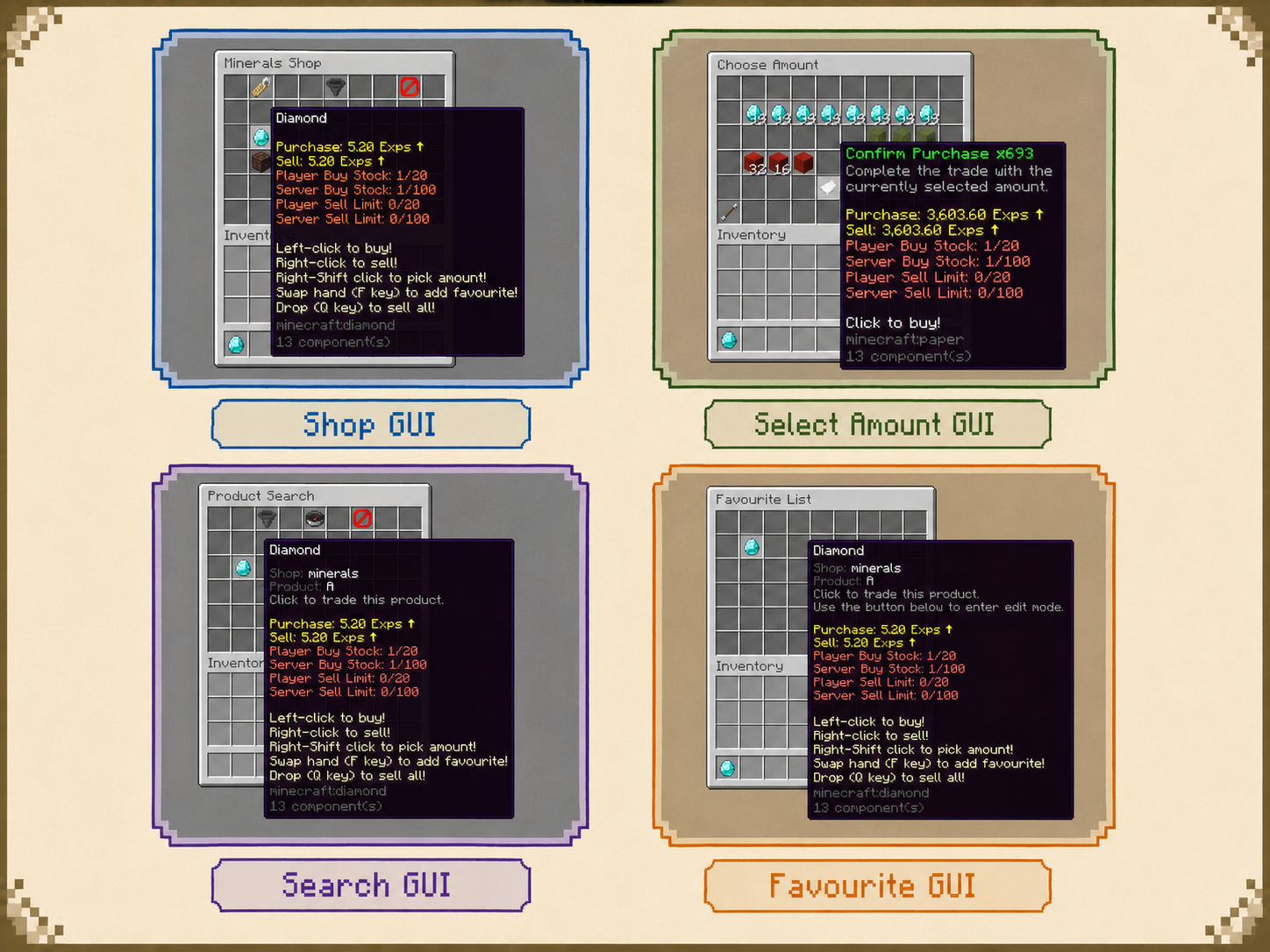
- 使用您自己的布局、展示物品、名称、Lore(描述文本)、按钮、条件和动作来设计商店菜单、导航菜单和数量选择菜单。配置基于交互或定期的按钮更新以显示动态信息。
- 让玩家通过 Buy More(多买) 选择数量,通过商品的 Sell All(全部卖出)功能卖出匹配的库存物品,或在允许的情况下使用快速买入、快速卖出、卖出手中物品和卖出所有手中物品的命令。
- 为每个商品设置默认买入和卖出数量以进行直接交易。实现一键购买一组或卖出一组配置好的数量。
- 提供两种物品存入出售的工作流程:Sell All GUI(全部卖出图形界面) 在菜单关闭时出售存入的物品;Item Sell Menus(物品售卖菜单) 让玩家预览调整后的价格并通过按钮确认出售。
- 启用智能物品发放以尊重堆叠大小、复用背包空间,并在发放购买物品前检查容量。
- Premium: 添加基于文本或物品的商品搜索、可编辑的收藏夹、条件按钮选择、动态布局、自定义菜单命令以及 GUI 标题更新。标题更新需要 PacketEvents 插件支持。
- Premium: 定义自定义商品点击动作,并在多个槽位或菜单中显示同一商品。在保持底层商品数据统一的同时,提供单独的数量快捷方式。
Java、Bedrock 与图形化对话框菜单
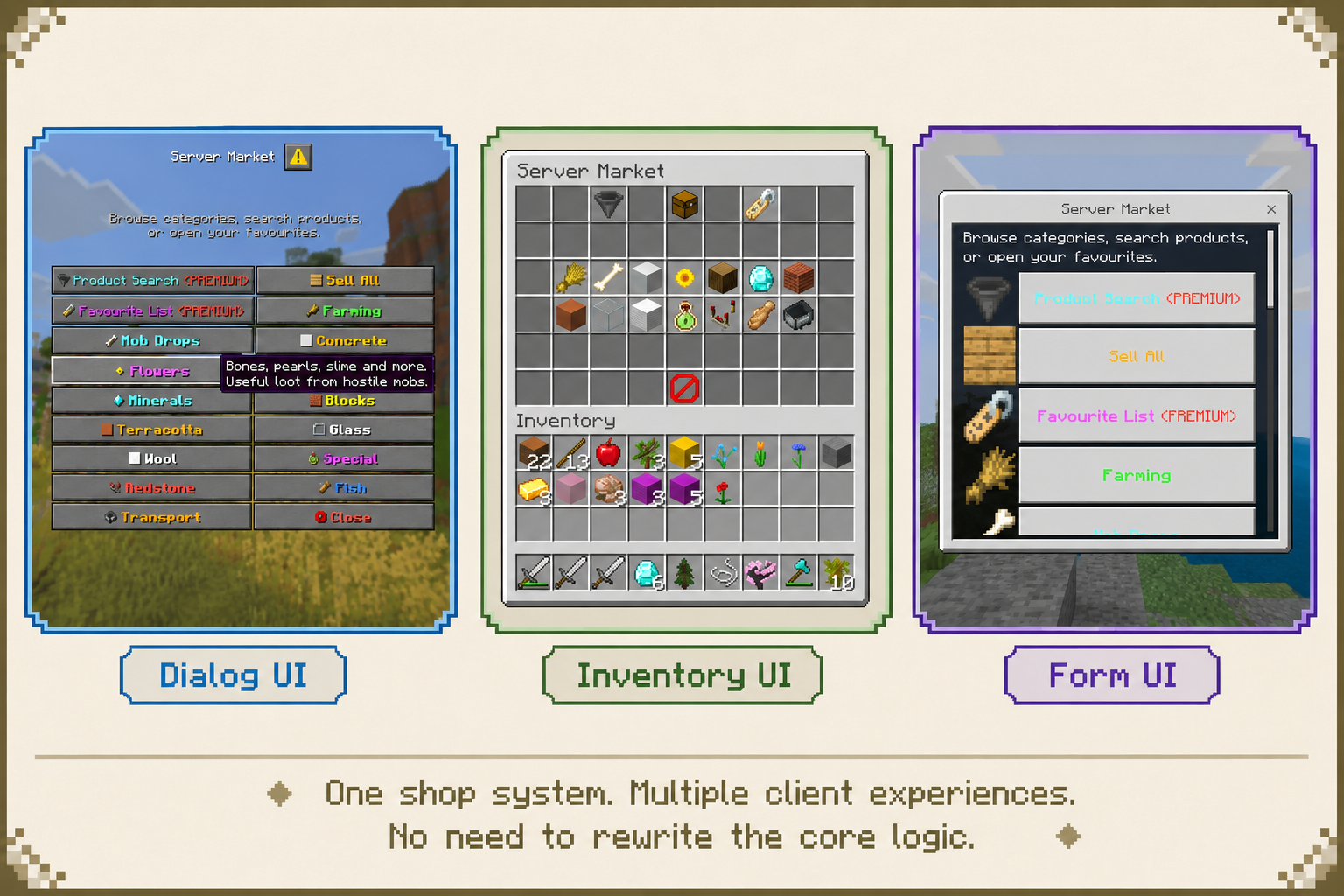
- 经典库存菜单: 为 Java 版玩家提供熟悉的箱式风格商店,具有可配置的物品布局和交易控制。
- Premium — Bedrock Form UI: 通过 Geyser 和 Floodgate 从现有菜单生成 Bedrock 表单。显示物品图标和价格信息,并为 Bedrock 客户端提供独立的点击行为,以实现更合适的交互流程。
- Premium — Native Dialog UI: 在 Paper 1.21.9+ 上使用 Minecraft 对话框菜单,并配合兼容的 Java 客户端。标准动作按钮和物品操作列表布局不需要资源包。
- Premium — Ore Graphical Menus: 创建带有自定义背景、按钮、商品卡片、物品图标和导航的对话框商店。自定义纹理和布局模板,然后通过 /shop dialogpack 命令生成所需的资源包。需要 Paper 1.21.9+、兼容的 Java 客户端以及由客户端加载生成的资源包。
- 在支持的菜单呈现形式之间重用商店定义,并根据商品出现的界面定制商品描述。
容器出售与条件出售奖励
- Premium — 出售物品: 允许玩家通过点击容器来出售符合条件的内容。为不同类型的“出售棒”配置使用次数和出售倍率。
- Premium — 出售箱子(实验性): 在所有者在线且区块已加载时,自动出售符合条件的箱子内容。配置使用限制、倍率和全息信息。“出售箱子”不支持 Folia。
- Premium — 潜影盒出售(Alpha): 启用通过支持的出售工作流出售潜影盒内符合条件的内容。
- Premium — 出售倍率: 应用条件性的奖励或税收。对于 VIP 奖励、活动加成和其他出售调整,使用最高匹配倍率或将匹配的条目相乘。
- 容器出售保护集成包括 WorldGuard、Residence、GriefPrevention、Lands、HuskTowns、HuskClaims、PlotSquared、Towny、BentoBox、Dominion 和 SuperiorSkyblock2。出售箱子全息图支持 DecentHolograms、CMI 和 FancyHolograms。
适用于服务器规则的 Actions & Conditions
- 通过权限、世界、生物群系、菜单和占位符检查来控制访问和交易。将商店限制在特定世界、要求特定等级,或将报价与由其他插件跟踪的进度相关联。
- 在打开或关闭菜单、点击按钮、交易成功或交易失败时执行操作。发送消息、执行命令、播放声音、传送玩家并打开其他菜单。
- 控制哪些交易计数会触发操作,以及针对批量交易是否仅运行一次。自定义资金不足、背包已满、条件未满足或达到限制时的反馈信息。
- Premium: 组合条件性、延迟和基于概率的操作;组合替代或取反的条件;并从条件结果中触发操作。当 Java 版和基岩版玩家的交互需要区别对待时,可对操作进行过滤。
动态信息与玩家语言
- 在产品描述和消息中显示价格、数量、限制、交易计数和重置信息。在支持的插件中集成 PlaceholderAPI 以及内置的数学、cron 和语言占位符。
- 使用传统颜色、十六进制颜色、渐变色和 MiniMessage 格式自定义文本,并控制数字和价格的呈现方式。
- Premium: 使用随机和条件性占位符来实现轮换报价和上下文文本。为每个玩家单独存储自定义值或全局存储;自定义占位符存储目前是 Beta 功能。
- Premium: 显示重置倒计时和比较结果,显示本地化的原版物品名称,并根据每位玩家的客户端区域设置选择语言文本。
- Premium: 通过聊天栏、标题、动作栏、Boss 条和声音提供语言反馈。受支持的现代 Paper 版本还为 Java 版玩家提供了物品精灵显示选项。
管理、存储与网络功能
- 通过命令和权限管理保存的物品、为玩家打开菜单、执行快速交易以及调整产品使用数据。
- 将数据存储为 YAML 或启用 SQL 存储。支持的 SQL 方言包括 MySQL、H2、PostgreSQL 和 SQLite,具有自动保存和异步数据库操作功能。
- Premium: 通过游戏内编辑器编辑商店、产品和菜单。
- Premium: 在文件或数据库中记录交易,包括玩家、产品、数量、价格和倍率信息。日志采用缓冲并以批处理方式写入。
- Premium: 启用数据库存储后,通过 BungeeCord 插件消息同步全局产品使用更新。配置代理网络时请查看设置指南。
UltimateShop
Build your own shop rules with flexible products, prices, conditions, actions, and dynamic menus.
UltimateShop is a highly configurable shop and trading framework for Spigot and Paper. Configure what appears in a shop, who can trade, what players pay and receive, how prices and stock change, and when offers refresh. Each part can follow its own rules and work together with the others.
Use conditions, placeholders, formulas, actions, and reset schedules across supported settings to connect your shop to player progress, server events, custom items, and existing economy plugins. A daily random shop, seasonal market, or reward menu is one example of these features working together. You can combine the same features differently, or layer several behaviors into one shop.
Features
Features marked Premium require UltimateShop Premium. Some integrations also require the corresponding third-party plugin.
Build Shops Around Your Own Rules
The shop's selection, transactions, availability, and refresh behavior are configured separately. Combine the supported rules at the menu, product, price, and reward levels to create your own trading experience.
- Decide what appears: Use configured products and display rules to shape the selection. Premium adds dynamic layouts, conditional product selection, and random placeholders: switch products according to conditions, choose weighted offers from a pool, or roll selections separately for each player.
- Decide what changes hands: Combine items, currencies, costs, rewards, and commands in a transaction. Conditions can change which entries apply, allowing the same offer to include different payments or rewards for eligible players.
- Decide who can trade and when: Check permissions, worlds, biomes, or placeholder values, then apply personal and global limits or cooldowns. Values exposed by other plugins can connect trading to levels, quests, seasons, dates, or event states.
- Decide how the shop evolves: Use formulas and transaction data to change prices, quantities, and available stock. Schedule usage resets independently. Premium random placeholders can also refresh product selections and values on a schedule, with product usage resets linked to the same cycle.
- Decide what happens around a trade: Configure menu and transaction actions, success or failure feedback, display information, and navigation. Connect purchases to services or rewards delivered by your other plugins.
For example: With Premium, random placeholders can select 5 daily offers from a larger pool, while conditional product selection can change what appears according to a season value supplied by another plugin. Those offers can also have rank-based rewards, alternative payments, limited stock, and prices that respond to trading activity. Each of these rules can be used independently or combined with the others.
The same building blocks can produce rotating merchants, seasonal offers, progression-based exchanges, player-supplied markets, daily rewards, one-time claims, or command-based services. These examples illustrate possible configurations; your shop's behavior comes from the rules you choose and how you combine them.
Flexible Products & Payment Methods
- Configure what players pay and what they receive independently. Both sides can include items, money, points, EXP, or levels, with separate buying and selling settings.
- Combine multiple costs or rewards in one transaction. For example, charge 500 points and 64 diamonds for a custom sword, then run a command to grant an additional reward.
- Use ALL mode to require or deliver every applicable entry, or ANY mode to let the system select a valid option. Offer money or points as alternative payment methods without creating separate products.
- Apply different prices or rewards at specific transaction counts, and add requirements to individual entries. Create introductory offers, milestone rewards, or progressively more expensive purchases.
- Build command shops and free reward entries, and reuse named price definitions to simplify common pricing settings.
- Premium: Connect other numeric resources through placeholders and give/take actions, even when no direct economy hook is available.
Dynamic Markets & Item-Based Sell Prices
- Calculate prices and product amounts with math expressions, PlaceholderAPI values, and player or server transaction counts. Make popular products more expensive or lower their sell price as more players supply them.
- Choose simple fixed-price calculations or calculate successive trades individually, so a bulk purchase can follow your changing price rules.
- Set minimum and maximum amounts to keep calculated prices within your intended range.
- Price Modifier (experimental): Adjust sell rewards using the actual item being sold, with price preview and confirmation through an Item Sell Menu. Reduce the value of damaged equipment, read numbers from Lore or NBT, or apply MythicChanger matching rules. Some modifier types require additional plugins.
- Premium: Show whether a dynamic price is above, below, or equal to its base price, and use additional lifetime-count and transaction-time data in your formulas.
Personal Limits, Global Stock & Cooldowns
- Set personal and server-wide buying and selling limits independently. Control how much each player can trade and how much the entire server can purchase or supply.
- Configure personal and global cooldowns for both buying and selling, alongside your transaction limits.
- Keep limits permanent, reset them after an interval, or refresh them on a schedule. Build daily allowances, weekly offers, or recurring stock refills.
- Use formulas and placeholders for limits and stock. Combine buy and sell data to create a market where player sales replenish available stock.
- Premium: Share usage data across products, including transaction counts, limits, and reset times. Shared product data is currently an Alpha feature.
- Premium: Use custom reset timestamps and random-placeholder reset schedules for more specialized offers and shop rotations.
Custom Items & Economy Integrations
- Retrieve supported plugin items directly through configuration. Item hooks include ItemsAdder, Oraxen, Nexo, CraftEngine, MMOItems, MythicMobs, EcoItems, EcoArmor, eco, NeigeItems, and ExecutableItems. ItemBridge can provide access to additional item plugins.
- Recognize supported custom items by their plugin identity, allowing them to remain sellable after name, Lore, or enchantment changes, provided their identifying data is preserved.
- Use ItemFormat to build configured items, customize supported item properties, and modify templates retrieved from item plugins. Save held items for later use in shops and menus.
- Choose strict vanilla item comparison or configurable ItemFormat matching. With MythicChanger installed, define more specific matching rules for the items you accept.
- Use Vault, PlayerPoints, CoinsEngine, ExcellentEconomy, UltraEconomy, EcoBits, PEconomy, RedisEconomy, RoyaleEconomy, and VotingPlugin, plus vanilla EXP and levels.
- Premium: Access additional ItemFormat options, including AdvancedEnchantments integration and modern item component settings on supported server versions.
Custom Menus & Convenient Trading
- Design shop menus, navigation menus, and quantity-selection menus with your own layouts, display items, names, Lore, buttons, conditions, and actions. Configure interaction-based or periodic button updates for dynamic information.
- Let players select quantities with Buy More, sell matching inventory items through product Sell All, or use quick-buy, quick-sell, sell-hand, and sell-all-hand commands where permitted.
- Set each product's default buy and sell quantities for direct trading. Make one click buy a stack or sell a configured batch.
- Provide two item-deposit selling workflows: Sell All GUI sells deposited items when the menu closes; Item Sell Menus let players preview the adjusted price and confirm the sale with a button.
- Enable smart item giving to respect stack sizes, reuse inventory space, and check capacity before giving purchased items.
- Premium: Add text or item-based product search, editable favourites, conditional button selection, dynamic layouts, custom menu commands, and GUI title updates. Title updates require PacketEvents.
- Premium: Define custom product click actions and display the same product in multiple slots or menus. Offer separate quantity shortcuts while keeping the underlying product data together.
Java, Bedrock & Graphical Dialog Menus
- Classic inventory menus: Give Java players familiar chest-style shops with configurable item layouts and trading controls.
- Premium — Bedrock Form UI: Generate Bedrock forms from your existing menus through Geyser and Floodgate. Show item icons and price information, with separate Bedrock click behavior for a more suitable interaction flow.
- Premium — Native Dialog UI: Use Minecraft Dialog menus on Paper 1.21.9+ with a compatible Java client. Standard action-button and item-action-list layouts do not require a resource pack.
- Premium — Ore Graphical Menus: Create Dialog shops with custom backgrounds, buttons, product cards, item icons, and navigation. Customize textures and layout templates, then generate the required resource pack with /shop dialogpack. Requires Paper 1.21.9+, a compatible Java client, and the generated resource pack loaded by the client.
- Reuse shop definitions across supported menu presentations, and tailor product descriptions to the interface in which they appear.
Container Selling & Conditional Sell Bonuses
- Premium — Sell Stick: Let players sell eligible contents by clicking a container. Configure usage counts and selling multipliers for different stick types.
- Premium — Sell Chest (experimental): Automatically sell eligible chest contents while the owner is online and the chunk is loaded. Configure usage limits, multipliers, and hologram information. Sell Chest does not support Folia.
- Premium — Shulker Box Selling (Alpha): Enable selling of eligible contents inside shulker boxes through supported selling workflows.
- Premium — Sell Multiplier: Apply conditional bonuses or taxes. Use the highest matching multiplier or multiply matching entries together for VIP bonuses, event boosts, and other sell adjustments.
- Container-selling protection integrations include WorldGuard, Residence, GriefPrevention, Lands, HuskTowns, HuskClaims, PlotSquared, Towny, BentoBox, Dominion, and SuperiorSkyblock2. Sell Chest holograms support DecentHolograms, CMI, and FancyHolograms.
Actions & Conditions for Your Server's Rules
- Control access and trading with permission, world, biome, menu, and placeholder checks. Restrict a shop to a world, require a rank, or connect an offer to progress tracked by another plugin.
- Run actions when menus open or close, buttons are clicked, transactions succeed, or trading fails. Send messages, execute commands, play sounds, teleport players, and open other menus.
- Control which transaction counts trigger an action and whether it runs once for a bulk transaction. Customize feedback for insufficient funds, full inventories, unmet conditions, or reached limits.
- Premium: Combine conditional, delayed, and chance-based actions; compose alternative or inverted conditions; and trigger actions from condition results. Filter actions for Java or Bedrock players when their interactions need to differ.
Dynamic Information & Player Language
- Display prices, quantities, limits, transaction counts, and reset information in product descriptions and messages. Integrate PlaceholderAPI and built-in math, cron, and language placeholders where supported.
- Customize text with legacy colors, hex colors, gradients, and MiniMessage formatting, and control how numbers and prices are presented.
- Premium: Use random and conditional placeholders for rotating offers and contextual text. Store custom values separately for each player or globally; custom placeholder storage is currently a Beta feature.
- Premium: Show reset countdowns and comparison results, display localized vanilla item names, and select language text according to each player's client locale.
- Premium: Deliver language feedback through chat, titles, action bars, boss bars, and sounds. Supported modern Paper versions also offer item sprite display options for Java players.
Management, Storage & Network Features
- Manage saved items, open menus for players, perform quick trades, and adjust product usage data through commands and permissions.
- Store data in YAML or enable SQL storage. Supported SQL dialects include MySQL, H2, PostgreSQL, and SQLite, with automatic saving and asynchronous database operations.
- Premium: Edit shops, products, and menus through the in-game editor.
- Premium: Record transactions in a file or database, including player, product, amount, price, and multiplier information. Logs are buffered and written in batches.
- Premium: Synchronize global product usage updates through BungeeCord plugin messaging with database storage enabled. Check the setup guide when configuring a proxy network.

下载 UltimateShop
需要联机服务器吗?
稳定流畅、一键部署,几分钟即可和朋友联机开服
最低仅需 8 元/月 即可畅快联机
下载 UltimateShop
需要联机服务器吗?
稳定流畅、一键部署,几分钟即可和朋友联机开服
最低仅需 8 元/月 即可畅快联机
下载 UltimateShop
需要联机服务器吗?
稳定流畅、一键部署,几分钟即可和朋友联机开服
最低仅需 8 元/月 即可畅快联机
下载 UltimateShop
需要联机服务器吗?
稳定流畅、一键部署,几分钟即可和朋友联机开服
最低仅需 8 元/月 即可畅快联机
下载 UltimateShop
需要联机服务器吗?
稳定流畅、一键部署,几分钟即可和朋友联机开服
最低仅需 8 元/月 即可畅快联机
下载 UltimateShop
需要联机服务器吗?
稳定流畅、一键部署,几分钟即可和朋友联机开服
最低仅需 8 元/月 即可畅快联机
下载 UltimateShop
需要联机服务器吗?
稳定流畅、一键部署,几分钟即可和朋友联机开服
最低仅需 8 元/月 即可畅快联机
下载 UltimateShop
需要联机服务器吗?
稳定流畅、一键部署,几分钟即可和朋友联机开服
最低仅需 8 元/月 即可畅快联机
下载 UltimateShop
需要联机服务器吗?
稳定流畅、一键部署,几分钟即可和朋友联机开服
最低仅需 8 元/月 即可畅快联机
下载 UltimateShop
需要联机服务器吗?
稳定流畅、一键部署,几分钟即可和朋友联机开服
最低仅需 8 元/月 即可畅快联机
- 在产品配置设置中增加了对
default-buy-amount(默认购买数量)和default-sell-amount(默认出售数量)选项的支持,两者默认值均为 1。当设置为其他值时,通过点击相应按钮触发的购买和出售操作的默认数量将与配置的数量一致。 - 重新组织了配置目录:所有菜单现在存储在
menus/下的分类子目录中,占位符配置保存在placeholders/下。系统还支持从旧目录结构自动迁移。 - 购买和出售操作现在支持
{amount}占位符,表示产品的默认购买数量或默认出售数量。 - 在 config.yml 文件中增加了许多有用的选项支持。
- 其他小改动和修复。
- 新增「物品价格修正」功能,并内置四种默认的物品价格修正规则。简而言之,你可以根据物品的耐久度、NBT、Lore(描述文本)及其他信息来调整其售价。(例如:剩余耐久度较低的物品售价会降低,而更稀有的武器售价则会提高。)
- 轻微优化了售卖箱的性能,并在计时器中增加了第二次检查,以确认区块是否已卸载。
- 修复了在启用 GUI 圆圈更新功能时可能导致内存泄漏的问题,例如因条件不满足或配置问题导致 GUI 无法正常打开等情况。
- 交易记录功能现已改为缓存机制,按间隔写入数据库或文件,避免每次交易都进行写入,从而防止因频繁交易导致的 I/O 瓶颈。
- 「使用次数」缓存系统已优化,避免为每次交易生成新的重置任务(在许多情况下,你的新购买或出售操作不会影响下一次重置时间),这可在某些情况下显著提升「使用次数」功能的性能。
- 其他小改动与修复。
关于这个资源的讨论、问题反馈与使用心得
还没有讨论,来发第一帖吧
你是这个资源的作者?登录后可认领此资源。
相似资源
 插件
ExyliaPlugins 的库。
 插件
重新定义服务器上的生物运输方式。使用高度可定制的口袋道具,安全地捕获、存储和释放任何实体。
 插件
一个在游戏内运行的 Minecraft 地图编辑器! 支持选区、蓝图、复制粘贴、笔刷和脚本。 可在创造模式中使用,也可在生存模式中临时使用。
 插件

创建用户友好的菜单以前往不同的世界
 插件
专为 Velocity 打造的自制聊天插件,功能丰富——支持跨服群组/全局/私聊消息,并集成 LibertyBans 的禁言功能。
 插件
一个高度兼容、功能完善且稳定的 TPA 模组
评论 0
登录后参与评分
还没有评论,来抢沙发吧