UnseenFrames 是一款适用于 Minecraft 的 Paper 插件,用于实现隐形物品展示框:手持剪刀,对已放置的展示框执行Shift + 右键操作,展示框将消失,但其中的物品仍保留在墙上。打造没有边框的物品商店、储物标签和地图墙——无需指令、无需创造模式、也无需资源包。
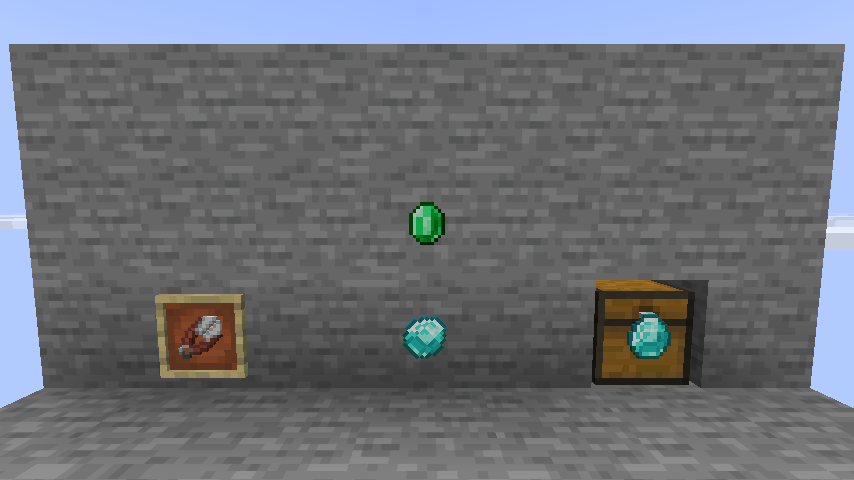
左图:一个普通展示框。中图:隐藏展示框——仅钻石和绿宝石可见。右图:位于箱子上的隐藏展示框;右键可打开箱子。
使用方法
| 操作 |
方法 |
| 隐藏展示框 |
手持剪刀并对展示框执行 Shift + 右键。剪刀会消耗 1 点耐久度 |
| 再次显示 |
对隐藏的展示框执行相同的操作 |
| 旋转物品 |
手持除剪刀外的任何物品进行 Shift + 右键点击——普通点击绝不会意外旋转隐藏展示框 |
| 打开后方容器 |
对悬挂在箱子、 barrels、熔炉、潜影盒等容器上的隐藏展示框执行普通右键点击 |
| 查找隐藏展示框 |
/uf scan 会用粒子效果高亮显示你周围所有的隐藏展示框 |
兼容普通物品展示框和发光物品展示框。
不会丢失任何东西
- 空的隐藏展示框会保持可见状态,以便被发现和破坏。一旦放入物品,它会再次隐藏自己。
- 被破坏的隐藏展示框会掉落一个普通物品展示框:该标记存在于实体上,而非物品本身。
- 由其他插件或
/data 指令变为不可见的展示框会在区块加载、首次点击或执行 /uf reload 时被接管,因此从其他方案切换时无需迁移数据。
- 通过展示框打开容器时,会优先触发
PlayerInteractEvent,因此 WorldGuard、GriefPrevention、Lands 及锁插件仍能正常判断谁能进入。
- 若玩家没有
unseenframes.use 权限,使用剪刀点击的行为将与原版完全一致。
指令
别名:/uf
| 指令 |
描述 |
权限(默认) |
/unseenframes reload |
重新读取 config.yml 并同步已加载的展示框 |
unseenframes.admin (op) |
/unseenframes scan [radius] |
用粒子效果高亮显示隐藏展示框数秒 |
unseenframes.admin (op) |
/unseenframes toggle |
切换当前注视的展示框状态,无需剪刀或潜行 |
unseenframes.admin (op) |
权限
| 节点 |
默认值 |
授予权限 |
unseenframes.use |
所有人 |
使用剪刀隐藏和显示展示框 |
unseenframes.admin |
op |
使用 /unseenframes 指令 |
配置
所有设置均位于 config.yml 中:包括工具(可以是任意物品,不限于剪刀)、是否必须按住 Shift、耐久度消耗、切换音效、旋转锁定、容器穿透及其保护检查、接管功能、扫描半径,以及所有玩家消息(采用 MiniMessage 格式)。
# 用于切换展示框可见性的物品。
tool: minecraft:shears
# 空的隐藏展示框会再次变得可见,以便被发现和破坏。
# false = 隐藏展示框即使为空也始终不可见。
reveal-when-empty: true
# 对位于箱子、barrel、熔炉等上面的隐藏展示框执行普通右键点击即可打开该容器。
container-passthrough:
enabled: true
# 优先询问区域保护和锁插件。
check-protection: true
安装
- 需要 Paper 26.2 或 26.3(Folia 同样支持)以及 Java 25+。无需其他插件。
- 将
UnseenFrames-x.y.z.jar 放入 plugins/ 目录并重启服务器。
指标
匿名使用统计数据通过 bStats 收集。
服务器管理员可以在 plugins/bStats/config.yml 中一次性为所有插件退出统计。
链接
UnseenFrames is a Minecraft Paper plugin for invisible item frames: hold shears,
Shift + right-click a placed frame, and the frame disappears while the item inside stays on the wall.
Item shops, storage labels and map walls without the frame border - no commands, no creative mode,
no resource packs.

Left: an ordinary frame. Middle: hidden frames - only the diamond and the emerald are visible.
Right: a hidden frame on a chest; a right-click opens the chest.
Using it
| Action |
How |
| Hide a frame |
Hold shears and Shift + right-click the frame. The shears lose 1 durability |
| Show it again |
The same gesture on the hidden frame |
| Rotate the item |
Shift + right-click with anything but the shears - a plain click never turns a hidden frame by accident |
| Open the container behind |
Plain right-click on a hidden frame hanging on a chest, barrel, furnace, shulker box... |
| Find hidden frames |
/uf scan highlights every hidden frame around you with particles |
Works with regular and glow item frames.
Nothing gets lost
- An empty hidden frame stays visible, so it can be found and broken. It hides itself again the moment
an item is put inside.
- A broken hidden frame drops an ordinary item frame: the flag lives on the entity, never on the item.
- Frames made invisible by another plugin or by
/data commands are adopted on chunk load, on the first
click and on /uf reload, so switching from another solution needs no migration.
- Opening a container through a frame fires a
PlayerInteractEvent first, so WorldGuard, GriefPrevention,
Lands and lock plugins keep deciding who gets in.
- Without the
unseenframes.use permission a click with shears behaves exactly like vanilla.
Commands
Alias: /uf
| Command |
Description |
Permission (default) |
/unseenframes reload |
Re-read config.yml and resync loaded frames |
unseenframes.admin (op) |
/unseenframes scan [radius] |
Highlight hidden frames with particles for a few seconds |
unseenframes.admin (op) |
/unseenframes toggle |
Toggle the frame you are looking at, no shears or sneaking needed |
unseenframes.admin (op) |
Permissions
| Node |
Default |
Grants |
unseenframes.use |
everyone |
Hiding and revealing frames with shears |
unseenframes.admin |
op |
The /unseenframes command |
Configuration
Everything lives in config.yml: the tool (any item, not only shears), whether Shift is required,
the durability cost, the toggle sound, the rotation lock, container pass-through and its protection check,
adoption, the scan radius and every player message in
MiniMessage format.
# Item used to toggle a frame's visibility.
tool: minecraft:shears
# An empty hidden frame becomes visible again so it can be found and broken.
# false = a hidden frame is always invisible, even when empty.
reveal-when-empty: true
# Plain right-click on a hidden frame on a chest, barrel, furnace, ... opens that container.
container-passthrough:
enabled: true
# Ask region protection and lock plugins first.
check-protection: true
Installation
- Requires Paper 26.2 or 26.3 (Folia works too) and Java 25+. No other plugins needed.
- Drop
UnseenFrames-x.y.z.jar into plugins/ and restart.
Metrics
Anonymous usage statistics are collected via bStats.
Server owners can opt out for every plugin at once in plugins/bStats/config.yml.
Links
评论 0
登录后参与评分
还没有评论,来抢沙发吧