
VebaStickers — 通用高清聊天贴纸与表情符号框架
Minecraft 行业标准的服务器端高清聊天贴纸引擎。
原生支持 Java 版(1.12.x – 26.x+ 游戏版本)及通过 GeyserMC 的基岩版。
直接在聊天中发送全尺寸的 Telegram/WhatsApp 风格高清贴纸,无需客户端模组、Forge、Fabric 或自定义启动器。
VebaStickers 是一款企业级、高性能的 Minecraft 插件,旨在为 Java 版和基岩版提供现代化的视觉消息体验。它具备零冗余纹理链接管道、纯原版容器隔离、交互式玩家引导向导(PackPromptMenu)、动态缓存清除与即时偏好重置、四层网络交付架构、实时 3x3 超级展示柜(含 9 槽交互命中框)、Shift 点击爆发发送、3D 浮动全息图以及16 种语言自动检测功能。VebaStickers 在不牺牲服务器 TPS、玩家自由度和网络带宽的前提下,提供了终极的聊天图形框架。
主要亮点与架构概览 (v1.9.2)
- Pure Vanilla Container Isolation(100% 未修改的箱子):与其他粗暴覆盖全局
generic_54.png 容器纹理并更改服务器上所有双层箱子的插件不同,VebaStickers 完全隔离了其自定义 GUI 背景。普通生存和创造模式下的箱子、末影箱以及 /vsa 管理员视图均保留 100% 原版纹理。自定义 Mega Vitrin 背景仅通过负空间字体字形叠加层(\uF808\uEE01\uF8F0)和 OptiGUI 钩子渲染用于贴纸展示。
- 交互式引导设置向导 (
PackPromptMenu):赋予每位玩家个人自由。首次登录时(或通过 /sticker pack 随时访问),玩家会看到一个美观的 27 槽位设置向导,可选择 Full HD + Modern GUI、仅贴纸(经典原版箱子) 或 跳过(文本模式),并附带一键记忆偏好设置的开关。
- 动态缓存清理与选择重置 (
/vebasticker remove-cache / /vsa remove-cache):服务器管理员和玩家可以立即清除服务器包缓存、重新生成新的 SHA-1 哈希值、解绑旧客户端包、擦除玩家的引导决策,并即时重新打开设置向导以无缝重新选择偏好设置。
- 全面重写的管理面板 (
/vsa):对称的 6 行布局,无任何缺失槽位,石板灰玻璃边框,带有禁用状态指示器的持久化分页控件(◀ First Page, Last Page ▶)、实时系统健康遥测数据和 Web 服务器诊断信息。
- 简洁极简标题与图标:所有 GUI 标题栏已去除杂乱的后缀(例如
" (Mega 3x3)" 已被移除,取而代之的是如 Stickers » Catalog 这样简洁的面包屑导航),并搭配现代单色/双色矢量图标。
- 零客户端模组(100% 兼容原版):原生支持默认的原版 Minecraft Java Edition 客户端(1.12.x 至 26.x+ Game Drops)及 Bedrock Edition(iOS, Android, Xbox, PlayStation, Switch, Windows 10/11),通过 GeyserMC 和 Floodgate 实现兼容。
- 通用多时代兼容性(1.12.x – 26.x+):单一的统一插件和资源包桥接了遗留的 1.12.x(通过 2048x2048 HD Unicode 表格和 OptiFine CIT)、现代的 1.14–1.20.4(
CustomModelData)、1.20.5+(Item Components)以及 1.21.4+(items/*.json 模型定义)。
- 零冗余纹理链接(资源包体积减少 95%):将 50 MB 的资源包臃肿压缩至 ~2.5 MB。每个贴纸存储为一个单一的 128x128 Retina 主 PNG,在 GUI 模型、字体字形和 CIT 属性中动态引用,无需文件重复。
- 3x3 Mega 展示区带 9 槽交互判定框:玩家可在 28 槽 WhatsApp 风格画廊和放大的 2.6 倍 Mega 展示区之间选择。周围 8 个槽位作为无边界空白画布映射到中心贴纸——点击 3x3 网格中的任何位置即可立即发送该贴纸。
- Shift + 左键单击:“连发发送”:玩家可以在不关闭菜单的情况下连续快速发送多个贴纸,模拟移动消息应用(Discord/WhatsApp/Telegram)的体验。
- 4 级弹性包分发机制:嵌入式微 HTTP 服务器(端口 8085-8095)、SSL/TLS 反向代理(Nginx/Caddy/Cloudflare 的
public-url)、原生 server.properties 回退机制以及外部 CDN 路由。
- 跨平台跨服联机(原生 GeyserMC):自动生成并分发
.mcpack 至 Geyser 的 packs 目录,支持触控友好的 Cumulus Form UI,以及 Bedrock Emote 按钮快捷触发。
- 动态游戏内管理:通过 URL(
/stickeradmin add <id> <url>)或批量导入 ZIP 包(/stickeradmin import <pack>)实时添加新贴纸,支持即时热重载且服务器零停机。
- 3D 浮动全息图(Java 版):在玩家头顶生成临时的、面向相机的 3D
TextDisplay 全息图,带有平滑的上下浮动动画,自动对 Bedrock 玩家隐藏以防止实体缩放故障。
- 经济系统与变现:全面集成 LuckPerms(基于等级的包)、Vault 经济系统(按贴纸/类别购买)和 PlayerPoints。
技术特性矩阵
| 功能/指标 |
VebaStickers v1.9.2 |
ItemsAdder / Oraxen |
标准聊天表情插件 |
| 核心架构重点 |
高清聊天贴纸、表情符号与 GUI 展示柜 |
全面的服务器资产重构(方块/物品) |
低分辨率 16x16 文本字符 |
| 容器纹理隔离 |
100% 纯原版保留(无全局箱子覆盖) |
全局覆盖 generic_54.png |
无 |
| 交互式玩家引导 |
27 槽位设置向导(完整 GUI vs 原版 vs 文本) |
无 / 强制资源包提示 |
纯文本提示 |
| 实时缓存清理与重置 |
即时 SHA-1 清理与游戏内重新提示 (/vsa remove-cache) |
手动重启服务器 |
无 |
| 客户端要求 |
零要求(100% 跨平台原版兼容) |
零要求(重度自定义资源包) |
零要求 |
| 支持的 Minecraft 版本范围 |
1.12.x – 26.x+(通用) |
1.16.5+ 或 1.20.4+ |
主要仅限现代版本 |
| 100 个贴纸的资源包大小 |
~2.5 MB(零冗余链接) |
35 – 60 MB+ |
~5 MB |
| 交互式 GUI 展示 |
2.6x 巨型展示柜(9 槽位碰撞箱) |
标准 1x 槽位网格 |
标准 1x 槽位网格 |
| 连发发送(保持打开) |
Shift + 左键单击(即时连击) |
不支持 |
不支持 |
| 通过 URL 游戏内上传 |
即时实时编译 (/sadmin add) |
复杂配置与手动资源包重建 |
手动编辑纹理包 |
| 基岩版跨平台集成 |
表单 UI + .mcpack 自动推送 + 表情动作钩子 |
复杂的基岩版映射流程 |
仅文本或损坏的字符 |
| 受限端口分发 |
4 级架构 (HTTP -> Nginx -> 原生 -> CDN) |
需要开放端口或外部 Web 主机 |
手动设置 |
| 3D 浮动视觉效果 |
TextDisplay 广告牌全息图 |
粒子效果 / 盔甲架黑客手段 |
无 |
| 复古 1.12.x 高清画质 |
2048x2048 高清 Unicode + OptiFine CIT |
不支持 / 已弃用 |
损坏 / 16x16 像素化 |
| 多语言 (i18n) |
16 种语言(自动检测区域设置) |
手动本地化 |
单语言 |
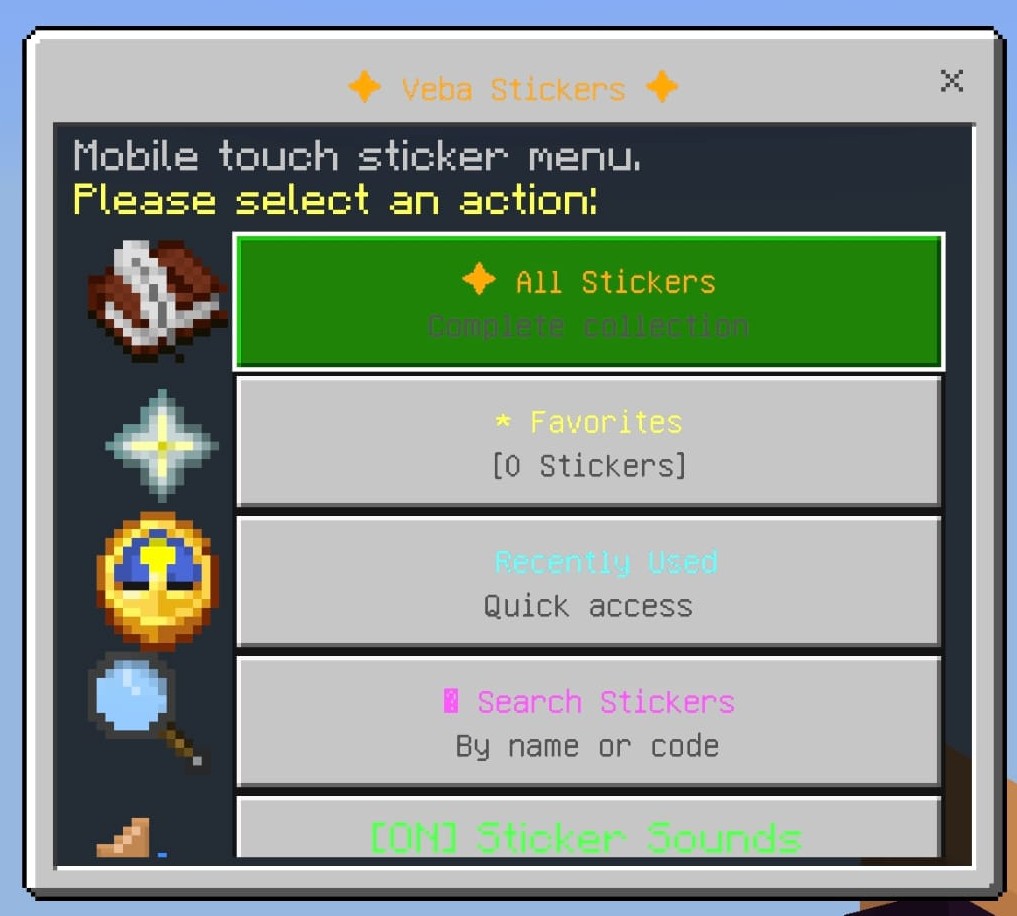
交互式设置与引导向导 (PackPromptMenu)
VebaStickers 尊重玩家的视觉偏好。与其强迫喜欢经典 Minecraft 美学的玩家接受沉重的 GUI 修改,VebaStickers 引入了交互式 资源包提示引导向导:
| 1. 全高清 + 现代 GUI |
2. 仅贴纸(原版箱子) |
 |
 |
| 3. 跳过下载(文本模式) |
4. 记住我的偏好 |
 |
 |
四种设置选项详解:
- 全高清 + 现代 GUI(第 11 槽位):
- 下载完整的资源包。
- 启用高清聊天贴纸、现代霓虹库存窗口框架和自定义矢量图标。
- 推荐给想要终极、前沿视觉重构的玩家。
- 仅贴纸 - 原版 GUI(第 13 槽位):
- 下载用于聊天和物品槽位的贴纸资源包。
- 100% 保留经典原版 Minecraft 箱子:所有 GUI 菜单保持为标准原版双格箱子及经典图标(下界之星、绿宝石、时钟、箭矢),而内部的贴纸则保持全高清表情符号!
- 跳过下载 - 文本模式(第 15 槽位):
- 拒绝资源包下载。
- 聊天中的贴纸显示为干净的备用文本代码(例如
:pepe:),并带有交互式悬停徽章。零下载开销或网络延迟。
- 记住我的偏好切换开关(第 22 槽位):
- 允许玩家选择服务器是否永久记住其决定,还是在每次登录时重新提示。
- 玩家可以随时运行
/sticker pack 重新打开此菜单!
动态缓存清理与偏好重置 (/vebasticker remove-cache):
- 当管理员运行
/vsa remove-cache 或 /vebasticker remove-cache 时,插件将执行以下操作:
- 清除缓存的 SHA-1 校验和并重新生成新资产。
- 向客户端发送解绑数据包 (
Player.removeResourcePacks()) 以卸载旧资源包。
- 完全擦除玩家存储的决定记录(
pack_decision 和 has_prompted_pack)。
- 立即打开 资源包提示引导向导,以便玩家可以当场选择他们偏好的模式!
- 支持
/vsa remove-cache all(提示所有在线玩家)或 /vsa remove-cache <player>(支持在线和离线玩家配置文件)。
双显示模式:28 槽位 WhatsApp 网格 & 3x3 巨型展示柜 & 基岩版 GUI
玩家可以通过游戏内的显示模式切换器轻松在两种不同的浏览体验之间切换:
| WhatsApp 画廊模式(28 格网格) |
巨型展示柜模式(放大 3x3 舞台) |
 |
 |
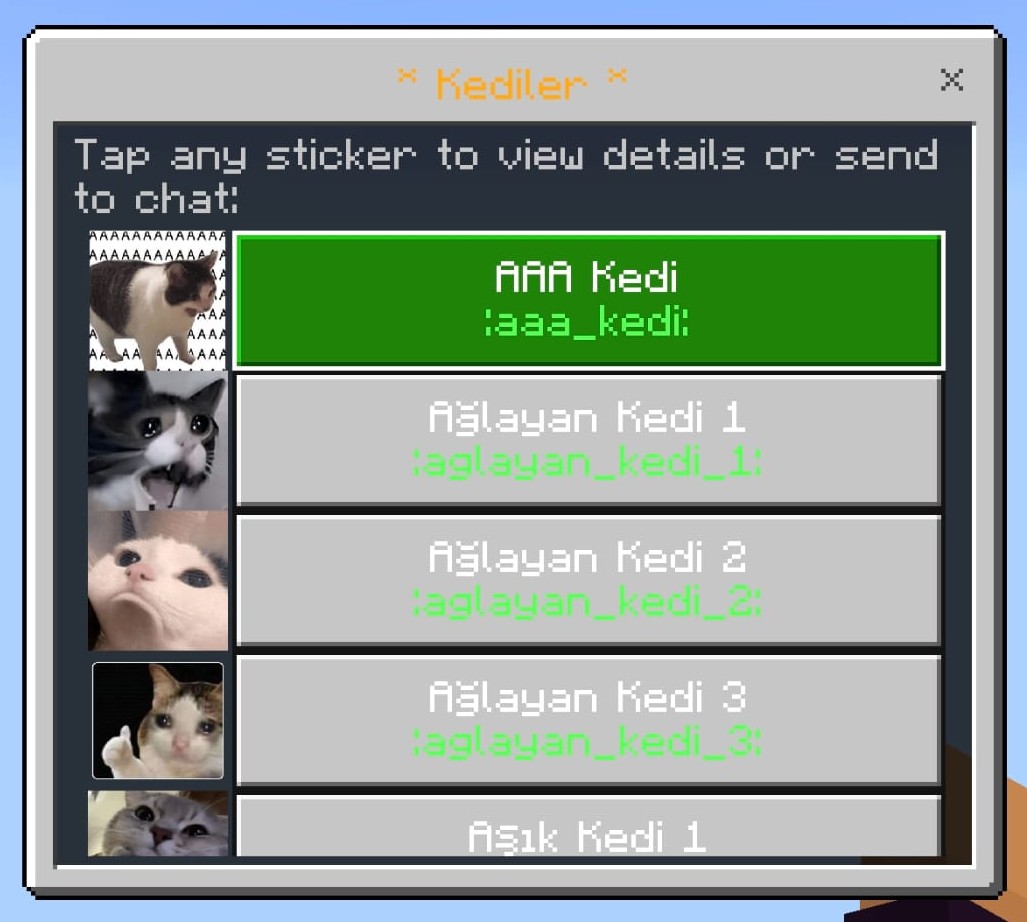
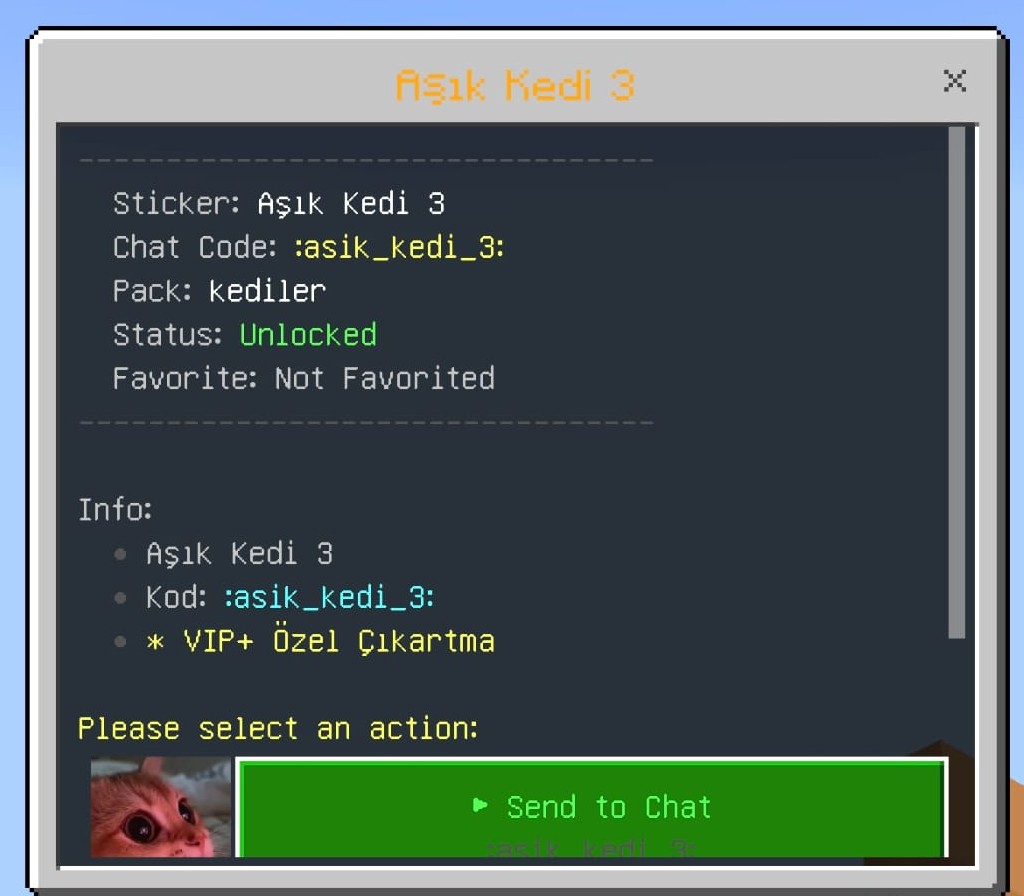
基岩版 UI 展示
1. WhatsApp 风格 28 格画廊网格 (/sticker)
- 一种紧凑的多贴纸布局,专为快速聊天和大量贴纸收藏而优化。
- 每页显示 28 个贴纸,并配有分类导航标签、收藏筛选器、最近列表、声音开关以及实时搜索功能。
- 当选择仅贴纸模式时,此菜单将渲染在一个完全还原原版 Minecraft 的箱子界面中!
2. 3x3 巨型展示柜展示
- 将选定的贴纸放大至 2.6 倍缩放,占据舞台中心位置。
- 连续 9 格可点击区域:周围的 8 个格子作为空白画布槽位,同时直接映射到中心的贴纸上。在 3x3 区域内的任意位置点击即可立即发送该贴纸!
- 纯容器隔离:使用零宽度负空间字体字形(
\uF808\uEE01\uF8F0)渲染隔离的霓虹框架,完全不影响普通生存模式下的箱子。
- 简洁标题栏:提供整洁的面包屑式标题(例如
Stickers » Catalog),去除了难看的文本后缀。
架构与技术管线路线图
| 管线阶段 |
技术操作 |
目标运行时 |
|
阶段 1:资产摄入与视网膜处理
|
通过实时 URL(/sadmin add)或目录同步摄入图像。重新采样为清晰的 128x128 视网膜 PNG,保留宽高比并添加透明 Alpha 通道边框。
|
异步后台线程
|
|
阶段 2:零冗余链接器
|
在磁盘上维护单个物理 PNG 文件。同时将模型 JSON、2.6 倍巨型展示柜模型、现代物品定义以及 OptiFine CIT 规则链接到此主纹理,无需复制文件。
|
统一纹理存储
|
|
阶段 3:多时代自适应编译
|
生成 1.21.4+ 版本的 range_dispatch 物品定义、1.16–1.20 版本的自定义模型数据谓词、1.12.x 版本的 2048x2048 unicode_page_e1.png HD 图集,以及在内存中虚拟流式传输 textures/items/。
|
通用资源包
|
|
阶段 4:自动分发与跨平台联机
|
通过四层网络故障转移提供服务(嵌入式 HTTP 端口 8085-8095、Nginx SSL、原生 server.properties、外部 CDN)。将编译好的 .mcpack 直接推送到 GeyserMC 的资源包目录。
|
Java 版与基岩版客户端
|
1. 零冗余纹理链接与通用包
- 单一事实来源(Single Source of Truth):所有贴纸均编译为标准 128x128 Retina PNG 格式,位于
assets/minecraft/textures/item/stickers/<id>.png。
- 去重链接:
models/item/stickers/<id>.json 引用 "minecraft:item/stickers/<id>"models/item/stickers/<id>_mega.json (2.6倍缩放) 引用 "minecraft:item/stickers/<id>"font/default.json 引用 "minecraft:item/stickers/<id>.png"items/paper.json (1.21.4+ range_dispatch) 引用 "minecraft:item/stickers/<id>"mcpatcher/cit/stickers/<id>.properties (OptiFine CIT) 引用 "minecraft:item/stickers/<id>"
- 虚拟 Zip 条目流式传输:为了支持在扁平化之前搜索复数路径
textures/items/ 的 1.12.x 客户端,ZipOutputStream 会实时流式传输一个虚拟条目——额外磁盘空间消耗为 0 字节。
- 通用元数据 (
pack.mcmeta):
{
  "pack": {
    "pack_format": 3,
    "supported_formats": {
      "min_inclusive": 3,
      "max_inclusive": 99
    },
    "description": "§d§lVebaStickers §7- Universal HD Pack (1.12.x - 26.x+)"
  }
}
- 1.12.x 客户端看到原生的
pack_format: 3 并加载时无警告。
- 从 1.20.2 到 26.x+ Game Drops 客户端识别
supported_formats,并以零红屏不兼容的情况无缝加载。
2. 面向 1.12.x 客户端的双字体桥接
Minecraft 1.12.x 缺乏 JSON 位图字体提供程序(font/default.json)。VebaStickers 通过算法化的 HD Unicode 表生成器克服了这一限制:
- 将活动贴纸编译为清晰无比的 2048x2048 ARGB 表(
unicode_page_e1.png, unicode_page_f0.png)。
- 将每个字符(例如
\uE101)映射到 16x16 网格中的 128x128 单元格。
- 零消息转换:现代客户端和 1.12 客户端在聊天中接收相同的 unicode,原生渲染出相同的 HD 图形。
3. 双引擎聊天拦截
- Paper / Purpur / Folia 引擎 (
AsyncChatEvent):使用 Adventure Component 和自定义 ChatRenderer 实现的异步、非阻塞聊天管道。即使在玩家流量高峰期也能保证主线程无延迟。
- Spigot 引擎 (
AsyncPlayerChatEvent):为原版 Spigot 和 CraftBukkit 服务器提供高兼容性且线程安全的备用管道。
4. 四层弹性包交付管道
| 优先级层级 |
交付机制 |
配置键 |
环境与降级条件 |
| 第 1 层 |
嵌入式微型 HTTP 服务器 |
http-server.enabled: true |
直接 HTTP 交付,支持端口自动扫描与故障转移(端口 8085-8095)。 |
| 第 2 层 |
Nginx / 反向代理 / SSL |
http-server.public-url |
通过 SSL/TLS 反向代理(https://pack.domain.com)进行自定义域名交付。 |
| 第 3 层 |
server.properties 原生握手 |
pack-delivery.strategy: AUTO |
为受限共享主机写入原生的 resource-pack= 和 SHA-1 设置。 |
| 第 4 层 |
外部 CDN 降级 |
pack-delivery.fallback-url |
Cloudflare R2、AWS S3 或 GitHub Releases 的次要下载链接。 |
- HTTP 范围请求 (HTTP 206):允许恢复中断的下载。
- ETag 与 304 Not Modified 缓存:当包内容未更改时,消除冗余的网络传输。
- ViaVersion 协议检测:动态附加客户端协议诊断信息(
?proto=340&target=legacy 或 ?proto=769&target=modern)。
游戏内玩家体验
聊天图形与行内代码
| Java 版聊天 |
基岩版聊天 |
 |
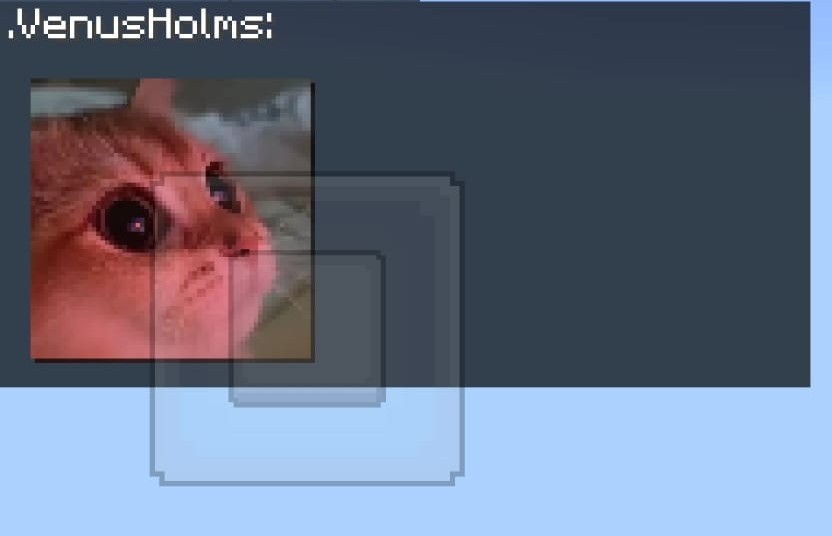 |
- 全尺寸高清贴纸:发送独立贴纸或在标准句子中的任意位置插入
:sticker_code: 行内代码。
- 智能表情符号转换:自动将标准笑脸(
:), <3, :fire:, ;))转换为鲜艳自定义贴纸。
- 丰富悬停提示框:显示交互式悬停卡片,展示贴纸标题、类别、所需权限和作者。
- 点击动作:配置贴纸,使其在聊天中被点击时建议或运行命令。
- 贴纸静音/切换 (
/sticker toggle):玩家可以单独切换贴纸可见性,而不影响其他人。
GUI 目录与爆发发送
- Shift + 左键单击(“爆发发送”):在不关闭菜单的情况下重复发送贴纸。
- 普通左键单击:将贴纸发送到聊天并关闭菜单。
- 右键单击:将贴纸添加或删除至个人收藏夹(
/sticker favorites)。
- 交互式书籍目录 (
/sbook):在交互式书籍界面中浏览贴纸。
- 双击 'F' 快捷键:双手为空时双击副手交换键 ('F') 可立即打开贴纸目录。
- 实时搜索 (
/sticker search <query>):按名称、ID 或聊天代码即时搜索过滤。
3D 浮动全息图 (Java 版)
| 3D 广告牌全息图 |
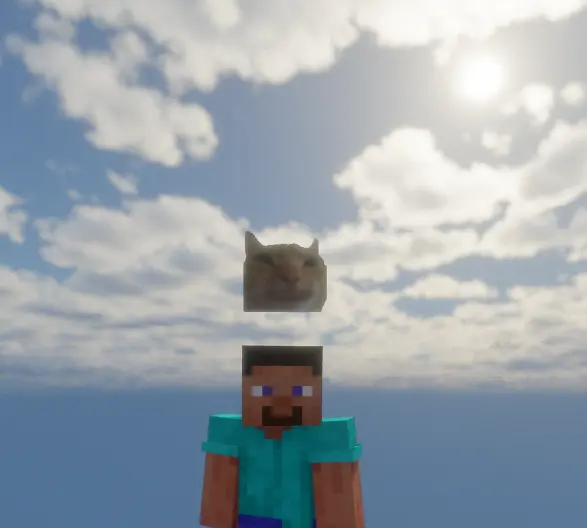 |
- 发送贴纸后,在玩家头顶生成一个悬浮的 3D
TextDisplay 实体。
- 始终面向(Billboard Orientation):自动朝向附近的观察者。
- 平滑浮动动画:柔和的垂直运动,避免生硬的瞬移。
- 隐藏发送者视角(
hide-from-sender: true):保持发送者自身的视野清晰。
- 防止幽灵实体:在区块卸载、玩家断开连接或服务器重载时干净地移除实体。
多语言本地化(16 种语言)
| 支持的语言目录 |
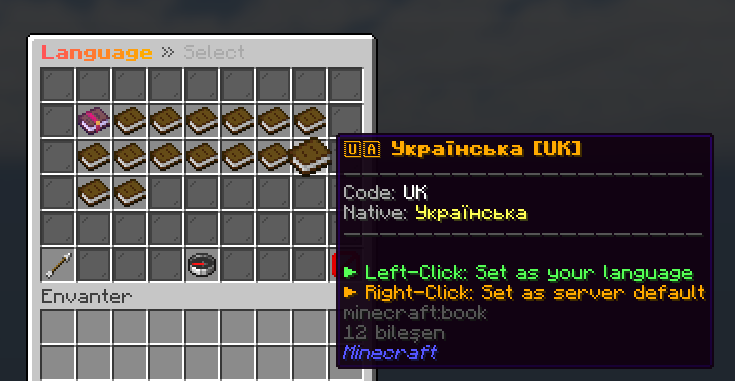 |
内置支持 16 种语言,并具备自动客户端区域设置检测功能(per-player-language: true):
en (English), tr (Turkish), de (German), es (Spanish), fr (French), pt (Portuguese), ru (Russian), zh (Chinese), ja (Japanese), ko (Korean), it (Italian), nl (Dutch), pl (Polish), ar (Arabic), hi (Hindi), uk (Ukrainian).
管理操作与全面重制的仪表盘 (/vsa)
| 管理员控制面板 |
完整性状态面板 |
 |
 |
- 对称的 6 行布局:重新设计了所有 14 个管理视图,采用石板灰玻璃边框,专用页眉面包屑导航(第 0 行),以及持久化的页脚导航控件(第 5 行)。
- 持久的分页箭头:通过禁用状态指示符消除首尾页面的不对称空白(
◀ First Page, Last Page ▶)。
- 实时缓存清理(
/vsa remove-cache [all|<player>]):清理资源包缓存,强制重新生成 SHA-1 校验和,清除存储的玩家选择,并立即打开设置引导向导。
- 实时 URL 贴纸导入(
/stickeradmin add <id> <url>):下载 PNG,转换为 128x128 Retina 分辨率,更新 Unicode 分配,编译模型,并在后台实时重新生成资源包。
- 即时贴纸移除(
/stickeradmin remove <id>):动态清理资产、模型和字体绑定。
- 批量 ZIP 导入(
/stickeradmin import <pack>):无需手动编辑文件即可将完整的贴纸文件夹批量导入到分类中。
- 基岩版资源包同步(
/stickeradmin exportbedrock):直接将更新的 .mcpack 归档推送至 Geyser。
- 实时系统状态(
/stickeradmin status):报告活动服务器版本、聊天引擎、TextDisplay 状态、HTTP 端口、带宽和下载指标。
- 6 点完整性审计(
/stickeradmin verify):自动验证纹理、模型、字体提供程序、ZIP 完整性和 SHA-1 校验和。
命令与权限参考
玩家命令
| 命令 |
别名 |
描述 |
权限 |
默认值 |
/sticker |
/s, /stickers, /emote, /cikartma |
打开主交互式贴纸图形用户界面 |
sticker.gui |
所有人 |
/sticker send <id> |
— |
通过标识符发送特定贴纸 |
sticker.use |
所有人 |
/sticker search <query> |
— |
按关键词搜索贴纸 |
sticker.gui |
所有人 |
/sticker favorites |
— |
打开个人收藏的贴纸 |
sticker.gui |
所有人 |
/sticker lang [code] |
— |
打开语言选择器或设置语言 |
sticker.gui |
所有人 |
/sticker toggle |
— |
切换贴纸渲染的可见性 |
sticker.gui |
所有人 |
/sticker pack |
/s rp, /s indir |
重新打开交互式设置引导向导 |
sticker.gui |
所有人 |
/sticker remove-cache |
/s clearcache |
清理您的资源包缓存并重新打开设置向导 |
sticker.admin |
OP |
/sticker help |
— |
显示命令帮助菜单 |
sticker.gui |
所有人 |
/sbook |
/stickerbook, /skitap |
以书籍图形用户界面形式打开贴纸合集 |
sticker.gui |
所有人 |
管理命令
| 命令 |
别名 |
描述 |
权限节点 |
默认值 |
/vsa |
/stickeradmin gui |
打开重构后的管理面板 |
sticker.admin |
OP |
/vsa remove-cache [all|<player>] |
/sadmin purge-cache |
清除缓存,重置选择并重新提示设置向导 |
sticker.admin |
OP |
/stickeradmin add <id> <url> |
— |
从图片 URL 添加贴纸并重新编译 |
sticker.admin |
OP |
/stickeradmin remove <id> |
— |
删除贴纸并更新包定义 |
sticker.admin |
OP |
/stickeradmin import <zip> |
— |
导入批量贴纸 ZIP 归档文件 |
sticker.admin |
OP |
/stickeradmin give <player> <pack> |
— |
授予玩家贴纸包访问权限 |
sticker.admin |
OP |
/stickeradmin ban <player> [reason] |
— |
禁止某玩家发送贴纸 |
sticker.admin |
OP |
/stickeradmin unban <player> |
— |
恢复某玩家的贴纸权限 |
sticker.admin |
OP |
/stickeradmin sync |
— |
强制完全重新生成包并更新 SHA-1 哈希 |
sticker.admin |
OP |
/stickeradmin exportbedrock |
— |
编译并将 Bedrock .mcpack 推送至 Geyser |
sticker.admin |
OP |
/stickeradmin status |
— |
显示 Web 服务器和交付诊断信息 |
sticker.admin |
OP |
/stickeradmin verify |
— |
运行自动化的 6 项系统验证 |
sticker.admin |
OP |
/stickeradmin reload |
/vsa rl |
重新加载配置、贴纸和语言文件 |
sticker.admin |
OP |
权限层级
| 权限节点 |
描述 |
默认值 |
sticker.gui |
访问贴纸 GUI 目录和基本命令 |
所有人 (true) |
sticker.use |
在聊天中发送基本贴纸的权限 |
所有人 (true) |
sticker.pack.<category> |
授予特定贴纸类别的访问权限 |
OP |
sticker.category.* |
授予所有贴纸类别的访问权限 |
OP |
sticker.bypass.cooldown |
绕过聊天贴纸冷却限制 |
OP |
sticker.admin |
完全访问所有管理工具和 GUI |
OP |
常见问题解答 (FAQ)
1. VebaStickers 是否需要客户端模组或自定义启动器?
不需要。VebaStickers 完全在服务端运行。原版 Java 版和基岩版客户端在加入时会自动接收轻量级资源包。
2. VebaStickers 如何防止覆盖标准 Minecraft 箱子?
在 v1.9.2 版本中,VebaStickers 确保 纯净原版容器隔离。正常的生存/创造模式双箱、单箱、末影箱和管理菜单均使用标准的原版 Minecraft 纹理。只有自定义 Mega Vitrin 库存通过利用不可见的负空间字体字形(\uF808\uEE01\uF8F0)和 OptiGUI 标题匹配(\uEE01)来渲染自定义背景,从而防止任何全局纹理泄漏。
3. “Full HD + Modern GUI” 与 “仅贴纸” 有什么区别?
- Full HD + Modern GUI:同时显示高清聊天贴纸和带有自定义图标的自定义现代 GUI 窗口边框。
- 仅贴纸:下载贴纸以便在聊天和 GUI 槽位中以高清显示表情符号,但将库存窗口保持为 100% 经典原版 Minecraft 箱子样式。
4. 玩家如何切换显示模式或重置选择?
玩家可以随时输入 /sticker pack 以打开 27 格设置向导并重新选择偏好。管理员也可以运行 /vsa remove-cache [all|<player>] 来重置选择并重新提示设置向导。
5. 如何在同一个资源包中同时支持 1.12.2 和现代 1.21.4 / 26.x+ Game Drops?
通过我们的双字体桥接器和通用元数据架构实现:
- 现代客户端(1.13+)解析
font/default.json 和模型定义。
- 旧版 1.12.x 客户端读取自动生成的 2048x2048
unicode_page_e1.png 字体表以及 OptiFine CIT 定义。
pack.mcmeta 指定 pack_format: 3 且 supported_formats: [3, 99],以零警告满足新旧客户端解析器的需求。
6. 如果我的服务器主机阻止了 8085 端口怎么办?
VebaStickers 的四层网络交付会自动扫描 8085-8095 端口。如果所有 HTTP 端口受限,它将无缝回退到更新 server.properties 原生资源包交付,或通过 SSL 反向代理(http-server.public-url)或外部 CDN 路由。
7. 3x3 Mega Vitrin 展示柜是如何工作的?
VebaStickers 没有将贴纸切割成 9 个独立的物理文件,而是在中心槽位渲染一个放大了 2.6 倍的超大模型,同时将相邻槽位清空为 AIR。所有 9 个槽位都在点击监听器中注册,提供了一个巨大且无缝的碰撞箱。
8. Shift + 左键单击“连发”功能是如何工作的?
普通左键单击发送贴纸并关闭库存界面。Shift + 左键单击会在保持菜单打开的同时向聊天发送带有完整音效和冷却验证的贴纸,从而实现快速的贴纸连击。
9. 是否支持基岩版玩家?
是的。借助 GeyserMC 和 Floodgate,VebaStickers 会生成原生的 .mcpack,提供适合触控操作的基岩版表单 GUI,并将基岩版的表情按钮直接映射到贴纸菜单。
许可证与遥测数据
版权所有 (c) Veba。保留所有权利。
作为优化过的、生产就绪的插件二进制文件提供。遥测指标通过 bStats 匿名收集,以监控版本采用情况和交付韧性。
VebaStickers — Universal HD Chat Stickers & Emoji Framework
The Industry-Standard Server-Side HD Chat Sticker Engine for Minecraft.
Native Support across Java Edition (1.12.x – 26.x+ Game Drops) & Bedrock Edition via GeyserMC.
Send full-scale Telegram/WhatsApp-style HD stickers directly in chat without requiring client mods, Forge, Fabric, or custom launchers.
VebaStickers is an enterprise-grade, high-performance Minecraft plugin engineered to deliver a modern visual messaging experience across Java Edition and Bedrock Edition. Featuring a zero-redundancy texture linking pipeline, pure vanilla container isolation, an interactive player onboarding wizard (PackPromptMenu), dynamic cache purging with instant preference reset, a 4-tier network delivery architecture, real-time 3x3 mega vitrin showcase with a 9-slot interactive hitbox, Shift-Click Burst Send, 3D floating holograms, and 16-language auto-detection, VebaStickers delivers the ultimate chat graphics framework without sacrificing server TPS, player freedom, or network bandwidth.
Key Highlights & Architectural Overview (v1.9.2)
- Pure Vanilla Container Isolation (100% Unmodified Chests): Unlike other plugins that brutally overwrite the global
generic_54.png container texture and alter every double chest on your server, VebaStickers isolates its custom GUI backgrounds completely. Normal survival and creative chests, Ender chests, and /vsa admin views retain 100% authentic vanilla textures. The custom Mega Vitrin backdrop is rendered strictly for the sticker showcase using negative-space font glyph overlays (\uF808\uEE01\uF8F0) and OptiGUI hooks.
- Interactive Onboarding Setup Wizard (
PackPromptMenu): Empowers every player with personal freedom. Upon initial login (or anytime via /sticker pack), players are greeted with an aesthetic 27-slot setup wizard where they can choose between Full HD + Modern GUI, Stickers Only (Classic Vanilla Chests), or Skip (Text Mode), complete with a one-click preference remember toggle.
- Dynamic Cache Purge & Choice Reset (
/vebasticker remove-cache / /vsa remove-cache): Server administrators and players can instantly purge the server pack cache, regenerate fresh SHA-1 hashes, unbind old client packs, wipe player onboarding decisions, and immediately re-open the setup wizard on-the-spot for seamless preference reselection.
- Overhauled Administrative Dashboard (
/vsa): Symmetrical 6-row layouts with zero missing slots, slate gray glass framing, persistent pagination controls with disabled-state indicators (◀ First Page, Last Page ▶), real-time system health telemetry, and web server diagnostics.
- Clean Minimalist Titles & Icons: All GUI title bars have been cleaned of cluttered suffixes (e.g.,
" (Mega 3x3)" has been removed in favor of clean breadcrumbs like Stickers » Catalog), paired with modern single/two-tone vector iconography.
- Zero Client Mods (100% Vanilla Compatible): Works natively on default Vanilla Minecraft Java Edition clients (1.12.x through 26.x+ Game Drops) and Bedrock Edition (iOS, Android, Xbox, PlayStation, Switch, Windows 10/11) via GeyserMC & Floodgate.
- Universal Multi-Era Compatibility (1.12.x – 26.x+): A single unified plugin and resource pack bridges legacy 1.12.x (via 2048x2048 HD Unicode sheets and OptiFine CIT), modern 1.14–1.20.4 (
CustomModelData), 1.20.5+ (Item Components), and 1.21.4+ (items/*.json model definitions).
- Zero-Redundancy Texture Linking (95% Pack Size Reduction): Slices 50 MB pack bloat down to ~2.5 MB. Each sticker is stored as a single 128x128 Retina master PNG referenced dynamically across GUI models, font glyphs, and CIT properties without file duplication.
- 3x3 Mega Showcase with 9-Slot Interactive Hitbox: Players can choose between a 28-slot WhatsApp-style gallery and an enlarged 2.6x Mega Showcase. The surrounding 8 slots act as empty border-free canvases while mapping to the center sticker—clicking anywhere in the 3x3 grid sends the sticker instantly.
- Shift + Left Click: "Burst Send": Players can send multiple stickers in rapid succession without the menu closing, mimicking mobile messaging apps (Discord/WhatsApp/Telegram).
- 4-Tier Resilient Pack Delivery: Embedded micro HTTP Server (ports 8085-8095), SSL/TLS reverse proxy (
public-url for Nginx/Caddy/Cloudflare), native server.properties fallback, and external CDN routing.
- Cross-Platform Crossplay (GeyserMC Native): Automatic
.mcpack generation and distribution to Geyser's packs directory, touch-friendly Cumulus Form UIs, and Bedrock Emote button shortcut triggers.
- Dynamic In-Game Administration: Add new stickers live via URL (
/stickeradmin add <id> <url>) or bulk-import ZIP packs (/stickeradmin import <pack>) with instant hot-reloading and zero server downtime.
- 3D Floating Holograms (Java Edition): Spawns temporary, billboarded 3D
TextDisplay holograms above player heads with smooth bobbing animations, automatically hidden from Bedrock players to prevent entity scaling glitches.
- Economy & Monetization: Full integration with LuckPerms (rank-based packs), Vault economy (per-sticker/category purchasing), and PlayerPoints.
Technical Feature Matrix
| Feature / Metric |
VebaStickers v1.9.2 |
ItemsAdder / Oraxen |
Standard Chat Emoji Plugins |
| Primary Architectural Focus |
HD Chat Stickers, Emojis & GUI Vitrin |
Complete Server Asset Overhaul (Blocks/Items) |
Low-Res 16x16 Text Glyphs |
| Container Texture Isolation |
100% Pure Vanilla Preserved (No global chest overrides) |
Overwrites generic_54.png globally |
None |
| Interactive Player Onboarding |
27-Slot Setup Wizard (Full GUI vs Vanilla vs Text) |
None / Forced Pack Prompt |
Plain Text Prompt |
| Live Cache Purge & Reset |
Instant SHA-1 Purge & In-Game Re-Prompt (/vsa remove-cache) |
Manual Server Restart |
None |
| Client Requirement |
Zero (100% Vanilla Cross-Platform) |
Zero (Heavy Custom Resource Pack) |
Zero |
| Supported Minecraft Range |
1.12.x – 26.x+ (Universal) |
1.16.5+ or 1.20.4+ |
Mostly Modern Only |
| Pack Size for 100 Stickers |
~2.5 MB (Zero-Redundancy Link) |
35 – 60 MB+ |
~5 MB |
| Interactive GUI Showcase |
2.6x Mega Vitrin (9-Slot Hitbox) |
Standard 1x Slot Grid |
Standard 1x Slot Grid |
| Burst Sending (Keep Open) |
Shift + Left Click (Instant Combo) |
Not Supported |
Not Supported |
| In-Game Upload via URL |
Instant Live Compile (/sadmin add) |
Complex Config & Manual Pack Rebuild |
Manual Texture Pack Editing |
| Bedrock Crossplay Integration |
Form UI + .mcpack Auto-Push + Emote Hook |
Complex Bedrock Mapping Pipeline |
Text-Only or Broken Glyphs |
| Restricted Port Delivery |
4-Tier (HTTP -> Nginx -> Native -> CDN) |
Requires Open Port or External Web Host |
Manual Setup |
| 3D Floating Visuals |
TextDisplay Billboard Hologram |
Particles / ArmorStand Hacks |
None |
| Legacy 1.12.x HD Quality |
2048x2048 HD Unicode + OptiFine CIT |
Unsupported / Dropped |
Corrupted / 16x16 Pixelated |
| Multi-Language (i18n) |
16 Languages (Auto-Detect Locale) |
Manual Localization |
Single Language |
Interactive Setup & Onboarding Wizard (PackPromptMenu)
VebaStickers respects your players' visual preferences. Instead of forcing heavy GUI modifications onto players who prefer classic Minecraft aesthetics, VebaStickers introduces the interactive Pack Prompt Onboarding Wizard:
| 1. Full HD + Modern GUI |
2. Stickers Only (Vanilla Chests) |
|
|
| 3. Skip Download (Text Mode) |
4. Remember My Preference |
|
|
The Four Setup Options Explained:
- Full HD + Modern GUI (Slot 11):
- Downloads the complete resource pack.
- Enables HD chat stickers, modern neon inventory window frames, and custom vector icons.
- Recommended for players who want the ultimate, cutting-edge visual overhaul.
- Stickers Only - Vanilla GUI (Slot 13):
- Downloads the sticker resource pack for chat and item slots.
- Preserves 100% classic vanilla Minecraft chests: All GUI menus remain standard vanilla double chests with classic icons (Nether Star, Emerald, Clock, Arrow), while the stickers inside remain full HD emojis!
- Skip Download - Text Mode (Slot 15):
- Declines the resource pack download.
- Stickers display as clean fallback text codes (e.g.
:pepe:) in chat with interactive hover badges. Zero download overhead or network lag.
- Remember My Preference Toggle (Slot 22):
- Allows players to toggle whether the server should remember their decision permanently or re-prompt them upon each login.
- Players can re-open this menu at any time by running
/sticker pack!
Dynamic Cache Purge & Preference Reset (/vebasticker remove-cache):
- When an administrator runs
/vsa remove-cache or /vebasticker remove-cache, the plugin:
- Purges cached SHA-1 checksums and regenerates fresh assets.
- Sends an unbind packet to the client (
Player.removeResourcePacks()) to unload the old pack.
- Completely wipes the player's stored decision (
pack_decision and has_prompted_pack).
- Immediately opens the Pack Prompt Onboarding Wizard so the player can choose their preferred mode again on-the-spot!
- Supports
/vsa remove-cache all (prompts all online players) or /vsa remove-cache <player> (supports online and offline player profiles).
Dual Display Modes: 28-Slot WhatsApp Grid & 3x3 Mega Vitrin & Bedrock Gui
Players can effortlessly switch between two distinct browsing experiences using the in-game display mode toggle:
| WhatsApp Gallery Mode (28-Slot Grid) |
Mega Vitrin Mode (Enlarged 3x3 Stage) |
|
|
Bedrock Edition UI Showcase
1. WhatsApp-Style 28-Slot Gallery Grid (/sticker)
- A dense, multi-sticker layout optimized for rapid chatting and extensive sticker collections.
- Displays 28 stickers per page with category navigation tabs, favorites filter, recents list, sound toggles, and live search.
- When Stickers Only mode is selected, this menu renders inside a 100% authentic vanilla Minecraft chest!
2. 3x3 Mega Vitrin Showcase
- Enlarges the selected sticker to 2.6x scale, commanding center stage.
- Continuous 9-Slot Clickable Hitbox: The surrounding 8 slots act as empty canvas slots while mapping directly to the center sticker. Clicking anywhere within the 3x3 area sends the sticker immediately!
- Pure Container Isolation: Uses zero-width negative-space font glyphs (
\uF808\uEE01\uF8F0) to render the isolated neon frame, leaving normal survival chests completely untouched.
- Clean Title Bar: Clean breadcrumb header (e.g.
Stickers » Catalog) without unsightly text suffixes.
Architecture & Technical Pipeline Roadmap
| Pipeline Stage |
Technical Operation |
Target Runtime |
|
Stage 1: Asset Ingestion & Retina Processing
|
Ingests image via live URL (/sadmin add) or directory sync. Resamples to a crisp 128x128 Retina PNG with aspect ratio preservation and transparent alpha-channel borders.
|
Async Background Thread
|
|
Stage 2: Zero-Redundancy Linker
|
Maintains a single physical PNG on disk. Simultaneously links model JSONs, 2.6x Mega vitrin models, modern items definitions, and OptiFine CIT rules to this master texture without file duplication.
|
Unified Texture Storage
|
|
Stage 3: Multi-Era Adaptive Compilation
|
Generates 1.21.4+ range_dispatch items definitions, 1.16–1.20 custom model data predicates, 2048x2048 unicode_page_e1.png HD sheets for 1.12.x, and in-memory virtual textures/items/ streaming.
|
Universal Resource Pack
|
|
Stage 4: Automated Distribution & Crossplay
|
Serves pack through 4-tier network failover (Embedded HTTP ports 8085-8095, Nginx SSL, native server.properties, external CDN). Pushes compiled .mcpack directly into GeyserMC packs directory.
|
Java & Bedrock Clients
|
1. Zero-Redundancy Texture Linking & Universal Pack
- Single Source of Truth: All stickers are compiled into standard 128x128 Retina PNGs at
assets/minecraft/textures/item/stickers/<id>.png.
- Deduplicated Linking:
models/item/stickers/<id>.json references "minecraft:item/stickers/<id>"models/item/stickers/<id>_mega.json (2.6x scale) references "minecraft:item/stickers/<id>"font/default.json references "minecraft:item/stickers/<id>.png"items/paper.json (1.21.4+ range_dispatch) references "minecraft:item/stickers/<id>"mcpatcher/cit/stickers/<id>.properties (OptiFine CIT) references "minecraft:item/stickers/<id>"
- Virtual Zip Entry Streaming: To support 1.12.x clients searching for the pre-flattening plural
textures/items/ path, ZipOutputStream streams a virtual entry on the fly—costing 0 bytes of extra disk space.
- Universal Metadata (
pack.mcmeta):
{
  "pack": {
    "pack_format": 3,
    "supported_formats": {
      "min_inclusive": 3,
      "max_inclusive": 99
    },
    "description": "§d§lVebaStickers §7- Universal HD Pack (1.12.x - 26.x+)"
  }
}
- 1.12.x clients see native
pack_format: 3 and load without warnings.
- 1.20.2 through 26.x+ Game Drops clients recognize
supported_formats and load seamlessly with zero red incompatibility screens.
2. Dual-Font Bridge for 1.12.x Clients
Minecraft 1.12.x lacks JSON bitmap font providers (font/default.json). VebaStickers overcomes this with an algorithmic HD Unicode Sheet Generator:
- Compiles active stickers into a crystal-clear 2048x2048 ARGB sheet (
unicode_page_e1.png, unicode_page_f0.png).
- Maps each character (e.g.
\uE101) to a 128x128 cell in a 16x16 grid.
- Zero-Message Conversion: Both modern and 1.12 clients receive the same unicode in chat, rendering identical HD graphics natively.
3. Dual-Engine Chat Interception
- Paper / Purpur / Folia Engine (
AsyncChatEvent): Asynchronous, non-blocking chat pipeline using Adventure Component and custom ChatRenderer implementations. Zero main-thread lag even under high player traffic.
- Spigot Engine (
AsyncPlayerChatEvent): High-compatibility thread-safe fallback pipeline for vanilla Spigot and CraftBukkit servers.
4. 4-Tier Resilient Pack Delivery Pipeline
| Priority Tier |
Delivery Mechanism |
Configuration Key |
Environment & Fallback Condition |
| Tier 1 |
Embedded Micro HTTP Server |
http-server.enabled: true |
Direct HTTP delivery with port auto-scan & failover (ports 8085-8095). |
| Tier 2 |
Nginx / Reverse Proxy / SSL |
http-server.public-url |
Custom domain delivery via SSL/TLS reverse proxy (https://pack.domain.com). |
| Tier 3 |
server.properties Native Handshake |
pack-delivery.strategy: AUTO |
Writes native resource-pack= and SHA-1 settings for restricted shared hosts. |
| Tier 4 |
External CDN Fallback |
pack-delivery.fallback-url |
Secondary download link for Cloudflare R2, AWS S3, or GitHub Releases. |
- HTTP Range Requests (HTTP 206): Allows resumption of interrupted downloads.
- ETag & 304 Not Modified Caching: Eliminates redundant network transfers when pack content hasn't changed.
- ViaVersion Protocol Detection: Dynamically appends client protocol diagnostics (
?proto=340&target=legacy or ?proto=769&target=modern).
In-Game Player Experience
Chat Graphics & Inline Codes
| Java Edition Chat |
Bedrock Edition Chat |
|
|
- Full-Scale HD Stickers: Send standalone stickers or insert
:sticker_code: inline anywhere within standard sentences.
- Smart Emoticon Conversion: Automatically converts standard smileys (
:), <3, :fire:, ;)) into vibrant custom stickers.
- Rich Hover Tooltips: Displays interactive hover cards showing sticker title, category, required permissions, and author.
- Click Actions: Configure stickers to suggest or run commands when clicked in chat.
- Sticker Mute/Toggle (
/sticker toggle): Players can individually toggle sticker visibility without affecting others.
GUI Catalogs & Burst Send
- Shift + Left Click ("Burst Send"): Send stickers repeatedly without closing the menu.
- Normal Left Click: Sends sticker to chat and closes menu.
- Right Click: Adds or removes sticker from personal favorites (
/sticker favorites).
- Interactive Book Catalog (
/sbook): Browse stickers in an interactive book interface.
- Double-Tap 'F' Shortcut: Double-tapping the offhand swap key ('F') with empty hands opens the sticker catalog instantly.
- Real-Time Search (
/sticker search <query>): Instant search filtering by name, ID, or chat code.
3D Floating Holograms (Java Edition)
| 3D Billboard Hologram |
|
- Spawns a floating 3D
TextDisplay entity above the player's head upon sending a sticker.
- Billboard Orientation: Always faces nearby viewers automatically.
- Smooth Bobbing Animation: Gentle vertical motion without jerky teleportation.
- Sender Hiding (
hide-from-sender: true): Keeps the sender's own vision clear.
- Ghost Entity Prevention: Clean entity removal on chunk unload, player disconnect, or server reload.
Multi-Language Localization (16 Languages)
| Supported Languages Catalog |
|
Built-in support for 16 languages with automatic client locale detection (per-player-language: true):
en (English), tr (Turkish), de (German), es (Spanish), fr (French), pt (Portuguese), ru (Russian), zh (Chinese), ja (Japanese), ko (Korean), it (Italian), nl (Dutch), pl (Polish), ar (Arabic), hi (Hindi), uk (Ukrainian).
Administrative Operations & Overhauled Dashboard (/vsa)
| Admin Control Panel |
Integrity Status Panel |
|
|
- Symmetrical 6-Row Layouts: Redesigned all 14 administrative views with slate gray glass borders, dedicated header breadcrumbs (Row 0), and persistent footer navigation controls (Row 5).
- Persistent Pagination Arrows: Eliminates asymmetric holes on first/last pages with disabled-state indicators (
◀ First Page, Last Page ▶).
- Live Cache Purge (
/vsa remove-cache [all|<player>]): Purges pack cache, forces SHA-1 regeneration, clears stored player choices, and immediately opens the setup onboarding wizard.
- Live URL Sticker Ingestion (
/stickeradmin add <id> <url>): Downloads PNG, converts to 128x128 Retina, updates unicode allocations, compiles models, and regenerates the pack live in the background.
- Instant Sticker Removal (
/stickeradmin remove <id>): Cleans up assets, models, and font bindings on the fly.
- Bulk ZIP Import (
/stickeradmin import <pack>): Bulk-imports complete sticker folders into categories without manual file edits.
- Bedrock Pack Sync (
/stickeradmin exportbedrock): Pushes updated .mcpack archives directly to Geyser.
- Live System Status (
/stickeradmin status): Reports active server version, chat engine, TextDisplay status, HTTP port, bandwidth, and download metrics.
- 6-Point Integrity Audit (
/stickeradmin verify): Validates textures, models, font providers, ZIP integrity, and SHA-1 checksums automatically.
Commands & Permissions Reference
Player Commands
| Command |
Aliases |
Description |
Permission |
Default |
/sticker |
/s, /stickers, /emote, /cikartma |
Opens main interactive sticker GUI |
sticker.gui |
Everyone |
/sticker send <id> |
— |
Sends a specific sticker by identifier |
sticker.use |
Everyone |
/sticker search <query> |
— |
Searches stickers by keyword |
sticker.gui |
Everyone |
/sticker favorites |
— |
Opens personal favorited stickers |
sticker.gui |
Everyone |
/sticker lang [code] |
— |
Opens language selector or sets language |
sticker.gui |
Everyone |
/sticker toggle |
— |
Toggles sticker rendering visibility |
sticker.gui |
Everyone |
/sticker pack |
/s rp, /s indir |
Re-opens interactive setup onboarding wizard |
sticker.gui |
Everyone |
/sticker remove-cache |
/s clearcache |
Purges your pack cache and re-opens setup wizard |
sticker.admin |
OP |
/sticker help |
— |
Displays command help menu |
sticker.gui |
Everyone |
/sbook |
/stickerbook, /skitap |
Opens sticker collection as a Book GUI |
sticker.gui |
Everyone |
Administrative Commands
| Command |
Aliases |
Description |
Permission |
Default |
/vsa |
/stickeradmin gui |
Opens the overhauled administrative dashboard |
sticker.admin |
OP |
/vsa remove-cache [all|<player>] |
/sadmin purge-cache |
Purges cache, resets choice & prompts setup wizard |
sticker.admin |
OP |
/stickeradmin add <id> <url> |
— |
Adds sticker from image URL and recompiles |
sticker.admin |
OP |
/stickeradmin remove <id> |
— |
Deletes sticker and updates pack definitions |
sticker.admin |
OP |
/stickeradmin import <zip> |
— |
Imports bulk sticker ZIP archive |
sticker.admin |
OP |
/stickeradmin give <player> <pack> |
— |
Grants sticker pack access to player |
sticker.admin |
OP |
/stickeradmin ban <player> [reason] |
— |
Suspends a player from sending stickers |
sticker.admin |
OP |
/stickeradmin unban <player> |
— |
Restores sticker privileges for a player |
sticker.admin |
OP |
/stickeradmin sync |
— |
Forces full pack re-generation and SHA-1 update |
sticker.admin |
OP |
/stickeradmin exportbedrock |
— |
Compiles and pushes Bedrock .mcpack to Geyser |
sticker.admin |
OP |
/stickeradmin status |
— |
Displays web server and delivery diagnostics |
sticker.admin |
OP |
/stickeradmin verify |
— |
Runs automated 6-point system verification |
sticker.admin |
OP |
/stickeradmin reload |
/vsa rl |
Reloads configurations, stickers, and languages |
sticker.admin |
OP |
Permission Hierarchy
| Permission Node |
Description |
Default |
sticker.gui |
Access to sticker GUI catalogs and basic commands |
Everyone (true) |
sticker.use |
Permission to send basic stickers in chat |
Everyone (true) |
sticker.pack.<category> |
Grants access to a specific sticker category |
OP |
sticker.category.* |
Grants access to all sticker categories |
OP |
sticker.bypass.cooldown |
Bypasses chat sticker cooldown restrictions |
OP |
sticker.admin |
Full access to all administrative tools and GUI |
OP |
Frequently Asked Questions (FAQ)
1. Does VebaStickers require client-side mods or custom launchers?
No. VebaStickers runs 100% server-side. Vanilla Java Edition and Bedrock Edition clients receive the lightweight resource pack automatically upon joining.
2. How does VebaStickers prevent overwriting standard Minecraft chests?
In v1.9.2, VebaStickers guarantees Pure Vanilla Container Isolation. Normal survival/creative double chests, single chests, Ender chests, and admin menus use the standard vanilla Minecraft texture. Only the custom Mega Vitrin inventory renders custom backgrounds by utilizing invisible negative-space font glyphs (\uF808\uEE01\uF8F0) and OptiGUI title matching (\uEE01), preventing any global texture leaks.
3. What is the difference between "Full HD + Modern GUI" and "Stickers Only"?
- Full HD + Modern GUI: Displays both HD chat stickers and custom modern GUI window borders with custom icons.
- Stickers Only: Downloads the stickers so emojis display in HD in chat and in GUI slots, but keeps the inventory window 100% classic vanilla Minecraft chest style.
4. How can players switch between display modes or reset their choices?
Players can type /sticker pack at any time to open the 27-slot setup wizard and re-select their preference. Administrators can also run /vsa remove-cache [all|<player>] to reset choices and re-prompt the setup wizard.
5. How does VebaStickers support both 1.12.2 and modern 1.21.4 / 26.x+ Game Drops in one pack?
Through our Dual-Font Bridge and Universal metadata architecture:
- Modern clients (1.13+) parse
font/default.json and model definitions.
- Legacy 1.12.x clients read the auto-generated 2048x2048
unicode_page_e1.png font sheet and OptiFine CIT definitions.
- The
pack.mcmeta specifies pack_format: 3 with supported_formats: [3, 99], satisfying both old and new client parsers with zero warnings.
6. What happens if port 8085 is blocked by my server host?
VebaStickers' 4-tier network delivery automatically scans ports 8085-8095. If all HTTP ports are restricted, it seamlessly falls back to updating server.properties native pack delivery or routes through an SSL reverse proxy (http-server.public-url) or external CDN.
7. How does the 3x3 Mega Vitrin showcase work?
Instead of cutting stickers into 9 separate physical files, VebaStickers renders a single 2.6x scaled mega model in the center slot while clearing adjacent slots to AIR. All 9 slots register in the click listener, providing a massive, seamless hitbox.
8. How does Shift + Left Click "Burst Send" work?
Normal Left-Click sends the sticker and closes the inventory. Shift + Left-Click sends the sticker to chat with full sound effects and cooldown validation while keeping the menu open, allowing rapid sticker combos.
9. Are Bedrock Edition players supported?
Yes. With GeyserMC and Floodgate, VebaStickers generates a native .mcpack, delivers touch-friendly Bedrock Form GUIs, and maps the Bedrock Emote button directly to the sticker menu.
License & Telemetry
Copyright (c) Veba. All Rights Reserved.
Provided as an optimized, production-ready plugin binary. Telemetry metrics are gathered anonymously via bStats to monitor version adoption and delivery resilience.


 插件

 插件
 插件
 插件
 插件
 插件
评论 0
登录后参与评分
还没有评论,来抢沙发吧