Velocity Web API

适用于 Velocity 代理的轻量级 HTTP API。提供玩家列表、各服务器人数统计、玩家详细信息等功能。非常适合用于网站、机器人或其他监控应用程序。这是我为自己用途开发的,但也许也能帮到其他人。
快速安装
- 将编译好的插件 JAR 文件放入 Velocity 的
plugins/ 文件夹中。
- 启动(或重启)你的代理;插件将在插件数据目录中创建其数据文件夹和
config.cfg(如果不存在)。
配置
- 插件在首次运行时会在其数据文件夹中创建一个
config.cfg。可用的键值如下:
port : HTTP 服务器监听的端口(默认 25576)。
bindAddress : 绑定 HTTP 服务器的接口/地址(默认 0.0.0.0 以监听所有 IPv4 接口;设置为 127.0.0.1 仅限本地访问)。
checkUpdates : 启用自动 Hangar 更新检查(默认 true)。
snapshotUpdates : 在检查中包含快照/不稳定版本的更新(默认 false)。
debugEnabled : 当为 true 时,在代理控制台中显示调试消息 (logger.debug)(默认 false)。
allowedOrigins : 允许访问 HTTP API 的 CORS 来源(逗号分隔,或使用 * 表示全部)(默认 *)。
测试环境
- Velocity 3.x(期望运行类路径中存在
velocity-api)
端点
除非另有说明,所有 JSON 端点均返回 Content-Type: application/json; charset=utf-8。
-
/
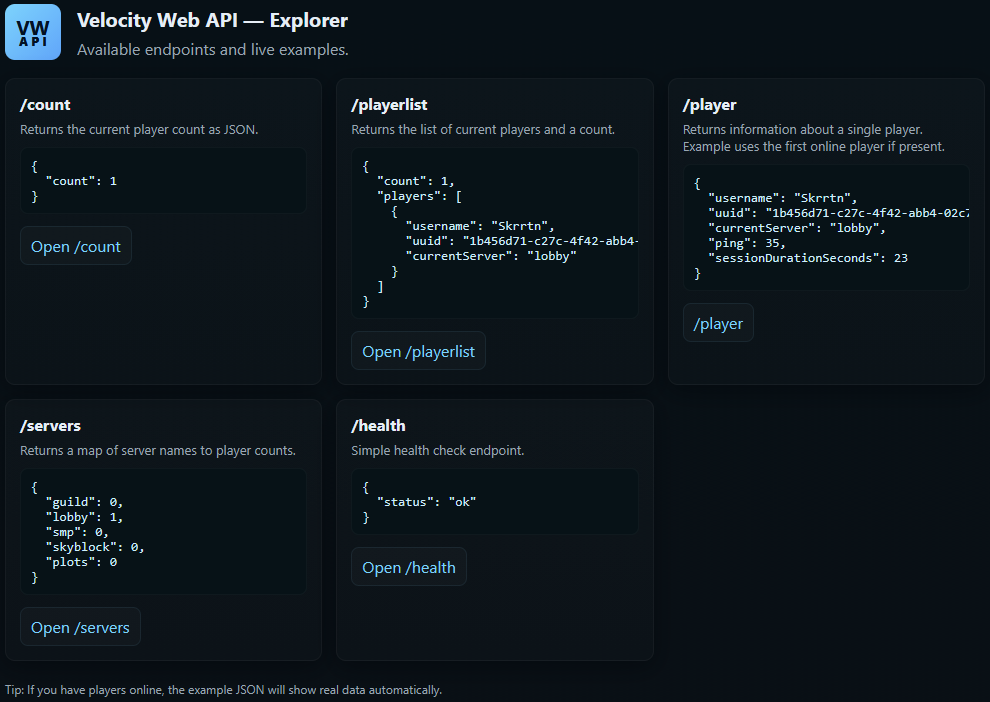
- 提供嵌入的
index.html(浏览器友好)。
- 示例 URL:
http://localhost:25576/
-
/playerlist
- 用途:列出已连接的玩家及其基本元数据和总人数。
- 示例 URL:
http://localhost:25576/playerlist
- 示例响应:
{
"count": 2,
"players":
[
{"username":"Alice","uuid":"...","currentServer":"lobby"},
{"username":"Bob","uuid":"...","currentServer":"minigames"}
]
}
-
/count
- 用途:返回已连接玩家的总数。
- 示例 URL:
http://localhost:25576/count
- 示例响应:
{
"count": 42
}
-
/player/<username> 或 /player?username=<name>
- 用途:获取已连接玩家的详细信息(精确大小写匹配查找)。
- 示例 URLs:
http://localhost:25576/player/Notch
http://localhost:25576/player?username=Notch
- 注意:如果缺少用户名则返回
400;如果玩家未连接则返回 404。
- 示例响应:
{
"username":"Notch",
"uuid":"...",
"currentServer":"lobby",
"ping":42,
"sessionDurationSeconds":360
}
-
/servers
- 用途:返回服务器名称到玩家数量的映射。
- 示例 URL:
http://localhost:25576/servers
- 示例响应:
{
"lobby": 5,
"minigames": 12
}
-
/health
- 用途:用于监控的轻量级健康检查。
- 示例 URL:
http://localhost:25576/health
- 示例响应:
{
"status": "ok"
}
命令
/vwapi reload : 从插件数据目录重新加载 config.cfg,如果 port 或 bindAddress 发生更改,则重启 HTTP 服务器。
/vwapi version : 打印插件版本(来自插件元数据)。
/vwapi debug [on|off] : 在运行时切换或显式设置调试日志记录。启用后,插件会将详细的调试消息和 HTTP 访问行打印到控制台。
/vwapi status : 显示当前 HTTP 服务器状态(运行中/未运行)、绑定的主机和端口,以及一个你可以访问的示例 URL(当绑定到所有接口时回退到 localhost)。
/vwapi help : 打印简短的帮助信息,列出可用的 /vwapi 子命令及使用示例。
权限
vwapi.admin : 使用 /vwapi 命令所需。
注意事项与行为
- 玩家查找是精确大小写匹配的,且仅返回已连接的玩家。
- HTTP 服务器绑定到
bindAddress;默认为 0.0.0.0(所有接口)。如需仅限本地访问或指定 IP,请更改为 127.0.0.1。
- 当你更改
bindAddress 或 port 并运行 /vwapi reload 时,插件将自动重启 HTTP 服务器以应用新的绑定/端口(不再需要为了这些更改而完全重启代理)。
故障排除
- 如果 HTTP 服务器未能启动,请检查代理日志中关于端口绑定或资源问题的错误。
- 确保
velocity-api 在运行时可用,并且插件已放置在正确的 plugins/ 文件夹中。
许可与支持
Velocity Web API

Lightweight HTTP API for Velocity proxies. Expose player lists, per-server counts, per-player details, etc. Ideal for websites, bots or other monitoring applications. I built it for my own uses, but it might help someone else out too.
Quick Install
- Drop the compiled plugin JAR into your Velocity
plugins/ folder.
- Start (or restart) your proxy; the plugin will create its data folder and a
config.cfg (if missing) in the plugin data directory.
Configuration
- The plugin creates a
config.cfg in its data folder on first run. Available keys:
port : port the HTTP server listens on (default 25576).
bindAddress : interface/address to bind the HTTP server (default 0.0.0.0 to listen on all IPv4 interfaces; set to 127.0.0.1 for local-only access).
checkUpdates : enable automatic Hangar update checks (default true).
snapshotUpdates : include snapshot/unstable updates in checks (default false).
debugEnabled : show debug messages (logger.debug) in the proxy console when true (default false).
allowedOrigins : CORS allowed origins for HTTP API access (comma-separated, or * for all) (default *).
Tested With
- Velocity 3.x (expects
velocity-api on the runtime classpath)
Endpoints
All JSON endpoints return Content-Type: application/json; charset=utf-8 unless otherwise noted.
-
/
- Serves the embedded
index.html (browser-friendly).
- Example URL:
http://localhost:25576/
-
/playerlist
- Purpose: list connected players with basic metadata and a total count.
- Example URL:
http://localhost:25576/playerlist
- Sample response:
{
"count": 2,
"players":
[
{"username":"Alice","uuid":"...","currentServer":"lobby"},
{"username":"Bob","uuid":"...","currentServer":"minigames"}
]
}
-
/count
- Purpose: return the total number of connected players.
- Example URL:
http://localhost:25576/count
- Sample response:
{
"count": 42
}
-
/player/<username> or /player?username=<name>
- Purpose: fetch detailed info for a connected player (exact-case lookup).
- Example URLs:
http://localhost:25576/player/Notch
http://localhost:25576/player?username=Notch
- Notes: returns
400 if username is missing; 404 if the player is not connected.
- Sample response:
{
"username":"Notch",
"uuid":"...",
"currentServer":"lobby",
"ping":42,
"sessionDurationSeconds":360
}
-
/servers
- Purpose: returns a mapping of server names to player counts.
- Example URL:
http://localhost:25576/servers
- Sample response:
{
"lobby": 5,
"minigames": 12
}
-
/health
- Purpose: lightweight health check for monitoring.
- Example URL:
http://localhost:25576/health
- Sample response:
{
"status": "ok"
}
Commands
/vwapi reload : reloads the config.cfg from the plugin data directory and restarts the HTTP server if the port or bindAddress have changed.
/vwapi version : prints the plugin version (from the plugin metadata).
/vwapi debug [on|off] : toggle or explicitly set debug logging at runtime. When enabled, the plugin prints detailed debug messages and HTTP access lines to the console.
/vwapi status : shows the current HTTP server status (running/not running), the bound host and port, and an example URL you can visit (falls back to localhost when bound to all interfaces).
/vwapi help : prints a short help listing the available /vwapi subcommands and usage examples.
Permissions
vwapi.admin : required to use the /vwapi commands.
Notes & Behavior
- Player lookup is exact-case and only returns connected players.
- The HTTP server binds to
bindAddress; by default this is 0.0.0.0 (all interfaces). Change to 127.0.0.1 for local-only access or a specific IP if desired.
- When you change
bindAddress or port and run /vwapi reload, the plugin will restart the HTTP server automatically to apply the new bind/port (a full proxy restart is no longer required for those changes).
Troubleshooting
- If the HTTP server does not start, check the proxy logs for errors about port binding or resource issues.
- Ensure
velocity-api is available at runtime and that the plugin is placed in the correct plugins/ folder.
License & Support
- Licensed under the MIT License.
- If you need any help or support, please contact me on our Discord.
评论 0
登录后参与评分
还没有评论,来抢沙发吧