
VelocityToolbox
适用于 Velocity 网络的插件管理、虚拟主机诊断、按服务器设置客户端版本规则,以及可选的资源包托管功能。
VelocityToolbox 将多项日常代理操作整合到一个命令中。无需完全重启代理即可加载或重载某个小型插件;查看每位在线玩家是通过哪个域名加入的;或将本地目录中的资源包转换为可直接使用的 URL 和 SHA-1 哈希值。
源代码 · 问题追踪器 · 中文文档 · 架构说明
功能特性
- 加载、卸载并重新加载已位于 Velocity
plugins/ 目录内的插件 JAR 文件
- 检查已加载插件的依赖项、注册的运行时资源及卸载风险,且不改变其运行状态
- 当另一个已加载插件声明了对目标插件的必需依赖时,拒绝执行卸载操作
- 报告监听器、任务、命令、插件消息通道、执行器和类加载器的清理情况
- 按玩家加入时所通过的虚拟主机对在线玩家进行分组,包括用于实时诊断的源 IP 地址
- 使用 Velocity 协议 API 为各服务器设置客户端版本范围、白名单和黑名单,无需 ViaVersion
- 可选择通过 HTTP 托管任意数量的本地资源包
.zip 文件
- 计算 SHA-1 哈希值并生成多资源包 VelocityResourcepacks 配置片段
- 使用向后兼容的管理员访问权限,或通过分层的基础权限、父级权限和操作权限进行管理
- 保持只读命令在控制台中静默,同时记录简洁的插件与配置操作日志
- 使用带颜色编码的 Adventure 控制台输出显示启动信息、资源包状态及关键插件操作
- 重载语言、配置文件、服务器版本规则和资源包托管服务,而无需重载其他插件
- 内置中文和英文消息,支持 MiniMessage 格式化
资源包 HTTP 服务器默认处于禁用状态,仅在您显式启用后才会开始监听。
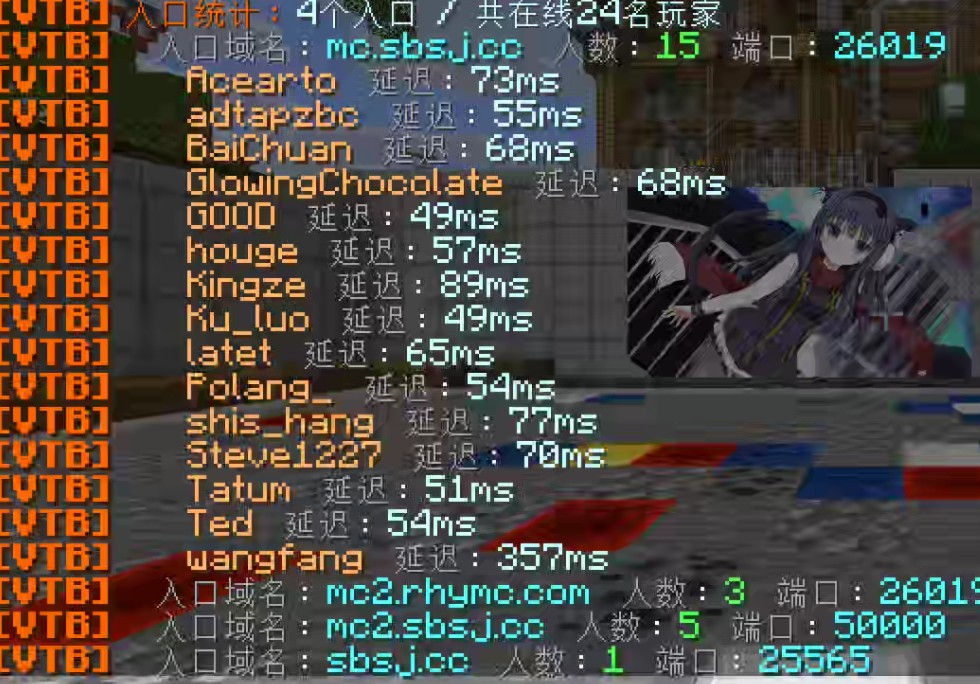
按加入所用的域名分组的玩家数量与延迟


在运行时加载或卸载插件,并附带清理报告

启用托管后,玩家将看到标准的资源包提示
要求
安装
- 从 Versions 标签页下载最新版本。
- 将 JAR 文件放入 Velocity 的
plugins/ 目录中。
- 完全启动一次代理以生成
plugins/VelocityToolbox/config.yml 配置文件。
- 授予可信管理员
velocitytoolbox.admin 权限。
- 运行
/vtoolbox help 或 /vtb help。
命令
主命令别名为 /vtb。velocitytoolbox.admin 保留为向后兼容的全能权限。只读命令在控制台中保持静默;插件的加载/卸载/重载以及配置文件的重载会发出简洁的状态消息。
| 命令 |
用途 |
/vtoolbox help |
显示帮助信息 |
/vtoolbox info |
显示插件、代理、Java、插件数量、服务器版本规则及资源包托管的摘要信息 |
/vtoolbox packs |
列出已托管资源包的 URL 和 SHA-1 哈希值 |
/vtoolbox vhosts |
按入口域名/端口和玩家数量对玩家进行分组;点击条目可查看名称和延迟 |
/vtoolbox reload |
重载语言、配置文件、服务器版本规则和资源包托管服务 |
/vtoolbox plugin list |
显示名称、版本和作者;悬停可查看完整元数据 |
/vtoolbox plugin inspect plugin-id |
显示四部分元数据、依赖项、运行时信息及风险评估报告 |
/vtoolbox plugin load file.jar |
从 plugins/ 目录加载一个 JAR 文件 |
/vtoolbox plugin unload plugin-id |
卸载一个插件 |
/vtoolbox plugin reload plugin-id |
卸载并重新加载一个插件 |
细粒度权限
若无 velocitytoolbox.admin 权限,请授予基础权限 velocitytoolbox.command,然后授予对应的子命令权限。
通用命令:
velocitytoolbox.command.infovelocitytoolbox.command.packsvelocitytoolbox.command.vhostsvelocitytoolbox.command.reload
插件管理父级权限:
velocitytoolbox.command.plugin
插件操作权限:
velocitytoolbox.command.plugin.listvelocitytoolbox.command.plugin.inspectvelocitytoolbox.command.plugin.loadvelocitytoolbox.command.plugin.unloadvelocitytoolbox.command.plugin.reload
例如,仅允许检查访问需要 velocitytoolbox.command、velocitytoolbox.command.plugin 和 velocitytoolbox.command.plugin.inspect。帮助输出仅列出发送者有权使用的命令。
按服务器的客户端版本规则

在 config.yml 的 server-versions 下配置版本范围、白名单和黑名单。该模块默认禁用,并使用 Velocity 的协议 API(不依赖 ViaVersion)。/vtoolbox info 会列出每个服务器的活跃规则,/vtoolbox reload 用于应用更改。共享同一协议的版本会以紧凑范围显示;悬停规则可查看协议 ID。
请参阅 配置指南 获取示例。
可选的资源包托管
pack-host:
  enabled: false
  bind: 0.0.0.0
  port: 8765
  public-url: ""
  packs-directory: packs
要启用托管功能,请在 plugins/VelocityToolbox/packs/ 中放置任意数量的 .zip 文件,将 enabled 设置为 true,然后运行 /vtoolbox reload。每个 ZIP 文件都会获得独立的下载 URL 和 SHA-1 校验值。在 VelocityResourcepacks 1.9.0+ 及更高版本中,生成的 global.packs 列表会在 Minecraft 1.20.3+ 客户端上堆叠所有资源包;旧版客户端仅使用其第一条条目。
移除不应作为全局资源包的条目。使用 restricted / permission 进行玩家特定的组合,或在 VelocityResourcepacks 中配置按服务器和按版本的分配。VelocityToolbox 负责托管和描述这些文件;它本身不会向玩家发送它们。
VelocityToolbox 仅从代理机器提供文件服务。它不会配置防火墙规则、端口转发、DNS 或 HTTPS。当通过互联网提供服务时,请将 public-url 设置为玩家实际可以访问的地址。
重要热重载说明
Velocity 未提供公开的插件加载/卸载 API。VelocityToolbox 会执行依赖检查并进行大量清理工作,但没有任何工具能保证安全地热卸载每一个第三方插件。
经过测试后,小型且自包含的工具插件是最佳候选者。权限系统、协议/数据包插件、连接管理器以及具有大型内存状态的插件仍应通过完整的代理重启来进行更新。
支持
欢迎在 GitHub Issue 跟踪器 提交错误报告和功能建议。特别欢迎围绕自动回滚、多代理操作、虚拟主机诊断和资源包可用性检查的想法。
如果 VelocityToolbox 帮你节省了代理重启时间,请考虑给该项目点个 Star?。
使用统计
VelocityToolbox
Plugin management, virtual-host diagnostics, per-server client version rules, and optional resource-pack hosting for Velocity networks.
VelocityToolbox puts several day-to-day proxy operations behind one command. Load or reload a small plugin without a full proxy restart, see which domain each online player used to join, or turn a local directory of resource packs into ready-to-use URLs and SHA-1 hashes.
Source code · Issue tracker · Chinese documentation · Architecture notes
Features
- Load, unload, and reload plugin JARs already inside Velocity's
plugins/ directory
- Inspect a loaded plugin's dependencies, registered runtime resources, and unload risk without changing its state
- Refuse unloads when another loaded plugin declares a required dependency on the target
- Report cleanup of listeners, tasks, commands, plugin-message channels, executors, and class loaders
- Group online players by the virtual host they joined through, including source IPs for live diagnostics
- Set per-server client version ranges, allowlists, and blocklists using Velocity's protocol API, without ViaVersion
- Optionally host any number of local resource-pack
.zip files over HTTP
- Calculate SHA-1 hashes and generate a multi-pack VelocityResourcepacks configuration snippet
- Use backward-compatible administrator access or layered base, parent, and action permissions
- Keep read-only commands quiet while logging concise plugin and configuration operations
- Use color-coded Adventure console output for startup, pack status, and critical plugin operations
- Reload language, configuration, server version rules, and pack hosting without reloading other plugins
- Built-in Chinese and English messages with MiniMessage formatting
The resource-pack HTTP server is disabled by default and listens only after you explicitly enable it.
Player counts and ping grouped by the domain used to join
Load or unload a plugin at runtime, with a cleanup report
Players see the standard pack prompt after hosting is enabled
Requirements
- Proxy: Velocity 4.0 or newer
- Java: 25 or newer
- Dependencies: none
- Optional companion: VelocityResourcepacks 1.9.0+ for assigning hosted packs to players and using the generated multi-pack list
Installation
- Download the latest file from the Versions tab.
- Place the JAR in Velocity's
plugins/ directory.
- Fully start the proxy once to generate
plugins/VelocityToolbox/config.yml.
- Grant trusted administrators
velocitytoolbox.admin.
- Run
/vtoolbox help or /vtb help.
Commands
The main command alias is /vtb. velocitytoolbox.admin remains a backward-compatible all-access permission. Read-only commands stay quiet in the console; plugin load/unload/reload and configuration reload emit concise status messages.
| Command |
Purpose |
/vtoolbox help |
Show help |
/vtoolbox info |
Plugin, proxy, Java, plugin-count, server version rules, and pack-host summary |
/vtoolbox packs |
List hosted pack URLs and SHA-1 hashes |
/vtoolbox vhosts |
Group players by entry domain/port and player count; click an entry for names and pings |
/vtoolbox reload |
Reload language, configuration, server version rules, and pack hosting |
/vtoolbox plugin list |
Names, versions, and authors; hover for full metadata |
/vtoolbox plugin inspect plugin-id |
Four-section metadata, dependency, runtime, and risk report |
/vtoolbox plugin load file.jar |
Load a JAR from plugins/ |
/vtoolbox plugin unload plugin-id |
Unload a plugin |
/vtoolbox plugin reload plugin-id |
Unload and load a plugin again |
Fine-grained permissions
Without velocitytoolbox.admin, grant the base permission velocitytoolbox.command, then the matching subcommand permission.
General commands:
velocitytoolbox.command.infovelocitytoolbox.command.packsvelocitytoolbox.command.vhostsvelocitytoolbox.command.reload
Plugin-management parent:
velocitytoolbox.command.plugin
Plugin actions:
velocitytoolbox.command.plugin.listvelocitytoolbox.command.plugin.inspectvelocitytoolbox.command.plugin.loadvelocitytoolbox.command.plugin.unloadvelocitytoolbox.command.plugin.reload
For example, inspection-only access requires velocitytoolbox.command, velocitytoolbox.command.plugin, and velocitytoolbox.command.plugin.inspect. Help output only lists commands the source can use.
Per-server client version rules
Configure version ranges, allowlists, and blocklists under server-versions in config.yml. The module is disabled by default and uses Velocity's protocol API without ViaVersion. /vtoolbox info lists the active rules for each server, and /vtoolbox reload applies changes. Versions sharing a protocol are displayed as compact ranges; hover a rule for protocol IDs.
See the configuration guide for examples.
Optional pack hosting
pack-host:
  enabled: false
  bind: 0.0.0.0
  port: 8765
  public-url: ""
  packs-directory: packs
To enable hosting, place any number of .zip files in plugins/VelocityToolbox/packs/, set enabled: true, and run /vtoolbox reload. Every ZIP receives an independent download URL and SHA-1. With VelocityResourcepacks 1.9.0+, the generated global.packs list stacks all of them on Minecraft 1.20.3+ clients; older clients use only its first entry.
Remove packs that should not be global. Use restricted / permission for player-specific combinations, or configure per-server and per-version assignments in VelocityResourcepacks. VelocityToolbox hosts and describes the files; it does not send them to players itself.
VelocityToolbox only serves files from the proxy machine. It does not configure firewall rules, port forwarding, DNS, or HTTPS. Set public-url to an address players can actually reach when serving packs over the internet.
Important hot-reload note
Velocity does not provide a public plugin load/unload API. VelocityToolbox performs dependency checks and extensive cleanup, but no tool can guarantee safe hot-unloading for every third-party plugin.
Small, self-contained utility plugins are the best candidates after testing. Permission systems, protocol/packet plugins, connection managers, and plugins with large in-memory state should still be updated with a full proxy restart.
Support
Bug reports and feature suggestions are welcome on the GitHub issue tracker. Ideas around automatic rollback, multi-proxy operations, virtual-host diagnostics, and pack availability checks are especially welcome.
If VelocityToolbox saves you a proxy restart, consider giving the project a Star?.
Usage statistics


 插件

 插件
 插件
 插件
 插件
 插件
评论 0
登录后参与评分
还没有评论,来抢沙发吧