
在原版 Minecraft 客户端上实现真实界面。无需模组、无需 Forge,玩家无需安装任何东西:他们使用已有的客户端加入服务器,接受资源包后,即可看到带有圆角、透明效果、Inter 字体、物品图标以及跟随鼠标的游标的窗口。
一个适用于 Paper 26.2 及以上版本客户端的插件。开源,采用 MIT 许可证。
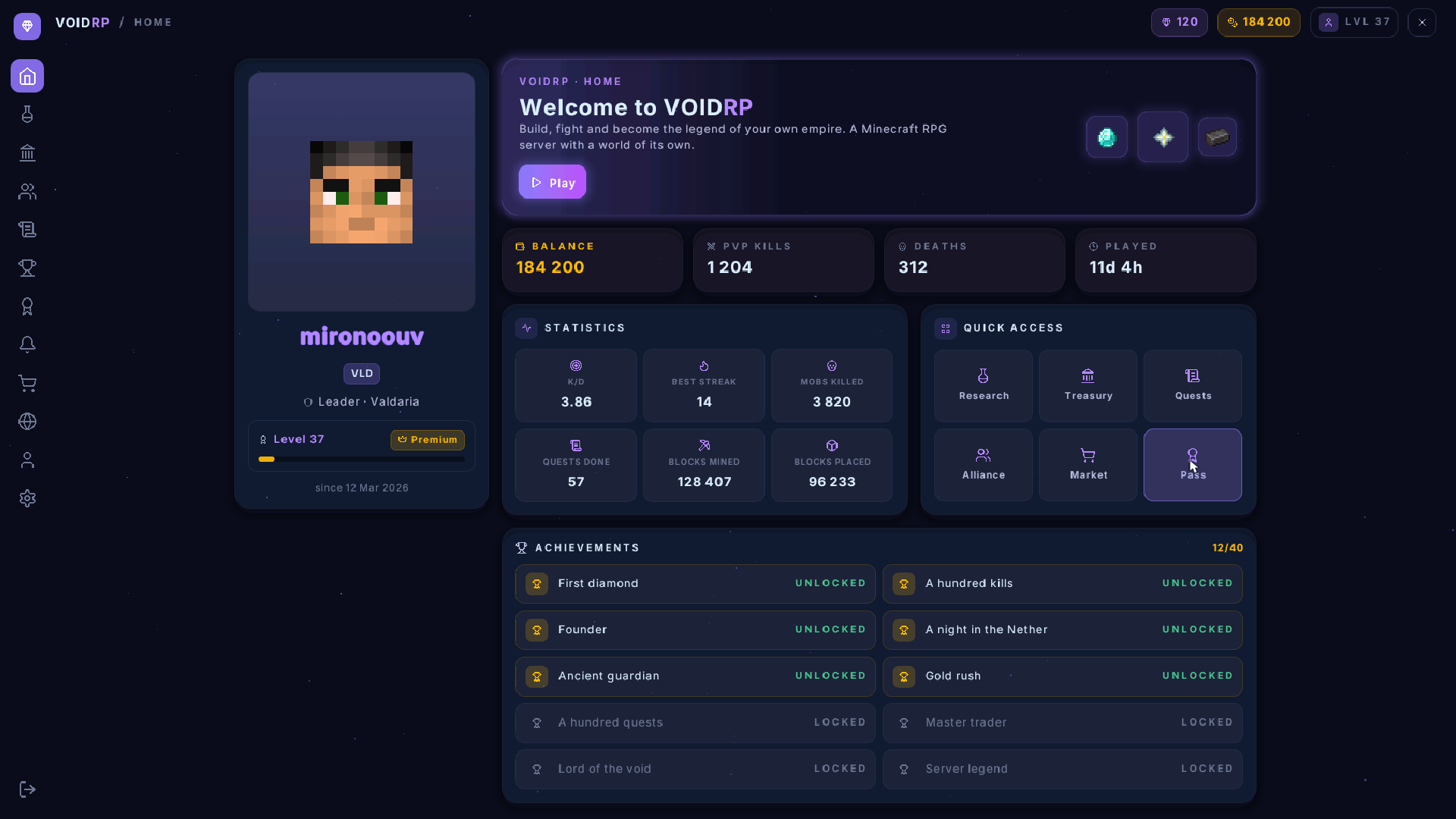
原版客户端上的主页:玩家自己的皮肤、游戏自带的物品纹理,以及停留在其悬停方块上的光标。
这不是模拟图,也不是渲染图。这是一张真实客户端的截图。上面的每一个矩形、字母和图标都作为一行位于不可见 Boss 栏内的文本传输。
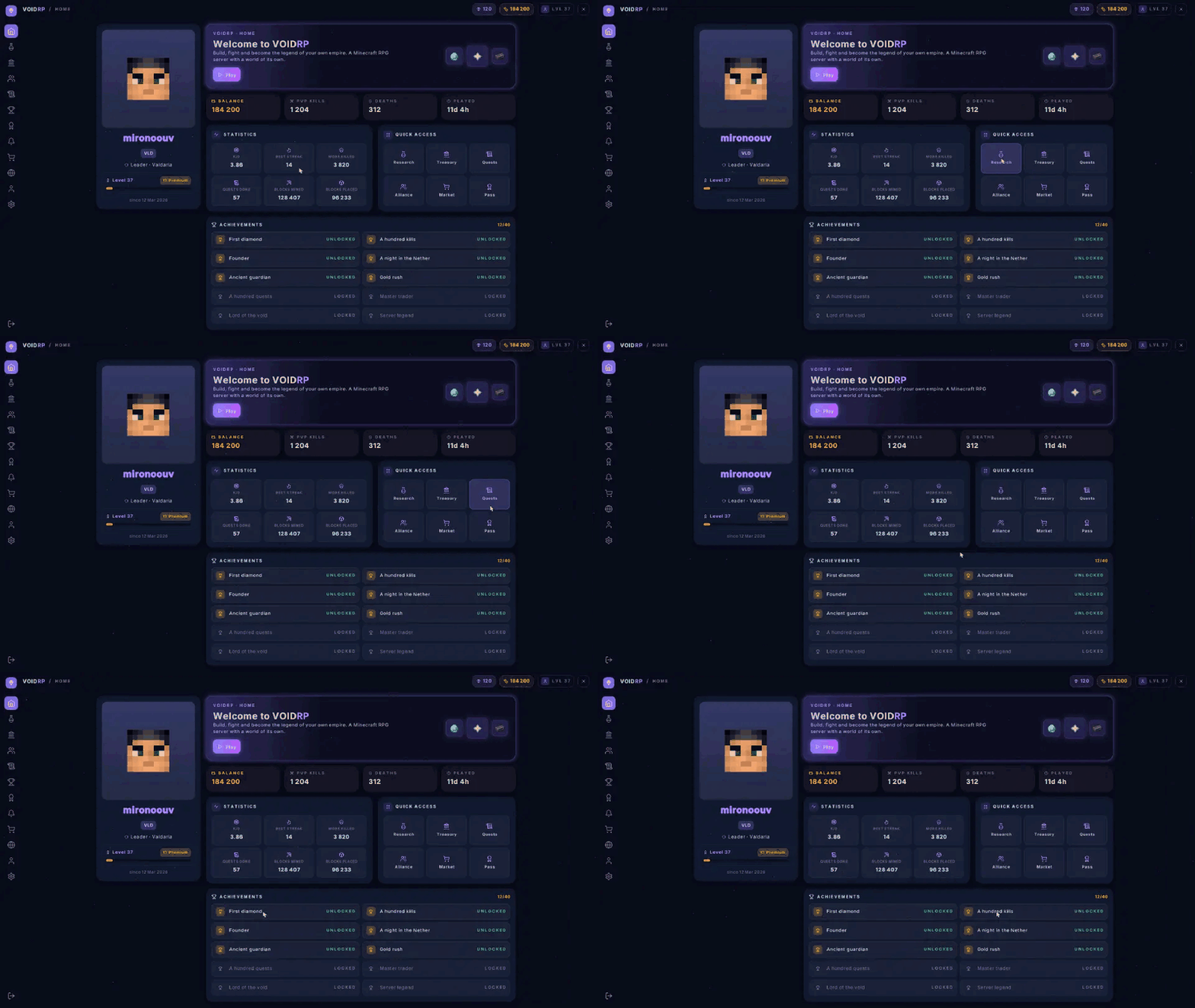
记录其实际使用情况:玩家转动头部,光标随之移动,其所覆盖的内容会亮起。
为什么
在 Minecraft 中,服务器的界面基本上就是一个装有物品的箱子。任何更丰富的功能都需要客户端模组,而很少有玩家会安装模组。像 LocoUI 这样的付费工具可以在原版客户端上绘制界面,但它们的页面是在可视化编辑器中构建并烘焙到资源包中的:当资源包构建完成后,其中不存在的数据无法显示。
在这里,页面是代码,页面上的所有内容都是在显示时从服务器即时发送的。无需重新构建资源包来添加按钮。
页面可以包含什么
- 布局:行、列和网格,根据玩家屏幕比例(从 5:4 到 21:9)自动排列
- 样式:背景、16 级透明度、圆角、边框、柔和阴影和发光效果
- 文本:Inter 字体,七种大小和三种字重,支持换行、对齐和彩色片段
- 组件:按钮、标签页、复选框、开关、步进器、滑块、下拉菜单、进度条、芯片、瓦片、通知、对话框
- 内容:滚动列表、工具提示、玩家头像、您自己的 PNG 图片,以及 788 个原版物品和方块图标
- 输入:由玩家视线驱动的光标,支持点击、滚轮、数字键、拖动滑块以及在游戏自带对话框中输入文本
- 主题:Jar 包内含四种主题,您也可以自定义十几种颜色的主题
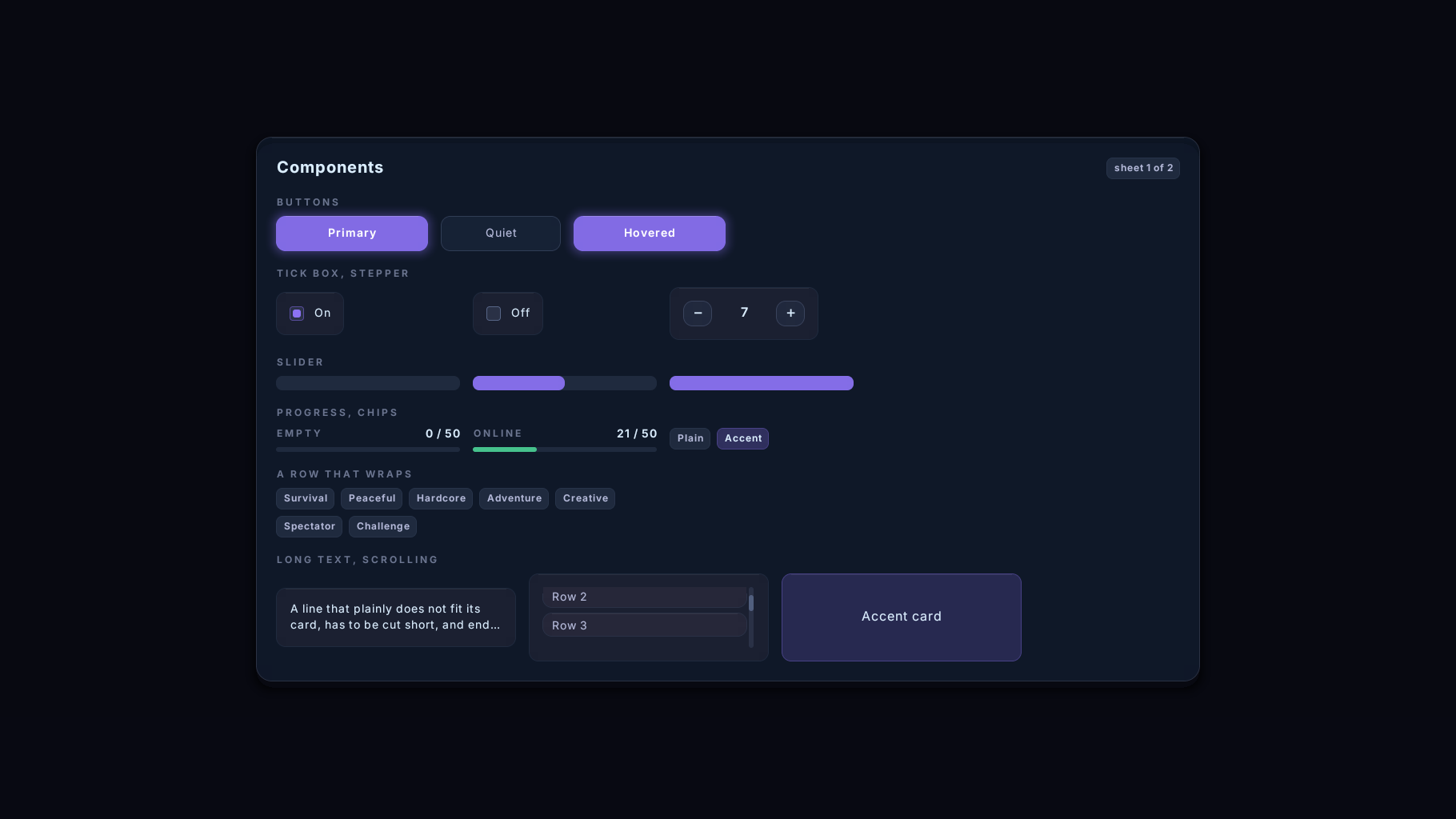
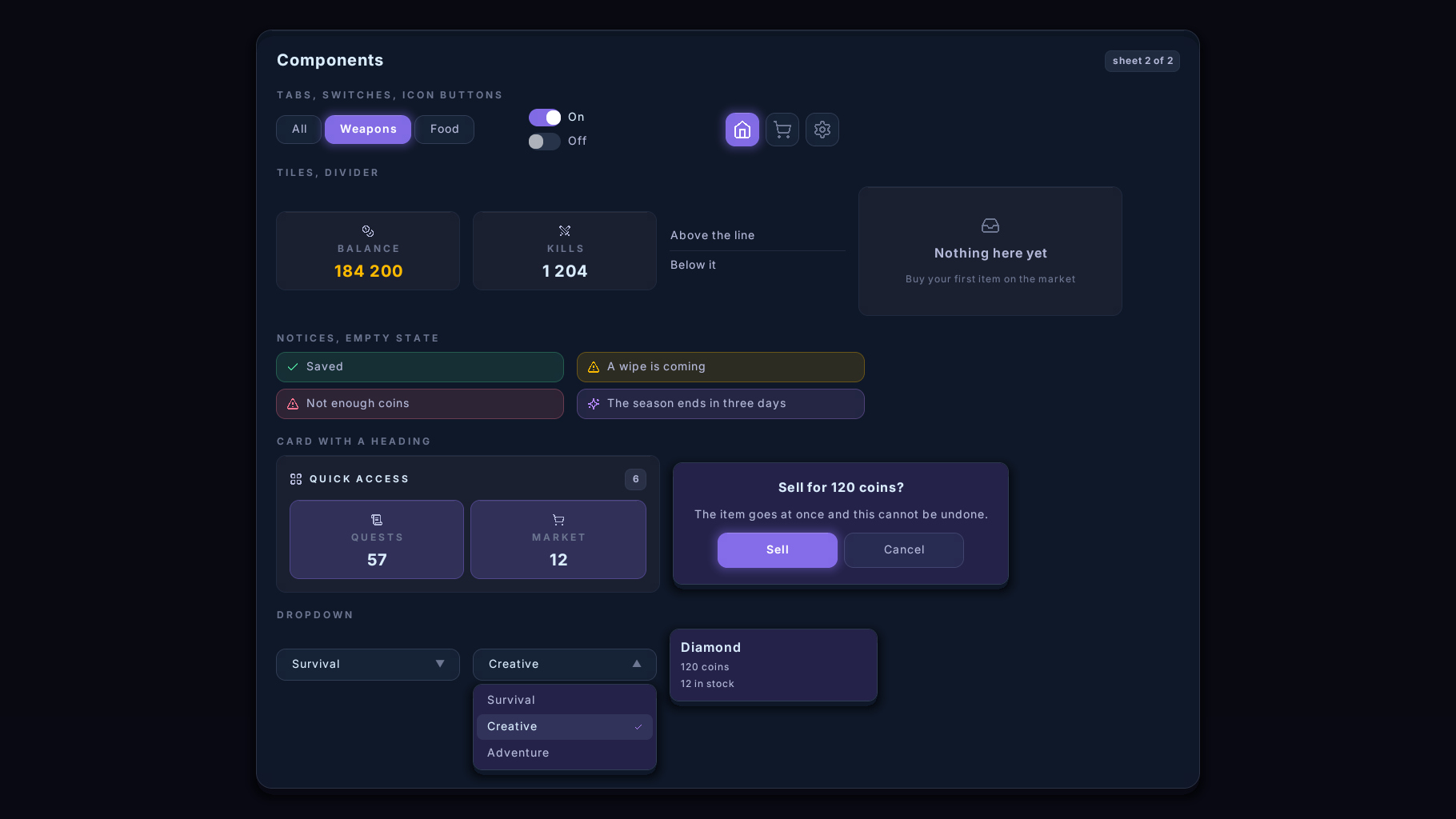
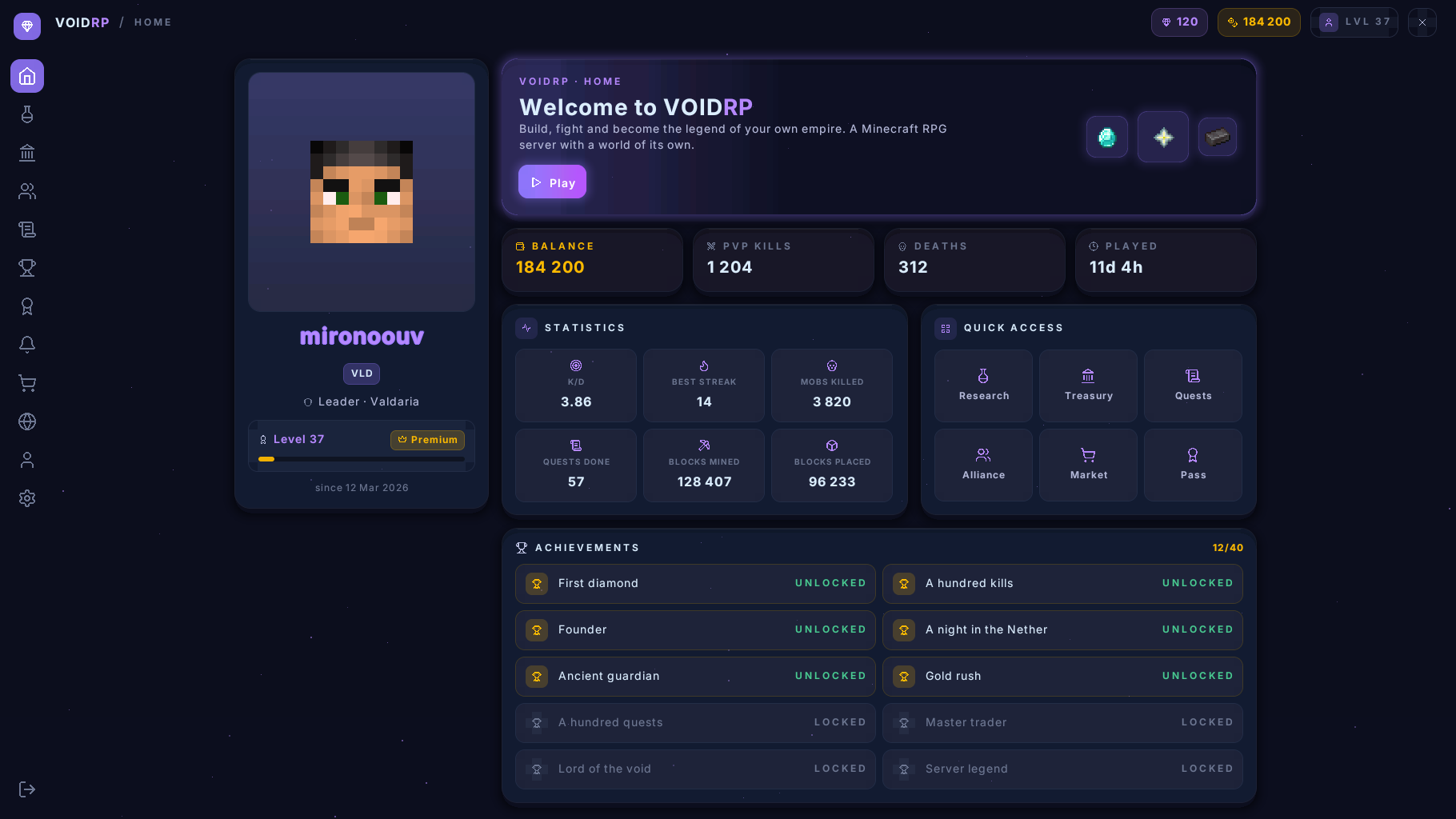
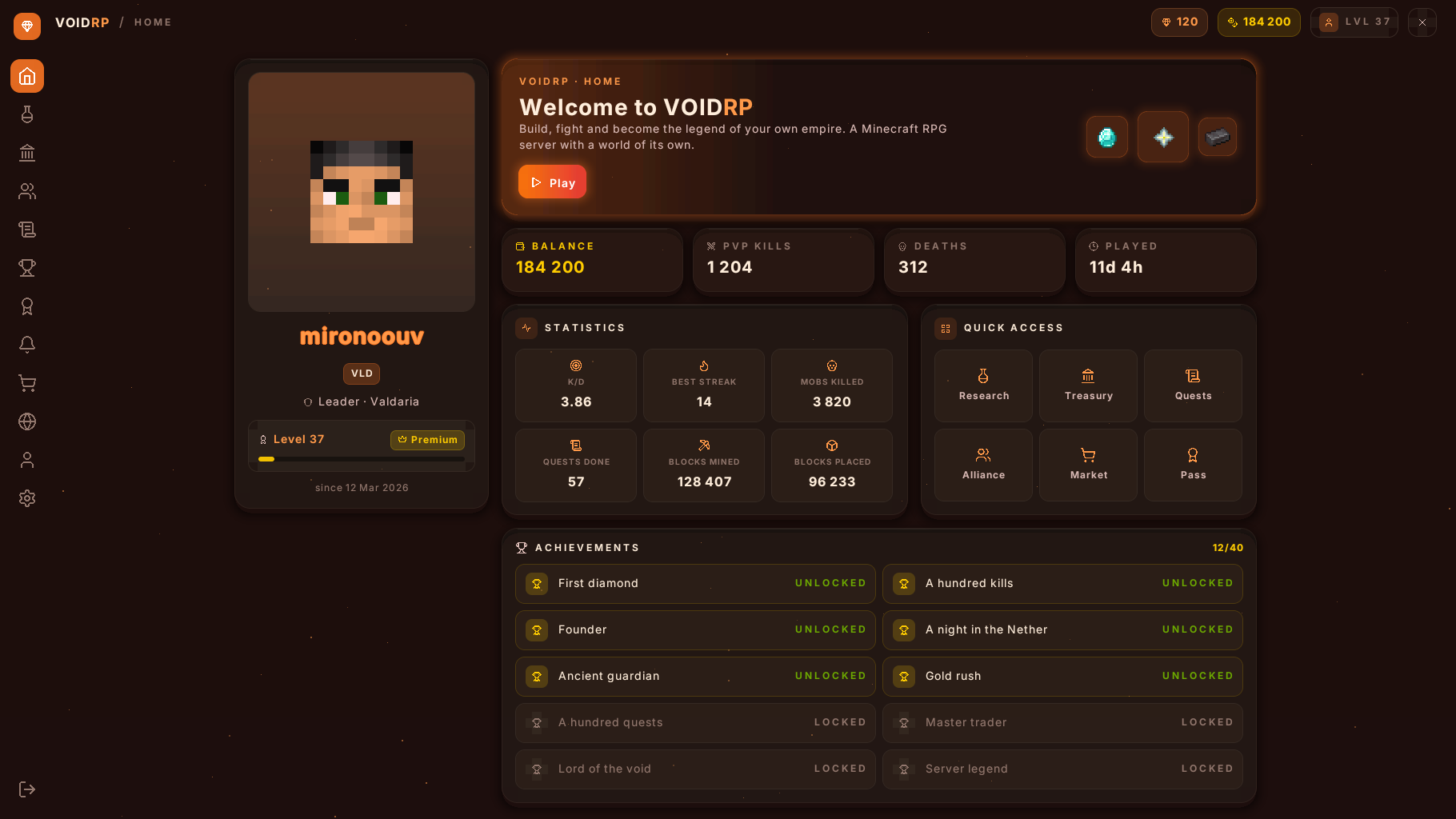
四种外观,同一个页面
 |
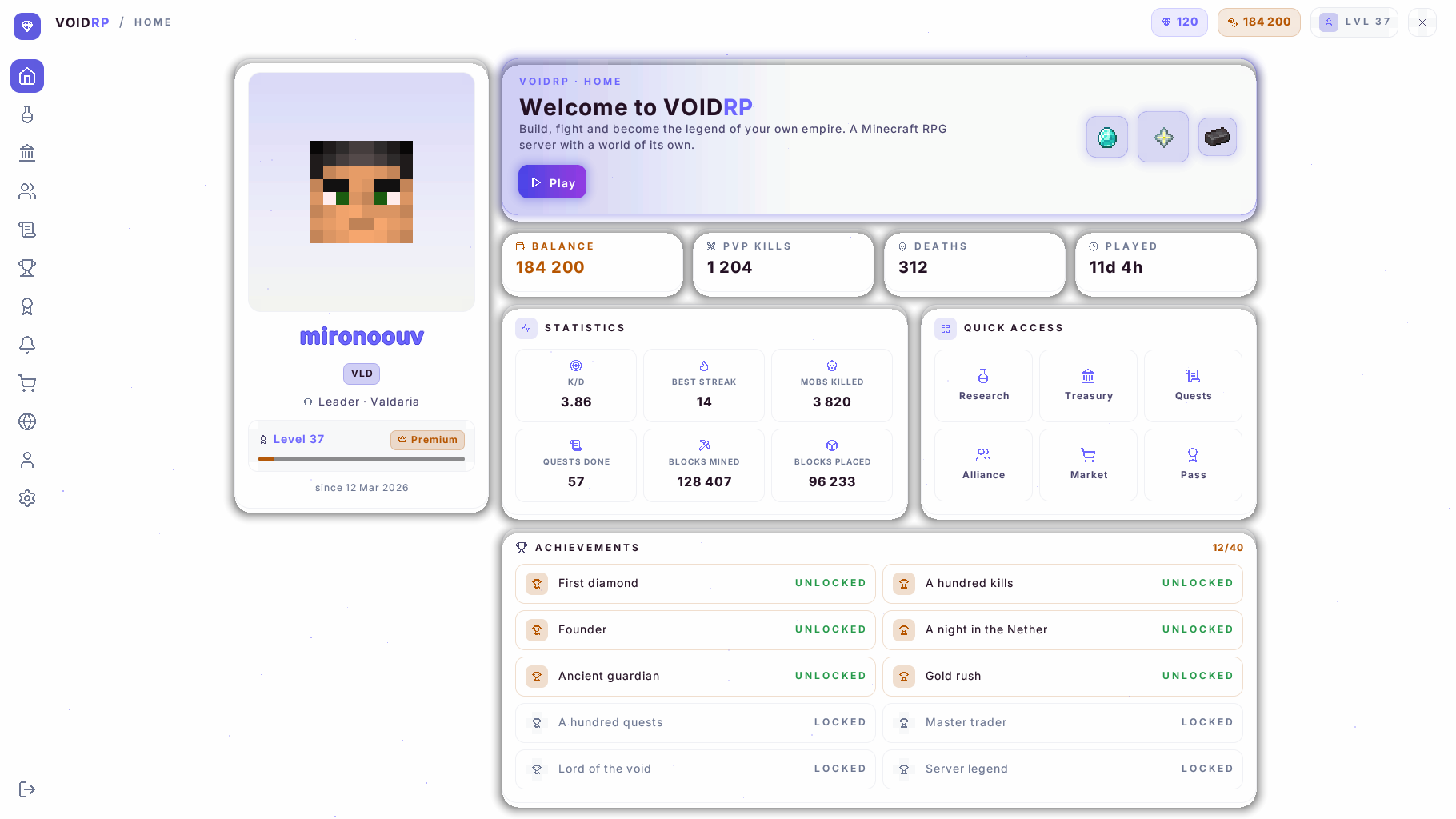 |
| midnight:接近黑色的紫色调,默认主题 | daylight:浅色主题 |
 |
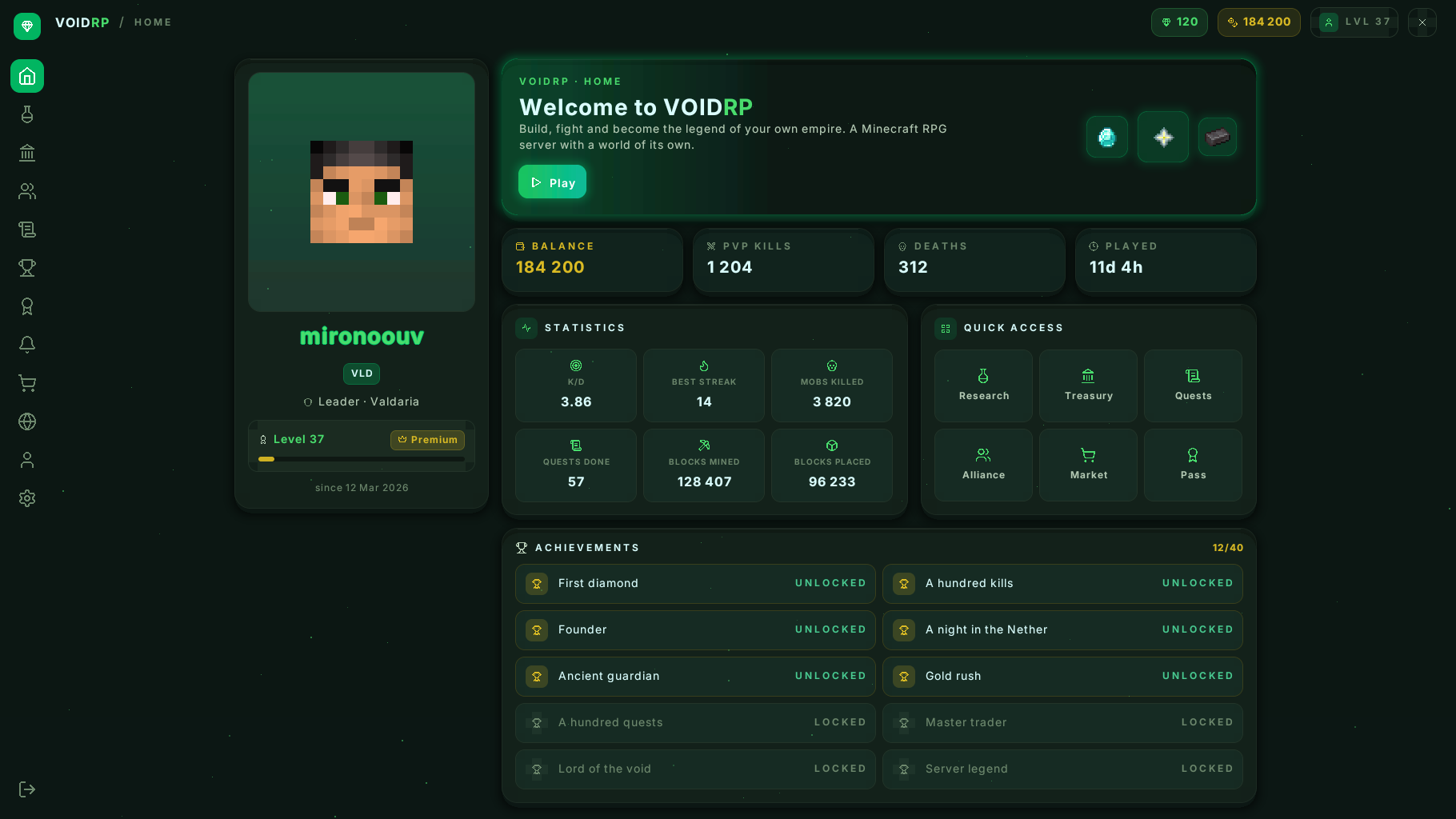 |
| ember:温暖的深色 | grove:深绿色 |
相同的页面和相同的代码。整体外观由 theme.yml 中的一打颜色决定。
安装
- 将 jar 文件放入
plugins/目录并重启服务器。 - 仅此而已。插件会构建资源包,并通过内置的小型 Web 服务器(端口
8123)自行提供下载。
端口关闭、共享主机或位于 Velocity/BungeeCord 之后? 请将插件安装在游戏服务器上,而不是代理服务器上。将资源包放置在任何 Web 主机上,设置 pack.url,并将 pack.publish-dir 指向该主机的文件夹:插件会在每次启动时将资源包复制过去,并在日志中检查地址是否提供了正确的资源包。
可选: PacketEvents。启用此插件后,光标的反应速度可提前最多 50 毫秒,旧版客户端的玩家会立即获得正确的资源包,并且在打开页面时会隐藏其他插件的 Boss 栏。
在游戏中尝试:输入 /vui open 查看主页,输入 /vui demo 一次性查看所有组件。
客户端兼容性
| 客户端 | 资源包 |
|---|---|
| 26.2 及更高版本 | voidrp-ui.zip |
| 1.21.6 – 26.1.2 | voidrp-ui-legacy.zip |
Mojang 在 26.2 版本中重命名了文本着色器,因此插件会构建两个资源包,并为每个玩家分配其客户端能够读取的那个。两者都已在真实客户端上测试过,包括通过 ViaVersion 连接的 1.21.6 版本,并且能呈现相同的页面。
对于开发者
页面是一个 Kotlin 类,它回答一个问题:我现在看起来是什么样?
class ShopPage(private val balance: Int) : Page() {
    override fun view(): View = Panel(
        style = Theme.page,
        width = Size.Fixed(600),
        gap = Theme.SPACE_4,
        children = listOf(
            Text("Shop", Theme.TEXT_H2, Theme.INK, Weight.SEMIBOLD),
            Text("Balance: $balance", Theme.TEXT_BODY, Theme.INK_SOFT),
            button("Buy", id = "buy"),
        ),
    )

    override fun onClick(id: String, button: Button) {
        if (id == "buy") { /* ... */ refresh() }
    }
}
Real interfaces on the vanilla Minecraft client. No mods, no Forge, nothing for the player to install: they join with the client they already have, accept the resource pack, and see windows with rounded corners, transparency, the Inter font, item icons and a cursor that follows the mouse.
A plugin for Paper 26.2 that serves clients from 1.21.6 up. Open source, MIT licensed.
The home page on a vanilla client: the player's own skin, the game's own item textures, and the cursor on the tile it is hovering.
This is not a mockup and not a render. It is a screenshot of a real client. Every rectangle, letter and icon on it travels as one line of text inside an invisible boss bar.
Recorded as it is used: the player turns their head, the cursor follows, and whatever it is over lights up.
Why
In Minecraft, a server's interface is basically a chest with items in it. Anything richer needs a client mod, and very few players will install one. Paid tools like LocoUI can draw interfaces on a vanilla client, but their pages are built in a visual editor and baked into a resource pack: data that did not exist when the pack was built cannot be shown.
Here a page is code, and everything on it is sent from the server the moment it is shown. No rebuilding the pack to add a button.
What a page can have
- Layout: rows, columns and grids that lay themselves out for the player's screen, from 5:4 to 21:9
- Style: backgrounds, 16 levels of transparency, rounded corners, borders, soft shadows and glows
- Text: the Inter typeface in seven sizes and three weights, wrapping, alignment, coloured runs
- Components: buttons, tabs, tick boxes, switches, steppers, sliders, dropdowns, progress bars, chips, tiles, notices, dialogs
- Content: scrolling lists, tooltips, players' faces, your own PNG pictures, and 788 vanilla item and block icons
- Input: a cursor driven by where the player looks, clicks, the scroll wheel, number keys, dragging a slider, and text typed into the game's own dialog
- Themes: four in the jar, and your own in a dozen colours
Four looks, one page
|
|
| midnight: near-black with violet, the default | daylight: a light theme |
|
|
| ember: warm dark | grove: dark green |
The same page and the same code. The whole look is a dozen colours in theme.yml.
Installing
- Drop the jar into
plugins/and restart the server. - That is all. The plugin builds the resource pack and serves it itself from a small built-in web server (port
8123).
Port closed, shared hosting, or behind Velocity/BungeeCord? Install the plugin on the game server, not the proxy. Put the pack on any web host, set pack.url, and point pack.publish-dir at that host's folder: the plugin copies the pack there on every start and checks in the log that the address serves the right one.
Optional: PacketEvents. With it the cursor reacts up to 50 ms sooner, players on older clients get the right pack straight away, and other plugins' boss bars are hidden while a page is open.
Try it in game: /vui open for the home page, /vui demo for every component at once.
Clients
| Client | Pack |
|---|---|
| 26.2 and newer | voidrp-ui.zip |
| 1.21.6 – 26.1.2 | voidrp-ui-legacy.zip |
Mojang renamed the text shader in 26.2, so the plugin builds two packs and gives each player the one their client can read. Both have been tried on real clients, including 1.21.6 through ViaVersion, and draw the same page.
For developers
A page is a Kotlin class that answers one question: what do I look like right now?
class ShopPage(private val balance: Int) : Page() {
    override fun view(): View = Panel(
        style = Theme.page,
        width = Size.Fixed(600),
        gap = Theme.SPACE_4,
        children = listOf(
            Text("Shop", Theme.TEXT_H2, Theme.INK, Weight.SEMIBOLD),
            Text("Balance: $balance", Theme.TEXT_BODY, Theme.INK_SOFT),
            button("Buy", id = "buy"),
        ),
    )

    override fun onClick(id: String, button: Button) {
        if (id == "buy") { /* ... */ refresh() }
    }
}

下载 VoidRP UI
下载 VoidRP UI
下载 VoidRP UI
下载 VoidRP UI
下载 VoidRP UI
下载 VoidRP UI
下载 VoidRP UI
下载 VoidRP UI
0.4.0
系统光标,适用于安装了配套模组的客户端。 运行 voidrp-client-info 1.2.0 的客户端会在页面显示期间保持一个空的、透明的屏幕窗口打开,并向 voidrp:ui_input 频道报告鼠标位置、按钮状态、滚轮操作、按键以及窗口大小;而服务器则通过 voidrp:ui_screen 频道告知页面何时打开或关闭,以及光标应呈现的样式。此类会话将指针控制权交由客户端而非视角控制,不绘制自己的光标,在可点击元素上自动将系统光标变为手型,并响应 Escape 和 Backspace 键(如同蹲下键一样)。模组报告的窗口大小会被保留为玩家屏幕尺寸,以便立即按该尺寸布局页面。从一个页面切换到下一个页面时,光标不会回到屏幕中央(关闭事件会延迟一 tick 处理,若新页面随即打开则丢弃该关闭事件);当插件晚加载时,相关频道也会向已在线的玩家重新广播。新增:Page.pointsWithMouse 用于提示功能,语言文件中新增 page.opened-mouse。设置 input.client-pointer: false 可禁用此功能。
客户端自行移动指针。 原版客户端每秒报告 20 次它注视的方向,而逐帧发送的指针只能取决于数据包何时到达,因此平滑度受限。现在,每次瞄准读数都成为时间表中的一个一 tick 线段 —— 从上一次读数的结束位置到新读数,从世界时钟稍超前一个完整 tick 开始 —— 文本着色器按照客户端自身的时间(GameTime)播放这些内容,仅在对应的 tick 显示每个线段,并在末尾保持静止。当数据包到达时不再重要,因此指针会依次经过所有读数而无跳跃,就像客户端在两次更新之间移动实体一样,大约落后于手部操作一个 tick。仅在使用 26.2 整合包的客户端上生效(input.client-motion);旧版客户端仍像以前一样逐帧发送。通过带有新 /vui debug mtrace(记录十秒内的每次读取和每个数据包)及 /vui debug clock 命令的实时客户端发现并测量了此功能。
每位玩家设置自己的指针 —— 使用 /vui cursor,或在服务器自身的设置页面中调用 VoidRpUi.cursorSettings(player, then):包括速度、平滑或逐帧模式,以及时钟对齐方式,与标尺对齐。数据保存在 cursor.yml 中;任何未修改的部分遵循 input 部分配置。
实验性功能:世界中的页面。 对于持有 voidrp.ui.world 权限的玩家(默认为操作员),该页面可以在玩家前方的文本显示器上绘制,位于黑暗房间中,准星作为指针 —— 没有任何延迟,因为客户端本身转动摄像机。文本着色器的世界变体将相同的字形放置在显示器的平面上。请参阅 README 文件。
来自 Noah Teetz 的分叉贡献:
- 拉丁-1 字母、德语和英语引号以及欧元符号出现在文本表中; 带重音的字母之前会无声消失且无错误提示。
theme.yml可以指定自定义字体,包括像素字体;若不指定则无任何变化。- 物品图标大小为 48 单位。
plugins/VoidRpUI/pack/下的文件直接作为资源包的一部分加载。
此外:
- 无论
input.frame-rate设置如何,瞄准信息每秒读取 60 次;这现在仅限制逐帧发送的指针。 input.client-clock-offset(默认值 0.9)以及/vui debug offset、/vui debug motion可用于比较两种指针模式的实际表现。
完整更新日志:
关于这个资源的讨论、问题反馈与使用心得
还没有讨论,来发第一帖吧
你是这个资源的作者?登录后可认领此资源。
相似资源
 插件

PacketEvents 是一款专为 Minecraft Java 版打造的协议库,旨在简化数据包的处理与传输。
 插件
ExyliaPlugins 的库。
 插件
通过对话框或铁砧界面帮助你的 Anthme
 插件
自定义你的Minecraft头像!
 插件
重新定义服务器上的生物运输方式。使用高度可定制的口袋道具,安全地捕获、存储和释放任何实体。
 插件
为基于 Spigot/Paper/Folia 的服务器添加对 Vivecraft 的支持
评论 0
登录后参与评分
还没有评论,来抢沙发吧