
MachinaWards
使用可配置的土地声明护盾保护你的建筑——无破坏,无纠纷。
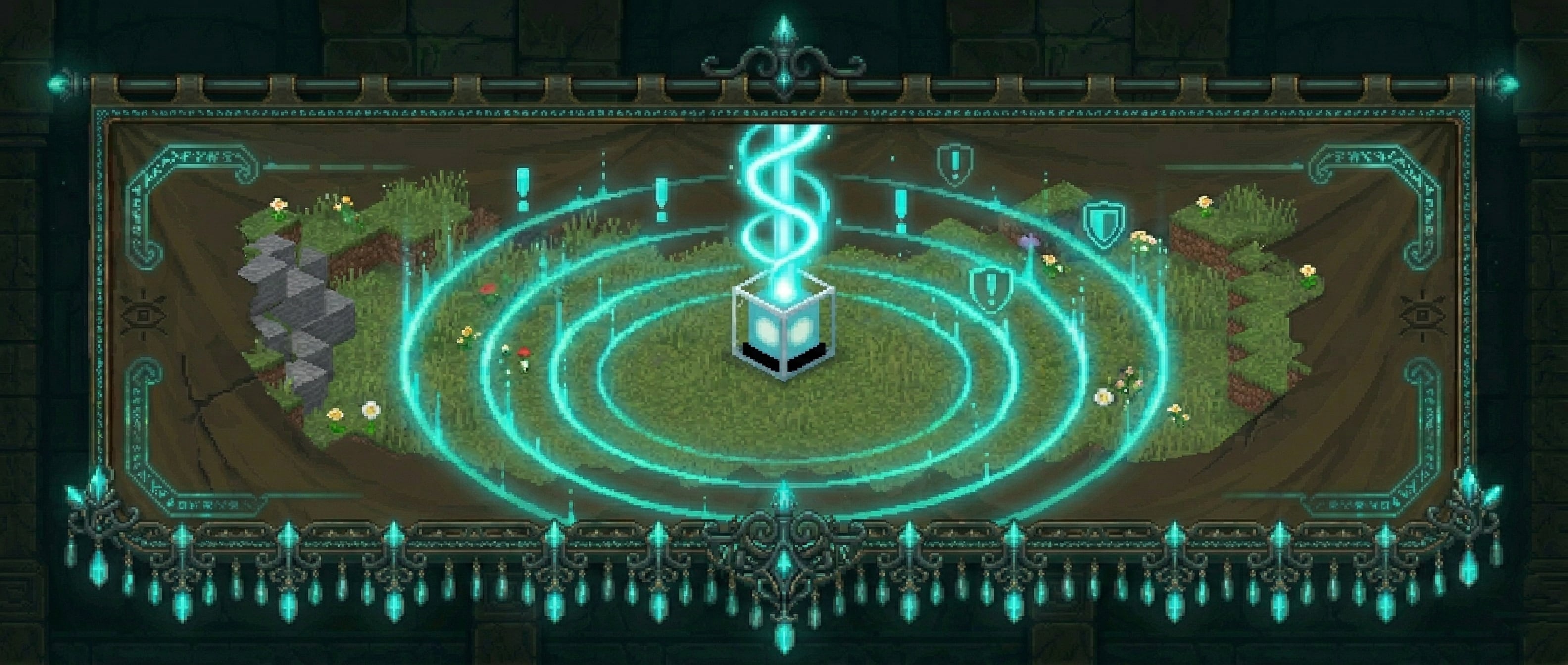
MachinaWards 允许玩家放置物理护盾方块来声明和保护一片区域。所有者可以添加成员,所有事件都会被记录,外部人员则会被完全阻止。三种等级的护盾从新手基地到高等级基础设施均可适用。
工作原理
制作一个护盾物品并将其像普通方块一样放置。该方块标记了你受保护区域的中心。破坏它,或潜行+右键点击两次以将其收回——护盾物品会返回到你的背包中,以便你随时重新安置它。
右键点击护盾方块即可打开管理菜单。
护盾等级
| 等级 |
方块 |
默认半径 |
成员上限 |
护盾智能 |
| 基础 |
灯笼 |
12 格 |
5 |
— |
| 高级 |
信标 |
20 格 |
10 |
— |
| 超级 |
哭泣的黑曜石 |
30 格 |
无限制 |
是 |
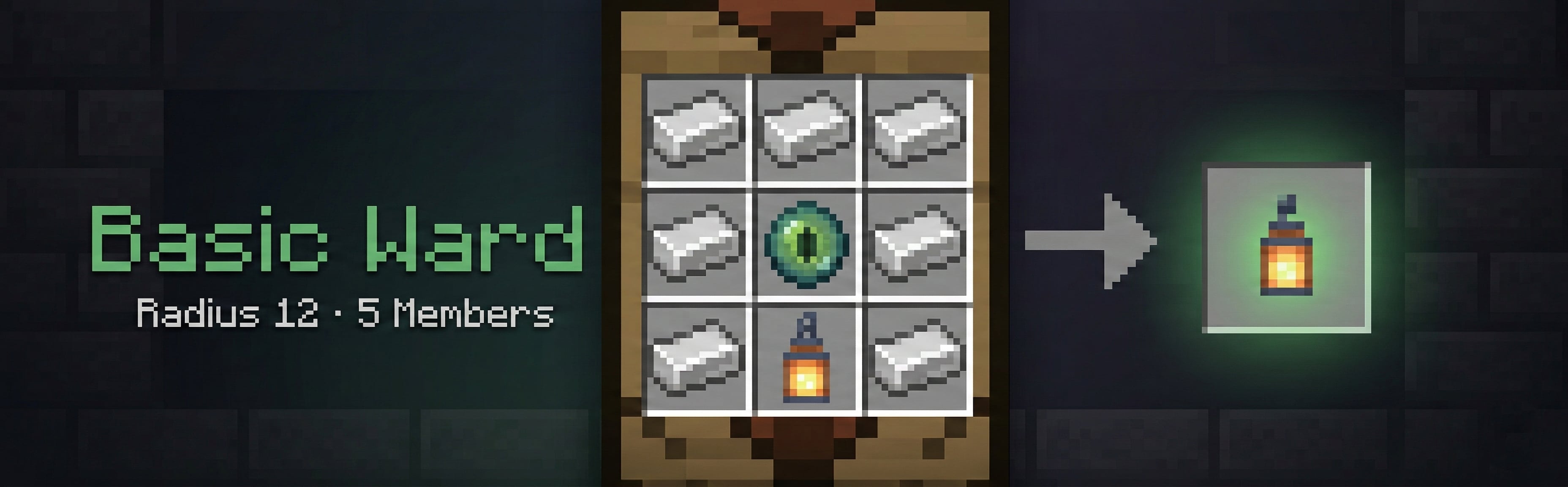
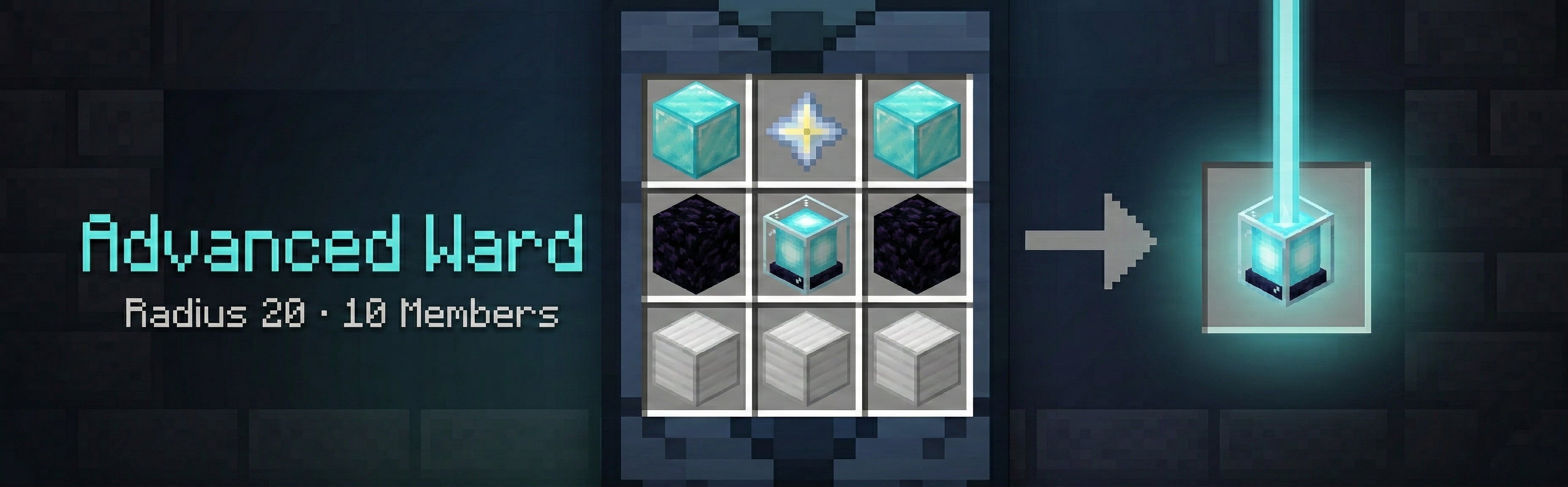
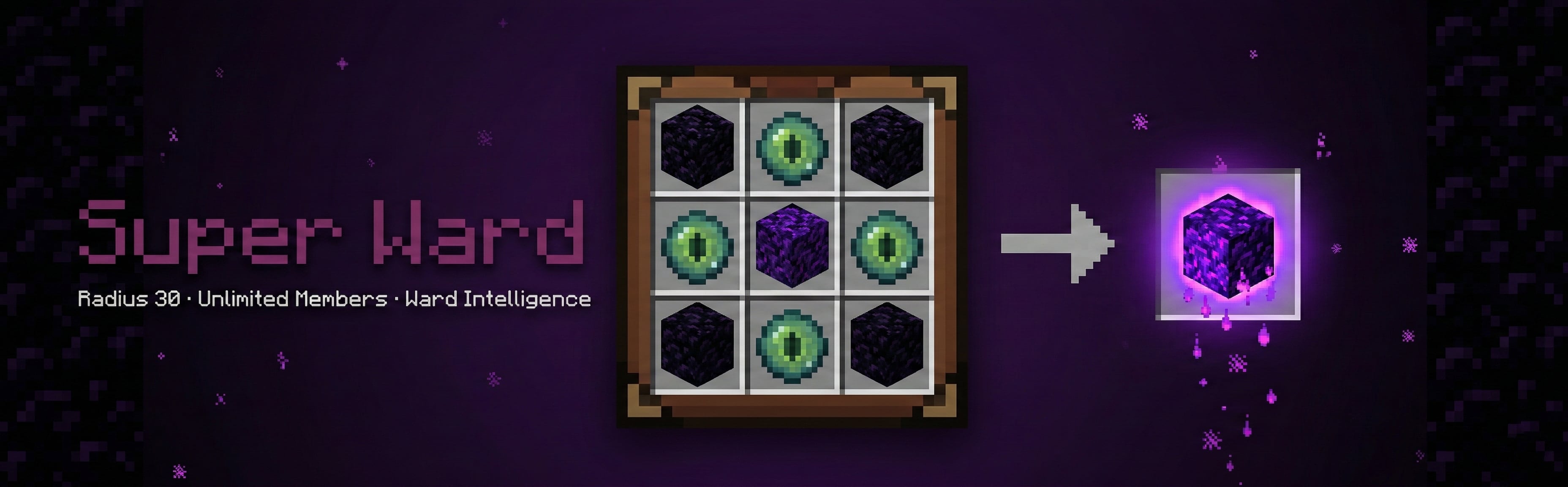
所有等级、配方、半径、价格和成员上限均可在 config.yml 中进行完全配置。服务器管理员可以自由添加或重命名等级。
保护机制
在护盾范围内,以下行为对非成员被禁止(所有选项均可在 config.yml 中单独切换):
| 类别 |
配置键 |
备注 |
| 放置方块 |
block_place |
|
| 破坏方块 |
block_break |
|
| 方块交互 |
interact |
按钮、箱子、门等。访客信任级别的成员仍可交互——见信任等级 |
| 爆炸 |
explosion |
苦力怕、TNT 等 |
| 火焰蔓延 |
fire |
|
| 活塞推拉 |
piston |
方块无法被推入或拉出护盾边界 |
| 实体破坏 |
entity_grief |
末影人、蠹虫、凋灵、劫掠兽及其他具有破坏性的生物无法改变方块 |
| 流体流动 |
fluid_flow |
岩浆和水无法从外部流入护盾内 |
| 悬挂实体 |
hanging |
物品展示框和画作受到保护,非成员无法操作 |
| PVP |
pvp |
外部人员无法攻击护盾内的玩家。单护盾覆盖设置:允许 PVP 标志 |
| 实体伤害 |
entity_damage |
外部人员无法伤害护盾内的动物或生物。单护盾覆盖设置:允许生物伤害 标志 |
| 作物踩踏 |
crop_trample |
非成员无法踩踏农田 |
| 桶倾倒 |
bucket_pour |
非成员无法将岩浆桶或水桶内的液体倒在护盾内 |
| 实体放置 |
entity_place |
非成员无法放置盔甲架、船只或矿车 |
| 载具破坏 |
vehicle_destroy |
非成员无法损坏或摧毁护盾内的载具 |
| 方块传播 |
block_spread |
火焰、深暗植被、藤蔓等无法从外部 蔓延进 护盾内 |
护盾所有者和所有已添加的成员不受任何限制。拥有 wards.admin 权限的玩家可绕过所有限制。
护盾不能重叠——如果新护盾的半径与现有护盾相交,则禁止放置,以确保保护区域明确无误。
信任等级
当向护盾添加成员时,他们会获得一个 信任等级,用于控制他们在护盾内能执行的操作:
| 等级 |
允许操作 |
禁止操作 |
| 成员 (默认) |
建造、破坏方块、使用所有物品 |
— |
| 访客 |
打开门、箱子、按钮、容器 |
放置或破坏方块、使用桶 |
信任等级是在护盾 GUI 中的 管理成员 界面上为每个成员单独分配和更改的。点击成员的头像即可打开其信任子菜单并选择等级。更改立即生效。
可以在 config.yml (trust_levels.enabled: false) 中全局禁用信任等级强制执行,这将使访客的行为与成员完全相同。
护盾菜单
右键点击护盾方块会打开一个以护盾名称为标题的管理菜单。顶部的下界之星头部显示护盾的等级、半径、成员数量、位置和 ID。每个按钮都描述了其功能,并在有状态时显示当前状态,同时告知点击后的效果。菜单会根据点击者的身份自适应:
所有者 / 管理员视图 — 完整管理权限:
| 物品 |
操作 |
| 命名牌 — 重命名 |
为此护盾设置自定义名称(参见护盾名称部分) |
| 羽毛 — 入场消息 |
设置访客进入时看到的自定义消息。支持 & 颜色代码和 &#RRGGBB 十六进制颜色。占位符:%ward%, %owner%, %tier%, %radius%。输入 clear 可清除 |
| 铃铛 — 入场警报 |
开启/关闭此护盾的入场通知。开启时会发光 |
| 玩家头颅 — 成员 |
添加和移除成员并设置其信任等级 |
| 纸张 — 历史 |
关闭菜单并在聊天中显示最近 20 条入场日志条目 |
| 望远镜 — 显示半径 |
绘制持续 10 秒的紫色粒子边界。仅你自己可见;再次点击可重新启动 |
| 铁剑 — 允许 PVP |
单护盾开关,允许外部人员在护盾内进行 PVP。开启时会发光 |
| 骨头 — 允许生物伤害 |
单护盾开关,允许外部人员伤害护盾内的动物/生物。开启时会发光 |
| 末影之眼 — 护盾智能 |
(仅限超级护盾) 访问追踪系统功能 |
成员视图 — 只读访问权限:
| 物品 |
操作 |
| 纸张 — 历史 |
在聊天中查看最近 20 条入场日志条目 |
| 望远镜 — 显示半径 |
可视化护盾边界(仅你自己可见) |
聊天提示 — 重命名、入场消息和添加成员需要你输入聊天内容。输入 cancel 可取消;忽略的提示将在 60 秒后过期。如果你输入的内容被拒绝,提示将保持打开状态以便你重试。
领地名称 — 在领地菜单中点击 重命名 (Rename),然后在聊天栏输入名称;或者运行 /ward rename <name>,并在 60 秒内右键点击你拥有的领地方块。使用 /ward rename cancel 可取消待处理的命名操作。名称必须包含 1 到 32 个可见字符,不能包含空格,且在整个服务器范围内必须唯一。保留 & 颜色代码和 &#RRGGBB 十六进制颜色用于显示;但像 /ward tp <name> 这样的命令匹配名称时会忽略其颜色部分。重命名不会改变领地的永久 ID。
成员管理
在 成员 (Members) 界面中,每个当前成员都以玩家头颅的形式显示。点击 添加成员 (Add Member),然后在聊天栏输入玩家名称以添加某人(或使用 /ward addmember <player>)。添加时会检查领地的成员上限,当领地已满时该按钮会变灰。已经是成员的玩家可以再次被添加,领地所有者也不能重复添加。
点击头颅可打开 信任 (Trust) 子菜单。每个等级都列出了其权限和限制,当前等级会高亮发光:
- 访客 (Visitor) — 可以交互但不能建造或破坏
- 成员 (Member) — 完全访问权限(默认)
- 移除成员 (Remove Member) — 在确认窗口内连续点击两次(
pickup.confirm_ms,默认 5 秒)。无需按住 Shift 键点击,因此也适用于基岩版玩家
超级领地 — 领地智能
超级领地包含一个 领地智能 (Ward Intelligence) 菜单,其中有五个可独立切换的追踪功能:
| 功能 |
追踪内容 |
| 苦力怕警报 (Creeper Alert) |
当苦力怕在领地内爆炸时通知所有者 |
| 生物击杀玩家 (Mob Kills Player) |
记录并通知生物在领地内击杀玩家的事件 |
| 生物击杀实体 (Mob Kills Entity) |
记录生物在领地内击杀任何非玩家实体的事件 |
| 玩家死亡 (Player Death) |
记录领地内所有玩家的死亡事件 |
| 爆炸日志 (Explosion Log) |
记录领地内的所有爆炸事件 |
每个功能都有自己的子菜单,你可以在其中开启/关闭该功能(开启时高亮发光)、查看最近的日志(最近 20 条,显示在聊天栏中)或清除日志历史。清除日志 (Clear Logs) 与 查看日志 (View Logs) 分开设置,需要在确认窗口内点击两次,以防止误触导致历史记录被清空。所有数据都会持久化保存到数据库,并在领地被销毁时自动清除。
经济商店
如果安装了 Vault 并配置了经济插件(例如 EssentialsX),玩家可以直接使用 /ward shop 购买领地物品。每个领地会显示其价格、成员上限以及领地智能功能的数量,如果你买不起,会显示一条红线。每次点击购买一个领地,已购买的领地会与同等级的制作领地叠加。价格按等级在 config.yml 中设置。如果玩家的背包已满,购买的物品会掉落至脚下,确保永远不会丢失。
命令
| 命令 |
描述 |
/ward |
显示帮助信息 |
/ward shop |
打开领地商店(需要 Vault) |
/ward list [page] |
列出你的领地,包括名称、等级、世界和坐标(每页 8 个) |
/ward rename <name> |
在 60 秒内,右键点击你拥有的领地方块以赋予其该名称;/ward rename cancel 可中止操作 |
/ward who |
显示你所站立的领地的所有者以及你的访问级别 |
/ward tp <id|name> |
传送至你的某个领地 |
/ward compass [id|name] |
将指南针指向某个领地 |
/ward transfer <player> |
将你附近的领地转让给另一位玩家(对方必须接受) |
/ward transfer <id> <player> |
将特定领地转让给另一位玩家 |
/ward accept / /ward decline |
接受或拒绝待处理的领地转让请求 |
/ward addmember <player> |
向你的附近领地添加一名成员 |
/ward removemember <player> |
从你的附近领地移除一名成员 |
/ward info [id|name] |
显示附近或特定领地的信息 |
/ward nearby [radius] |
列出半径内的领地(默认 100 格,最大 500 格),按距离排序 |
/ward admin list [player] |
(管理员) 列出所有领地,可按玩家筛选 |
/ward admin delete <id|name> |
(管理员) 通过 ID 或名称删除领地 |
/ward admin tp <id|name> |
(管理员) 传送到任意领地 |
/ward admin stats |
(管理员) 显示领地总数、各世界的分布、成员数和所有者数量 |
/ward admin cleanup <days> |
(管理员) 预览并确认后删除所有者离线时间 ≥ N 天的领地 |
/ward admin migrate mysql |
(管理员) 将所有领地数据从 SQLite 复制到 MySQL |
/ward reload |
(管理员) 重新加载配置文件并重新注册配方 |
权限
| 节点 |
描述 |
wards.admin |
完全管理访问权限 — 绕过保护,删除任何领地 |
wards.place |
允许放置领地方块(默认:所有玩家为 true) |
wards.player.<N> |
限制玩家可拥有的领地数量(例如 wards.player.3) |
视觉效果与声音
粒子效果
- 环境粒子 (Ambient) — 每个领地方块上方漂浮着微弱的
END_ROD 效果,让你随时知道领地的位置(类型和间隔可配置)
- 放置爆发 (Placement burst) — 确认新领地已创建
- 拆除爆发 (Deletion burst) — 当领地方块被破坏或拾取时触发
- 范围预览 (Radius preview) — 点击“显示范围”按钮后,紫色粒子方块会显示你的领地边界,持续 10 秒
音效 (所有音效均可在 config.yml → sounds: 中配置,设置为 "" 可单独禁用)
| 键值 |
播放时机 |
ward_place |
放置领地方块时 |
ward_break |
领地方块被破坏/移除时 |
ward_pickup |
通过潜行+右键拾取领地时 |
entry_alert |
访客进入领地时 |
menu_click |
菜单按钮、切换开关以及双击确认中的第一次点击 |
menu_success |
菜单操作完成:购买成功、成员添加或移除、名称保存 |
menu_error |
菜单操作被拒绝:余额不足、无权限、输入无效 |
入口警告
当非成员进入领地时,他们会看到一个显示领地名称和所有者的操作栏通知。领地所有者可以通过领地菜单设置完全自定义的欢迎信息,支持 & 颜色代码和 &#RRGGBB 十六进制颜色。支持的占位符:%ward%、%owner%、%tier%、%radius%。访客警告可以在 config.yml 中全局切换。
领地指南针
/ward compass 将你的指南针设置为指向当前世界中最近的领地。指定 ID 或名称以定位特定领地。不需要特殊物品——背包中的任何指南针均可使用。
所有权转让
站在领地内时使用 /ward transfer <player> 可以将所有权转让给另一位玩家。使用 /ward transfer <id> <player> 可在任意位置发起转让。接收者必须在线并在 60 秒内接受(可通过 transfer.request_timeout_seconds 配置),方法是点击聊天中的 [ACCEPT] / [DECLINE] 按钮——或使用 /ward accept / /ward decline。在转让完成前会检查接收者的领地数量上限。管理员可瞬间完成转让,包括转让给离线玩家。
附近领地
/ward nearby [radius] 列出给定半径内的所有领地(默认 100 格,最大 500 格),按距离排序。显示每个领地的名称、等级、所有者和距离。
防滥用机制
- 领地物品不能用作合成材料
- 领地物品不能放入信标支付槽
- 领地不能与现有领地重叠放置
- 拾取领地方块需要二次确认(潜行+右键),在可配置的窗口期内(默认 5 秒)进行,以防止误操作
- 直接破坏领地方块也会返还领地物品,而不是掉落原始材料
- 移除成员或清除领地智能日志需要在同一窗口期内两次点击确认
- 领地菜单仅响应其自身槽位的点击;背包中的物品无法拖入或通过菜单购买
- MachinaWards 直接识别自己的菜单而非通过标题,因此其他插件的同名菜单不会受到影响
数据库
MachinaWards 将所有领地数据存储在数据库中。支持两种后端:
SQLite(默认 — 无需设置)
database:
  type: sqlite
数据存储在 plugins/MachinaWards/MachinaWards.db。
MySQL / MariaDB
database:
  type: mysql
  mysql:
    host: localhost
    port: 3306
    database: machinawards
    username: root
    password: ""
MySQL 驱动程序必须在类路径中可用。在切换之前,使用 /ward admin migrate mysql 将现有的 SQLite 数据复制到 MySQL。
配置参考
所有内容均可在 config.yml 中配置:
| 部分 |
键 |
默认值 |
描述 |
database |
type |
sqlite |
sqlite 或 mysql |
region |
shape |
column |
column(方形柱体,高度无限)或 cube(高度也受半径限制) |
worlds |
— |
[] |
允许放置领地的世界白名单。空 = 所有世界 |
height |
min_y / max_y |
-64 / 320 |
限制领地放置的高度范围 |
alerts |
enabled |
true |
入场警报的主开关 |
alerts |
cooldown_ms |
90000 |
同一入侵者在同一领地中警报之间的最小毫秒数 |
alerts |
title_format |
&6Ward alert |
领地所有者看到的标题 |
alerts |
actionbar_format |
&e%player% entered &f%ward% |
所有者/成员看到的操作栏文本 |
entry |
show_warning_to_visitor |
true |
向访客显示入场操作栏 |
entry |
warning_format |
&c⚠ Entering &f%ward% &c— owned by &f%owner% |
默认访客警告(每个领地可通过“入场消息”覆盖) |
pickup |
confirm_ms |
5000 |
潜行+右键拾取和两次点击菜单确认(移除成员、清除日志)的确认窗口期(毫秒) |
transfer |
request_timeout_seconds |
60 |
/ward transfer 报价的有效时间 |
protection |
(见上表) |
true |
各个保护类别的开关 |
trust_levels |
enabled |
true |
如果为 false,访客拥有完整的成员权限 |
members |
notify_on_add |
true |
添加玩家时通知他们 |
members |
notify_on_remove |
true |
移除玩家时通知他们 |
sounds |
ward_place, menu_click 等 |
(见上文) |
每个事件的声音效果,设为 "" 则禁用 |
particles |
enabled |
true |
切换环境领地粒子效果 |
particles |
type |
END_ROD |
Bukkit Particle 枚举名称 |
particles |
interval_ticks |
40 |
每次粒子脉冲之间的刻数 |
wards.<tier> |
display_name |
— |
带颜色代码的显示名称 |
wards.<tier> |
result_material |
— |
领地方块的 Bukkit 材质 |
wards.<tier> |
price |
— |
经济价格(需要 Vault) |
wards.<tier> |
radius |
— |
保护半径(格) |
wards.<tier> |
max_members |
— |
成员上限;-1 = 无限制 |
wards.<tier> |
features |
— |
为此等级启用的领地智能功能 ID 列表 |
wards.<tier> |
custom_recipe |
— |
用于合成配方的 3×3 材料名称列表 |
颜色支持:所有文本字段均接受 & 颜色代码和 &#RRGGBB 十六进制颜色。
依赖项
- Paper / Purpur 1.21 through 26.x — 一个 jar 包涵盖所有版本(1.21.x 服务器需 Java 21+,26.1+ 服务器需 Java 25+)
- 纯 Spigot 仅由旧版 v1.9.1 支持 — v2.x 使用随 Paper/Purpur 捆绑的 Adventure API
- Vault (可选) — 仅在启用经济商店时需要
- MySQL/MariaDB (可选) — 仅在选用 MySQL 数据库后端时需要
MachinaWards
Protect your builds with configurable land claim wards — no grief, no drama.
MachinaWards lets players place physical ward blocks to claim and protect an area. Members can be added by the owner, events are logged, and outsiders are stopped cold. Three tiers of wards scale from starter bases to high-value infrastructure.
How It Works
Craft a ward item and place it like any block. The block marks the center of your protected zone. Break it, or sneak+right-click it twice, to pick it back up — the ward item is returned to your inventory so you can relocate it any time.
Right-click the ward block to open the management menu.
Ward Tiers
| Tier |
Block |
Default Radius |
Member Limit |
Ward Intelligence |
| Basic |
Lantern |
12 blocks |
5 |
— |
| Advanced |
Beacon |
20 blocks |
10 |
— |
| Super |
Crying Obsidian |
30 blocks |
Unlimited |
Yes |
All tiers, recipes, radii, prices, and member limits are fully configurable in config.yml. Server operators can add or rename tiers freely.
Protection
Inside a ward the following are blocked for non-members (all individually toggleable in config.yml):
| Category |
Config key |
Notes |
| Block placing |
block_place |
|
| Block breaking |
block_break |
|
| Block interaction |
interact |
Buttons, chests, doors, etc. VISITOR trust members can still interact — see Trust Levels |
| Explosions |
explosion |
Creeper, TNT, etc. |
| Fire spread |
fire |
|
| Piston push/pull |
piston |
Blocks cannot be pushed or pulled across ward boundaries |
| Entity grief |
entity_grief |
Endermen, silverfish, Wither, Ravagers, and other griefing mobs cannot alter blocks |
| Fluid flow |
fluid_flow |
Lava and water cannot flow into a ward from outside |
| Hanging entities |
hanging |
Item frames and paintings are protected from non-members |
| PVP |
pvp |
Outsiders cannot attack players inside. Per-ward override: Allow PVP flag |
| Entity damage |
entity_damage |
Outsiders cannot damage animals or mobs inside. Per-ward override: Allow Mob Damage flag |
| Crop trampling |
crop_trample |
Non-members cannot trample farmland |
| Bucket pouring |
bucket_pour |
Non-members cannot pour lava or water buckets inside a ward |
| Entity placement |
entity_place |
Non-members cannot place armor stands, boats, or minecarts |
| Vehicle destruction |
vehicle_destroy |
Non-members cannot damage or destroy vehicles inside a ward |
| Block spread |
block_spread |
Fire, sculk, vines, etc. cannot spread into a ward from outside |
The ward owner and all added members bypass all restrictions. Players with wards.admin bypass everything.
Wards cannot overlap — placement is blocked if the new ward's radius intersects an existing one, keeping protection zones unambiguous.
Trust Levels
When adding a member to a ward, they receive a trust level that controls what they can do inside:
| Level |
Can Do |
Cannot Do |
| Member (default) |
Build, break blocks, use all items |
— |
| Visitor |
Open doors, chests, buttons, containers |
Place or break blocks, use buckets |
Trust levels are assigned and changed per-member from the Manage Members screen in the ward GUI. Click a member's skull to open their trust sub-menu and select a level. The change takes effect immediately.
Trust level enforcement can be disabled server-wide in config.yml (trust_levels.enabled: false), which makes Visitors behave identically to Members.
Ward Menu
Right-clicking the ward block opens a management menu titled with the ward's name. A Nether Star header at the top shows the ward's tier, radius, member count, location, and ID. Every button describes what it does, shows its current state where it has one, and tells you what a click will do. The menu adapts based on who is clicking:
Owner / Admin view — full management access:
| Item |
Action |
| Name Tag — Rename |
Set a custom name for this ward (see Ward names below) |
| Feather — Entry Message |
Set a custom message visitors see on entry. Supports & color codes and &#RRGGBB hex. Placeholders: %ward%, %owner%, %tier%, %radius%. Type clear to remove |
| Bell — Entry Alerts |
Turn entry notifications on/off for this ward. Glows while on |
| Player Head — Members |
Add and remove members and set their trust levels |
| Paper — History |
Closes the menu and shows the last 20 entry log entries in chat |
| Spyglass — Show Radius |
Draw a purple particle boundary for 10 seconds. Only you can see it; click again to restart it |
| Iron Sword — Allow PVP |
Per-ward toggle to allow outsiders to PVP inside this ward. Glows while on |
| Bone — Allow Mob Damage |
Per-ward toggle to allow outsiders to damage animals/mobs inside this ward. Glows while on |
| Ender Eye — Ward Intelligence |
(Super Ward only) Access the feature tracking system |
Member view — read-only access:
| Item |
Action |
| Paper — History |
View the last 20 entry log entries in chat |
| Spyglass — Show Radius |
Visualize the ward boundary (only you can see it) |
Chat prompts — Rename, Entry Message, and Add Member ask you to type in chat. Type cancel to back out; a prompt you ignore expires after 60 seconds. If what you typed is rejected, the prompt stays open so you can try again.
Ward names — Click Rename in the ward menu and type a name in chat, or run /ward rename <name> and right-click the ward block you own within 60 seconds. Use /ward rename cancel to abandon a pending selection. Names must have 1 to 32 visible characters, no spaces, and be unique across the server. & color codes and &#RRGGBB hex colors are kept for display; commands like /ward tp <name> match the name without its colors. Renaming keeps the ward's permanent ID.
Member Management
From the Members screen, each current member is shown as a player skull. Click Add Member and type a player name in chat to add someone (or use /ward addmember <player>). The ward's member limit is enforced at time of addition, and the button grays out when the ward is full. Players who are already members, and the ward owner, can't be added again.
Click a skull to open the Trust sub-menu. Each level lists what it can and cannot do, and the current one glows:
- Visitor — can interact but not build or break
- Member — full access (default)
- Remove Member — click it twice within the confirm window (
pickup.confirm_ms, default 5 seconds). No shift-click needed, so it works for Bedrock players too
Super Ward — Ward Intelligence
Super wards include a Ward Intelligence menu with five independently toggleable tracking features:
| Feature |
What It Tracks |
| Creeper Alert |
Alerts the owner when a creeper explodes inside the ward |
| Mob Kills Player |
Logs and alerts when a mob kills a player inside the ward |
| Mob Kills Entity |
Logs when a mob kills any non-player entity inside the ward |
| Player Death |
Logs every player death inside the ward |
| Explosion Log |
Logs all explosions inside the ward |
Each feature has its own sub-menu where you can toggle it on/off (it glows while on), view recent logs (last 20 entries, shown in chat), or clear the log history. Clear Logs sits apart from View Logs and takes two clicks within the confirm window, so a stray click can't wipe your history. All data is persisted to the database and wiped automatically when the ward is destroyed.
Economy Shop
If Vault is installed with an economy provider (e.g. EssentialsX), players can purchase ward items directly using /ward shop. Each ward shows its price, member limit, and number of Ward Intelligence features, with a red line if you can't afford it. Each click buys one ward, and bought wards stack with crafted ones of the same tier. Prices are set per tier in config.yml. If a player's inventory is full, purchased items drop at their feet so they are never lost.
Commands
| Command |
Description |
/ward |
Show help |
/ward shop |
Open the ward shop (requires Vault) |
/ward list [page] |
List your wards with names, tiers, worlds, and coords (8 per page) |
/ward rename <name> |
Within 60 seconds, right-click the ward block you own to give it that name; /ward rename cancel aborts |
/ward who |
Show who owns the ward you are standing in and your access level |
/ward tp <id|name> |
Teleport to one of your wards |
/ward compass [id|name] |
Point your compass at a ward |
/ward transfer <player> |
Offer your nearby ward to another player (they must accept) |
/ward transfer <id> <player> |
Offer a specific ward to another player |
/ward accept / /ward decline |
Accept or decline a pending ward transfer offer |
/ward addmember <player> |
Add a member to your nearby ward |
/ward removemember <player> |
Remove a member from your nearby ward |
/ward info [id|name] |
Show info about a nearby or specific ward |
/ward nearby [radius] |
List wards within radius blocks (default 100, max 500), sorted by distance |
/ward admin list [player] |
(admin) List all wards, optionally filtered by player |
/ward admin delete <id|name> |
(admin) Delete a ward by ID or name |
/ward admin tp <id|name> |
(admin) Teleport to any ward |
/ward admin stats |
(admin) Show total wards, per-world breakdown, members, and owner count |
/ward admin cleanup <days> |
(admin) Preview, then confirm-delete wards of owners offline ≥ N days |
/ward admin migrate mysql |
(admin) Copy all ward data from SQLite to MySQL |
/ward reload |
(admin) Reload config and re-register recipes |
Permissions
| Node |
Description |
wards.admin |
Full administrative access — bypass protection, delete any ward |
wards.place |
Allows placing ward blocks (default: true for all players) |
wards.player.<N> |
Cap how many wards a player can own (e.g. wards.player.3) |
Visual & Sound Effects
Particles
- Ambient — a subtle
END_ROD effect floats above each ward block so you always know where your wards are (configurable type and interval)
- Placement burst — confirms a new ward was created
- Deletion burst — fires when a ward is broken or picked up
- Radius preview — purple particle square shows your claim boundary for 10 seconds via the Show Radius button
Sounds (all configurable in config.yml → sounds:, set to "" to disable individually)
| Key |
When It Plays |
ward_place |
Ward block is placed |
ward_break |
Ward is broken/removed |
ward_pickup |
Ward is picked up via sneak+right-click |
entry_alert |
Visitor enters a ward |
menu_click |
Menu buttons, toggles, and the first click of a two-click confirm |
menu_success |
A menu action completed: purchase, member added or removed, name saved |
menu_error |
A menu action was refused: can't afford, no permission, invalid input |
Entry Warnings
When a non-member enters a ward they see an action bar notification showing the ward name and owner. The ward owner can set a fully custom entry message from the ward menu with & color codes and &#RRGGBB hex colors. Supported placeholders: %ward%, %owner%, %tier%, %radius%. The visitor warning can be toggled globally in config.yml.
Ward Compass
/ward compass sets your compass to point at your nearest ward in the current world. Specify an ID or name to target a specific ward. No special item required — any compass in your inventory works.
Ownership Transfer
/ward transfer <player> while standing in a ward offers ownership to another player. Use /ward transfer <id> <player> to offer from anywhere. The recipient must be online and accept within 60 seconds (configurable via transfer.request_timeout_seconds) using the clickable [ACCEPT] / [DECLINE] chat buttons — or /ward accept / /ward decline. The recipient's ward limit is checked before the transfer completes. Admins transfer instantly, including to offline players.
Nearby Wards
/ward nearby [radius] lists all wards within the given radius (default 100 blocks, max 500), sorted by distance. Shows each ward's name, tier, owner, and distance.
Anti-Abuse
- Ward items cannot be used as crafting ingredients
- Ward items cannot be inserted into beacon payment slots
- Wards cannot be placed overlapping an existing ward
- Picking up a ward block requires a second sneak+right-click confirmation within a configurable window (default 5 seconds) to prevent accidents
- Breaking the ward block directly also returns the ward item instead of dropping the raw material
- Removing a member or clearing Ward Intelligence logs takes two clicks within the same window
- Ward menus only respond to clicks on the menu's own slots; items in your own inventory can't be dragged into or bought through a menu
- MachinaWards recognizes its own menus directly rather than by title, so another plugin's menu with the same name is never affected
Database
MachinaWards stores all ward data in a database. Two backends are supported:
SQLite (default — no setup required)
database:
  type: sqlite
Data is stored in plugins/MachinaWards/MachinaWards.db.
MySQL / MariaDB
database:
  type: mysql
  mysql:
    host: localhost
    port: 3306
    database: machinawards
    username: root
    password: ""
The MySQL driver must be available on the classpath. Use /ward admin migrate mysql to copy existing SQLite data to MySQL before switching.
Configuration Reference
Everything is configurable in config.yml:
| Section |
Key |
Default |
Description |
database |
type |
sqlite |
sqlite or mysql |
region |
shape |
column |
column (square column, unlimited height) or cube (height also limited by radius) |
worlds |
— |
[] |
Whitelist of worlds where wards can be placed. Empty = all worlds |
height |
min_y / max_y |
-64 / 320 |
Restrict ward placement to a height range |
alerts |
enabled |
true |
Master toggle for entry alerts |
alerts |
cooldown_ms |
90000 |
Minimum ms between alerts for the same intruder in the same ward |
alerts |
title_format |
&6Ward alert |
Title shown to ward owner on entry |
alerts |
actionbar_format |
&e%player% entered &f%ward% |
Action bar text shown to owner/members |
entry |
show_warning_to_visitor |
true |
Show the entry action bar to the visitor |
entry |
warning_format |
&c⚠ Entering &f%ward% &c— owned by &f%owner% |
Default visitor warning (overridden per-ward by Entry Message) |
pickup |
confirm_ms |
5000 |
Confirmation window in ms for sneak+right-click pickup and two-click menu confirms (Remove Member, Clear Logs) |
transfer |
request_timeout_seconds |
60 |
How long a /ward transfer offer stays valid |
protection |
(see table above) |
true |
Individual protection category toggles |
trust_levels |
enabled |
true |
If false, Visitors have full Member access |
members |
notify_on_add |
true |
Notify players when they are added to a ward |
members |
notify_on_remove |
true |
Notify players when they are removed from a ward |
sounds |
ward_place, menu_click etc. |
(see above) |
Sound effect per event, "" to disable |
particles |
enabled |
true |
Toggle ambient ward particles |
particles |
type |
END_ROD |
Bukkit Particle enum name |
particles |
interval_ticks |
40 |
Ticks between each particle pulse |
wards.<tier> |
display_name |
— |
Display name with color codes |
wards.<tier> |
result_material |
— |
Bukkit material for the ward block |
wards.<tier> |
price |
— |
Economy price (requires Vault) |
wards.<tier> |
radius |
— |
Protection radius in blocks |
wards.<tier> |
max_members |
— |
Member cap; -1 = unlimited |
wards.<tier> |
features |
— |
List of Ward Intelligence feature IDs to enable for this tier |
wards.<tier> |
custom_recipe |
— |
3×3 list of material names for the crafting recipe |
Color support: all text fields accept & color codes and &#RRGGBB hex colors.
Dependencies
- Paper / Purpur 1.21 through 26.x — one jar covers all versions (Java 21+ for 1.21.x servers, Java 25+ for 26.1+ servers)
- Plain Spigot is supported only by legacy v1.9.1 — v2.x uses the Adventure API bundled with Paper/Purpur
- Vault (optional) — required only for the economy shop
- MySQL/MariaDB (optional) — only if using the MySQL database backend


 插件

 插件
 插件
 插件
 插件
 插件
评论 0
登录后参与评分
还没有评论,来抢沙发吧