WarpMarkers Bukkit 插件

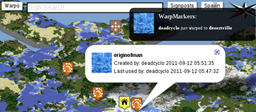
此插件会生成一个 JSON 文件,其中包含来自 Essentials Bukkit 插件的传送点(Warppoints)位置信息,供各种 Minecraft 地图制作软件使用。在地图上点击标记时,将显示以下信息:传送点的名称、创建者及其创建时间、最后使用者及其使用时间。此外,WarpMarkers 还会在地图上实时显示任何与传送点相关的事件消息(可关闭)。该项目包含了所有必需的文件以及用于 Minecraft Overviewer 地图生成器的安装说明。所显示的事件包括:创建传送点、使用传送点和删除传送点。
使用 WarpMarkers 的实时地图位于 mc.minecraftstuff.net
资源下载
安装步骤
- 下载 zip 压缩包
- 解压下载的 zip 文件
- 将 WarpMarkers.jar 文件放入你的插件文件夹中
- 停止并重新启动 Minecraft
- 首次运行时,WarpMarkers 将在你的插件文件夹中名为
WarpMarkers 的文件夹内生成所需的配置文件,其中包含默认值(默认情况下,JSON 文件将输出到 <minecraft_server_working_directory>/world/ 目录下)
- 如需更改设置,请参阅下方的配置部分
配置说明
以下用于配置插件本身的选项位于 <pluginfolder>/WarpMarkers/config.yml 文件中:
- interval(默认值 3000):插件检查是否需要生成新输出文件的频率(以毫秒为单位)
- outputFile(默认值 world/warpmarkers.json):包含所有传送点标记的 JSON 文件的位置
- updateFile:(默认值 world/warpupdates.json):包含传送点标记更新信息的 JSON 文件的位置
- updateLife:(默认值 50000):更新信息在更新 JSON 文件中保留的最短时间(以毫秒为单位)。注意,此值必须高于 JavaScript 文件中设置的刷新值
以下用于配置插件与地图交互方式的选项位于 WarpMarkers.js 文件中(有关该文件的更多信息,请参阅设置部分):
- refreshrate(默认值 5000):脚本检查更新的频率(以毫秒为单位),该值必须低于 config.yml 文件中设置的 updateLife 值
- show_notifications(默认值 true):将此值设为 false 以关闭所有通知(事件、开始、停止)
- marker_image(默认值 "cropcircles.png"):用于标记的图片文件
- markershadow(默认值 "markershadow.png"):用于标记阴影的图片文件
- warp_icon(默认值 "warp.jpg"):在弹出窗口和通知中显示的图标
- onbydefault(默认值 true):确定传送点是否在地图渲染完成后立即显示,还是仅在用户点击按钮后显示。
- warpmarkers_file(默认值 "warpmarkers.json"):主传送点标记 JSON 文件的位置
- warpupdates_file(默认值 "warpupdates.json"):传送点标记更新 JSON 文件的位置
Minecraft Overviewer 设置
- 执行安装(见上文)
- 编辑
<minecraftpluginfolder>/WarpMarkers/config.yml,使 warpmarkers.json 文件放置在与你的 Minecraft Overviewer 输出相同的文件夹中。或者,在 GNU/Linux 系统上,无需编辑 config.yml,而是创建一个符号链接。如果你更改了文件名,必须在 WarpMarkers.js 文件中反映该更改。
- 编辑
<minecraftpluginfolder>/WarpMarkers/config.yml,使 warpupdates.json 文件放置在与你的 Minecraft Overviewer 输出相同的文件夹中。或者,在 GNU/Linux 系统上,无需编辑 config.yml,而是创建一个符号链接。如果你更改了文件名,必须在 WarpMarkers.js 文件中反映该更改。
- 停止 Minecraft
- 启动 Minecraft
- 将
web_assets 文件夹中的所有文件和文件夹复制到你的 Minecraft Overviewer 所使用的 web_assets 文件夹中。
-
在你使用的 Minecraft Overviewer 的 web_assets 文件夹中的 index.html 文件里添加以下三行代码。将它们直接添加到 </head> 标签之前:
<link rel="stylesheet" type="text/css" href="css/gritter.css" /><script type="text/javascript" src="js/jquery.gritter.js"></script><script type="text/javascript" src="WarpMarkers.js"></script>
-
在同一个文件中,将 ;warpmarkers.init(); 添加到 body 的 onload 中。也就是说,用 <body onload="overviewer.util.initialize();warpmarkers.init();"> 替换 <body onload="overviewer.util.initialize()">
- 运行 Minecraft Overviewer,一切应该就能正常工作了。
Pigmap 的设置方法
待补充。即将推出。
版本历史
-
2011年9月15日 - 版本 - 1.0.2
- 修复了启动时如果 Essentials 未运行,WarpMarkers 仍然无法卸载的问题(改为监听 Essentials)。
-
2011年9月13日 - 版本 - 1.0.1
- 在生成事件前检查权限。这避免了用户没有正确权限时触发虚假事件。
- 在生成事件前检查命令是否已在 Essentials 配置中被禁用。这避免了用户尝试使用被禁用的命令时触发虚假事件。
- 如果 Essentials 未运行,WarpMarkers 现在会等待其(可能)在未来某个时间点启动,而不是报错失败。
- 当 Essentials 被禁用和启用时,现在会暂停和恢复。
-
2011年9月12日 - 版本 1.0.0
已知问题
- 我们无法确定是在 Essentials 插件之前还是之后接收到玩家与告示牌交互的事件。这意味着我们无法检查用户是否有足够的积分 如果 传送告示牌的使用需要消耗积分。这可能导致没有足够积分的用户点击告示牌时,地图上显示虚假事件。
计划
- 添加文件和使用 WarpMarkers 配合 Pigmap 以及其他地图软件的说明
- 添加对 Warpx0r 和其他类似插件的支持
- 实现 /setwarpdiscription(带权限),将在地图上显示
构建
- 解压 zip 文件 或克隆该项目(
git clone git@github.com:deadcyclo/WarpMarkers.git)
- 创建一个名为 lib 的子目录
- 下载 Craftbukkit .jar 文件并将其放入 lib 目录
- 如果文件名不同,将其重命名为
craftbukkit-0.0.1-SNAPSHOT.jar
- 下载 Essentials .jar 文件并将其放入 lib 目录
- 如果文件名不同,将其重命名为
Essentials.jar
- 下载 JSON simple .jar 文件并将其放入 lib 目录
- 如果文件名不同,将其重命名为
json_simple-1.1.jar
- 为项目创建 plugin.yml 文件
- 在根目录下运行
make(或 make WarpMarkers.jar 或 make WarpMarkers.zip)
贡献代码
- Fork 该项目。
- 创建一个分支(
git checkout -b my_project)
- 提交你的更改(
git commit -am "Added Something")
- 推送到该分支(
git push origin my_project)
- 创建一个 [Issue][1] 并附上你分支的链接
- 享受一杯或十杯咖啡,然后等待
使用的外部项目
通知功能使用了 Jordan Boesch 的 gritter jQuery 插件
地图标记(cropcircles.png)来自 Nicolas Mollet 的 Map 图标集合项目
WarpMarkers 图标 warp.jgp 是对 Torley Olmstead 这张图片 的重制版本
以下库也被使用:
WarpMarkers Bukkit Plugin
This plugin outputs a JSON file containing the locations of Warppoints from the Essentials Bukkit plugin for use with various Minecraft mapping software. When clicking on a marker on the map, the following information is shown: The name of the warppoint, who created it, and when, who last used it, and when. In addition WarpMarkers shows live messages for any Warppoint related event on the map (can be turned off). The project includes all of the files needed and installation instructions for the Minecraft Overviewer map generator. The events shown are: warppoint created, warppoint used and warppoint deleted.
A live map using WarpMarkers is found at mc.minecraftstuff.net
Resources
Installation
- Download the zip-file
- Unzip the downloaded zip-file
- Put the WarpMarkers.jar file in your plugin folder
- Stop and start Minecraft
- On first run, WarpMarkers will generate the configuration files needed in a folder called
WarpMarkers in your plugin folder containing default values (by default it will output the JSON files to <minecraft_server_working_directory>/world/
- To change see the configuration section below
Configuration
The following configuration options for configuring the plugin itself are available in the <pluginfolder>/WarpMarkers/config.yml file:
- interval (default 3000) how often (in miliseconds) the plugin should check if a new output file needs to be generated
- outputFile (default world/warpmarkers.json) the location of the json file to contain all of the warpmarkers
- updateFile: (default world/warpupdates.json) the location of the json file to contain updates to the warpmarkers
- updateLife: (default 50000) the (shortest) amount of time (in miliseconds) an update should remain in the update json file. Note that this value MUST be higher than the refresh-value set in the javascript-file
The following configuration options for configuring how the plugin interacts with the map are available in the WarpMarkers.js file (see the setup sections for more information about this file):
- refreshrate (default 5000) How often the script checks for an update in miliseconds, value MUST be lower than the updateLife-value set in the config.yml file
- show_notifications (default true) Set this to false to turn of all notifications (events, start, stop)
- marker_image (default "cropcircles.png") Image file used for markers
- markershadow (default "markershadow.png") Image file used for marker shadows
- warp_icon (default "warp.jpg") Icon showed in popups and notifications
- onbydefault (default true) Determines if warppoints should be shown on the map as soon as it renders, or only after the user clicks the button.
- warpmarkers_file (default "warpmarkers.json") The location of the main warpmarkers json file
- warpupdates_file (default "warpupdates.json") The location of the warpmarkers updates json file
Setup for Minecraft Overviewer
- Perform installation (see above)
- Edit
<minecraftpluginfolder>/WarpMarkers/config.yml so that the warpmarkers.json file is placed in the same folder as your Minecraft Overviewer output. Alternatively on GNU/Linux don't edit config.yml, make a symlink. If you change the name of the file, you must reflect said namechange in the WarpMarkers.js file.
- Edit
<minecraftpluginfolder>/WarpMarkers/config.yml so that the warpupdates.json file is placed in the same folder as your Minecraft Overviewer output. Alternatively on GNU/Linux don't edit config.yml, make a symlink. If you change the name of the file, you must reflect said namechange in the WarpMarkers.js file.
- Stop Minecraft
- Start Minecraft
- Copy all of the files and folders in the
web_assets folder to the web_assets folder your Minecraft Overviewer uses.
-
Add the following three lines to the index.html file in the web_assets folder your Minecraft Overviewer uses. Add them directly before the </head> tag:
<link rel="stylesheet" type="text/css" href="css/gritter.css" /><script type="text/javascript" src="js/jquery.gritter.js"></script><script type="text/javascript" src="WarpMarkers.js"></script>
-
In the same file, add ;warpmarkers.init(); to the bodies onload. In other words replace <body onload="overviewer.util.initialize()"> with <body onload="overviewer.util.initialize();warpmarkers.init();">
- Run Minecraft Overviewer and everything should work
Setup for Pigmap
TODO. Coming soon.
Version history
-
September 15 2011 - Version - 1.0.2
- Bug fix: WarpMarkers still unloaded if Essentials not running on start up instead of listening for Essentials.
-
September 13 2011 - Version - 1.0.1
- Checks permission before generating events. This avoids false events to be triggered if user doesn't have the correct permissions.
- Checks that command has not been disabled in Essentials config before generating events. This avoids false events to be triggered if user tries to use a disabled command.
- If Essentials not running, WarpMarkers will now wait for it to (possibly) start sometime in the future, instead of failing with an error message.
- Will now suspend and resume when Essentials is disabled and enabled.
-
September 12 2011 - Version 1.0.0
Known bugs
- We have no way of knowing if we get the event when a player interacts with a sign before or after the Essentials plugin. This means that we cannot check if the user has enough credits if the warp-sign costs credits to use. This can lead to false events being showed on the map when a user without enough credits clicks on the sign.
Planned
- Add files for, an instructions on, using WarpMarkers with Pigmap and perhaps other map software
- Add support for Warpx0r and other similar plugins
- Implement /setwarpdiscription (with permissions) that will show on map
Building
- Unzip the zip-file or clone the project (
git clone git@github.com:deadcyclo/WarpMarkers.git)
- Make a sub-directory named lib
- Download the Craftbukkit .jar file and put it in the lib directory
- If different, rename it to
craftbukkit-0.0.1-SNAPSHOT.jar
- Download the Essentials .jar file and put it in the lib directory
- If different, rename it to
Essentials.jar
- Download the JSON simple .jar file and put it in the lib directory
- If different, rename it to
json_simple-1.1.jar
- Create a plugin.yml file for the project
- In the top directory run
make (or make WarpMarkers.jar or make WarpMarkers.zip)
Contributing
- Fork it.
- Create a branch (
git checkout -b my_project)
- Commit your changes (
git commit -am "Added Something")
- Push to the branch (
git push origin my_project)
- Create an [Issue][1] with a link to your branch
- Enjoy a cup of coffee or ten and wait
External projects used
Notifications use gritter jQuery plugin by Jordan Boesch
The map marker (cropcircles.png) is from the Map Icons Collection project by Nicolas Mollet
The WarpMarkers icon warp.jgp is a remake of this image by Torley Olmstead
The following libraries where also used:

 插件
 插件
 插件
 插件

 插件
 插件
评论 0
登录后参与评分
还没有评论,来抢沙发吧