
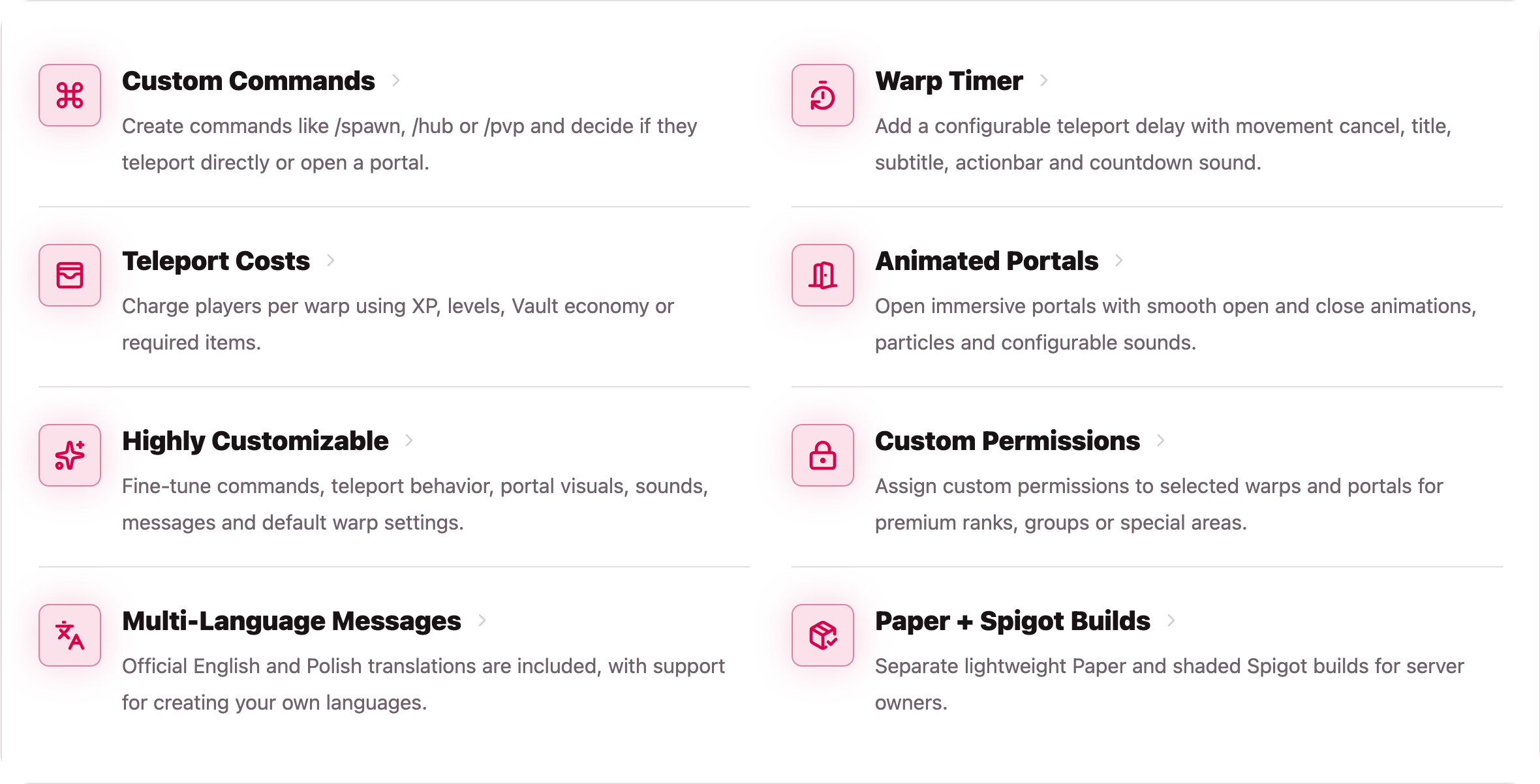
WarpPortals 专为那些希望传送体验更加刻意、可配置且精致的服务器而设计,而非仅仅作为一个即时的传送指令。
你可以保留经典的 /warp 行为,将传送点转化为动画化的门户旅行,或者根据指令、传送点名称、玩家权限或服务器区域混合使用这两种风格。
| 适用场景 |
适配原因 |
| 出生点和大厅传送 |
创建如 /spawn 和 /hub 这样简洁的快捷方式。 |
| VIP 专属目的地 |
通过自定义权限保护单个传送点。 |
| 经济类服务器 |
对直接传送、门户创建或两者同时收费。 |
| 生存类服务器 |
在传送前添加移动计时器(防止作弊)。 |
| RPG 和副本区域 |
当即时传送显得过于单调时,使用门户效果。 |
| 服务器网络 |
为不同的快捷方式配置不同的行为,无需编写额外的插件。 |
每个保存的传送点都会存储目标位置和玩家的朝向,确保玩家到达时面对的是你预设的方向。门户视觉效果、音效、计时、访问规则、提示信息以及费用均可从配置文件中进行调整。
门户功能预览

指令
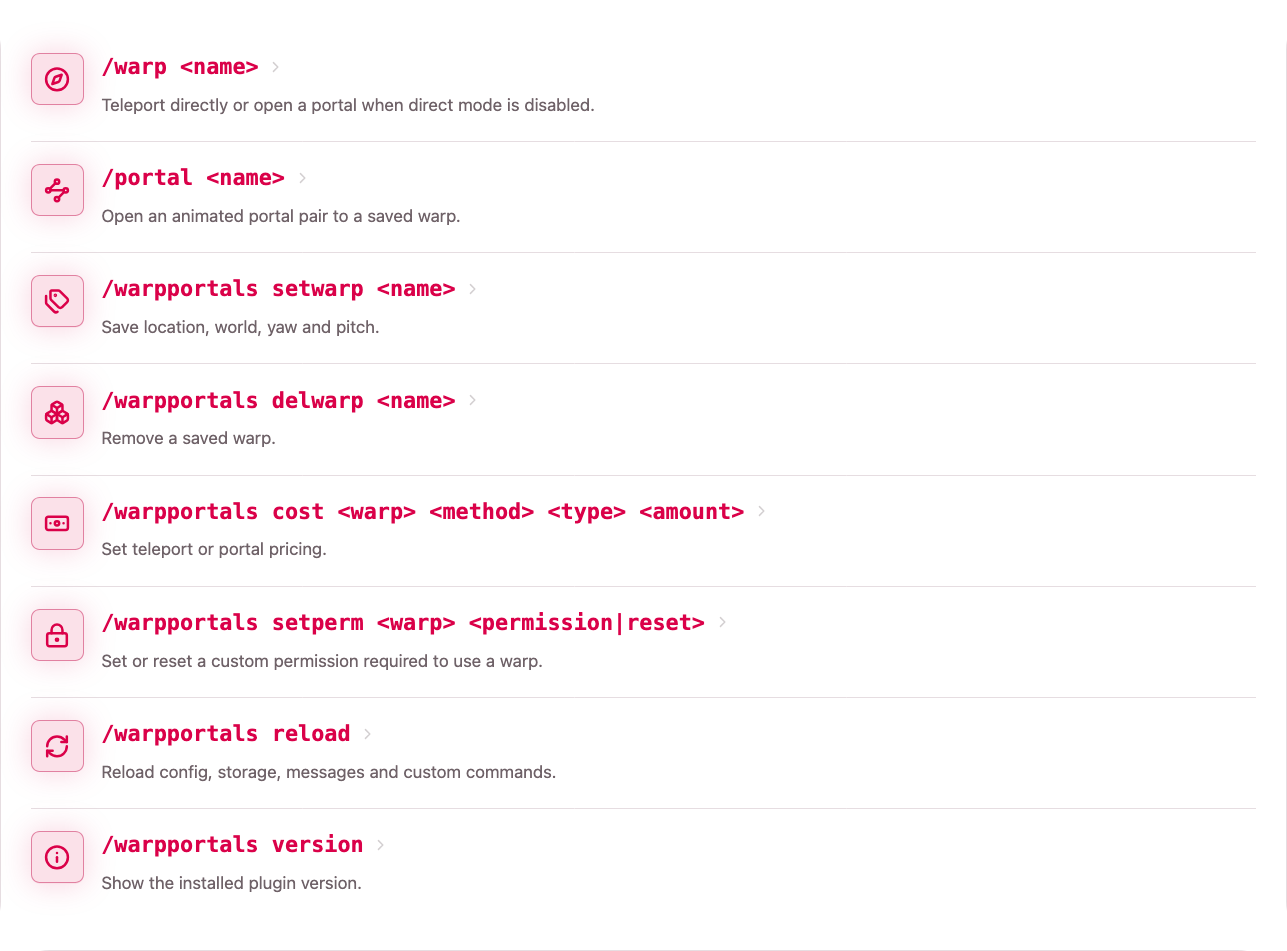
大多数服务器管理员会采用以下三种简单的工作流程:
| 工作流程 |
操作内容 |
| 玩家旅行 |
玩家使用 /warp <name> 进行直接传送,或使用 /portal <name> 进行门户传送。 |
| 传送点管理 |
管理员创建和删除已保存的目标位置。 |
| 访问控制与定价 |
管理员设置费用、自定义权限并重载插件。 |
如果在配置中禁用了直接传送功能,/warp <name> 将自动打开一个门户。
指令行为说明
玩家旅行
玩家使用 /warp <name> 进行常规传送,而在需要打开动画门户时使用 /portal <name>。
传送点管理
管理员站在目标位置并运行 /warpportals setwarp <name> 来创建传送点。插件会保存世界、坐标、偏航角(yaw)和俯仰角(pitch)。之后可以使用 /warpportals delwarp <name> 删除传送点。
访问控制与定价
管理员可以为直接传送和门户创建设置独立的价格。他们还可以为传送点附加自定义权限,这使得创建仅限特定等级使用的目的地变得容易,而无需创建多个命令别名或单独的配置部分。
编辑配置文件、存储数据、消息或自定义指令后,请使用 /warpportals reload 重载插件,无需重启服务器。
权限

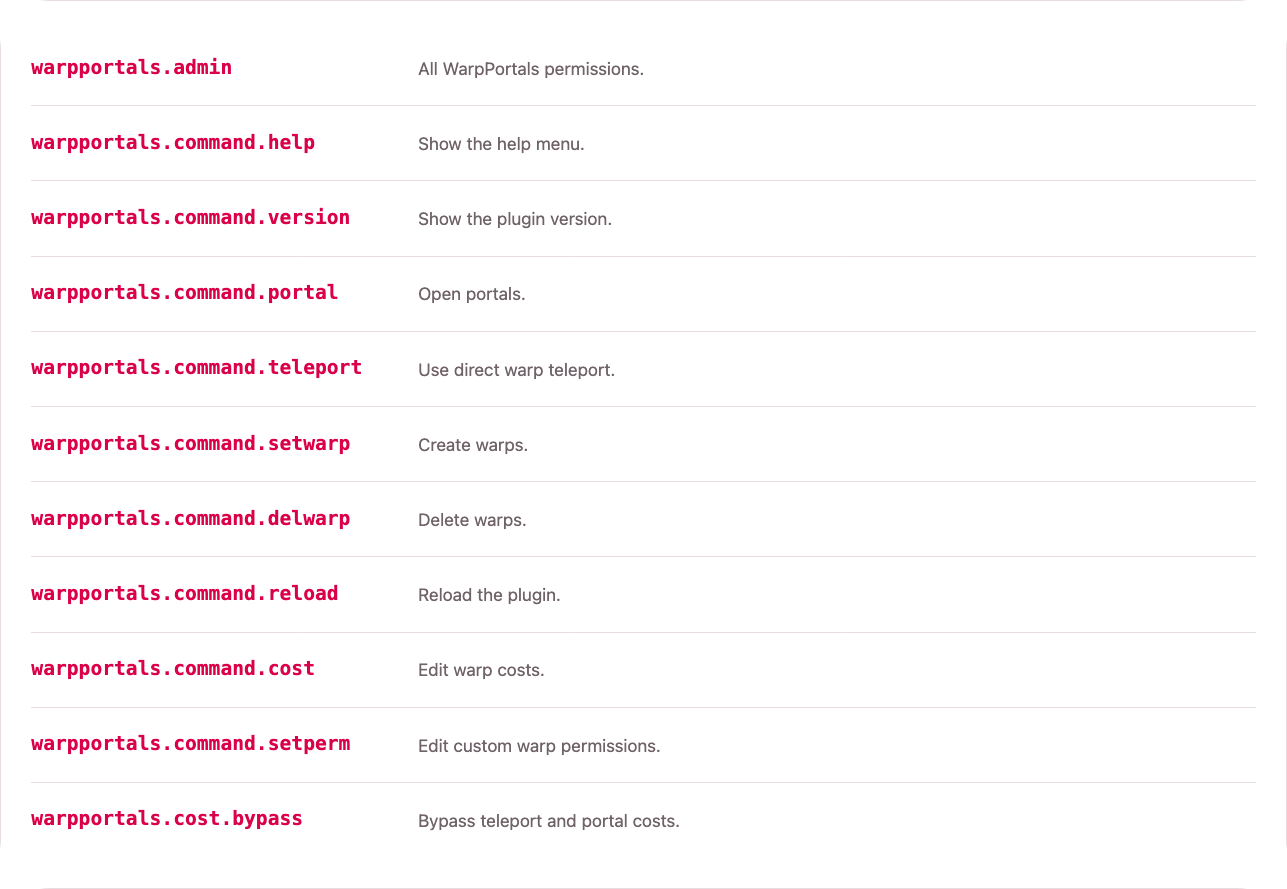
权限复制粘贴
| 权限名称 |
权限描述 |
| warpportals.admin |
所有 WarpPortals 权限。 |
| warpportals.command.help |
显示帮助菜单。 |
| warpportals.command.version |
显示插件版本。 |
| warpportals.command.portal |
打开门户。 |
| warpportals.command.teleport |
使用直接传送功能。 |
| warpportals.command.setwarp |
创建传送点。 |
| warpportals.command.delwarp |
删除传送点。 |
| warpportals.command.reload |
重载插件。 |
| warpportals.command.cost |
编辑传送点费用。 |
| warpportals.command.setperm |
编辑自定义传送点权限。 |
| warpportals.cost.bypass |
绕过传送和门户费用。 |
默认的权限设置故意保持简单:
| 用户组类型 |
建议权限 |
| 普通玩家 |
warpportals.command.teleport, warpportals.command.portal |
| VIP 玩家 |
普通玩家权限加上自定义传送点权限,例如 warpportals.warp.vip |
| 工作人员 |
用于创建、删除、定价和重载的管理员指令权限 |
| 受信任用户 |
如果他们应忽略费用,则赋予 warpportals.cost.bypass |
示例等级设置
default:
  warpportals.command.teleport
  warpportals.command.portal

vip:
  warpportals.command.teleport
  warpportals.command.portal
  warpportals.warp.vip

admin:
  warpportals.admin
自定义传送点权限并非硬编码。你可以使用任何你想要的权限字符串,然后通过你的权限插件进行分配。
配置
WarpPortals 使用三个主要的配置区域:
| 文件 |
用途 |
config.yml |
全局行为、门户、音效、计时器和自定义指令。 |
storage.yml |
已保存的传送点、传送点权限及每个传送点的费用。 |
messages/*.yml |
语言文件和 MiniMessage 格式的消息。 |
核心配置
全局传送设置
teleport:
  delay-seconds: 3
  cancel-on-move: true
  title: true
  actionbar: false
将 delay-seconds 设置为 0 以禁用计时器。任何大于 0 的值都会在传送前启用预热时间。
直接传送还是门户传送
commands:
  direct-warp-teleport: true
当此值为 true 时,/warp <name> 会直接传送。当此值为 false 时,/warp <name> 则会打开一个门户。
优化选项
optimizations:
  cache-warps: true
  shared-particle-scheduler: true
  portal-spatial索引: true
  cache-portal-calculations: true
  cache-settings: true
  cache-vault-provider: true
这些高级设置默认开启,适用于大多数服务器。仅在分析性能或特定服务器配置显示其他模式更有效时才更改它们。
门户设置
portal:
  protection-mode: block
  material: TINTED_GLASS
  width: 1.25
  height: 2.5
  distance-from-player: 1.5
  min-distance: 10
  animation-enabled: true
  use-display-transitions: true
  animation-ticks: 10
  hold-ticks: 60
portal.min-distance 用于防止玩家在与目的地过近时开启传送门。将其设置为 0 可禁用此检查。
portal.use-display-transitions 允许 Minecraft 客户端将每个显示实体从起始变换动画过渡到结束变换。仅在需要服务器端每秒更新的传统动画时才禁用它。
已保存的传送点示例
warps:
  vip:
    world: world
    x: 120.5
    y: 70.0
    z: -40.5
    yaw: 180.0
    pitch: 0.0
    permission: warpportals.warp.vip
    costs:
      teleport:
        enabled: true
        type: xp
        amount: 100
        item: DIAMOND
      portal:
        enabled: true
        type: item
        amount: 5
        item: DIAMOND
permission 字段是可选的。如果所有拥有传送点访问权限的玩家都可以使用该目的地,请留空。
费用类型
| 类型 |
含义 |
xp |
移除原始经验值点数。 |
level |
移除经验等级。 |
vault |
通过 Vault 经济系统移除货币。 |
item |
从玩家背包中移除物品。 |
none |
禁用费用。 |
传送费用和门户费用是分开计算的,因此开启传送门的定价可以与直接传送不同。
自定义命令示例
custom-commands:
  spawn:
    aliases:
      - hub
    warp: spawn
    mode: direct
    delay-seconds: 0
    cooldown-seconds: 0
    message: ""
    cost:
      enabled: false
      type: xp
      amount: 0
      item: DIAMOND
对于即时或基于计时器的传送,请使用 mode: direct。当命令应开启传送门时,请使用 mode: portal。
语言
默认包含英语和波兰语:
language: en_us
language: pl_pl
您可以在 messages 文件夹中添加自己的语言文件。插件重载时,缺失的键会从英语文件中复制。
常见问题解答 (Q&A)
传送点创建与基本旅行
如何创建新的传送点?
站在玩家应该到达的位置并运行:
/warpportals setwarp spawn
插件会保存位置、世界、偏航角和俯仰角。
如何让 /warp 开启传送门而不是直接传送?
commands:
  direct-warp-teleport: false
重载后,/warp <name> 将开启一个传送门。
如何保持 /warp 为正常的传送命令?
commands:
  direct-warp-teleport: true
传送计时器
如何创建带有延迟的传送点?
设置全局延迟:
teleport:
  delay-seconds: 3
  cancel-on-move: true
玩家需要等待 3 秒才能直接传送。如果启用了 cancel-on-move,移动会取消传送。
如何禁用延迟?
teleport:
  delay-seconds: 0
VIP 和自定义权限
如何创建仅限 VIP 玩家使用的传送点?
创建传送点:
/warpportals setwarp vip
分配权限:
/warpportals setperm vip warpportals.warp.vip
然后将 warpportals.warp.vip 赋予你的 VIP 用户组。
如何移除传送点的 VIP 限制?
/warpportals setperm vip reset
如何手动编辑传送点的权限?
打开 storage.yml 并编辑:
warps:
  vip:
    permission: warpportals.warp.vip
使用空字符串表示无限制:
permission: ""
费用和经济学
如何对传送收取经验值费用?
/warpportals cost spawn teleport xp 100
如何对开启传送门收取经验值费用?
/warpportals cost spawn portal xp 100
如何对传送收取等级费用?
/warpportals cost spawn teleport level 10
如何对传送收取 Vault 货币费用?
/warpportals cost spawn teleport vault 20
必须安装 Vault 和经济插件。
如何对传送收取物品费用?
/warpportals cost spawn portal item 5 DIAMOND
这会在开启传送门时扣除 5 颗钻石。
如何移除费用?
/warpportals cost spawn teleport none 0
对于传送门费用:
/warpportals cost spawn portal none 0
如何让工作人员豁免所有费用?
赋予他们以下权限:
warpportals.cost.bypass
自定义命令
如何创建 /spawn 命令?
custom-commands:
  spawn:
    warp: spawn
    mode: direct
    delay-seconds: 0
如何让 /hub 也执行出生点传送?
custom-commands:
  spawn:
    aliases:
      - hub
    warp: spawn
    mode: direct
如何使特定快捷方式开启传送门?
custom-commands:
  dungeon:
    warp: dungeon
    mode: portal
之后玩家可以使用 /dungeon 来开启通往该传送点的传送门。
如何为自定义命令添加冷却时间?
custom-commands:
  spawn:
    warp: spawn
    mode: direct
    cooldown-seconds: 30
如何添加自定义成功消息?
custom-commands:
  spawn:
    warp: spawn
    mode: direct
    message: "<gray>Teleported to <#e23a6f>spawn<gray>."
仅传送门设置
如何使传送点只能通过传送门访问?
为玩家应使用的命令使用传送门模式:
自定义命令:
  地牢:
    传送: dungeon
    模式: 传送门
那么请不要给这些玩家授予 warpportals.command.teleport 权限,或者仅允许管理员直接使用 /warp 命令。
如何为某个用户组完全禁用传送门?
不要授予该用户组以下权限:
warpportals.command.portal
如果 /warp 配置为打开传送门,请确保仅对需要直接使用传送功能的用户组保留 commands.direct-warp-teleport: true。
传送门距离与保护
如何防止玩家在离目标过近的地方打开传送门?
portal:
  min-distance: 10
如果入口传送门距离目的地传送门小于 10 格,则无法打开。
如何禁用此距离检查?
portal:
  min-distance: 0
如何防止重复激活的传送门?
portal:
  protection-mode: block
当新传送门打开时,如何替换旧的传送门?
portal:
  protection-mode: replace
传送门通行规则
如何让传送门变为单向?
portal:
  teleport:
    one-way: true
如何允许所有人穿过传送门?
portal:
  teleport:
    only-owner: false
如何让传送门仅对创建者生效?
portal:
  teleport:
    only-owner: true
如何在创建者使用传送门后关闭它?
portal:
  teleport:
    close-after-owner-use: true
传送门视觉效果与计时
如何更改传送门大小?
portal:
  width: 1.25
  height: 2.5
  depth: 0.1875
如何更改入口传送门相对于玩家的显示距离?
portal:
  distance-from-player: 1.5
如何更改传送门动画速度?
portal:
  animation-enabled: true
  use-display-transitions: true
  animation-ticks: 10
将 animation-enabled 设置为 false 可使传送门立即出现和消失。animation-ticks 值越低速度越快,值越高速度越慢。
如何更改传送门保持开启的时间?
portal:
  hold-ticks: 60
20 ticks 等于 1 秒。
音效
如何禁用某种音效?
使用 none:
portal:
  sounds:
    open:
      sound: none
如何更改传送音效?
teleport:
  sounds:
    complete:
      sound: ENTITY_EXPERIENCE_ORB_PICKUP
      volume: 1.0
      pitch: 2.0
    cancel:
      sound: BLOCK_NOTE_BLOCK_BASS
      volume: 1.0
      pitch: 0.6
如何更改传送门音效?
portal:
  sounds:
    open:
      sound: BLOCK_PORTAL_TRIGGER
      volume: 0.7
      pitch: 1.6
    close:
      sound: BLOCK_PORTAL_TRAVEL
      volume: 0.4
      pitch: 1.8
重载与语言文件
如何重载插件?
/warpportals reload
重载会刷新配置文件、存储数据、消息提示和自定义命令。
如果配置文件或消息文件缺失会发生什么?
插件在启动或重载时会重新生成缺失的配置和消息文件。
我可以添加其他语言吗?
可以。创建一个类似以下的文件:
messages/de_de.yml
然后设置:
language: de_de
缺失的键将从英文文件中复制。
预期会有 Bug
我试图预见所有可能导致错误或 Bug 的情况,但独自测试可能会遗漏一些内容。如果您发现任何 Bug,请立即通过项目 GitHub 固定链接中的问题追踪器或我的 Discord 进行报告。
谢谢您 ❤️
如果您觉得这个插件有用、独特或仅仅是很酷,请考虑通过在 Modrinth 上关注该项目来支持我。如果您想提供更多支持,也可以查看我的 Ko-fi。每一份支持都激励我继续完善这个插件。
WarpPortals is designed for servers that want warp travel to feel intentional, configurable and polished instead of being just another instant teleport command.
You can keep classic /warp behavior, turn warps into animated portal travel, or mix both styles depending on the command, warp, rank or server area.
| Good for |
Why it fits |
| Spawn and hub travel |
Create clean shortcuts like /spawn and /hub. |
| VIP destinations |
Protect individual warps with custom permissions. |
| Economy servers |
Charge for direct teleporting, portal creation, or both. |
| Survival servers |
Add a no-move timer before teleporting. |
| RPG and dungeon areas |
Use portals when instant teleporting feels too flat. |
| Server networks |
Configure different behavior per shortcut without writing extra plugins. |
Every saved warp stores the destination position and player rotation, so players arrive facing the direction you prepared. Portal visuals, sounds, timing, access rules, messages and costs can all be adjusted from configuration files.
Portal Feature Preview
Commands
Most server owners will use three simple workflows:
| Workflow |
What you do |
| Player travel |
Players use /warp <name> for direct travel or /portal <name> for portal travel. |
| Warp management |
Admins create and remove saved destinations. |
| Access and pricing |
Admins set costs, custom permissions and reload the plugin. |
If direct warp teleport is disabled in config, /warp <name> automatically opens a portal instead.
Command behavior notes
Player Travel
Players use /warp <name> for normal warp travel and /portal <name> when they should open an animated portal.
Warp Management
Admins create warps by standing at the destination and running /warpportals setwarp <name>. The plugin saves the world, coordinates, yaw and pitch. Warps can be removed later with /warpportals delwarp <name>.
Access And Pricing
Admins can set separate prices for direct teleporting and portal creation. They can also attach a custom permission to a warp, which makes it easy to create rank-only destinations without making multiple command aliases or separate config sections.
After editing config, storage, messages or custom commands, use /warpportals reload to refresh the plugin without restarting the server.
Permissions
Permission Copy-Paste
| Permission name |
Permission description |
| warpportals.admin |
All WarpPortals permissions. |
| warpportals.command.help |
Show the help menu. |
| warpportals.command.version |
Show the plugin version. |
| warpportals.command.portal |
Open portals. |
| warpportals.command.teleport |
Use direct warp teleport. |
| warpportals.command.setwarp |
Create warps. |
| warpportals.command.delwarp |
Delete warps. |
| warpportals.command.reload |
Reload the plugin. |
| warpportals.command.cost |
Edit warp costs. |
| warpportals.command.setperm |
Edit custom warp permissions. |
| warpportals.cost.bypass |
Bypass teleport and portal costs. |
The default permission setup is intentionally simple:
| Group type |
Suggested permissions |
| Normal players |
warpportals.command.teleport, warpportals.command.portal |
| VIP players |
Normal player permissions plus custom warp permissions like warpportals.warp.vip |
| Staff |
Admin command permissions for creating, deleting, pricing and reloads |
| Trusted users |
warpportals.cost.bypass if they should ignore costs |
Example rank setup
default:
  warpportals.command.teleport
  warpportals.command.portal

vip:
  warpportals.command.teleport
  warpportals.command.portal
  warpportals.warp.vip

admin:
  warpportals.admin
Custom warp permissions are not hardcoded. You can use any permission string you want, then assign it through your permissions plugin.
Configuration
WarpPortals uses three main configuration areas:
| File |
Purpose |
config.yml |
Global behavior, portals, sounds, timers and custom commands. |
storage.yml |
Saved warps, warp permissions and per-warp costs. |
messages/*.yml |
Language files and MiniMessage-formatted messages. |
Essential configuration
Global Teleport Settings
teleport:
  delay-seconds: 3
  cancel-on-move: true
  title: true
  actionbar: false
Set delay-seconds to 0 to disable the timer. Any value above 0 enables the warmup before teleporting.
Direct Warp Or Portal Warp
commands:
  direct-warp-teleport: true
When this is true, /warp <name> teleports directly. When this is false, /warp <name> opens a portal instead.
Optimizations
optimizations:
  cache-warps: true
  shared-particle-scheduler: true
  portal-spatial-index: true
  cache-portal-calculations: true
  cache-settings: true
  cache-vault-provider: true
These advanced settings are enabled with defaults suitable for most servers. Change them only when profiling or a specific server setup shows that a different mode works better.
Portal Settings
portal:
  protection-mode: block
  material: TINTED_GLASS
  width: 1.25
  height: 2.5
  distance-from-player: 1.5
  min-distance: 10
  animation-enabled: true
  use-display-transitions: true
  animation-ticks: 10
  hold-ticks: 60
portal.min-distance prevents players from opening a portal when they are already too close to the destination. Set it to 0 to disable that check.
portal.use-display-transitions lets Minecraft clients animate each display entity from a start transform to an end transform. Disable it only when you need the legacy server-side animation updated every tick.
Saved warp example
warps:
  vip:
    world: world
    x: 120.5
    y: 70.0
    z: -40.5
    yaw: 180.0
    pitch: 0.0
    permission: warpportals.warp.vip
    costs:
      teleport:
        enabled: true
        type: xp
        amount: 100
        item: DIAMOND
      portal:
        enabled: true
        type: item
        amount: 5
        item: DIAMOND
The permission field is optional. Leave it empty if every player with warp access can use that destination.
Cost types
| Type |
Meaning |
xp |
Removes raw experience points. |
level |
Removes experience levels. |
vault |
Removes money through Vault economy. |
item |
Removes items from the player's inventory. |
none |
Disables the cost. |
Teleport and portal costs are separate, so opening a portal can be priced differently from using direct teleport.
Custom command example
custom-commands:
  spawn:
    aliases:
      - hub
    warp: spawn
    mode: direct
    delay-seconds: 0
    cooldown-seconds: 0
    message: ""
    cost:
      enabled: false
      type: xp
      amount: 0
      item: DIAMOND
Use mode: direct for instant or timer-based teleporting. Use mode: portal when the command should open a portal.
Languages
English and Polish are included by default:
language: en_us
language: pl_pl
You can add your own language file in the messages folder. Missing keys are copied from English when the plugin reloads.
Q&A
Warp creation and basic travel
How do I create a new warp?
Stand where players should arrive and run:
/warpportals setwarp spawn
The plugin saves the location, world, yaw and pitch.
How do I make /warp open portals instead of teleporting directly?
commands:
  direct-warp-teleport: false
After reload, /warp <name> will open a portal.
How do I keep /warp as a normal teleport command?
commands:
  direct-warp-teleport: true
Teleport timer
How do I create a warp with a delay?
Set the global delay:
teleport:
  delay-seconds: 3
  cancel-on-move: true
Players will need to wait 3 seconds before direct teleporting. If cancel-on-move is enabled, moving cancels the teleport.
How do I disable the delay?
teleport:
  delay-seconds: 0
VIP and custom permissions
How do I make a warp only for VIP players?
Create the warp:
/warpportals setwarp vip
Assign a permission:
/warpportals setperm vip warpportals.warp.vip
Then give warpportals.warp.vip to your VIP group.
How do I remove the VIP requirement from a warp?
/warpportals setperm vip reset
How do I manually edit a warp permission?
Open storage.yml and edit:
warps:
  vip:
    permission: warpportals.warp.vip
Use an empty string to make it unrestricted:
permission: ""
Costs and economy
How do I charge XP for teleporting?
/warpportals cost spawn teleport xp 100
How do I charge XP for opening a portal?
/warpportals cost spawn portal xp 100
How do I charge levels?
/warpportals cost spawn teleport level 10
How do I charge Vault money?
/warpportals cost spawn teleport vault 20
Vault and an economy plugin must be installed.
How do I charge items?
/warpportals cost spawn portal item 5 DIAMOND
This charges 5 diamonds when opening a portal.
How do I remove a cost?
/warpportals cost spawn teleport none 0
For portal costs:
/warpportals cost spawn portal none 0
How do I let staff bypass all costs?
Give them:
warpportals.cost.bypass
Custom commands
How do I create /spawn?
custom-commands:
  spawn:
    warp: spawn
    mode: direct
    delay-seconds: 0
How do I make /hub also run the spawn warp?
custom-commands:
  spawn:
    aliases:
      - hub
    warp: spawn
    mode: direct
How do I make a specific shortcut open a portal?
custom-commands:
  dungeon:
    warp: dungeon
    mode: portal
Players can then use /dungeon to open a portal to that warp.
How do I add a cooldown to a custom command?
custom-commands:
  spawn:
    warp: spawn
    mode: direct
    cooldown-seconds: 30
How do I add a custom success message?
custom-commands:
  spawn:
    warp: spawn
    mode: direct
    message: "<gray>Teleported to <#e23a6f>spawn<gray>."
Portal-only setups
How do I make a warp available only through a portal?
Use portal mode for the command players should use:
custom-commands:
  dungeon:
    warp: dungeon
    mode: portal
Then do not give those players warpportals.command.teleport, or keep direct /warp usage for staff only.
How do I disable portals completely for a group?
Do not give that group:
warpportals.command.portal
If /warp is configured to open portals, also keep commands.direct-warp-teleport: true for groups that should only use direct teleport.
Portal distance and protection
How do I stop players from opening a portal too close to the target?
portal:
  min-distance: 10
If the entrance portal would be closer than 10 blocks to the destination portal, it will not open.
How do I disable that distance check?
portal:
  min-distance: 0
How do I prevent duplicate active portals?
portal:
  protection-mode: block
How do I replace the old portal when a new one opens?
portal:
  protection-mode: replace
Portal travel rules
How do I make portals one-way?
portal:
  teleport:
    one-way: true
How do I allow everyone to walk through a portal?
portal:
  teleport:
    only-owner: false
How do I make portals work only for the creator?
portal:
  teleport:
    only-owner: true
How do I close portals after the creator uses them?
portal:
  teleport:
    close-after-owner-use: true
Portal visuals and timing
How do I change portal size?
portal:
  width: 1.25
  height: 2.5
  depth: 0.1875
How do I change how far the entrance portal appears from the player?
portal:
  distance-from-player: 1.5
How do I change the portal animation speed?
portal:
  animation-enabled: true
  use-display-transitions: true
  animation-ticks: 10
Set animation-enabled to false to make portals appear and disappear immediately. Lower animation-ticks values are faster, while higher values are slower.
How do I change how long portals stay open?
portal:
  hold-ticks: 60
20 ticks equals 1 second.
Sounds
How do I disable a sound?
Use none:
portal:
  sounds:
    open:
      sound: none
How do I change teleport sounds?
teleport:
  sounds:
    complete:
      sound: ENTITY_EXPERIENCE_ORB_PICKUP
      volume: 1.0
      pitch: 2.0
    cancel:
      sound: BLOCK_NOTE_BLOCK_BASS
      volume: 1.0
      pitch: 0.6
How do I change portal sounds?
portal:
  sounds:
    open:
      sound: BLOCK_PORTAL_TRIGGER
      volume: 0.7
      pitch: 1.6
    close:
      sound: BLOCK_PORTAL_TRAVEL
      volume: 0.4
      pitch: 1.8
Reloading and language files
How do I reload the plugin?
/warpportals reload
Reload refreshes config, storage, messages and custom commands.
What happens if config or message files are missing?
The plugin recreates missing config and message files on startup or reload.
Can I add another language?
Yes. Create a file such as:
messages/de_de.yml
Then set:
language: de_de
Missing keys will be copied from English.
EXPECT BUGS
I tried to anticipate every possible scenario that could cause errors or bugs, but testing it alone might have missed something. If you find a bug, PLEASE report it immediately to the issue tracker on the project's GitHub pin or on my Discord.
Thank you ❤️
If you find this plugin helpful, unique, or simply cool, please consider supporting me by following the project on Modrinth. If you’d like to offer even more support, you can also check out my Ko-fi. Every bit of support motivates me to keep working on this plugin.


 插件
 插件

 插件
 插件

 插件

 插件

评论 0
登录后参与评分
还没有评论,来抢沙发吧