Wavepoint
Wavepoint 是一款全新的、简洁的航点插件,旨在让 Minecraft 的游戏体验更加轻松。

命令
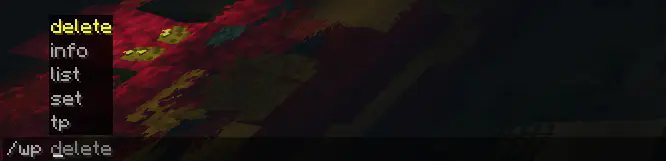
Wavepoint 使用单个命令 /wp 来管理航点:
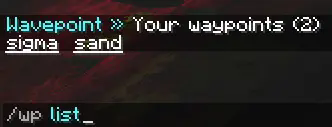
/wp list: 列出你当前拥有的所有航点
/wp set <name>: 在你当前位置设置一个航点
/wp tp <name>: 将玩家传送至其拥有的某个航点
/wp info <name>: 获取特定航点的信息
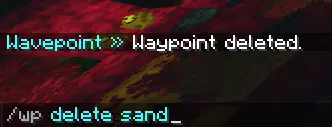
/wp delete <name>: 删除玩家拥有的某个航点
集成
Wavepoint 能够与部分插件集成以提供额外功能:
# 以下是可与其他插件集成的选项。
# 如果启用了集成,但未满足插件或依赖要求,则不会执行任何操作。
integrations:
vault: # | https://www.spigotmc.org/resources/vault.34315/
enabled: true # 是否启用与 Vault 的集成,用于经济功能。
charge_amount: 5 # 每次传送向用户收取的费用。
combatlogx: # | https://www.spigotmc.org/resources/combatlogx.31689/
enabled: true # 是否启用与 CombatLogX 的集成。
combat:
# false = 限制
set: false # 是否在战斗期间限制设置路点。false 表示限制。
teleport: false # 是否在战斗期间限制传送到路点。false 表示限制。
未来可能会添加更多集成。
权限
Wavepoint 提供了多种权限,可与 LuckPerms 等权限插件配合使用,以限制或约束用户可执行的操作,包括:
waypoint.wp: 允许使用主命令 /wp
waypoint.wp.tp: 允许使用 /wp tp
waypoint.wp.set: 允许使用 /wp set
waypoint.wp.list: 允许使用 /wp list
waypoint.wp.delete: 允许使用 /wp delete
waypoint.wp.info: 允许使用 /wp info
命令执行
Wavepoint 能够在玩家执行特定操作时执行控制台命令,支持两个占位符:
${player} 和 ${playerId}
可在 config.yml 文件中进行设置:
# 允许服务器在特定事件发生时执行命令。${player} 和 ${playerId} 是有效的占位符。
commands:
teleport:
- '' # 例如 kick ${player} No teleporting!
set:
- '' # 例如 say ${player} has set a waypoint!
list:
- '' # 例如 say Hey ${player}, what you looking at??
delete:
- '' # 例如 say Waypoint is now gone!
info:
- '' # 例如 say ${player} is really interested in this waypoint!
如需查看完整的 config.yml,请点击此处。
语言
Wavepoint 包含一个可随时修改的语言文件!你可以在插件文件夹下的 languages/en_us.yml 中找到它。
AI 使用情况
AI 主要在 Tab 补全方面提供了帮助(尽管我至今不知道如何关闭该功能)。
然而,它并未用于制作 Wavepoint 的大部分代码。大部分代码均为人工编写。
API
Wavepoint 确实提供了 API,你可以在此查看相关函数 here。
本项目采用 MIT License 授权。

Wavepoint
Wavepoint is a new, simplistic waypoint plugin designed to make playing Minecraft easier.

Commands
Wavepoint uses one command, /wp, to manage waypoints:

/wp list: Lists the current waypoints that you have
/wp set <name>: Sets a waypoint at your location
/wp tp <name>: Teleports the player to a waypoint they own
/wp info <name>: Get information about a specific waypoint
/wp delete <name>: Deletes a waypoint that the player owns
Integrations
Wavepoint has the ability to integrate with some plugins to provide extra functionality:
# Below are integrations that work with other plugins.
# If the integration is enabled, but the plugin or requirements aren't met, nothing will happen.
integrations:
vault: # | https://www.spigotmc.org/resources/vault.34315/
enabled: true # Whether to integrate with Vault, for economy purposes.
charge_amount: 5 # How much money to charge the user per teleport.
combatlogx: # | https://www.spigotmc.org/resources/combatlogx.31689/
enabled: true # Whether to integrate with CombatLogX.
combat:
# False = restricted
set: false # Whether to restrict setting waypoints during combat. false = restricted.
teleport: false # Whether to restrict teleporting to waypoints during combat. false = restricted.
More integrations may be added in the future.
Permissions
Wavepoint comes with a variety of permissions that can be used with a permissions plugin like LuckPerms to limit or restrict what users can do, those being:
waypoint.wp: Allows usage of the main /wp command
waypoint.wp.tp: Allows usage of /wp tp
waypoint.wp.set: Allows usage of /wp set
waypoint.wp.list: Allows usage of /wp list
waypoint.wp.delete: Allows usage of /wp delete
waypoint.wp.info: Allows usage of /wp info
Command Executions
Wavepoint has the ability to execute console commands if a player does a specific action, with two placeholders:
${player} and ${playerId}
This can be set in the config.yml file:
# Allows the server to execute a command on a specific event. ${player} and ${playerId} are valid placeholders.
commands:
teleport:
- '' # For example kick ${player} No teleporting!
set:
- '' # For example say ${player} has set a waypoint!
list:
- '' # For example say Hey ${player}, what you looking at??
delete:
- '' # For example say Waypoint is now gone!
info:
- '' # For example say ${player} is really interested in this waypoint!
If you would like to view the full config.yml, you can view it here.
Language
Wavepoint contains a language file that can be modified at any time! You can find it under languages/en_us.yml in the plugins folder.
AI Usage
AI mostly helped with Tab Completions (which I still don't know how to turn off).
However, it was not used to make the majority of Wavepoint. Most of the code is human-made.
API
Wavepoint does have an API, and you can check out the functions here.
This project is licensed under the MIT License.
评论 0
登录后参与评分
还没有评论,来抢沙发吧