Waypoints | Waypoints.Signs | Waypoints.Plates
点击上方链接可导航至其他模块
Waypoints.Signs
一个 Waypoints.Signs 模块
源代码位于
Sessional 的 GitHub 仓库
此模块需要 Waypoints v2.0 或更高版本才能正常工作!
概述
该模块允许 Waypoints(2.0 及以上版本)通过右键点击格式正确的告示牌来传送玩家。
历史
在我开始玩 Minecraft 不久后,我就开始开发 waypoints。我发现自己倾向于远离所有其他玩家,包括我的朋友。起初这很棒,但后来发现要与其他人见面和共享物品变得很繁琐。我所在的服务器有一个传送命令,但该命令输入起来很长,且需要两个名字。我并不反对这个命令,只是经常需要正确输入长达 12 个字符的名字很烦人。我开始在自己的小地方建造,发现让别人来访并查看我的建筑成果成了一项苦差事。我去拜访他们时也是如此。于是,waypoints 的想法由此诞生。
Waypoints 原本被设计为与“Permissions”模组配合使用,但在我的本地环境中进行测试时,由于我尚不清楚如何修改权限配置,因此需要使其在没有权限限制的情况下也能正常运行。简单来说,插件本身的机制让我感到困惑。我必须将数据保存为一种易于修复的格式,因为我并不清楚会遇到哪些 bug,而且很有可能需要手动修复存档文件。配置文件部分的代码主要是参照 Wiki 上的教程编写的,既然已经能够正常工作,也就没有必要再做改动。
理念
Waypoints 旨在满足玩家的需求,让那些可能被认为不太理想的部分——比如在广阔分散的世界中往返于朋友家——不再耗费太多时间。作为一名模组开发者和资深玩家,我深知自己的需求并不总是大多数人的需求,因此欢迎提出建议。某些功能可能不会很快被添加,对此我深表歉意,因为修改未经深思熟虑的代码确实很困难。在编写代码的过程中,我发现自己经常需要重写大量内容,这主要源于我是自学出身且缺乏耐心。修复和绕过 bug 非常重要,以确保用户体验不至于成为噩梦(这在更新时可能会发生)。对于单个用户在本地服务器上进行测试来说,情况并不总是那么容易。
告示牌格式
告示牌必须遵循特定格式才能与此插件正确配合使用。
作为传送点的告示牌
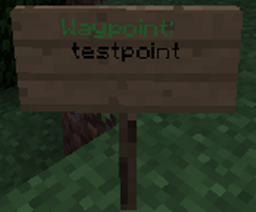
路标:
<destination>
<cost>
其中 <destination> 是你希望传送到的信标名称,
该信标必须已经作为信标创建过,而 cost 则是你希望为使用该告示牌设定的费用。留空则使用在信标设置中预设的默认费用。
将告示牌用作信标:
目的地:
<desiredWaypointName>
其中 <desiredWaypointName> 是你希望与告示牌关联的航点名称。该航点必须尚未创建。
权限
使用告示牌需要以下任一权限
waypoints.go
waypoints.signs.go
创建告示牌
waypoints.signs.create
删除告示牌
waypoints.signs.destroy
Waypoints | Waypoints.Signs | Waypoints.Plates
Click the links above to navigate to other modules
Waypoints.Signs
A Waypoints.Signs module
Source code available at
Sessional's GitHub Repository
This module requires Waypoints v2.0 or higher to work correctly!
Overview
This module allows Waypoints (version 2.0 and higher) to teleport the player around with a simple right click of a well formatted sign.
History
Development of waypoints started a little while after I began to play Minecraft. I found I had a tendency to wander far away from every other player, including my friends. While this was awesome at first, it eventually became tedious to meet up and share items with other people. The server I played on had access to a teleport command, but this command was long with requiring both names. I have nothing against the command, aside from the fact that 12 character names are annoying to type correctly often. I began building in my own little place and found that while it was great, for people to come visit me and see what I had built was a chore. This was mirrored in me visiting them to see what they had. Thus, waypoints was thought out.
Waypoints had to be designed to work with the “Permissions” mod, but to test it on my local environment it had to work with no permissions because I didn’t quite understand how to modify them. Simply, the plugin just confused me. I had to save it in a format that would be easy to fix because I didn’t quite know what bugs I was going to run into and there was a large chance I might have to hand fix the save files. Writing the code for the config file was largely clumped out of the tutorial on the wiki, and it worked, so why change it.
Philosophy
Waypoints is developed to meet players desires to make certain aspects of Minecraft that some may find undesirable such as trekking to and from friends houses in large, spread out, worlds less time consuming. As a mod developer and an avid gamer, I understand that what I want isn’t always what most people want and as such, suggestions are welcome, certain ones may not be added quickly, and I do apologize, but it becomes difficult to modify not well thought out code. As I write code I find myself rewriting it a lot because of poor planning. This comes largely from being self taught and impatient. Fixing and working around bugs is important to make sure that the user experience isn’t a nightmare which certainly may happen with updates. Testing is not always easy on a local server by a single user.
Sign Format
Signs must follow a specific format to work correctly with this plugin.
Signs as teleporters
Waypoint:
<destination>
<cost>
Where <destination> is the name of the waypoint you wish to teleport to,
that has already been created as a Waypoint and the cost is what you wish to charge to use the sign. Leaving it blank will leave it as the default cost set in the waypoint setting.
Signs as waypoints:
Destination:
<desiredWaypointName>
Where <desiredWaypointName> is the name of a waypoint you wish to have the sign link with. The waypoint must not have been created yet.
Permissions
Using signs requires EITHER of the following permissions
waypoints.go
waypoints.signs.go
Creating signs
waypoints.signs.create
Deleting signs
waypoints.signs.destroy

 插件
 插件

 插件
 插件

 插件

 插件
评论 0
登录后参与评分
还没有评论,来抢沙发吧