此插件允许服务器管理员通过其 插件通道 API 来控制 World Downloader 模组(有时也被称为 WorldDownloader、WorldDL 或 WDL)在其服务器上的使用。它支持广泛的功能,从简单地禁用该模组到权限请求,再到仅允许在特定区域下载。

为什么选择 WDLCompanion 而不是其他插件?WDLCompanion 有哪些功能?
WDLCompanion 的主要优势在于它完整实现了 WDL 的插件通道 API,而不是仅仅在玩家加入时立即将其踢出(这会带来极差的用户体验)。这作为服务器管理员,让你对 WDL 的使用拥有更广泛的控制权。
对于基本配置,你可以切换是否允许 WorldDL 进行下载,或者设置更具体的设置(区块缓存、实体保存、方块实体保存等)。这些配置可以是全局的,也可以针对你服务器上的特定世界。
你还可以使用标准的 Bukkit 权限系统来授予玩家权限。这些权限文档见 此处。
WDLCompanion 执行一些自定义日志逻辑,因此由它生成的消息(玩家登录、玩家请求)既会保存到全局服务器日志中,也会以子文件夹的形式保存到自定义日志中(位于服务器日志文件夹内)。如果需要,可以禁用此功能。
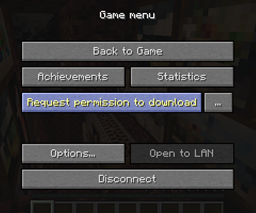
此插件还允许权限请求。如果你想允许玩家使用 WDL,但不想无条件地允许,这是最简单的方法。他们可以直接在模组内请求权限。(这仍在进行中,模组端尚未完全完成,但已具备功能性)。权限请求允许你临时授予玩家权限,并且会在可配置的时间后过期。
此插件最强大的功能之一是区块覆盖(chunk overrides)。区块覆盖允许你指定玩家始终能够下载的区域,无论地图的其他部分如何。这听起来可能并不强大,但关键在于这些区域不必是静态的。对于简单情况,你可以在配置文件中放入一组坐标并直接使用它们,但还有一个功能齐全的 API,可以根据玩家动态生成来自其他插件的区块覆盖。例如,如果你运行一个 factions 服务器,你可以配置为仅允许玩家在他们的派系内部,或在他们的派系和荒野区域内部下载,或者其他任何组合!如果玩家想在未被现有区块覆盖覆盖的区域下载,他们可以提交权限请求。
在你提问之前:是的,我也是 World Downloader 模组的开发者。这是插件通道 API 的官方实现。 当模组更新时,它不会失效。
使用方法
使用此插件的主要方式是编辑其配置文件。
配置
默认配置文件(可查看 此处)包含完整的注释,因此如果你不确定某个设置的作用,请首先查看那里。此外,错误的配置文件会在游戏中生成警告或错误,告诉你哪里出了问题以及如何修复。
如果你只想禁用 World Downloader,只需将 canDownloadInGeneral 设置为 false 即可。这就是你需要做的全部操作。(其他设置可以保持为 true 或 false;如果 canDownloadInGeneral 为 false,则它们会被推断为 false)。玩家仍然可以加入服务器,并且仍然可以请求权限。我建议你将 requestMessage 设置为针对请求者的内容,以便他们了解你关于使用该模组的规则。在对其进行更改后,你需要使用 /wdl reload 重新加载配置。
如果你想为特定世界配置某些内容,请编辑 per-world 标签。在其中,首先放入世界名称(如在世界文件夹中显示的那样),然后在那里放置通用配置文件中的键。如果在 per-world 部分未设置值,则将使用全局值。如果世界有多个维度,则需要为世界名称指定所有维度。
对于区块覆盖,配置稍微复杂一些。默认情况下,有两种类型的区块覆盖:ChunkRange 和 BlockRange。这两者非常相似,唯一的区别是一个基于区块坐标工作,另一个基于方块坐标工作。对于两者,都有最小和最大的 x 和 z 坐标,其中将最小值和最大值设置为相同则给出单个区块。由于 WDL 的工作方式,BlockRange 会四舍五入到最近的区块。两者都可以选择限制在特定世界中,由 world 属性指定。
区块覆盖项有一个名称(即配置节的键名),以及一个可选的 tag。这两者主要在日志记录中重要,但也会被发送至客户端。tag 对于简单的区块范围来说并不关键,但在动态更新的情况下很有用(因为可以借此进行数据包优化)。以下是一个定义了两个区块覆盖项的配置示例:
region1:
  type: BlockRange
  world: world
  tag: Freebuild area
  x1: 1000
  z1: 1000
  x2: 1100
  z2: 1250
region2:
  type: ChunkRange
  tag: Spawn chunks
  x1: -5
  z1: -5
  x2: 5
  z2: 5
扩展插件能够定义其他类型的区块覆盖。通常,该插件会记录其自身覆盖的结构(并且在操作不正确时提供警告/错误)。有关已知扩展的列表,请参阅下面的扩展部分。
有关配置文件的更多信息,请查看此处。
此插件还具有多个权限,可用于授予玩家使用 WDL 的权限。
命令
作为玩家:
/wdl updateme - 刷新客户端权限(通常不需要这样做,但在权限更改时可以使用)。也可以从模组内部执行此操作。
作为管理员:
/wdl reload - 重新加载插件配置(/reload 或 /restart 也可以做到这一点)/wdl update <player> - 手动更新指定玩家的权限(通常不需要这样做)/wdl updateall - 手动更新所有在线玩家的权限(通常不需要这样做)/wdl requests list [page] - 列出当前所有的权限请求/wdl requests show <player> - 显示指定玩家的请求/wdl requests accept <player> - 接受指定玩家的请求/wdl requests reject <player> - 拒绝指定玩家的请求/wdl requests revoke <player> - 在接受后撤销指定玩家的请求
关于 World Downloader 的注意事项
请勿仅仅因为安装了 World Downloader 就认定玩家有罪。安装此模组有几个合法的理由:
- 备份你建造的东西(这也是我开发此模组的原因)
- 进入创造模式在单人游戏中尝试建造,然后再回到多人游戏进行实际建造
- 导出建筑的 3D 模型以用于同人创作(这需要除 WDL 之外的其他工具,但这也是一种常见用途)
此外,WDL 在加入服务器时会发送权限数据包(以便在下载开始前拥有准确的权限信息)。仅仅因为插件显示玩家安装了模组,并不意味着他们实际上使用了它。
一般来说,如果你运营的是一个允许玩家建造的服务器,玩家应该能够在自己的建筑上使用此模组。另一方面,如果你运营的是小游戏服务器或其他类似服务器,默认阻止此模组是有道理的。
贡献
此插件是开源的;你可以在 GitHub 上查看源代码。欢迎在那里提交问题或拉取请求。
如果你想创建自己的区块覆盖类型,请在此处查看各种示例。
基础的 World Downloader 模组也是开源的。欢迎在那里提出建议。
有关 WDL 插件通道 API 的信息,请参考 wiki.vg 上的文章。
扩展
WDLCompanion 具有几个扩展,用于与其他插件集成,通常提供其他类型的区块覆盖:
你是否编写了想要添加到此列表中的扩展?请告诉我!
MCStats 免责声明
此插件使用 MCStats (pluginmetrics) 进行匿名统计。你可以在此处查看这些统计数据:here.
This plugin allows server owners to control the World Downloader mod (sometimes refered to as WorldDownloader, WorldDL, or WDL) on their server, using its plugin channel API. It supports a wide range of functions, from simply disabling the mod to permission requests to only allowing downloading in certain areas.
Why use WDLCompanion over other plugins? What features does WDLCompanion have?
The main benefit of WDLCompanion is that it fully implements WDL's plugin channel API, rather than simply kicking players immediately upon joining (which is horrible user experience). This gives you, as a server owner, a much wider degree of control over how WDL is used.
For basic configuration, you can toggle whether WorldDL can download at all, or set more specific settings (chunk caching, saving of entities, saving of tile entities, etcetera). This configuration can be global and can also be for specific worlds on your server.
You can also use the standard bukkit permissions system to grant players permissions. Those permissions are documented here.
WDLCompanion does some custom logging logic, so messages generated by it (player login, player request) are saved both in your global server log and in a custom log as a subfolder of the server log folder. This functionality can be disabled if you desire.
This plugin also allows for permission requests. If you want to allow players to use WDL, but not without your permission, this is the easiest way of doing so. They can request permission directly from inside the mod. (This is still a work in progress and the mod side of things isn't completely done, although it is functional). Permission requests allow you to temporarily grant a player permission and will expire after a configurable amount of time.
One of the most powerful features of this plugin is chunk overrides. Chunk overrides allow you to specify areas where players are always able to download regardless of the other parts of the map. This may not seem too powerful, but the key part is that these don't have to be static areas. For simple cases, you can just put a set of coordinates in the configuration file and use those, but there is a fully-functional API for dynamically generating chunk overrides from other plugins on a player-by-player basis. For instance, if you run a factions server, you can configure it so that players are only able to download in their own faction, or in their own faction and in wilderness areas, or anything else! If a player wants to download in an area that's not covered by an existing chunk override, they can just submit a permission request.
And before you ask: Yes, I am also the developer of the World Downloader mod. This is the official implementation of the plugin channel API. It's not going to break when the mod updates.
Usage
The main way you use this plugin is editing its configuration file.
Configuration
The default configuration file (viewable here) is fully annotated, so if you are unsure about what any setting does, look there first. Additionally, incorrect configuration files will generate warnings or errors in-game, letting you know what is wrong and how to fix it.
If you just want to disable World Downloader, all you need to do is set canDownloadInGeneral to false. That's all you need to do. (The other settings can remain true or false; if canDownloadInGeneral is false they are inferred to be false). Players will still be able to join, and can request permission still. I recommend that you set requestMessage to something for players who are requesting, so that they know your rules regarding use of the mod. You will need to reload the configuration using /wdl reload after making changes to it.
If you want to configure something for a specific world, edit the per-world tag. Inside of it, first put the world name (as it would appear in the world folder), and then put keys from the general configuration file there. If a value is not set in the per-world secion, the global value is used instead. If the world has multiple dimensions, you will need to specify all dimensions for the world name.
For chunk overrides, the configuration is a bit more complicated. By default, there are two types of chunk overrides: ChunkRange and BlockRange. These two are very similar with the only difference being that one works in chunk coordinates and the other in block coordinates. For both, there are minimum and maximum x and z coordinates, where having both the minimum and maximum set to each other gives a single chunk. BlockRange will round to the nearest chunk, due to the way WDL works. Both optionally can be confined to a specific world, specified by the world property.
Chunk overrides have a name (which is the key name for the configuration section) and optionally a tag. Both of these are mainly important in logging but are still sent to the client. tag doesn't really matter for simple chunk ranges, but is useful when it's something that updates dynamically (as packet optimizations can occur with it). Here's a sample configuration that defines two chunk overrides:
region1:
  type: BlockRange
  world: world
  tag: Freebuild area
  x1: 1000
  z1: 1000
  x2: 1100
  z2: 1250
region2:
  type: ChunkRange
  tag: Spawn chunks
  x1: -5
  z1: -5
  x2: 5
  z2: 5
Extension plugins are able to define additional types of chunk overrides. Generally, that plugin will document the structure of its own overrides (and should also provide warnings/errors when it is done incorrectly). See the extensions section below for a list of known extensions.
For more information on the configuration file, look here.
This plugin also has several permissions which can be used to grant players permission to use WDL.
Commands
As a player:
/wdl updateme - refresh your clientside permissions (generally shouldn't be necessary but can be used when permissions are changed). This can also be performed from inside of the mod.
As a moderator:
/wdl reload - reload the plugin configuration (/reload or /restart will also do this)/wdl update <player> - manually update the given player's permissions (generally should not be necessary)/wdl updateall - manually update the permissions of all online players (generally should not be necessary)/wdl requests list [page] - list all current permission requests/wdl requests show <player> - show the given player's request/wdl requests accept <player> - accept the given player's request/wdl requests reject <player> - reject the given player's request/wdl requests revoke <player> - revoke the given player's request after it has been accepted
Note about World Downloader
Please don't treat players as guilty just because they have World Downloader installed. There are several legitimate reasons to have the mod installed:
- To make a backup of something you've built (this is why I develop the mod)
- To go into creative mode to experiment with building in single player before returning to multiplayer to actually build
- To export 3D models of a build for use in fan art (this requires other tools beyond just WDL but is a common use nevertheless)
Also, WDL sends the permission packet whenever it joins the server (so that it can have accurate permission information before starting download). Just because the plugin says a player has the mod installed doesn't mean that they actually used it.
In general, if you're running a server where players build, players should be able to use the mod on their own builds. On the other hand, if you're running a minigame server or similar, it makes sense to block the mod by default.
Contributing
This plugin is open source; you can view the source code on github. Feel free to open issues there or submit pull requests.
If you want to create your own type of chunk override, look here for various examples.
The base World Downloader mod is also open source. Feel free to make suggestions there.
For information on WDL's plugin channel API, refer to the wiki.vg article.
Extensions
WDLCompanion has several extensions to integrate with other plugins, generally providing additional types of chunk overrides:
Have you written an extension that you want to add to this list? Let me know!
MCStats disclaimer
This plugin uses MCStats (pluginmetrics) for anonymous statistics. You can view these statistics here.

 插件

 插件
 插件
 插件
 插件

 插件

评论 0
登录后参与评分
还没有评论,来抢沙发吧