Welcome Warp Signs
Welcome Warp Signs 为玩家提供了一种轻松创建传送点的方式!
- 每位玩家同时只能激活一个传送点
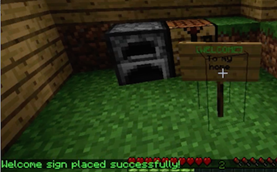
- 玩家在告示牌第一行输入 [WELCOME] 即可创建传送点
- 如果传送点创建成功,[WELCOME] 字样将变为绿色。之前的传送点告示牌会自动失效。
通过 /wwarps 命令可以在图形界面中查看传送点。玩家可以点击传送点或使用 /wwarp <玩家名称> 进行传送。
要销毁或移除传送点,玩家只需破坏告示牌即可。如果告示牌因环境因素或被管理员玩家破坏,该传送点也会被移除。
告示牌上的其他行可以填写任意内容,并会在图形界面中显示。这允许玩家宣传他们的传送点。
在玩家传送前会检查传送点的安全性,如果不安全,则不允许传送。
说明视频
功能特性
- 创建和移除传送点简单便捷
- 每个玩家仅限一个传送点
- 传送点安全性检查
- 支持管理传送点告示牌的管理员命令
设置与安装
所需插件
安装与配置
- 下载插件 (wwarps.jar)
- 将其放入 plugins 文件夹
- 启动服务器
- 插件将创建一个名为 WelcomeWarpSigns 的文件夹。打开该文件夹。
- 检查 config.yml 并根据需要进行调整。设置您希望 Welcome Warp Signs 生效的世界。
- 重启服务器或输入 /reload。
- 完成!
问题反馈
如果您发现问题或有改进建议,请提交工单。
命令 & 权限
- /wwarp 或 /wwarps 列出传送点
- /wwarp <名称> 进行传送或使用图形界面
- /wwadmin 或 /wadmin reload - 重载配置文件
权限
welcomewarpsigns.add:
description: 添加传送点告示牌的权限
default: true
welcomewarpsigns.use:
description: 使用欢迎传送点告示牌的权限
default: true
welcomewarpsigns.admin:
description: 运行管理员命令或破坏传送点告示牌的权限
default: op
源码
可在此处找到源码。
统计数据披露
本插件使用插件指标系统,这意味着以下信息会被收集并发送至 mcstats.org:
- 唯一标识符
- 服务器的 Java 版本
- 服务器处于离线模式还是在线模式
- 插件的版本
- 服务器的版本
- 操作系统版本/名称及架构
- CPU 核心数
- 在线玩家数量
- Metrics 版本
如果您想了解有关所收集统计数据的更多信息,请访问 mcstats.org。如果您希望禁用数据收集,请进入 /plugins/PluginMetrics/config.yml 进行修改。
Welcome Warp Signs
Welcome Warp Signs are an easy way for players to make warps!
- Each player can have up to one warp active at a time
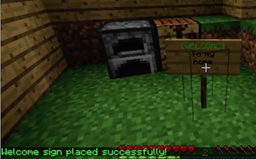
- Players create a warp by placing a sign that has [WELCOME] as the first line
- If the warp creation is successful, [WELCOME] will become green. Previous warp signs will be automatically deactivated.

Warps are show in a GUI via the /wwarps command. Players can warp by clicking the warp or typing /wwarp <name of player>.
To destroy or remove a warp, the player just breaks the sign. If signs get destroyed by the environment or an admin player, the warp is also removed.
The other lines on the sign can say anything and are displayed in the GUI. This enables players to advertise their warps.
The safety of a warp is checked before a player warps and if unsafe, the warp is not allowed.
Explanation video
Features
- Easy to create and remove warps
- Warps are kept to one per player
- Warps are checked for safety
- Admin commands to manage warp signs
Set Up and Installation
Required Plugins
- No other plugins are required.
Installation and Configuration
- Download the plugin (wwarps.jar)
- Place into your plugins folder
- Start your server
- The plugin will make a folder called WelcomeWarpSigns. Open the folder.
- Check config.yml and adjust how you like. Set up worlds where you want Welcome Warp Signs to operate.
- Restart the server or type /reload.
- Done!
Problems
Please file a ticket if you find a problem, or have an idea for improvement.
Commands & Permissions
- /wwarp or /wwarps to list warps
- /wwarp <name> to warp or use the GUI
- /wwadmin or /wadmin reload - reloads config file
Permissions
welcomewarpsigns.add:
description: Permission to add warp signs
default: true
welcomewarpsigns.use:
description: Permission to use welcome warp signs
default: true
welcomewarpsigns.admin:
description: Permission to run the admin command or destroy warp signs
default: op
Source
Source can be found here.
Stats Disclosure
This plugin utilizes a plugin metrics system, which means that the following information is collected and sent to mcstats.org:
- A unique identifier
- The server's version of Java
- Whether the server is in offline or online mode
- The plugin's version
- The server's version
- The OS version/name and architecture
- The core count for the CPU
- The number of players online
- The Metrics version
Visit mcstats.org if you would like to learn more about the stats collected. Go into /plugins/PluginMetrics/config.yml to disable stat collecting if you wish.
评论 0
登录后参与评分
还没有评论,来抢沙发吧