一种简单而强大的方式来设置您的 Bukkit 服务器经济平衡:竞争性拍卖行。
核心功能
- 创建 Well-Auction 商店,支持任意方块、告示牌、物品展示框等,未来还将支持更多类型。
- 商店可处理任何种类和数量的物品(受限于双箱库存大小)。
- 允许玩家将库存中的物品上架出售到这些商店。
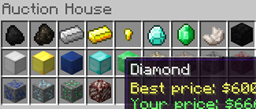
- 以可视化的、类似库存的窗口查看、购买和出售物品。
- 卖家在每次售出时都会收到通知。
- 支持本地化 欢迎在此提交您语言版本的翻译配置文件!
- 数据库存储,源自您的 Bukkit 服务器配置。
- 设置简单快捷,得益于即插即用的商店预设。
快速且安全
- Well-Auction 专注于性能与交易,因为一个消耗性能的插件或存在物品复制漏洞的经济插件是不适合实际使用的。
- 玩家无法进行虚假的物品操作。如果玩家光标上的物品并非其真正拥有,则意味着存在物品复制的安全漏洞。
- 同一个实际的拍卖行将在所有销售实例间共享,因为首先这能保护玩家不会丢失已上架的物品。
玩家指南
- 右键点击拍卖行:将出现物品分类的库存界面。
- 左键点击分类将打开关联的“购买”库存。
- 右键点击分类将打开关联的“出售”库存。
- 按住 Shift 键并点击分类,用户可为该物品设定单价。
- 在“出售”库存中,用户可以出售所选物品的 1、4、8、16、32 或 64 个单位。可通过右键点击撤回已售出的物品。
- 在“购买”库存中,仅显示按堆叠数量排序的最佳报价。这是竞争系统的核心!
服务器管理员指南
使用方法
- 注视您希望设置为拍卖行的方块,然后输入
/wauc preset <preset_name> 在此加载商店。
- 就这么简单!重复此操作即可设置所有您想要的商店。
- 您可以在
well-auction.yml 中将语言更改为 language 键值。系统将查找 lang 子文件夹中名为 <language>.yml 的文件。
预设
- building1
- building2
- building3
- glass
- decoration
- coloration
- primary1
- primary2
- mineral
- misc
- food1
- food2
- redstone
- tools1
- tools2
- fightwear
- craft
- harvesting
- vegetal
- rare
待办事项
- [x] 单个 Well-Auction 商店支持出售多种物品。
- [x] 玩家可以取消出售价格,从而采用默认动态价格(如果已设置)。
- [x] 优化销售排序以实现最佳可视化效果。
- [x] 物品预设用于快速设置商店。
- [ ] 从 NPC 创建 Well-Auction 商店。
- [ ] 竞争系统:当其他玩家提供新的最高出价时,通知卖家。
- [ ] 可配置(可选)的卖家每笔交易税费。
安装说明
此插件依赖于 well-core(点击此处),请务必获取其最新版本,否则 well-auction 将无法工作。
用法
命令
| `/wauc preset` |
将物品预设附加到拍卖行。预设配置在 presets.yml 中
|
| `/wauc remove` |
移除您当前注视的方块上的拍卖行。 |
| `/wauc attach` |
通过添加您手中所持物品的类型来创建或更新拍卖行用于出售。在您注视的方块内创建商店(右键点击打开)。 |
| `/wauc detach` |
通过解除您手中所持物品类型的出售关联来更新拍卖行。没有出售物品的商店将被移除。 |
| `/wauc reload` |
重新加载插件。如果在经济插件依赖冲突导致插件设置出错的情况下,这可能很有用。 |
| `/wauc list` |
列出存在的拍卖行。 |
权限
| `well.auction` |
执行 `/wellauction`(或 `/wauc`)命令 |
| `well.auction.open` |
打开拍卖行 |
| `well.auction.buy` |
购买物品 |
| `well.auction.sell` |
出售物品 |
源代码
Github:
Yet a simple but powerful way to set the economic equilibrium in your bukkit server: competitive auction houses.
Core features
- Create Well-Auction shops, from any block, sign, item frame, and more to come.
- Shops can handle any kind and number of items (limited to double chest inventory size).
- Allow players to put on sale items from their inventory to these shops.
- Check, buy and sell items visually, with inventory-like window.
- Seller notification on each sale.
- Localizable Don't hesitate to send here your translated configuration file in your language!
- DB storage from your bukkit server's configuration.
- Easy and fast setup thanks to ready-to-use shop presets.
Fast and secure
- Well-Auction is Performance and Transaction oriented, because a performance-consuming plugin or an economy plugin with item duplication flaws is not meant to be really used.
- No fictive item manipulation by the player. As soon as the player has on his cursor an item that he doesn't really own, that means that would be a security breach for item duplication.
- The same actual Auction House will actually be shared across all shop instances of the sale, because at first it protects your players from losing items they put on sale.
For players
- Right click an Auction House: an inventory of item categories appears.
- Left clicking a category opens the associated "Buy" inventory.
- Right-clicking a category opens the associated "Sell" inventory.
- Shift-clicking a category lets the user define a price per unit of the item.
- In "Sell" inventory, user can sell 1, 4, 8, 16, 32 or 64 units of the selected item. A sale can be taken back by right-clicking it.
- In "Buy" inventory, only best sales by stack size are shown. This is the core of the competitivity system!
For server owners
How to
- Look at the desired block to be an Auction House, then load a shop here by typing
/wauc preset <preset_name>
- That's all! Just repeat the operation for all the shops you want to setup.
- You can change the language in
well-auction.yml, key: language. This will look for a the file named <language>.yml in lang subfolder.
Presets
- building1
- building2
- building3
- glass
- decoration
- coloration
- primary1
- primary2
- mineral
- misc
- food1
- food2
- redstone
- tools1
- tools2
- fightwear
- craft
- harvesting
- vegetal
- rare
To do
- [x] Multiple items to be sold in a single Well-Auction shop.
- [x] Players can unset price of sale, taking default dynamic price, if set.
- [x] Clean sales sorting for optimal visualization.
- [x] Item presets for quick shops setup.
- [ ] Create Well-Auction shop from NPCs.
- [ ] Competitive system with seller notification on new best offer from another player.
- [ ] Configurable (and optional) tax for seller on each sale.
Installation note
This plugin depends on well-core (click here), please get its last version or well-auction won't work.
Usage
Commands
| `/wauc preset` |
to attach a preset of items to an Auction House. Presets are configured in presets.yml
|
| `/wauc remove` |
remove an auction house from the block you're looking at. |
| `/wauc attach` |
create or update an auction house by adding the type of item you're holding in your hand on sale. Creates the shop inside the block you're looking at (right-click to open). |
| `/wauc detach` |
update an auction house by detaching the type of item you're holding in your hand from sales. A shop without sales is removed. |
| `/wauc reload` |
reloads the plugin. This may be useful in case on economy plugin dependency conflict which would break setup of the plugin. |
| `/wauc list` |
lists the auction houses that exist. |
Permissions
| `well.auction` |
execute `/wellauction` (or `/wauc`) commands |
| `well.auction.open` |
open auction houses |
| `well.auction.buy` |
buy items |
| `well.auction.sell` |
sell items |
Source code
Github:
评论 0
登录后参与评分
还没有评论,来抢沙发吧