概览
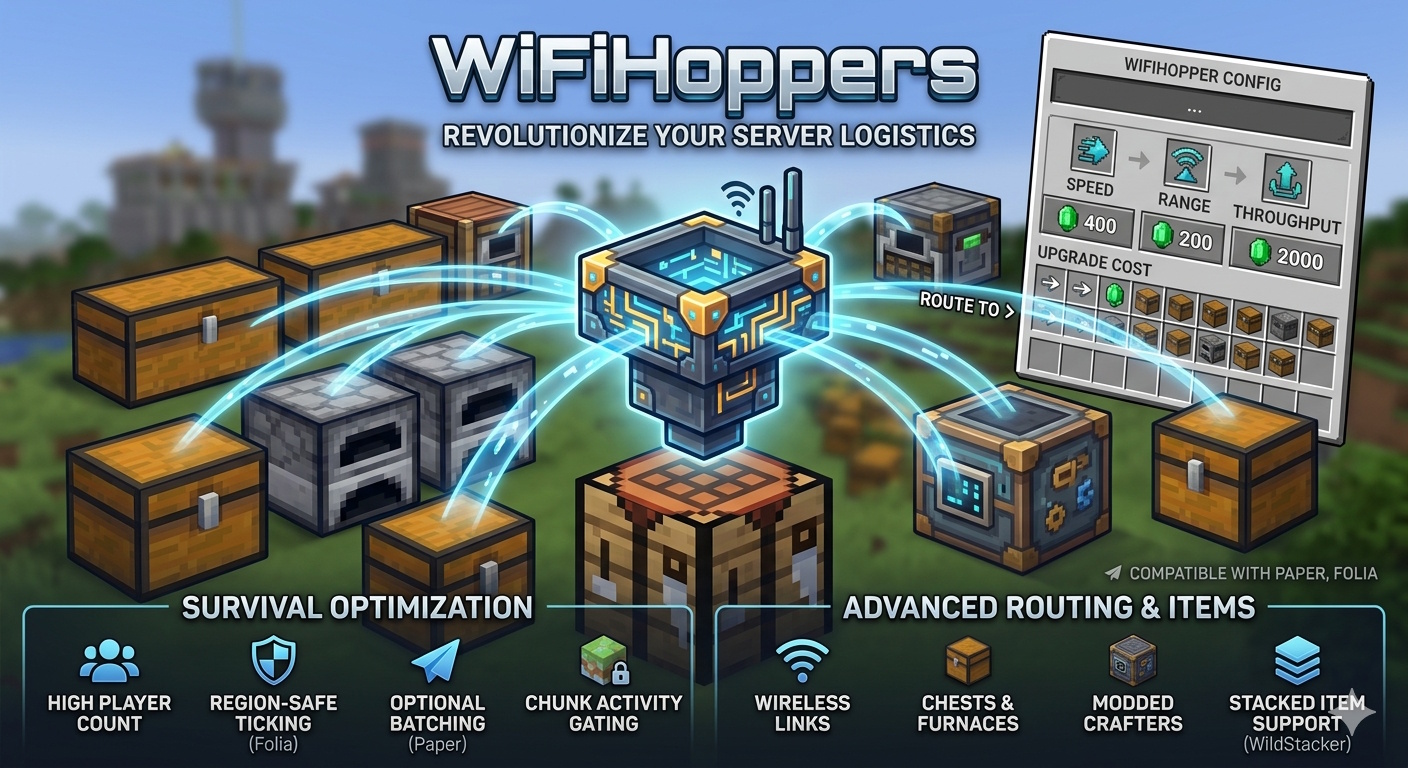
WifiHoppers 使用无线容器链接取代原版漏斗物流。放置一个特殊的漏斗方块,打开其菜单,使用游戏内货币升级属性,并将物品路由到箱子、熔炉、合成器等——无需在世界中铺设漏斗链。
该插件专为高玩家数量的生存服务器构建:支持 Folia 上的区域安全刻处理、Paper 上的可选批量处理、玩家区块活动门控,以及可选的堆叠物品支持(WildStacker)。
核心功能
无线漏斗
- 放置 Wifi Hopper 物品以在该位置注册受管理的漏斗。
- 破坏方块可回收漏斗物品,其物品描述符中保存了等级、类型和链接数量。
- 数据存储在本地 SQLite 数据库中(内置驱动——无需外部数据库设置)。
容器链接
- 将漏斗链接到同世界内的任何容器持有者:箱子、 barrels、潜影盒、熔炉、高炉、烟熏炉、营火、合成器等。
- 无需物理漏斗链——物品会从漏斗库存瞬移到配置距离内的链接目标。
- 基于升级等级的每链接限制(GUI 中最多 36 个链接槽,实际最大链接数由升级决定)。
- 重新排序链接(优先级)、重命名链接,并从菜单中移除链接。
- 链接验证:同世界、距离上限、防止重复、最大链接数。
物品吸取(拾取)
- 按可配置的刻间隔将地面上的物品吸入漏斗库存。
- 普通漏斗:以漏斗为中心的球形半径范围(可升级)。半径为 0 = 仅从上方方块进行原版式拾取。
- 区块漏斗:从漏斗周围加载区块中的区块半径范围内吸取物品(适用于大型农场)。
- 当存在链接时,尊重漏斗库存空间和可选过滤规则。
- WildStacker:安装插件后正确处理堆叠物品实体。
物品传输(输出)
- 按单独的刻间隔将物品从漏斗库存移动到链接容器中。
- 每个周期的传输量可升级(例如,普通类型的每次周期可从 8 升级到 320+ 物品)。
- 支持熔炉(仅限输入和燃料槽,绝不输出)、合成器(尊重禁用槽位)和普通库存。
高级路由
- 按顺序插入(开/关):
- 开:第一个匹配的链接优先获取物品。
- 关:在匹配的链接间均匀分配。
- 删除非过滤物品(开/关):
- 开:不匹配任何过滤器的物品会被销毁(吸取可以收集所有物品;路由会删除被拒绝的物品)。
- 关:未匹配的物品保留在漏斗中或进入未过滤的“溢出”链接。
- 过滤器优先级:严格过滤器 → 类型/名称 → 未过滤溢出链接。
每链接过滤
每个链接都有自己独立的过滤 GUI:
- 过滤模式
- 匹配类型
- 类型(材料)、严格(精确物品 + NBT)、名称(显示名称)
- 类型过滤器
- 潜影盒过滤器
- 严格过滤器
- 清除过滤器
默认新链接:白名单 + 类型。
升级(GUI + 经济)
每种漏斗类型有四个升级轨道,通过 Vault 支付(如果已安装;若无 Vault 则免费):
- 链接 — 同时连接的容器最大数量
- 传输 — 每次传输周期移动的物品数量
- 吸取半径 — 拾取范围(根据类型是方块或区块)
- 链接距离 — 目标可以有多远
所有成本和等级值均在 hoppers.yml 中定义(采用 UpgradeableHoppers 风格的布局)。
主动吸取调整
- 独立于最大吸取升级:为每个漏斗设置主动拾取半径(在 GUI 中增加/减少)。
- 让玩家可以在繁忙的农场上限制延迟,而无需降级已购买的升级。
漏斗类型
可在 hoppers.yml 中配置:
- 普通
- 区块
- 基于区块的拾取,适用于大型物品农场;不同的升级曲线
使用 /hopper get [玩家] [数量] [类型] 获得类型。
控制
- 左键点击漏斗 -> 打开升级与链接菜单
- 右键点击漏斗 -> 打开原版漏斗库存
- 破坏漏斗 -> 掉落带有保存属性的漏斗物品
- 链接模式 -> 菜单 → “链接到容器” -> 左键点击容器
- 重命名链接 -> Shift + 右键点击菜单中的链接 -> 在聊天中输入名称(清空以重置)
- 重新排序链接 -> Shift + 左键点击(上移)/ 右键点击(下移)
- 移除链接 -> 在菜单中按下 Q(丢弃)链接图标
命令权限
wifihoppers.get
- /hopper get [玩家] [数量] [类型]
- /hopper types
wifihoppers.admin
- /hopper reload
- /hopper import
- 从 UpgradeableHoppers 数据库重新导入
别名:hoppers, h, uhopper, uhoppers, uh, uhr, wifihopper, wifihoppers, wh
旧版权限:uhr.get, uhr.admin(同上)
配置
config.yml
engine:
  tick-interval: 2          # 引擎每 N 个服务器刻运行一次
  paper:
    scan-stride: 2          # Paper:每批处理的漏斗数量(轮询)
    adaptive-stride: false  # 当存在大量漏斗时自动调整步长
    target-batch-size: 300  # 启用自适应时的目标每刻漏斗数
import:
  uh-db-path: plugins/UpgradeableHoppers/Data/database.db
  completed: false        # 首次成功导入 UH 后设为 true
hoppers.yml
- 定义漏斗类型、显示名称、刻间隔和所有升级等级(数值 + Vault 成本)。
- 结构镜像 UpgradeableHoppers,便于迁移和平衡。
依赖项
- Paper (或 Folia) -> 必需
- Vault -> 可选
- WildStacker -> 可选
不依赖 Citizens、WorldEdit 或其他插件。
UpgradeableHoppers 迁移
- WifiHoppers 可在首次启动时(或通过
/hopper import 命令)导入现有的 UpgradeableHoppers 数据:
- 从 UH 数据库路径读取每个世界的 SQLite 表。
- 导入漏斗位置、等级、链接、过滤器(包括严格物品、潜影盒代币、命名过滤器)。
- 可在首次安装时从旧的 UH 配置同步
default hoppers.yml 的值。
- 在成功导入后,将
config.yml 中的 import.completed 设置为 true,以跳过未来重启时的自动导入。
提示:导入前请备份 plugins/UpgradeableHoppers/ 目录及你的世界文件。
性能与 Folia
- Folia:为每个漏斗使用区域调度器——支持跨区域链接,当目标区块位于其他区域线程上时会优雅地跳过。
- Paper:可选的轮询批处理机制,防止数百个漏斗在同一服务器刻内全部 ticking(通过
scan-stride 和 adaptive-stride)。
- 活动门控:漏斗仅在玩家处于服务器模拟距离内时才进行处理(减少空闲世界的 CPU 占用)。
- 每种漏斗类型拥有独立的吸取/传输计时器(
ticks.transfer、ticks.suction,位于 hoppers.yml 中)。
要求
Paper 或 Folia
Minecraft 1.21.11 / 26.1.2(已在 Paper 26.1.2 上测试)
Java 25+(与 Paper 26.1.x 匹配)
安装
- 下载
WifiHoppers-x.x.x.jar。
- 将其放入
plugins/ 文件夹。
- 重启服务器。
- 配置
hoppers.yml(升级成本/数值)和 config.yml(引擎 + 导入路径)。
- 可选:安装 Vault 以启用经济升级功能。
- 获取漏斗权限:
/hopper get 1 normal
如果从 UpgradeableHoppers 迁移,请确保在首次启动前将 import.uh-db-path 指向旧的 database.db 文件。
Jar 包包含内容
- 插件类 + 默认配置文件(
config.yml、hoppers.yml)
- SQLite JDBC(已捆绑——无需单独下载)
Overview
WifiHoppers replaces vanilla hopper logistics with wireless container links. Place a special hopper block, open its menu, upgrade stats with in-game currency, and route items to chests, furnaces, crafters, and more — without running hopper chains through the world.
The plugin is built for high-player-count survival servers: region-safe ticking on Folia, optional batch processing on Paper, player-chunk activity gating, and optional stacked-item support (WildStacker).
Core features
Wireless hoppers
- Place a Wifi Hopper item to register a managed hopper at that location.
- Break the block to recover a hopper item with saved levels, type, and link count on the item lore.
- Data is stored in a local SQLite database (bundled driver — no external DB setup).
Container linking
- Link hoppers to any inventory holder in the same world: chests, barrels, shulker boxes, furnaces, blast furnaces, smokers, campfires, crafters, etc.
- No physical hopper chain required — items teleport from the hopper inventory to linked targets within your configured distance.
- Per-link limits based on upgrade level (up to 36 link slots in the GUI, actual max links from upgrades).
- Reorder links (priority), rename links, and remove links from the menu.
- Link validation: same world, distance cap, duplicate prevention, max links.
Item suction (pickup)
- Pulls ground items into the hopper inventory on a configurable tick interval.
- Normal hopper: spherical radius around the hopper (upgradeable). Radius 0 = vanilla-style pickup from the block above only.
- Chunk hopper: sucks items from loaded chunks in a chunk-radius around the hopper (for large farms).
- Respects hopper inventory space and optional filter rules when links exist.
- WildStacker : correctly handles stacked item entities when plugin is installed.
Item transfer (output)
- Moves items from the hopper inventory into linked containers on a separate tick interval.
- Transfer amount per cycle is upgradeable (e.g. 8 → 320+ items per cycle on normal type).
- Supports furnaces (input + fuel slots only, never output), crafters (respects disabled slots), and normal inventories.
Advanced routing
- Insert by order (ON/OFF):
- ON: first matching link gets items first.
- OFF: distribute evenly across matching links.
- Delete non-filter items (ON/OFF):
- ON: items that match no filter are voided (suction can collect everything; routing deletes rejects).
- OFF: unmatched items stay in the hopper or go to unfiltered “overflow” links.
- Filter priority: STRICT filters → TYPE/NAMED → unfiltered overflow links.
Per-link filtering
Each link has its own filter GUI:
- Filter mode
- Match type
- TYPE (material), STRICT (exact item + NBT), NAMED (display name)
- TYPE filters
- Click items in your inventory to add/remove materials
- Shulker filters
- Empty/full shulker occupancy tokens (TYPE mode)
- STRICT filters
- Full item serialization — exact stack matching
- Clear filters
Default new links: WHITELIST + TYPE.
Upgrades (GUI + economy)
Four upgrade tracks per hopper type, paid via Vault (if installed; free when Vault is absent):
- Links — max simultaneous container links
- Transfer — items moved per transfer cycle
- Suction radius — pickup range (blocks or chunks depending on type)
- Link distance — how far away targets can be
All costs and level values are defined in hoppers.yml (UpgradeableHoppers-style layout).
Active suction tuning
- Separate from max suction upgrade: set active pickup radius per hopper (increase/decrease in GUI).
- Lets players cap lag on busy farms without downgrading purchased upgrades.
Hopper types
Configurable in hoppers.yml:
- Normal
- Block-radius item pickup, high link/transfer ceilings
- Chunk
- Chunk-based pickup for large item farms; different upgrade curves
Give types with /hopper get [player] [amount] [type].
Controls
- Left-click hopper -> Open upgrade & link menu
- Right-click hopper -> Open vanilla hopper inventory
- Break hopper -> Drops hopper item with saved stats
- Link mode -> Menu → “Link to Containers” → left-click a container
- Rename link -> Shift + right-click link in menu → type name in chat (clear to reset)
- Reorder link -> Shift + left-click (up) / right-click (down)
- Remove link -> Press Q (drop) on link icon in menu
Commands permissions
wifihoppers.get
- /hopper get [player] [amount] [type]
- Give wireless hopper item(s)
- /hopper types
-List configured hopper types
wifihoppers.admin
- /hopper reload
- Reload config + hoppers.yml + runtime
- /hopper import
- Re-import from UpgradeableHoppers DB
Aliases: hoppers, h, uhopper, uhoppers, uh, uhr, wifihopper, wifihoppers, wh
Legacy permissions: uhr.get, uhr.admin (same as above)
Configuration
config.yml
engine:
  tick-interval: 2          # Engine runs every N server ticks
  paper:
    scan-stride: 2          # Paper: hoppers processed per batch (round-robin)
    adaptive-stride: false  # Auto-adjust stride when many hoppers exist
    target-batch-size: 300  # Target hoppers per tick when adaptive is on
import:
  uh-db-path: plugins/UpgradeableHoppers/Data/database.db
  completed: false        # Set true after first successful UH import
hoppers.yml
- Defines hopper types, display names, tick intervals, and all upgrade levels (value + Vault cost).
- Structure mirrors UpgradeableHoppers for easy migration and balancing.
Dependencies
- Paper (or Folia) -> Yes
- Vault -> Optional
- WildStacker -> Optional
No dependency on Citizens, WorldEdit, or other plugins.
UpgradeableHoppers migration
- WifiHoppers can import existing UpgradeableHoppers data on first start (or via /hopper import):
- Reads per-world SQLite tables from the UH database path.
- Imports hopper locations, levels, links, filters (including strict items, shulker tokens, named filters).
- Can sync default hoppers.yml values from the old UH config on first install.
- Set import.completed: true in config.yml after a successful import to skip auto-import on future restarts.
Tip: Back up plugins/UpgradeableHoppers/ and your world before importing.
Performance & Folia
- Folia: Uses region schedulers per hopper — safe cross-region linking with graceful skip when a target chunk is on another region thread.
- Paper: Optional round-robin batching so hundreds of hoppers don’t all tick in one server tick (scan-stride, adaptive-stride).
- Activity gating: Hoppers only process when a player is within server simulation distance (reduces idle-world CPU).
- Separate suction/transfer timers per hopper type (ticks.transfer, ticks.suction in hoppers.yml).
Requirements
Paper or Folia
Minecraft 1.21.11 / 26.1.2 (tested on Paper 26.1.2)
Java 25+ (matches Paper 26.1.x)
Installation
- Download WifiHoppers-x.x.x.jar.
- Place in plugins/.
- Restart the server.
- Configure hoppers.yml (upgrade costs/values) and config.yml (engine + import path).
- Optional: install Vault for economy upgrades.
- Give hoppers: /hopper get 1 normal
If migrating from UpgradeableHoppers, ensure import.uh-db-path points at the old database.db before first start.
What’s included in the jar
- Plugin classes + default configs (config.yml, hoppers.yml)
- SQLite JDBC (bundled — no separate download)


 插件

 插件
 插件
 插件
 插件
 插件
评论 0
登录后参与评分
还没有评论,来抢沙发吧