
功能特性
想成为拥有各种法术的酷炫巫师吗?现在就可以!你可以建造一座法术祭坛,制作超过 50 种独特的法术,获取知识,并使用各式各样的魔法!该插件灵感来源于 Minecraft Forge 模组 Ars Magica。
注意:此插件处于早期 Alpha 测试阶段,因此可能会出现错误。如果遇到任何问题,请在此处提交工单。
法术祭坛:
通过将红石环绕放置在附魔台周围来建造法术祭坛。不需要金块,但祭坛所放置的地面方块类型会影响祭坛等级。某些法术需要更高级别的祭坛才能制作。
- 任意方块:0 级
- 铁:1 级
- 金:2 级
- 钻石:3 级

知识:
制作法术需要知识,每种法术都有其所需的特定知识。你可以通过执行常规的 Minecraft 操作来学习不同的知识片段。例如,拾取一把 Notch 苹果会教你“神圣干预”。有时在获得知识时也会获得法力值。你可以在《知识之书》中查看如何获取知识的详细信息。
法力值:
施放法术需要消耗法力值,初始值为 10(除非服务器管理员修改了该设置)。当你获得知识时,可能会获得法力值。此外,每次施放法术时也有轻微几率获得法力值。
法术书:
当你击败一个 Boss(凋灵、末影龙或远古守卫者)时,他们有 50% 的几率掉落一本法术书。法术书中最多可以存储 9 个法术。按住 Shift 并右键点击以打开书本,然后可以将法术放入或取出。右键点击槽位 1 中的法术即可施放。按住 Shift 并左击可在相邻法术之间切换当前激活的法术。

法术:
要制作法术,必须将配方放在法术祭坛上,然后在祭坛上丢弃一张奥术卷轴。如果你缺乏所需的知识、配方无效或祭坛等级过低,聊天栏会弹出提示告诉你该如何操作。你可以在《法术之书》中查看法术及其配方的详细信息。
法杖:
你可以制作法杖以更好地操控法术。获得法杖后,点击它以打开绑定菜单。将你想要使用的法术放入槽位中并关闭界面。此时这些法术已绑定到该法杖上,且无法更改——这是一次性操作。右键点击可施放法术,左键点击可循环切换法术。法杖共有三个等级,制作难度逐级递增。制作配方请参见配方部分。
特殊生物掉落:
本插件添加了用于法术配方的特殊生物掉落物。例如,苦力怕在被击杀时有 20% 的概率掉落“苦力怕之心”。随后你可以使用“苦力怕之心”来制作 TNT 法术。你可以根据需要自行在配置文件中修改、移除或添加这些掉落物。你可以在“掉落之书”中查看所有特殊掉落物、获取方式及其掉落概率。
法师长袍:
法师长袍本质上就是普通的皮革护甲,但所有护甲部件必须为相同颜色。当你穿戴完整的法师长袍时,你的法力值恢复速度将翻倍。
法力药水:
你可以将空玻璃瓶投入水中,然后加入史莱姆球、岩浆膏或末影之眼,最后投入一些绑定粉末来制作法力药水。如果每种材料放入多个,药水会每秒生成一个,直到原料耗尽。
可配置性:
本插件具有高度可配置性。所有法术、配方和知识均可在配置文件中进行调整。不仅如此,你还可以使用默认法术所用的所有组件来创建自己的法术。为方便起见,还提供了一个 /setSpellRecipe 命令,使设置法术配方更加轻松。
--------------------------------------------------
合成表
奥术卷轴合成:

法术配方:
你可以使用指令查看法术配方。若要获取法术列表、相关信息以及获取各法术配方的指令,你需要制作 法术之书:

其他书籍:
你可以制作其他书籍以获取更多信息。
知识之书:

掉落之书:

法杖:
要制作法杖或法杖帽,你需要将配方放入咒语祭坛。但不是把奥术卷轴丢到祭坛上,而是需要丢弃绑定粉末(可以通过击杀僵尸获得)。
法杖类型:

注意:此处展示的法杖帽并非原版物品,它们是通过合成获得的,或是从怪物身上掉落。
法杖帽:
末影帽:

此配方中的末影珍珠是原版物品,但其他四项物品是由怪物掉落的特殊能量球。
下界帽:
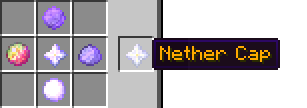
此配方中的下界之星是原版物品,但其他四项物品是由怪物掉落的特殊能量球。
入门视频教程:
玩家施放法术的演示:

-----------------------------------------------------
命令
OP 命令:
/wm reload
/wm getSpell <name>
/wm setSpellRecipe <name>
/wm giveSpell <spell> <player>
/wm spellBook
/wm getDrops <mob>
玩家指令:
/mana
/srecipe <spell>
--------------------------------------------------------------
权限
使用 OP 命令的权限为:wizardly.magic.commands
所有玩家均可使用 /mana 命令。
你可以在配置文件中为特定法术指定权限,但默认情况下没有任何法术需要权限。
--------------------------------------------------------------
安装
1. 将插件和 WizardlyMagic 文件夹复制到你的 plugins 文件夹中,然后重载服务器。
2. 你可以在配置文件中编辑任何你想要的选项。
3. 如果遇到任何问题,请在发帖前阅读 常见问题解答 (FAQ)。
--------------------------------------------------------------
创建自定义法术
这是为管理员准备的,这里有一个包含所有可用法术选项的测试法术:
删除所有你不想包含在法术中的内容。
spells:
  test:
    type: <touch/projectile/self>
    description: "A test spell"
    spellType: <pvp/build/other>
perms: test.spell
projectile: <enderpearl/snowball/egg/arrow/fireBall/item/block/beam/witherskull/entity>
projectileCount: 1
projectileInterval: 5
projectileSound: BLAZE_BREATH
randomRadius: 3
randomDistance: 0.2
homing: false
trailParticalEffect: LARGE_SMOKE:0:3
beamRange: 50
speed: 3
drop: false
fixedDrop: true
height: 25
data: <"particalType"/"id:data/entityType">
    cooldown: 3
    sound: blaze_beath
    lifeTime: <ticks>
    mana: 1
    altarLevel: 0
    requiredKnowledge:
      - 开始
      - 挖掘
    selfEffects:
      recall: false
      potionEffects:
        - "再生:1:5"
    effects:
      damage: 2
      changeBlock: "20:0:10"
      recall: false
      dig: 1
      digPower: 1
      digReplace: true
      mount: false
      potionEffects:
        - "失明:1:5"
        - "虚弱:1:5"
    splash:
      radius: 3
      particalEffect: LARGE_SMOKE:1:50:1
      sound: explode
      gravityBlocks: false
      changeBlock: "20:0:10"
      explode: false
      lightning: false
      recall: false
      mark: false
      knockBack: 0
      tp: false
      fireWork: "255:80:0"
      fireWorkLife: 0
      velocity: "0:1:0"
      effects:
        disarm: false
        damage: 2
        potionEffects:
          - "blindness:1:5"
          - "weakness:1:5"
        clearPotionEffects:
          - "poison:1:5"
recipe:
0:
item: 3
你无需手动定义法术配方,可以在游戏内通过命令完成。
制作法术视频教程:
-----------------------------------------------------------
即将推出的功能
- 错误修复
- 更多法术!
- 护身符
---------------------------------------------------
MC Stats
此插件会发送有关使用该插件的服务器和玩家数量的信息。
如果您希望禁用使用统计,请查看 /plugins/PluginMetrics/config.yml。

---------------------------------------------------
捐赠
如果你喜欢我的插件并希望支持我:
-------------------------------------------------------
YouTube/Facebook/Twitter
前往我的 YouTube 频道,探索更多精彩的 Minecraft 内容:
关注我的 Discord 以获取最新动态或帮助:
--------------------------------------------------------------
需要定制专属插件吗?

Features
Want to be a cool wizard with all kinds of spells? Well now you can! You can build a Spell Altar, craft over 50 unique spells, gain knowledge, and use all kinds of wizardly magic! This plugin is inspired by the Minecraft Forge mod Ars Magica.
Note: This plugin is in early alpha, so expect bugs, if you get any please create a ticket with them here.
Spell Altar:
You build a spell altar by putting redstone around an enchanting table. You don't gold blocks, but the type of blocks the altar is build on effects the altar level. Certain spells require higher level altars.
- Anything: 0
- Iron: 1
- Gold: 2
- Diamond: 3
Knowledge:
Knowledge is needed to make spells, each spell has certain knowledge it requires to be crafted. You can learn different bits knowledge by doing normal Minecraft actions. For example, picking up a Notch apple will teach you "Divine Intervention". Sometimes you can get mana from gaining knowledge. You can see info on how to get knowledge in the "Book of Knowledge".
Mana:
Spells require mana to cast, you start with 10 (Unless your server owner has changed it). When you gain knowledge you can get mana. Also there is a slight chance to gain mana each time you cast a spell.
Spell Book:
When you kill a boss (Wither, Ender Dragon, or Elder Guardian), they have a 50% chance to drop a spell book. You can store up to 9 spells in a Spell Book. Sneak right-click to open the book, then you can put spells in, or take them out. Right-click the cast the spell in slot 1. Sneak left-click to toggle the active spell to the one next to it.
Spells:
To craft a spell, you must put the recipe in a spell altar, then drop a Arcane Scroll on the altar. If you don't have required knowledge, if the recipe is invalid, or if your altar level is to low, you will get a chat message prompt telling you what to do. You can see info on spells and their recipes in the "Book of Spells".
Staffs:
You can craft staffs for better spell manipulation. Once you get a staff your click with it to open the binding menu. You put the spells you want in the slots and close it. Now those spells have been bound to the staff, you can not change these spells ever, its a one time thing. You can right-click to cast and left-click to cycle through the spells. There are three tiers of staffs, they get harder and harder to craft. For crafting recipes see the recipe section.
Special Mob Drops:
This plugin adds special mob drops that are used in spell recipes. For example, there is a 20% chance for a creeper to drop a "creeper heart" when killed. Then you can use the "creeper heart" to craft the TNT spell. You can change, remove, and add these in the config as you wish. You can see all the special drops, how to get them, and the chance they have to drop in the "Book of Drops".
Wizard Robes:
Wizard Robes are just normal leather armour. However, all the armour pieces must be the same colour. If you are wearing full wizard robes your mana will regenerate double.
Mana Potions:
You can make mana potions by throwing a empty glass bottle into a pool of water, then drop a slime ball, magma cream, or eye of ender in with it. Lastly throw in some binding powder. It will form a mana potion. If you drop in more than one of each of these items it will keep generating at one a second till it runs out of ingredients.
Configurability:
This plugin is very configurable. All the spells, recipes, and knowledge are configurable in the config. It does not end there though, you can crate your own spells with all the components the default spells use. Also, for convenience there is a /setSpellRecipe command to make setting a spell's recipe easier.
--------------------------------------------------------------
Recipes
Arcane Scroll recipe:
Spell Recipes:
You can see spell recipes with a command. For a list of spells, info on them, and the command to get each spells recipe, you will need to craft the Book of Spells:
Other Books:
You can craft other books for more info.
Book of Knowledge:
Book of Drops:
Staffs:
To craft staffs or staff caps, you need to put the recipe into a spell altar. But instead of dropping an arcane scroll onto the altar, you have to drop binding powder (Which you can get from killing zombies).
Staff Types:
Note: The staff caps seen here are not the vanilla items, they are ether crafted, or dropped from mobs.
Caps:
Ender Cap:
The ender-pearl in this recipe is just the vanilla one, but the other four items are special orbs dropped by mobs.
Nether Cap:
The nether-star in this recipe is just the vanilla one, but the other four items are special orbs dropped by mobs.
Getting Started Video Tutorial:
Player holding a spell:
--------------------------------------------------------------
Commands
OP Commands:
/wm reload
/wm getSpell <name>
/wm setSpellRecipe <name>
/wm giveSpell <spell> <player>
/wm spellBook
/wm getDrops <mob>
Player Commands:
/mana
/srecipe <spell>
--------------------------------------------------------------
Permissions
Permission to use the OP commands is: wizardly.magic.commands
All players can use the /mana command.
You can specify permissions for certain spells in the config, but none have perms by default.
--------------------------------------------------------------
Installation
1. Copy the plugin and the WizardlyMagic folder into your plugins folder, then reload the server.
2. You can edit any options you want in the config.
3. If you have any problems, read the FAQ before posting.
--------------------------------------------------------------
Creating A Custom Spell
This is for admins, here is a test spell with all the available spell options included:
Remove all things you don't want in the spell.
spells:
  test:
    type: <touch/projectile/self>
    description: "A test spell"
    spellType: <pvp/build/other>
    perms: test.spell
    projectile: <enderpearl/snowball/egg/arrow/fireBall/item/block/beam/witherskull/entity>
    projectileCount: 1
    projectileInterval: 5
    projectileSound: BLAZE_BREATH
    randomRadius: 3
    randomDistance: 0.2
    homing: false
    trailParticalEffect: LARGE_SMOKE:0:3
    beamRange: 50
    speed: 3
    drop: false
    fixedDrop: true
    height: 25
    data: <"particalType"/"id:data/entityType">
    cooldown: 3
    sound: blaze_beath
    lifeTime: <ticks>
    mana: 1
    altarLevel: 0
    requiredKnowledge:
      - Start
      - Dig
    selfEffects:
      recall: false
      potionEffects:
        - "regeneration:1:5"
    effects:
      damage: 2
      changeBlock: "20:0:10"
      recall: false
      dig: 1
      digPower: 1
      digReplace: true
      mount: false
      potionEffects:
        - "blindness:1:5"
        - "weakness:1:5"
    splash:
      radius: 3
      particalEffect: LARGE_SMOKE:1:50:1
      sound: explode
      gravityBlocks: false
      changeBlock: "20:0:10"
      explode: false
      lightning: false
      recall: false
      mark: false
      knockBack: 0
      tp: false
      fireWork: "255:80:0"
      fireWorkLife: 0
      velocity: "0:1:0"
      effects:
        disarm: false
        damage: 2
        potionEffects:
          - "blindness:1:5"
          - "weakness:1:5"
        clearPotionEffects:
          - "poison:1:5"
    recipe:
      0:
        item: 3
You do not need to manually define the spell recipe, you can do that in-game with a command.
Spell making video tutorial:
--------------------------------------------------------------
Upcoming Features
- Bug Fixes
- More Spells!
- Charms
--------------------------------------------------------------
MC Stats
This plugin sends info on how many servers and players are using this plugin.
If you wish to disable the usage stats, look at /plugins/PluginMetrics/config.yml.
--------------------------------------------------------------
Donate
If you like my plugins and want to help me out:
--------------------------------------------------------------
YouTube/FaceBook/Twitter
Check out my YouTube for more Minecraft awesomeness:
Keep up to date or get help on my Discord:
--------------------------------------------------------------
Want your own custom plugin?

 插件
 插件
 插件
 插件

 插件

 插件

评论 0
登录后参与评分
还没有评论,来抢沙发吧