概览
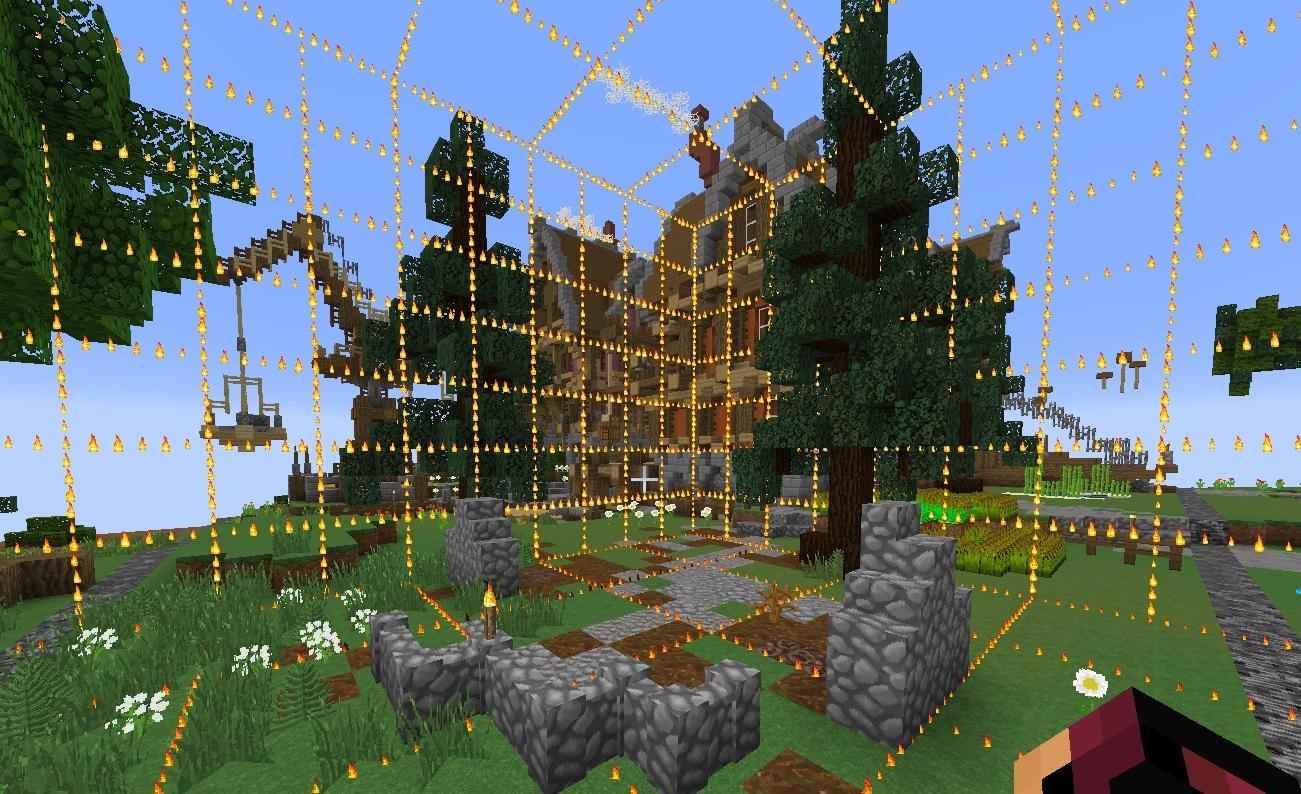
- 此插件使用炫酷粒子效果可视化你当前的 WorldEdit 选区
- 你可以自定义显示的粒子效果、数量,并启用高级网格(对于较大的选区非常有用)。欲查看其他选项,请参阅下方的配置部分!
支持立方体、球体、椭球体、圆柱体、2D 多边形和 3D 多面体选区(示例见画廊页面)。
- 你还可以显示你复制的选区(//copy),可通过 WESUI 命令切换开关。你也可以通过使用
/wesui showregion <region> 命令来显示特定的 WorldGuard 区域
兼容性
此插件适用于 1.9 及以上所有版本,无需额外依赖,且在版本更新时几乎不会出错。它与以下版本的 WorldEdit 兼容:
如果你想在 1.8.x 服务器上运行此插件,可以从 GitHub Releases 页面 下载旧版。
命令
可用命令及其权限如下:
/wesui - wesui.command/wesui reload - wesui.command.reload/wesui toggle - wesui.command.toggle/wesui toggleclipboard - wesui.command.toggleclipboard/wesui showregion <region> - wesui.command.showregion
wesui.maxselectionsize.bypass - 绕过配置中设置的选区大小限制
配置
# 如果启用,粒子的位置将在每次选区生成时仅计算一次并进行缓存。
# 这基本上完全消除了计算带来的较高 CPU 占用,但在处理大量/大型选区时会导致一些缓存问题。
#
# 如果遇到并发错误,请禁用此项。
cache-calculated-positions: true

# 所有粒子的列表可在此处找到:https://hub.spigotmc.org/javadocs/bukkit/org/bukkit/Particle.html
# 请注意,新引入的粒子在旧版本中显然无法使用。
# 用于显示你当前选区的粒子。
#
# 如果你想使用需要额外数据的粒子(REDSTONE, FALLING_DUST, BLOCK_DUST, BLOCK_CRACK, ITEM_CRACK),
# 你可以在该插件 Spigot 页面的底部阅读相关说明。
# 每个粒子的视距、速度和偏移量也适用同样的规则。
particle: FLAME
# 用于剪贴板(在使用 WorldEdit 的 //copy 命令后)显示的粒子。
# 可以通过 '/wesui toggleclipboard' 命令启用。
clipboard-particle: VILLAGER_HAPPY
# 用于 WG 区域视图(当使用 '/wesui showregion <region>' 时)显示的粒子。
wg-region-particle: VILLAGER_HAPPY

# 每单位长度的方块应显示多少个粒子。
# 推荐数量为 2 到 4。可设置为 1 到 5。
particles-per-block: 3

# 这个数字决定了每次发送粒子之间的间隔 tick 数。
# 可设置为 5 到 200。
# 参考:20 Minecraft ticks 相当于 1 秒 -> 10 ticks 是 0.5 秒 -> 1 tick 是 0.05 秒。
particle-send-interval: 12

# 玩家的最大延迟阈值,超过此值将不再发送粒子 - 此选项仅在 Paper 服务器上有效。
# 设置为 -1 以禁用。
max-ping: 150

# 选择巨大区域可能导致高 CPU 占用或服务器卡顿。
# 这限制了可以显示的最大方块数(默认为 1000 万,约 ~250*150*250 个方块)。
# 如果只有受信任的人可以使用,你可以设置得更高。
max-selection-size-to-display: 10_000_000
# 如果设置为 true,拥有 'wesui.maxselectionsize.bypass' 权限的玩家将忽略上述限制。
enable-max-selection-bypass-perm: true

advanced-grid:
  # 如果启用,选区不仅会显示轮廓,
  # 还会在轮廓之间显示网格(选区越大,网格越大)。
  # 需要大约 2 到 3 倍的计算量,但效果惊人!
  enabled: false
  # 每单位长度的方块应显示多少个粒子。
  # 推荐数量为 2 到 3。可设置为 2 到 5。
  particles-per-block: 2

advanced-clipboard-grid:
  # 你也可以为剪贴板视图启用网格。
  # 与 advanced-grid 设置相同,但针对剪贴板。
  enabled: false
  particles-per-block: 2

advanced-wg-region-grid:
  # 你也可以通过 '/wesui showregion <region>' 命令为 WG 区域视图启用网格。
  # 与 advanced-grid 设置相同,但针对 WorldGuard 区域。
  enabled: false
  particles-per-block: 2

particle-expiry:
  # 如果启用且选区在给定秒数内未更改,粒子将停止发送
  enabled: false
  expires-after-seconds: 180
  # 如果启用,当粒子因过期而消失时,玩家会收到通知。
  expire-message: true

# 如果设置为 'none',每位玩家的选区都会显示。
# 否则,只有拥有指定权限的玩家才会看到其选区的粒子。
permission: "none"

send-particles-to-all:
  # 如果启用,粒子将发送给所有玩家,而不仅仅是拥有 WorldEdit 选区的玩家。
  # 在组队建造时可能很有用。
  enabled: false
  # 你还可以通过权限限制观看粒子的人数。留空 'none' 则允许所有玩家观看。
  # 警告:如果你有一个(不好的)权限插件,它不缓存检查项 / 权限检查耗时较长,请将其保留为 'none'。
  view-others-particles-perm: "none"
  # 如果你想让人们看到其他玩家选区的不同粒子,可以在这里设置。
  others-particle: FLAME
  others-clipboard-particle: VILLAGER_HAPPY

# 如果设置为 false,玩家必须首先使用 '/wesui toggle' 才能看到粒子效果。
show-selection-by-default: true
# 如果设置为 false,玩家必须首先使用 '/wesui toggleclipboard' 才能看到粒子效果。
show-clipboard-by-default: false

# 将切换状态保存到文件中,以便在玩家退出和服务器重启后保持更改。
# 这也包括剪贴板切换状态。
persistent-toggles: false

# 更改可以看见粒子的距离,可设置为 1 到 500(如果你出于某种原因想在 500 格之外看到它们)。
# 这不会对服务器性能产生任何影响。
particle-viewdistance: 99

# 建议启用此选项,否则你将错过新功能和整体改进。
update-checks: true
使用数据设置粒子
... 如果你想使用需要额外数据的粒子(REDSTONE、FALLING_DUST、BLOCK_DUST、BLOCK_CRACK、ITEM_CRACK),或者想要设置速度、粒子视距或偏移量,你还需要在配置中放入这些额外数据(注意 REDSTONE 粒子仅在 1.13+ 服务器上可更改)。
以下所有内容均为示例——重要的是 X-particle-data 键后面的内容!
假设你想将普通选择粒子设置为 REDSTONE 并更改半径和偏移量;那么你的配置应类似于这样:
[...]
particle: REDSTONE
particle-data:
  # RGB 颜色数据 - 数字范围从 0 到 255
  r: 0 # 红色
  g: 0 # 绿色
  b: 0 # 蓝色
  # 相对粒子大小
  size: 0.9
  # 通用设置
  radius: 50
  offX: 0.2
  offY: 0.1
  offZ: 1
[...]
你还可以在 -data 部分添加速度参数,它是一个从 0 到 1 的小数。[/SIZE]请注意,某些粒子不支持设置其速度。
现在你想将剪贴板粒子设置为 FALLING_DUST(BLOCK_DUST 和 BLOCK_CRACK 同理):
[...]
clipboard-particle: FALLING_DUST
clipboard-particle-data:
  # 方块材质
  material: DIAMOND_BLOCK
[...]
最后,你想将 send-particles-to-all 中的 others-particle 字段设置为 ITEM_CRACK:
[...]
send-particles-to-all:
  others-particle: ITEM_CRACK
  others-particle-data:
    material: STICK
[...]
重要提示:如果你在运行 1.12 或更低版本的服务器上使用 BLOCK_CRACK、BLOCK_DUST 或 FALLING_DUST,需要注意以下几点:
- 在 material 之后,你可能还需要额外的数据/耐久度值。例如,棕色羊毛在 1.13+ 中只是 YELLOW_WOOL,但在 1.12- 中是 WOOL 且数据值为 4,因此你会像下面示例那样编写:
particle: FALLING_DUST
particle-data:
  material: WOOL
  data: 4
当然,你可以将任何粒子放入任何字段中;我只是使用了不同的粒子来说明其结构。
Overview
- This plugin visualizes your current WorldEdit selection with fancy particles
- You can customize the shown particle effect, their amount and enable an advanced grid (useful for bigger selections). To take a look at other options, look at the configuration section below!
Covered are cuboid, spherical, ellipsoid, cylinder, 2D polygonal and 3D polyhedral selections (see the galleries page for examples).
- You can also display your copied selection (//copy), which can be toggled with the WESUI command. You can also show a specific WorldGuard region by using the
/wesui showregion <region> command
Compatibility
This plugin runs on all versions from 1.9 onwards, needs no additional dependencies and (almost) never breaks on version updates. It is compatible with the following versions and forks of WorldEdit:
If you want to run this plugin on a 1.8.x server, you can download a legacy version from the GitHub Releases page.
Commands
Available commands and their permissions are:
/wesui - wesui.command/wesui reload - wesui.command.reload/wesui toggle - wesui.command.toggle/wesui toggleclipboard - wesui.command.toggleclipboard/wesui showregion <region> - wesui.command.showregion
wesui.maxselectionsize.bypass - bypass the selection size limit set in the config
Configuration
# If enabled, the positions for particles will only be calculated once per selection and then cached.
# This essentially entirely removes the higher CPU usage of the calculations, but results in some caching if many/big selections are being made.
#
# Disable this if you run into concurreny errors.
cache-calculated-positions: true

# A list of all particles can be found here: https://hub.spigotmc.org/javadocs/bukkit/org/bukkit/Particle.html
# Just note that newly introduced particles obviously won't work in older versions.
# Shown for the selection you currently have.
#
# If you want to use a particle that requires extra data (REDSTONE, FALLING_DUST, BLOCK_DUST, BLOCK_CRACK, ITEM_CRACK),
# you can read up on how to do that at the bottom of the plugin's Spigot page.
# The same applies to per-particle view-distance, speed, and offsets.
particle: FLAME
# Shown for the clipboard (after using WorldEdit's //copy command).
# Can be enabled with the '/wesui toggleclipboard' command.
clipboard-particle: VILLAGER_HAPPY
# Shown for the WG region view (when using '/wesui showregion <region>').
wg-region-particle: VILLAGER_HAPPY

# How many particles should be displayed for every block of length.
# The recommended amount is between 2 and 4. Can be set from 1 to 5.
particles-per-block: 3

# This number determines how many ticks should be between every sending of particles.
# Can be set from 5 to 200.
# For reference: 20 Minecraft ticks are equivalent to 1 second -> 10 ticks are 0.5 seconds -> 1 tick is 0.05 seconds.
particle-send-interval: 12

# Max ping a player can have before particles are no longer sent - this option only works on Paper servers.
# Set this to -1 to disable.
max-ping: 150

# Selecting giant areas may result in a high cpu usage or server lag.
# This limits the maximum number of blocks that can be displayed (default is 10 million, ~250*150*250 blocks).
# You could still go even higher if they can only be used by trusted people.
max-selection-size-to-display: 10_000_000
# If set to true, players with the 'wesui.maxselectionsize.bypass' permission ignore the limit from above.
enable-max-selection-bypass-perm: true

advanced-grid:
  # If enabled, the selection will not only be displayed by the outline,
  # but also with a grid between the outlines (the bigger the selection, the bigger the grid).
  # Requires more or less 2 to 3 times the amount of calculations, but looks amazing!
  enabled: false
  # How many particles should be displayed for every block of length.
  # The recommended amount is between 2 and 3. Can be set from 2 to 5.
  particles-per-block: 2

advanced-clipboard-grid:
  # You can also enable the grid for the clipboard view.
  # Same as advanced-grid settings, but for the clipboard.
  enabled: false
  particles-per-block: 2

advanced-wg-region-grid:
  # You can also enable the grid for the WG region view by using the '/wesui showregion <region>' command.
  # Same as advanced-grid settings, but for the WorldGuard regions.
  enabled: false
  particles-per-block: 2

particle-expiry:
  # If enabled and a selection isn't changed for the given amount of seconds, particles will stop being sent for it
  enabled: false
  expires-after-seconds: 180
  # If enabled, players are notified if their particles disappear after the expiry.
  expire-message: true

# If set to 'none', every player will have their selection displayed.
# Else, only players with the set permission will have particles for their selection.
permission: "none"

send-particles-to-all:
  # If enabled, the particles will be sent to all players, rather than just to the player having the WorldEdit selection.
  # Might be useful when building as a group.
  enabled: false
  # You can also limit those seeing the particles by a permission. Leave 'none' to let all players see them.
  # Warning: If you have a (bad) perm plugin that does not cache its checks / takes a while for permission checks, leave this at 'none'.
  view-others-particles-perm: "none"
  # If you want people to see different particles for another player's selections, you can set them here.
  others-particle: FLAME
  others-clipboard-particle: VILLAGER_HAPPY

# If set to false, players will have to use '/wesui toggle' first to be able to see the particles.
show-selection-by-default: true
# If set to false, players will have to use '/wesui toggleclipboard' first to be able to see the particles.
show-clipboard-by-default: false

# Saves toggles to a file, so that they stay changed after player quits and server restarts.
# This also includes the clipboard toggle.
persistent-toggles: false

# Changes the distance from which particles can be seen, can be set from 1 to 500 (if you for some reason want to see them 500 blocks away).
# This does NOT affect server performance in any way.
particle-viewdistance: 99

# Recommended to have this enabled, as you'd else miss out on new features and overall improvements.
update-checks: true
Setting Particles With Data
... If you want to use particles that require extra data (REDSTONE, FALLING_DUST, BLOCK_DUST, BLOCK_CRACK, ITEM_CRACK) or want to set speed, part-particle view-distance, or offsets, you also need to put that extra data in the config (note that the REDSTONE particle is only changeable for 1.13+ servers).
All of the below are examples - the important bits are what follows the X-particle-data key!
Let's say you want to set the normal selection particle to REDSTONE and change radius and offset; Then your config should look similar to this:
[...]
particle: REDSTONE
particle-data:
  # RGB color data - numbers from 0 to 255
  r: 0 # red
  g: 0 # green
  b: 0 # blue
  # Relative particle size
  size: 0.9
  # Generic settings
  radius: 50
  offX: 0.2
  offY: 0.1
  offZ: 1
[...]
You can also add the speed parameter to the -data section, being a decimal number from 0 to 1. [/SIZE]Note that some particles do not support setting their speed.
Now you want to set the clipboard particle to FALLING_DUST (works the same for BLOCK_DUST and BLOCK_CRACK):
[...]
clipboard-particle: FALLING_DUST
clipboard-particle-data:
  # Block material
  material: DIAMOND_BLOCK
[...]
Finally, you want to set the others-particle field in send-particles-to-all to ITEM_CRACK:
[...]
send-particles-to-all:
  others-particle: ITEM_CRACK
  others-particle-data:
    material: STICK
[...]
IMPORTANT: If you are running a server on 1.12 or lower, you need to note the following when using either BLOCK_CRACK, BLOCK_DUST, or FALLING_DUST:
- after the material, you might also need the extra data/durability. E.g. brown wool is just YELLOW_WOOL in 1.13+, but in 1.12- it is WOOL with data 4, so you would write it as in the following example:
particle: FALLING_DUST
particle-data:
  material: WOOL
  data: 4
You can of course put any particle in any of the fields; I just used different ones to illustrate its structure.


 插件

 插件
 插件
 插件
 插件
 插件
评论 0
登录后参与评分
还没有评论,来抢沙发吧