? 简介
WorldGuardFlagPanel 是一款轻量级的 Paper/Folia 插件,它为 WorldGuard 区域标志添加了一个完全交互式的游戏内 GUI——无需使用复杂的命令。
不再需要每次输入 /region flag <region> <flag> <value>,只需打开面板,点击某个标志即可循环切换值或打开表单输入新值。更改会立即保存。
✨ 主要功能
?️ 原生游戏内面板
- 穿透式界面 — 标志及其当前值列表显示;单击即可切换或打开编辑器
- 状态标志 — 通过单击在
ALLOW → DENY → (未设置) 之间循环
- 布尔标志 — 瞬间切换
TRUE / FALSE
- 文本/数字标志 — 打开预填当前值的原生输入表单
- Set 标志 — 多行编辑器,每行一个条目
- game-mode 标志 — 下拉选择器:
Survival、Creative、Adventure、Spectator
- 位置标志 — 接受
x,y,z 或 x,y,z,world 格式
?️ 智能区域检测
- 自动检测 — 在您站立的位置自动打开对应区域的面板
- 多区域选择器 — 如果您处于重叠区域内,选择器允许您选择要编辑的区域
- 直接访问 — 按名称定位任意区域:
/wgfpanel <region>
- 全局区域 — 当您在当前位置未找到区域时,回退到
__global__
? 多语言支持
- 内置
fr_FR ?? 和 en_GB ??
- 根据每个玩家的 Minecraft 客户端语言环境自动选择语言
- 可通过
.toml 文件完全自定义
⚡ 性能
- 即时保存 — 每次编辑后,区域更改立即持久化到磁盘
? 依赖要求
| 组件 |
最低版本 |
| Paper 或 Folia |
1.21.8 |
| WorldGuard |
7.0.13 |
| WorldEdit |
7.3.11 |
| Java |
21 |
? 安装
- 下载 GitHub Releases 中的最新
.jar 文件。
- 放置 到您的服务器
plugins/ 文件夹中。
- 确保已安装 WorldGuard 和 WorldEdit。
- 重启 服务器。
无需配置文件即可开始使用。
? 命令
/wgfpanel [region]
| 用法 |
行为 |
/wgfpanel |
打开您当前所在区域的面板。如果多个区域重叠,将显示区域选择器。 |
/wgfpanel <region> |
无论您身在何处,打开指定区域的面板。 |
支持区域名称的 Tab 补全。
? 权限
| 权限 |
描述 |
默认 |
worldguardflagpanel.use |
允许玩家打开其拥有的区域的面板 |
OP |
worldguardflagpanel.admin |
完全访问任何世界中所有区域 |
OP |
如果没有 worldguardflagpanel.admin 权限,玩家只能编辑他们在 WorldGuard 中被设置为所有者的区域。
? 语言
该插件内置两种翻译:
- ??
fr_FR — 法语
- ??
en_GB — 英语
显示的语言由每个玩家的 Minecraft 客户端语言环境自动确定——无需配置。
要自定义消息,请编辑位于以下位置的 .toml 文件:
plugins/WorldGuardFlagPanel/language/
? 统计信息
本插件通过 FastStats 收集匿名使用统计数据(服务器数量、玩家数量)。绝不会传输任何个人数据。这些指标有助于跟踪采用情况并指导未来的开发。
? 支持
? 许可证
WorldGuardFlagPanel 是开源软件。有关详细信息,请参阅 LICENSE 文件。
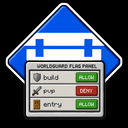
WorldGuardFlagPanel
A native GUI panel for managing WorldGuard flags — fully compatible with Folia
GitHub • Issues • Modrinth • Discord

? About
WorldGuardFlagPanel is a lightweight Paper/Folia plugin that adds a fully interactive in-game GUI to manage WorldGuard region flags — no complex commands needed.
Instead of typing /region flag <region> <flag> <value> every time, simply open the panel, click a flag, and the value cycles or a form opens for you to type a new one. Changes are saved instantly.
✨ Key Features
?️ Native In-Game Panel
- Click-through interface — Flags are listed with their current value; one click toggles or opens an editor
- State flags — Cycle through
ALLOW → DENY → (unset) with a single click
- Boolean flags — Toggle
TRUE / FALSE instantly
- Text / numeric flags — Opens a native input form pre-filled with the current value
- Set flags — Multiline editor, one entry per line
- game-mode flag — Dropdown selector:
Survival, Creative, Adventure, Spectator
- Location flags — Accepts
x,y,z or x,y,z,world format
?️ Smart Region Detection
- Auto-detect — Opens the panel for the region you're standing in
- Multi-region selector — If you're inside overlapping regions, a picker lets you choose which one to edit
- Direct access — Target any region by name:
/wgfpanel <region>
- Global region — Falls back to
__global__ when no region is found at your position
? Multi-language Support
- Ships with
fr_FR ?? and en_GB ??
- Language is picked automatically from each player's Minecraft client locale
- Fully customizable via
.toml files
⚡ Performance
- Instant saves — Region changes are persisted to disk immediately after each edit
? Requirements
| Component |
Minimum version |
| Paper or Folia |
1.21.8 |
| WorldGuard |
7.0.13 |
| WorldEdit |
7.3.11 |
| Java |
21 |
? Installation
- Download the latest
.jar from GitHub Releases.
- Place it in your server's
plugins/ folder.
- Make sure WorldGuard and WorldEdit are already installed.
- Restart the server.
No configuration file is required to get started.
? Commands
/wgfpanel [region]
| Usage |
Behaviour |
/wgfpanel |
Opens the panel for the region at your position. Shows a region selector if multiple regions overlap. |
/wgfpanel <region> |
Opens the panel for the specified region, wherever you are. |
Tab-completion is available for region names.
? Permissions
| Permission |
Description |
Default |
worldguardflagpanel.use |
Allows opening the panel for regions the player owns |
OP |
worldguardflagpanel.admin |
Full access to all regions in any world |
OP |
Without worldguardflagpanel.admin, players can only edit regions where they are set as owner in WorldGuard.
? Languages
The plugin ships with two built-in translations:
- ??
fr_FR — French
- ??
en_GB — English
The displayed language is automatically determined by each player's Minecraft client locale — no configuration needed.
To customize messages, edit the .toml files located in:
plugins/WorldGuardFlagPanel/language/
? Statistics
This plugin collects anonymous usage statistics (server count, player count) via FastStats. No personal data is ever transmitted. These metrics help track adoption and guide future development.
? Support
? License
WorldGuardFlagPanel is open source. See the LICENSE file for details.
评论 0
登录后参与评分
还没有评论,来抢沙发吧