
7.0.0 版本之后,所有配置都将发生显著变化。不过不用担心,因为新插件会自动迁移旧插件的配置。你只需要安装新插件,然后删除旧插件即可。
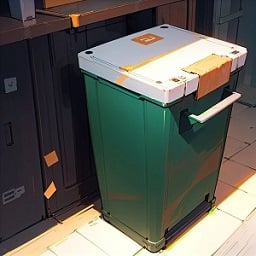
允许玩家自定义其家园世界的垃圾桶。
此清理插件在特定世界(即玩家的家)中运行,当清理物品时,会将它们收集到玩家在家园中亲自设置的垃圾桶中。它结合了多种功能,支持 Folia,拥有高度可配置的设置,并兼容多种语言。 (此插件更适合与世界团队服务器搭配使用,例如 Home 服务器(使用 PlayerWorldsPro 插件或其他 Home 插件服务器)。如果关闭 World Garbage can,其功能也可以完全替代其他清理插件)
现在,给你讲个地狱笑话:
玩家:嘿,我的量子太阳能板被清理插件扫走了。你能赔偿我吗?
OP:不可能,你没法证明,而且我的清理插件不保留记录。
玩家:我刚买的!
OP:万一你藏起来了,我给你赔了,岂不是变相翻倍?
玩家:***
OP:即使服务器上有人造公共垃圾桶,那些太阳能板也会被抢光。
OP:那我该怎么办?
于是乎,这个插件应运而生。
当 Foila 支持多世界时,这款清理插件将惠及所有人。
特性:
- 完全自定义提示
支持多种提示消息 你可以实现完全自定义的提示 例如,当剩余三秒时,让“bossbar”、“actionbar”、“chat”和“title”同时提示, 或者,你可以让 bossbar 每秒改变其样式(实心、非实心,包括其颜色,每秒可以不同) 5.7.0 版本之后,支持每秒切换不同的提示声音,以及设置每秒不同的音量和音调
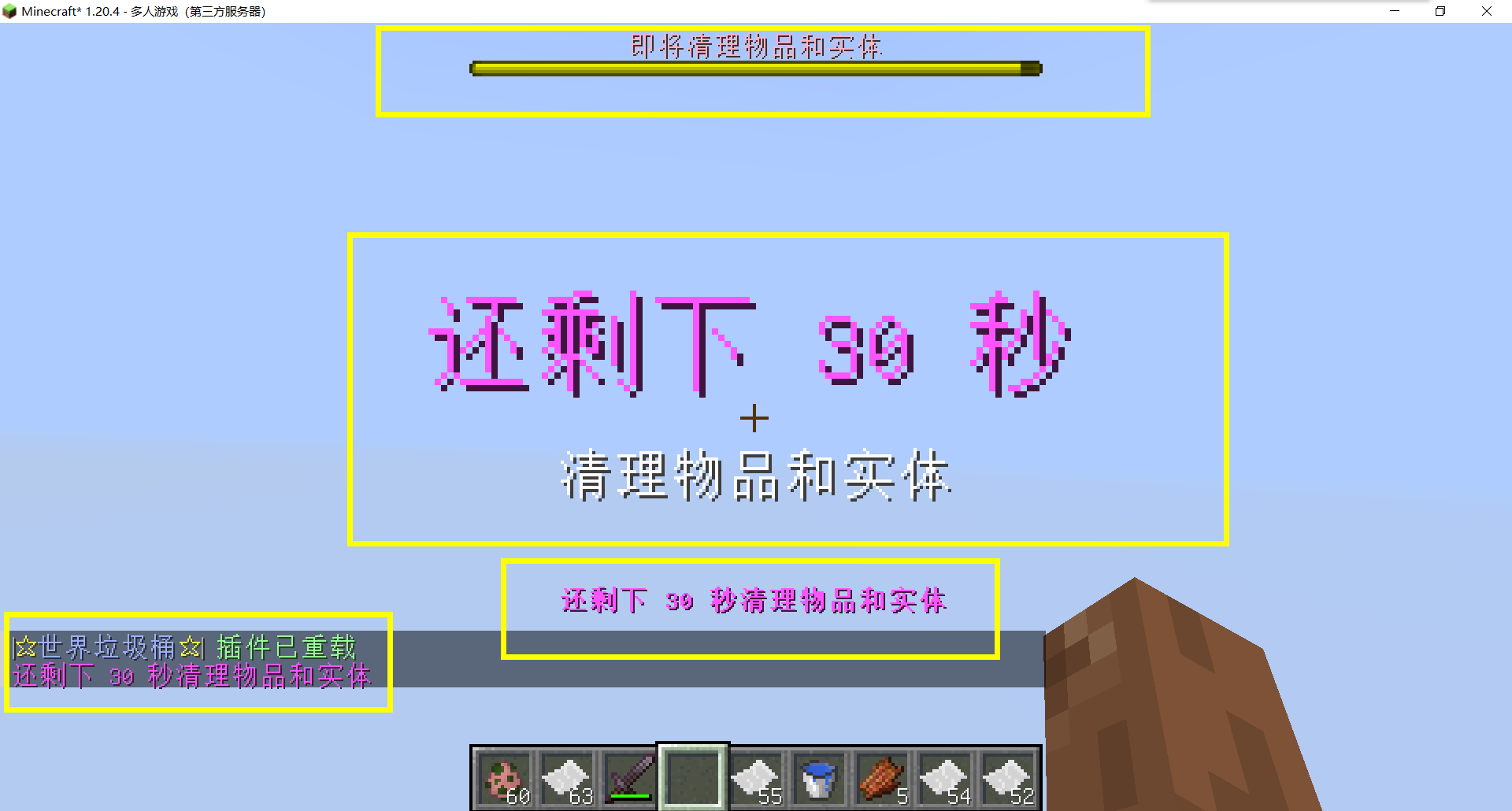
- 感谢 QQ 1664907770(“笑脸猫”)为 “itemsadder” 插件提供素材包(适用于公共垃圾桶)点击下载 (IteamsAdder/WorldTrashCan config and resource)
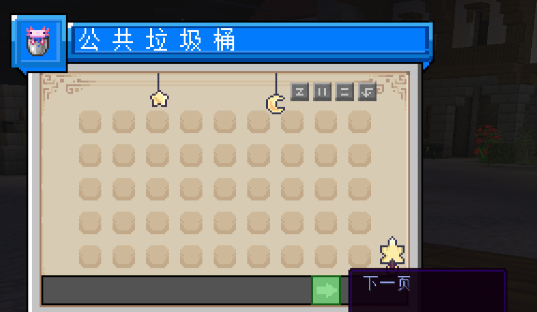
- 玩家创建的世界垃圾桶:
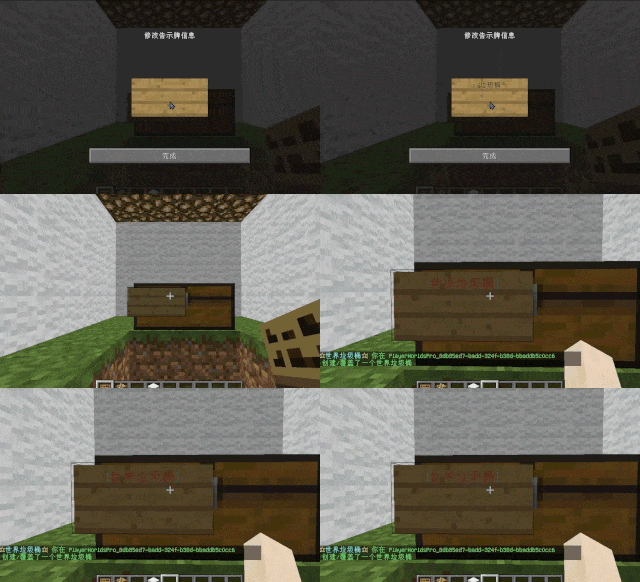
玩家有能力在其世界中创建垃圾桶。 类似于之前用告示牌锁定的箱子机制,创建后告示牌上的文字会发生变化。 当开始清理时,物品将自动添加到家园垃圾桶中。 可配置的设置允许玩家指定检测名称和清理后的转换名称。
“为满足少数人的需求,这里有一个提醒” 如何创建世界垃圾桶: 将箱子放在地上,手持告示牌右键点击箱子。在配置文件中输入 [世界垃圾桶](在 Set. SighCheckName 中配置),一旦文字转换,即创建成功。每次清理垃圾时,都会被放入标记的箱子中 在默认配置文件中,“world, dim-1, dim1” 这三个世界的名称被禁用,创建“世界垃圾桶”(排除 OP)
-
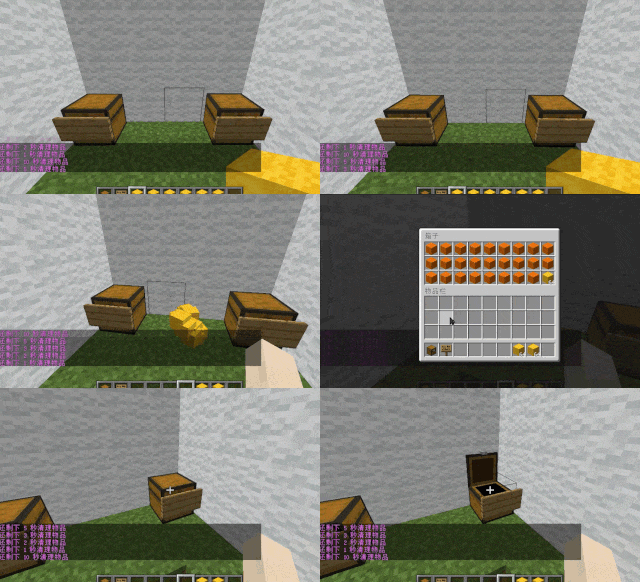
支持多个家园垃圾桶:
玩家可以使用命令授予特殊玩家放置额外家园垃圾桶的能力。 家园垃圾桶的默认数量可配置。
-
家园垃圾桶溢出至公共垃圾桶:
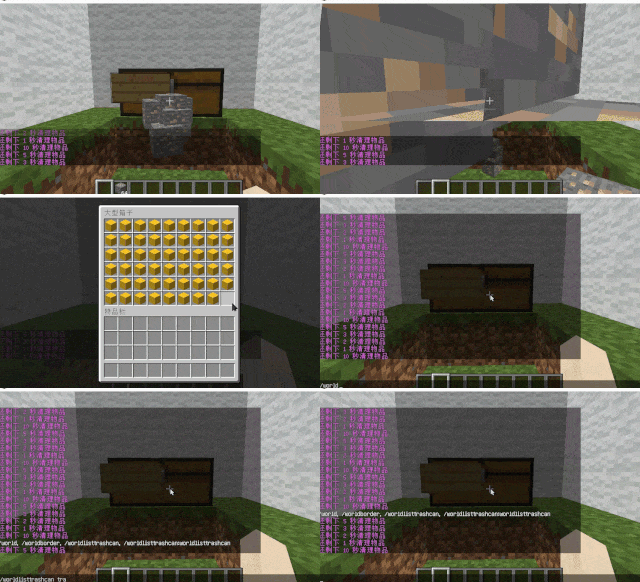
来自家园垃圾桶的物品溢出到公共垃圾桶。 公共垃圾桶可配置最大页数和黑名单。
-
物品排除与公共垃圾桶处理:
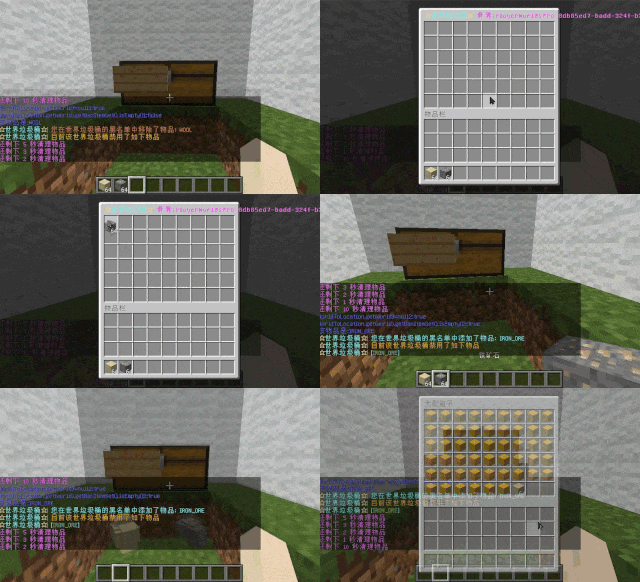
玩家可以将物品加入家园垃圾桶黑名单以防止回收。 被排除的物品直接送往公共垃圾桶。 配置包括支持排除具有特殊 Lore 的物品(例如 QS 商店中具有 showLocation 的物品)。 公共垃圾桶可以在每次清扫时清除新物品,也可以累积所有垃圾而不进行清除。
-
公共垃圾桶可以启用日志记录:
记录玩家取走了哪些物品
-
实体清理:
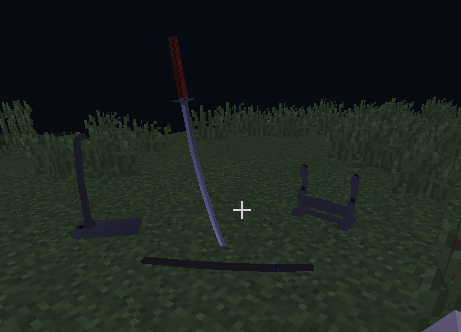
可选地清理所有动物/怪物。 使用命令 (/WorldListTrashCan Look) 查看实体类型并配置实体黑名单/白名单。 支持清理模组中的特殊实体。
-
密集实体清理:
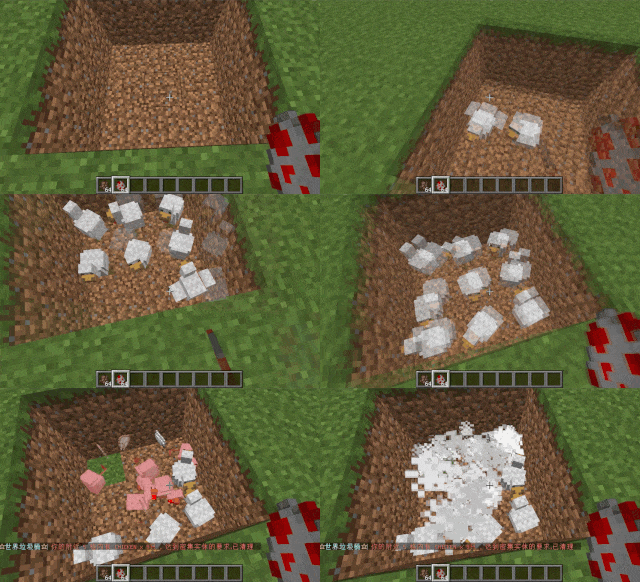
可配置半径、目标数量、杀死或移除选项,以及密集实体清理时的玩家通知。
-
垃圾信息/命令限制:
可配置聊天/命令间隔、白名单命令和信息性消息。 防止掉落物品的防御。 玩家可以手动启用或禁用物品掉落防御模式。 -
性能优化:
所有优化选项均可在设置中配置。- 快速移除无法收集的箭(例如来自骷髅或附魔了无限附魔的弓射出的箭)。
- 禁止玩家踩踏农田
安装方法
- 将其放入 Plugins 文件夹
命令:
- /wtc reload
重载插件。 - /wtc GlobalTrash
打开公共垃圾桶。 - /wtc help
显示帮助信息。 - /wtc ban
打开本地世界垃圾桶黑名单 GUI。 - /wtc Look
右键点击以获取实体类型(用于添加到配置黑名单/白名单)。 - /wtc GlobalBan
打开全局世界垃圾桶黑名单 GUI。 - /wtc add [WorldName] [数量]
设置指定世界中垃圾桶的最大数量(如果未指定,则默认为你脚下的世界)。 - /wtc DropMode
打开或关闭掉落模式。
占位符
- %WTC_ClearTime%:
距离下次清理的时间。
权限
- WorldListTrashCan.BanGui:
打开添加物品到玩家家园垃圾桶黑名单 GUI 的权限。 - WorldListTrashCan.GlobalTrashOpen:
打开全局垃圾桶的权限。 - WorldListTrashCan.help:
访问命令帮助的权限。 - WorldListTrashCan.DropMode:
打开或关闭掉落模式的权限。
(上述权限默认拥有) - WorldListTrashCan.GlobalBan:
打开全局垃圾桶黑名单 GUI 的权限。 - WorldListTrashCan.Look:
右键点击查询实体类型的权限。
(上述权限默认不拥有)
After version 7.0.0, all configurations will undergo significant changes. However, don't worry, because the new plugin will automatically migrate the configurations of the old plugin. You just need to install the new plugin and then delete the old one
Allows players to customize their home world's trash bin.
This cleaning plugin operates within a specific world (the player's home) and, when cleaning items, gathers them into a trash bin that the player has personally set up in their home. It combines various features, supports Folia, boasts highly configurable settings, and is compatible with multiple languages. (This plugin is more suitable for pairing a world with a team's server, such as the Home server (using the PlayerWorldsPro plugin or other Home plugin servers). If you close the World Garbage can, its functions can also completely replace other cleaning plugins)
Now, here's a hellish joke for you:
Player : Hey, my quantum solar panels got swept away by the cleaning plugin. Can you compensate me?
OP : No way, you can't prove it, and my cleaning plugin doesn't keep records.
Player : I just bought them!
OP : What if you hid them, and I compensate you, essentially doubling them?
Player : ***
OP : Even if there were public trash bins on the server, someone would snatch up those solar panels.
OP : What should I do?
And there you have it, this plugin was born.
When Foila supports multiple worlds, this cleaning plugin will benefit everyone
Features:
- Fully customizable tip
Support multiple prompt messages You can achieve fully customized prompts For example, when there are three seconds left, let "bossbar", "actionbar", "chat",and "title" prompt together, Alternatively, you can have the bossbar change its style every second (solid, non solid, including its color, can be different every second) After version 5.7.0, it supports switching between different prompt sounds per second, as well as setting different volumes and tones per second
- Thank you to QQ 1664907770 ("笑脸猫") for providing the material package for the "itemsadder" plugin (applicable to public trash cans) Click here to download (IteamsAdder/WorldTrashCan config and resource)
- Player-Created World Trash Bin:
Players have the ability to create a trash bin in their world. Similar to the mechanics of previous sign-locked chests, the font on the sign will undergo a transformation after creation. When the cleaning process is initiated, items will be automatically added to the home trash bin. Configurable settings allow players to specify detection names and transformed names after cleaning.
"To meet the demands of a small number of people, here is a reminder" How to create a world trash can: Place the chest on the ground, hold the signboard and right-click on the chest. Enter [世界垃圾桶] in the configuration file (configured in Set. SighCheckName), and once the font is converted, it is created. Every time the garbage is cleaned, it will be placed in the marked chest In the default configuration file, the names of the three worlds "world, dim-1, dim1" are disabled, creating a "world trash can" (excluding op)
-
Support for Multiple Home Trash Bins:
Players can use commands to grant special players the ability to place additional home trash bins. Default quantities for home trash bins are configurable.
-
Home Trash Bin Overflow to Public Trash Bin:
Items from home trash bins overflow into the public trash bin. Public trash bins can have a configurable maximum page count and a blacklist.
-
Item Exclusion and Public Trash Bin Handling:
Players can add items to the home trash bin blacklist to prevent their recycling. Excluded items go directly to the public trash bin. Configuration includes support for excluding items with special lore (e.g., items from the QS shop with showLocation). Public trash bins can either clear new items during each sweep or accumulate all trash without clearing.
-
The public trash can can enable logging:
Record what items the player took away -
Entity Cleanup:
Optional cleanup of all animals/monsters. Command (/WorldListTrashCan Look) to view entity types and configure entity blacklists/whitelists. Support for cleaning special entities from mod.
-
Dense Entity Cleanup:
Configurable radius, target quantity, kill or remove options, and player notifications for dense entity cleanup.
-
Spam/Command Limitations:
Configurable chat/command intervals, whitelist commands, and informative messages. Defense against item dropping. Players can manually enable or disable the item-drop defense mode. -
Performance Optimization:
All optimizations have configurable options in the settings.- Quick removal of uncollectible arrows (e.g., arrows from skeletons or bows with infinite enchantments).
- Prohibit players from trampling on farmland
How to Install
- Throw it into the Plugins folder
Commands:
- /wtc reload
Reloads the plugin. - /wtc GlobalTrash
Opens the public trash bin. - /wtc help
Displays help information. - /wtc ban
Opens the local world trash blacklist GUI. - /wtc Look
Right-click to get entity type (useful for adding to the configuration blacklist/whitelist). - /wtc GlobalBan
Opens the global world trash blacklist GUI. - /wtc add [WorldName] [Quantity]
Sets the maximum quantity for the trash bin in the specified world (defaults to the world at your feet if not specified). - /wtc DropMode
Opens or closes drop mode.
Placeholders
- %WTC_ClearTime%:
Time until the next cleaning.
Permission
- WorldListTrashCan.BanGui:
Permission to open the GUI for adding items to the player's home trash bin blacklist. - WorldListTrashCan.GlobalTrashOpen:
Permission to open the global trash bin. - WorldListTrashCan.help:
Permission to access command help. - WorldListTrashCan.DropMode:
Permission to open or close drop mode.
(The above is available by default) - WorldListTrashCan.GlobalBan:
Permission to open the global trash bin blacklist GUI. - WorldListTrashCan.Look:
Permission to right-click and query the entity type.
(The above is not available by default)
下载 WorldListTrashCan
需要联机服务器吗?
稳定流畅、一键部署,几分钟即可和朋友联机开服
最低仅需 8 元/月 即可畅快联机
下载 WorldListTrashCan
需要联机服务器吗?
稳定流畅、一键部署,几分钟即可和朋友联机开服
最低仅需 8 元/月 即可畅快联机
下载 WorldListTrashCan
需要联机服务器吗?
稳定流畅、一键部署,几分钟即可和朋友联机开服
最低仅需 8 元/月 即可畅快联机
下载 WorldListTrashCan
需要联机服务器吗?
稳定流畅、一键部署,几分钟即可和朋友联机开服
最低仅需 8 元/月 即可畅快联机
下载 WorldListTrashCan
需要联机服务器吗?
稳定流畅、一键部署,几分钟即可和朋友联机开服
最低仅需 8 元/月 即可畅快联机
下载 WorldListTrashCan
需要联机服务器吗?
稳定流畅、一键部署,几分钟即可和朋友联机开服
最低仅需 8 元/月 即可畅快联机
下载 WorldListTrashCan
需要联机服务器吗?
稳定流畅、一键部署,几分钟即可和朋友联机开服
最低仅需 8 元/月 即可畅快联机
下载 WorldListTrashCan
需要联机服务器吗?
稳定流畅、一键部署,几分钟即可和朋友联机开服
最低仅需 8 元/月 即可畅快联机
下载 WorldListTrashCan
需要联机服务器吗?
稳定流畅、一键部署,几分钟即可和朋友联机开服
最低仅需 8 元/月 即可畅快联机
下载 WorldListTrashCan
需要联机服务器吗?
稳定流畅、一键部署,几分钟即可和朋友联机开服
最低仅需 8 元/月 即可畅快联机
修复了 /wtc clear 命令在统计掉落物实体数量时的错误。 修复了在漏斗收集堆叠的掉落物时比较器的更新逻辑,同时保留未收集的剩余部分。 为菜单描述文本添加了可选的 PacketEvents 支持。当未安装 PacketEvents 时,仍可使用原始的显示方法。 改进了紧凑模式下的排序:存入或取出物品时,仅更新操作者自己的菜单界面。 改进了堆叠模式:空出的槽位保持为空且不会重新排列其他物品,并且对同一垃圾桶的其他查看者同步更改内容。
7.5.4
- 恢复旧版本中清理数量的统计标准。 %DealItemSum% 表示成功处理的实体数量。例如,地面上有三组各为 64 的圆石,将显示“3”而不是“192”。
- 修正公共垃圾桶源端数量的统计。
%GlobalTrashAddSum% 统计源端投入公共桶中的实体数量。即使分批添加相同的掉落物,也仅计数一次。 - 新增两个精确数量变量。
- %DealItemAmount%:实际处理的项目数量,上述圆石将被计为 192。
- %GlobalTrashAddAmount%:实际添加到公共垃圾桶的项目数量。
- 规范手动和定时清理的默认提示规格。 /wtc clear 的默认回收数量已更改为 %DealItemSum%,与定时清理保持一致;现有自定义消息中的 {routed} 仍代表实际路由的项目数量。
- 保持内部精确数量统计。 仅根据规范调整通知变量,而垃圾桶存储、个人垃圾桶通知、审计、控制台项目以及防复制处理仍使用实际数量。
- 同步配置说明和多语言文案。 更新 cleanup.yml 中的统计变量注释,同步简体中文、繁体中文、英文和西班牙语的 manual cleanup 提示,并在中英文 README 中添加变量说明。
7.5.5
- 修复启用物品堆叠后漏斗比较器信号未更新的问题。 从正常路径中移除“拦截并吸收事件后手动编写库存”的实现,改为由服务端原生漏斗处理吸收,同时保留比较器更新和原生吸收冷却。
- 正确保护超过原始设定值的剩余库存。 例如,逻辑数量为 256 时,首先保护 192,然后将 64 个有效单位传递给漏斗进行处理,并根据实际吸收量进行结算。
- 正确处理漏斗部分的容量。 当漏斗每次只能吸收 10 个时,地面最终将剩余 246 个,避免错误地扣除整组。
- 兼容其他插件以取消吸收。 即使其他监听器在后期取消该事件,原始数量也将恢复,确保不会因临时拆分而导致物品丢失或重复。
- 优化全漏斗处理。 当库存已满时直接保留地面物品,以避免无效吸收和重复生成临时剩余实体。
- 加强吸收期间的竞争保护。 暂时防止相同物品合并、拾取、自然消失或通过扫帚提交。持续时间结束后解除保护。
- 改进 Folia 的线程处理。 通过物理调度完成最终处理并验证区域归属;当源数量和剩余数量属于不同区域时,不强制跨区合并,并保留正确的数量。
关于这个资源的讨论、问题反馈与使用心得
还没有讨论,来发第一帖吧
你是这个资源的作者?登录后可认领此资源。
相似资源
 插件

PacketEvents 是一款专为 Minecraft Java 版打造的协议库,旨在简化数据包的处理与传输。
 插件
ExyliaPlugins 的库。
 插件
通过对话框或铁砧界面帮助你的 Anthme
 插件
自定义你的Minecraft头像!
 插件
重新定义服务器上的生物运输方式。使用高度可定制的口袋道具,安全地捕获、存储和释放任何实体。
 插件
为基于 Spigot/Paper/Folia 的服务器添加对 Vivecraft 的支持
评论 0
登录后参与评分
还没有评论,来抢沙发吧