
XPKeeper 允许你通过点击告示牌来保存和取回当前的经验等级。
是的,我知道市面上已经有不少类似的经验银行插件了,但我想要一个不依赖其他任何插件、且操作简单(不含任何经济功能)的插件——我只需要保存我的经验,以免丢失,不需要其他多余的功能。
Quote from eccentric_nz:
依然活跃!获取构建版本:
移除 XPKeeper 告示牌
XPKeeper 告示牌无法通过破坏方式移除。你必须使用命令。输入:
然后点击你想要移除的告示牌。你的手中必须为空(AIR)。
你只能移除你自己放置的告示牌。
其他功能
- 每个服务器世界只能有一个 XPKeeper 告示牌
- XPKeeper 告示牌受到爆炸和恶意破坏的保护
配置
有一些配置选项:
这决定了告示牌第一行方括号内必须包含的内容,例如你可以将其更改为 'Bank'。
must_use_fist: [true|false]
这决定了你是否必须使用拳头点击告示牌。
这决定了是否启用存入限制功能。
如果 set_limits 为 true,在此设置由 xpkeeper.limit.[amount] 权限节点使用的限制值。
设置右键点击告示牌时提取的经验等级数量。设置为 0 则使用旧版行为,即提取所有经验。
messages:
    deposit: You deposited %d XP and have reached level %d :)
    withdraw_all: You withdrew all your XP!
    withdraw_some: You withdrew %d XP Levels!
    [...]
使用此功能可以本地化游戏内的玩家消息。部分消息字符串包含符号 %s 和 %d,这些不得删除,因为它们会在游戏中被实时计算的值替换。你可以将它们移动到与消息语义相符的任何位置。
由 DragonSlayer875 提供的法语翻译可在此处找到。
权限
存在以下权限:
xpkeeper.use - 允许玩家制作 XPKeeper 告示牌,默认:TRUE
xpkeeper.fist - 允许玩家使用 /xpkfist 命令,默认:OP
xpkeeper.pay - 允许玩家使用 /xpkpay 命令,默认:OP
xpkeeper.force - 允许玩家使用 /xpkforceremove 命令,默认:OP
xpkeeper.admin - 允许玩家使用 /xpkgive、/xpkset 和 /xpkwithdraw 命令,默认:OP
xpkeeper.editsign - 允许玩家编辑告示牌,默认:OP
xpkeeper.limit - 允许玩家使用 /xpklimit 命令,默认:OP
xpkeeper.limit.[amount] - 限制玩家可存入的经验等级上限,[amount] 必须与配置中的 limit 选项之一匹配
xpkeeper.limit.bypass - 允许玩家绕过存入限制,默认:OP
命令
共有七个命令:
| 命令 |
描述 |
别名 |
权限 |
|
|
用于移除你的 XPKeeper 告示牌,详见上文
移除 XPKeeper 告示牌 |
/xpkr |
- |
|
|
切换 must_use_fist 配置选项
在 true 和 false 之间或反之 |
/xpkf |
xpkeeper.fist |
|
|
切换 set_limits 配置选项
在 true 和 false 之间或反之 |
/xpkl |
xpkeeper.limit |
|
|
将 withdraw 配置选项
设置为指定的经验等级数量 |
/xpkw |
xpkeeper.admin |
|
|
重新加载配置更改 |
/xpkrl |
xpkeeper.admin |
/xpkgive [player] [amount]
|
为指定玩家添加经验值 |
/xpkg |
xpkeeper.admin |
/xpkset [player] [amount]
|
设置指定玩家的总经验值 |
/xpks |
xpkeeper.admin |
/xpkpay [player] [amount]
|
向玩家支付一些经验值 |
/xpkp |
xpkeeper.use |
|
|
用于从数据库中移除指定玩家的所有 XPKeeper 数据。
当从控制台使用该命令时,必须指定一个玩家名称,否则将使用输入命令的玩家运行。
请谨慎使用! |
/xpkfr |
xpkeeper.force |
待办事项
- 跨世界链接告示牌?
- 添加配置选项以限制每个玩家的告示牌数量
统计信息
本插件通过 MCStats / Plugin Metrics 收集基本统计数据,例如:
- Java 版本
- 操作系统
- 系统架构
- 全局统计 - 玩家和服务器数量
- 服务器位置
- 游戏版本 - 即 Minecraft 版本 - 服务器所在的版本
- 服务器软件 - 服务器运行的软件 - 如 CraftBukkit
您可以在任何时候通过在 plugins/PluginMetrics/config.yml 中设置 opt-out: true 来退出统计。
更新日志
在此获取新版本构建:
v1.4
- 需要 CraftBukkit 1.7.5 或更高版本
- [为 Minecraft/CraftBukkit 1.7.6/7/8 做准备] 我们在存储和检索经验值时已改用玩家 UUID 而非用户名
- 插件将自动备份并更新 XPKeeper 数据库
- 在更新期间,插件将连接到 api.mojang.com 查找玩家 UUID - 如果您拥有大量用户,这可能需要一些时间
- 服务器必须处于在线模式!
v1.3.10
- 修复了设置经验值上限和 PermissionsEx 时出现的 bug
v1.3.9
- 添加了为告示牌第一行着色的功能——在配置文件中将
firstline_colour 设置为颜色代码(&2、&c 等),或使用命令 xpkc [颜色代码]。注意 着色仅适用于新创建的告示牌。
v1.3.8
- 修复了在 CraftBukkit 1.7.2-R0.3 #2978 及更高版本中启动时出现的错误
v1.3.7
- 修复了使用
/xpkpay 命令时的字符串格式错误
v1.3.6
v1.3.5
- 添加了
/xpkreload 命令,用于重新加载对配置文件所做的更改
v1.3.4
- 修复了插件首次运行时未设置
firstline 配置选项的问题
- 添加了可配置的存款上限
- 通过
set_limits: true 启用此功能——使用命令 /xpklimit 切换开启/关闭状态
- 在配置文件中设置最大等级上限的范围,然后为玩家/权限组授予权限
xpkeeper.limit.[其中一个配置好的数值]
- 通过权限
xpkeeper.limit.bypass(默认 OP 拥有)绕过上限设置(如果已启用)
- 如果玩家当前持有的经验值会使 XPKeeper 的经验超过上限,则该插件会尽可能多地存入(直至等级上限),剩余部分仍由玩家持有。
v1.3.3
- 在配置文件中添加了可自定义的字符串,以便更改向玩家发送消息所使用的语言。
v1.3.2
- 修复了当玩家名称无法完整显示在告示牌上(超过 15 个字符)时出现的问题。
v1.3.1
- 将所有 SQL 查询改为使用预处理语句,以支持世界名称中包含撇号的情况。
v1.3
- 添加了可配置的提取数量。
- 在配置文件中通过
withdraw: [amount] 设置提取的数量(以等级为单位)。
- 若要保留旧版行为(提取全部经验),请设置为
withdraw: 0。
- 若要无视
withdraw 的设置并提取全部经验,请在潜行状态下右键点击 XPKeeper 告示牌。
- 添加了命令
/xpkwithdraw [amount],用于在配置中设置提取数量。
- 添加了一些反馈消息。
- 修复 - 使用
/xpkremove 移除 XPKeeper 告示牌后,现在你可以收回所有经验,且告示牌会自然掉落。
- 修复 - 只有告示牌上标注姓名的玩家才能与其交互。
- 已更新至 Bukkit 1.4.6-R0.4-SNAPSHOT。
v1.2.3
- 新增
/xpkpay [玩家] [数量] 指令,用于向指定玩家支付经验值
v1.2.2
- 添加了命令
/xpkgive [玩家] [数量],用于向玩家添加经验值
- 新增命令
/xpkset [player] [amount] 用于设置玩家的总经验值
v1.2.1
- 为命令
/xpkforceremove 新增了权限 xpkeeper.force
v1.2
- 基于 Bukkit 1.4.5-R0.3-SNAPSHOT 构建
- 新增命令
/xpkforceremove 可从数据库中删除所有玩家数据 请谨慎使用 从控制台使用该命令时,必须指定玩家名称,否则将默认对输入该命令的玩家执行操作。
- 添加了插件指标(metrics)统计功能
- 修正了权限嵌套问题,从而解决了插件清除告示牌第一行文本的问题
v1.0.2
- 基于 Bukkit 1.4.5-R0.1-SNAPSHOT 构建
- 制作 XPKeeper 告示牌时,第一行不再区分大小写,因此
[XpKeEpeR] 和 [xpkeeper] 现在均有效
- 改进了告示牌的防破坏保护机制
- 新增配置选项,允许使用任意物品点击告示牌(之前用可放置方块右键点击告示牌会比较麻烦,但现在至少有了这个选项)- 将
must_use_fist 设置为 false 即可使用任意物品点击
- 新增权限
xpkeeper.use 默认值为 OP。你必须拥有此权限才能创建 XPKeeper 告示牌
v1.1
包含 v1.0.2 的所有更改,以及:
- 更改了经验值的存储与读取公式,告示牌现在会尊重“高等级需要更多经验值”这一事实
- 新增命令
/xpkfist 用于切换配置选项 must_use_fist 的 true 或 false 状态
- 新增权限
xpkeeper.fist 默认值为 OP。你必须拥有此权限才能使用 /xpkfist 命令
效果展示
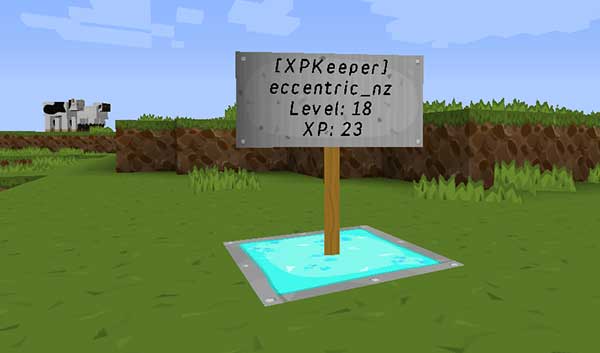
源代码
XPKeeper GitHub 仓库
XPKeeper lets you save and retrieve your current XP level by clicking on a sign.
Yes, I know there are quite a few XP bank type plugins out there, but I wanted one without any other plugin dependencies, and one that was simple to use without any economy features - I just want to save my XP, so I don't lose it - no need for anything else.
Quote from eccentric_nz:
Still alive! Get builds here:
Removing an XPKeeper sign
XPKeeper signs cannot be removed by breaking them. You must use a command instead. Type:
And then click on the sign you want to remove. You must have nothing (AIR) in your hand.
You can only remove your own signs.
Other features
- You may have one XPKeeper sign per server world
- XPKeeper signs are protected from explosions and griefing
Configuration
There are some configuration options:
This determines what must be inside the square brackets on the first line of the sign, you could change this to 'Bank' for instance.
must_use_fist: [true|false]
This determines whether you must use your fist to click the sign.
This determines whether the deposit limit feature is enabled.
If set_limits is true, set the limits used by the xpkeeper.limit.[amount] permission nodes here.
Set the amount of XP levels you will withdraw when you right-click the sign. Set to 0 to use the old behaviour of withdrawing all your XP.
messages:
    deposit: You deposited %d XP and have reached level %d :)
    withdraw_all: You withdrew all your XP!
    withdraw_some: You withdrew %d XP Levels!
    [...]
Use this to localise the player messages in game. Some message strings contain the symbols %s and %d these must not be removed as they are replaced in game with values calculated in real time. You can move them to any position that makes sense with the message.
A French translation courtesy of DragonSlayer875 can be found here
Permissions
There are some:
xpkeeper.use - allow players to make XPKeeper signs, default: TRUE
xpkeeper.fist - allow players to use the /xpkfist command, default: OP
xpkeeper.pay - allow players to use the /xpkpay command, default: OP
xpkeeper.force - allow players to use the /xpkforceremove command, default: OP
xpkeeper.admin - allow players to use the /xpkgive, /xpkset and /xpkwithdraw commands, default: OP
xpkeeper.editsign - allow players to edit signs, default: OP
xpkeeper.limit - allow players to use the /xpklimit command, default: OP
xpkeeper.limit.[amount] - limit the amount of level a player a player can deposit up to, [amount] must match one of the limit options in the config
xpkeeper.limit.bypass - allow players to by pass deposit limits, default: OP
Commands
There are seven:
| Command |
Description |
Alias |
Permission |
|
|
Use to remove your XPKeeper sign, see
Removing an XPKeeper sign above |
/xpkr |
- |
|
|
Toggle the must_use_fist config option
between true and false or vice versa |
/xpkf |
xpkeeper.fist |
|
|
Toggle the set_limits config option
between true and false or vice versa |
/xpkl |
xpkeeper.limit |
|
|
Set the withdraw config option
to the amount of levels specified |
/xpkw |
xpkeeper.admin |
|
|
Reload changes to the config |
/xpkrl |
xpkeeper.admin |
/xpkgive [player] [amount]
|
Add XP to a player |
/xpkg |
xpkeeper.admin |
/xpkset [player] [amount]
|
Set a player's total XP amount |
/xpks |
xpkeeper.admin |
/xpkpay [player] [amount]
|
Pay a player some XP |
/xpkp |
xpkeeper.use |
|
|
Use to remove all XPKeeper data for
the specified player from the database.
When using the command from the
console, you must specify a player
name, otherwise it runs using the player
that types the command.
USE WITH CARE! |
/xpkfr |
xpkeeper.force |
To do
- Link signs between worlds?
- Add config option to limit signs per player
Stats
Basic statistics are collected by this plugin using MCStats / Plugin Metrics , such as:
- Java Version
- Operating System
- System Arch
- Global Statistics - player and server counts
- Server Locations
- Game Version the game version - or Minecraft Version - servers are on
- Server Software - the server software - such as CraftBukkit - servers are running
You can opt out at any time by setting opt-out: true in plugins/PluginMetrics/config.yml
Change log
Get new builds here:
v1.4
- Requires CraftBukkit 1.7.5 or higher
- [In preparation for Minecraft/CraftBukkit 1.7.6/7/8] we have switched to using player UUIDs instead of names when storing and retrieving XP
- The plugin will automatically backup and update the XPKeeper database
- When the updating takes place the plugin will connect to api.mojang.com to lookup player UUIDs - this make take some time if you have a large number of users
- The server must be in online mode!
v1.3.10
- Fixed a bug with setting XP limits and PermissionsEx
v1.3.9
- Added the ability to colour the first line of the sign - set
firstline_colour to a colour code (&2, &c etc) in the config, or use the command xpkc [colour code] Note colour will only apply to newly created signs.
v1.3.8
- Fixed startup errors with CraftBukkit 1.7.2-R0.3 #2978 and higher
v1.3.7
- Fixed a String format error when using the
/xpkpay command
v1.3.6
- Signs (and the blocks they may be attached to) can no longer be destroyed by pistons
v1.3.5
- Added
/xpkreload command to reload changes made to the config file
v1.3.4
- Fixed
firstline config option not being set when the plugin is run for the first time
- Added configurable deposit limits
- Enable the feature with
set_limits: true - command is /xpklimit to toggle true|false
- Set a range of maximum level limits in the config, then give players/ranks the permission
xpkeeper.limit.[one of the configured amounts]
- Bypass the limit setting (if enabled) with the permission:
xpkeeper.limit.bypass (default OP)
- If a player's currently held XP would boost the XPKeeper XP over the limit, then the plugin deposits as much as it can (up to the level limit) and leaves the rest with the player
v1.3.3
- Added configurable strings to the config so you can change the language used to message players
v1.3.2
- Fixed a problem with player names that don't fit on a sign (> 15 characters)
v1.3.1
- Changed all SQL to use prepared statements so that world names can have apostrophes in them
v1.3
- Added configurable withdrawal amount.
- Set the amount (in levels) in the config with
withdraw: [amount]
- To keep the old behaviour of withdrawing all your XP, set
withdraw: 0
- To withdraw all your XP regardless of the
withdraw amount, right-click the XPKeeper sign while sneaking
- Added command
/xpkwithdraw [amount] to set the withdrawal amount in the config.
- Added some feedback messages.
- Fixed - when removing an XPKeeper sign with
/xpkremove you now get all your XP back and the sign drops naturally.
- Fixed - only the player whose name is on the sign can interact with it.
- Updated to Bukkit 1.4.6-R0.4-SNAPSHOT
v1.2.3
- Added
/xpkpay [player] [amount] to pay a player some XP
v1.2.2
- Added command
/xpkgive [player] [amount] to add XP to a player
- Added command
/xpkset [player] [amount] to set a player's total XP amount
v1.2.1
- Added permission
xpkeeper.force for the command /xpkforceremove
v1.2
- Built with Bukkit 1.4.5-R0.3-SNAPSHOT
- Added command
/xpkforceremove to delete all player data from the database USE WITH CARE When using the command from the console, you must specify a player name, otherwise it runs using the player that types the command.
- Added plugin metrics
- Correctly nested permissions, so that the plugin is not clearing the first line of signs
v1.0.2
- Built with Bukkit 1.4.5-R0.1-SNAPSHOT
- When making an XPKeeper sign, the first line is case-insensitive so
[XpKeEpeR] and [xpkeeper] are now both valid
- Improved sign grief prevention
- Added config option so that you can use anything to click the sign (bit of a pain when you right-click the sign with a placeable block, but at least you now have the option) - set
must_use_fist to false to click with anything
- Added permission
xpkeeper.use The default is OP. You must have this permission in order to create an XPKeeper sign
v1.1
Includes all the v1.0.2 changes as well as:
- Changed the formula for storing and retrieving XP, the sign now respects the fact that higher levels require more XP
- Added command
/xpkfist to toggle the config option must_use_fist true or false
- Added permission
xpkeeper.fist The default is OP. You must have this permission to use the /xpkfist command
What it looks like
Source code
XPKeeper GitHub repository

 插件

 插件

 插件
 插件
 插件
 插件
评论 0
登录后参与评分
还没有评论,来抢沙发吧