Xtpa 是一款创新的 Minecraft 传送插件,旨在增强玩家互动与导航体验。借助 Xtpa,玩家可以轻松发送和接受传送请求,打造更加紧密的游戏体验。
Xtpa 的一大亮点是 TPA GUI(传送请求图形界面)。当玩家收到传送请求时,只需点击一个简单的按钮即可打开 GUI,该界面提供了清晰直观的交互体验。此 GUI 包含以下内容:
-
接受按钮:
一个绿色羊毛方块,允许玩家轻松接受传送请求。
-
警告信息:
一个标有“!!warning maybe a tp trap!!”的纸张物品,提醒玩家注意传送可能存在的风险。
-
取消按钮:
一个红色羊毛方块,若玩家选择不接受请求,可借此取消传送请求。
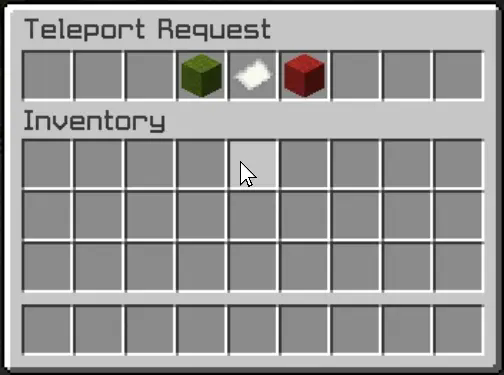
这种用户友好的设计不仅使接受或拒绝请求的过程简单明了,还为整体体验增添了引人入胜的视觉元素。玩家无需在聊天栏中输入命令即可快速做出决策,从而实现无缝且高效的传送功能。
Xtpa 与 LuckPerms 完美集成,方便服务器管理员管理权限。以下是相关命令及权限说明:
/tpa [playername]
权限:xtpa.tpa
描述:向其他玩家发送传送请求。
/tpahere [playername]
权限:xtpa.tpahere
描述:请求其他玩家传送到你的位置。
/tpaccept [playername]
权限:xtpa.tpaccept
描述:接受来自其他玩家的传送请求。
/tpcancel [playername]
权限:xtpa.tpcancel
描述:取消传送请求。
/tpatoggle [on/off]
权限:xtpa.tpatoggle
描述:开启或关闭你自己的 TPA 请求接收功能。
/tpagui [requester]
权限:xtpa.tpagui
描述:打开指定请求者的 TPA 请求 GUI,以便接受或取消请求。
总体而言,Xtpa 致力于通过提供流畅且令人愉悦的传送系统来丰富 Minecraft 社区,让玩家乐于使用。凭借其直观的 GUI 界面以及通过 LuckPerms 实现的强大权限管理能力,Xtpa 成为任何希望提升玩家连通性的 Minecraft 服务器的理想选择。
Xtpa is an innovative teleportation plugin for Minecraft designed to enhance player interaction and navigation. With Xtpa, players can easily send and accept teleport requests, creating a more connected gameplay experience.
One of the standout features of Xtpa is the TPA GUI. When a player receives a teleport request, they can click on a simple button to open the GUI, which provides a clear and intuitive interface. This GUI includes:
-
Accept Button:
A green wool block that allows players to accept the teleport request effortlessly.
-
Warning Message:
A paper item labeled "!!warning maybe a tp trap!!", alerting players to the risks associated with teleportation.
-
Cancel Button:
A red wool block that enables players to cancel the teleport request if they choose not to accept it.
This user-friendly design not only makes the process of accepting or rejecting requests straightforward but also adds an engaging visual element to the experience. Players can quickly make decisions without cluttering their chat with commands, making teleportation seamless and efficient.
Xtpa integrates seamlessly with LuckPerms, allowing server owners to manage permissions easily. The following commands and permissions are included:
/tpa [playername]
Permission: xtpa.tpa
Description: Send a teleport request to another player.
/tpahere [playername]
Permission: xtpa.tpahere
Description: Request another player to teleport to your location.
/tpaccept [playername]
Permission: xtpa.tpaccept
Description: Accept a teleport request from another player.
/tpcancel [playername]
Permission: xtpa.tpcancel
Description: Cancel a teleport request.
/tpatoggle [on/off]
Permission: xtpa.tpatoggle
Description: Toggle TPA requests on or off for yourself.
/tpagui [requester]
Permission: xtpa.tpagui
Description: Open the TPA request GUI for accepting or canceling requests.
Overall, Xtpa aims to enrich the Minecraft community by providing a smooth and enjoyable teleportation system that players will love to use. With its intuitive GUI and robust permission management through LuckPerms, Xtpa is the ideal solution for any Minecraft server looking to enhance player connectivity.


 插件

 插件
 插件
 插件
 插件
 插件
评论 0
登录后参与评分
还没有评论,来抢沙发吧