Xwarp - 适用于 Minecraft 的完整传送解决方案
Xwarp 是一款功能丰富的 Minecraft 传送插件,允许玩家轻松设置并传送到世界中的自定义传送点。无论您是在管理拥有多个地点的大型服务器,还是仅仅希望在喜爱的地点之间快速移动,Xwarp 都能提供无缝且沉浸式的体验。
主要特性:
自定义传送点: 使用 /setwarp [warpname] 命令,您可以轻松在世界中的任何位置设置传送点。这些传送点可由拥有相应权限的任何玩家访问。
传送倒计时: 当玩家选择某个传送点后,将开始 5 秒倒计时,屏幕中央会显示清晰的提示信息:“Teleporting in 5 seconds, don't move!”(以黄色显示)。如果玩家在此期间行走或移动,传送将被取消,为传送过程增添了真实感和控制感。
移动取消机制: 防止玩家在等待期间移动时进行传送。这鼓励玩家在传送完成前保持静止,从而避免在游戏过程中意外传送。
基于图形用户界面 (GUI) 的传送点选择:
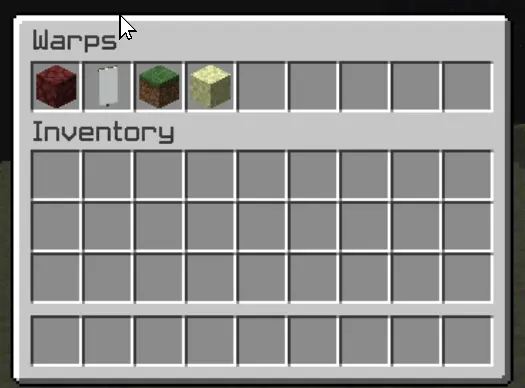
Xwarp 的一大亮点是其用于选择传送点的图形用户界面 (GUI)。玩家不再仅依赖命令,而是可以访问一个时尚的传送点选择界面,在其中直观地选择所需的传送点。以下是该 GUI 的独特之处:
图标自定义: 每个传送点在 GUI 中都可以由不同的图标(方块/物品)表示。管理员可以使用 /seticonwarp [warpname] [itemname] 命令更改传送点图标,从而完全自定义传送菜单的外观和感觉。
可视化传送点选择: 玩家只需打开传送菜单并点击所需传送点的图标即可开始传送。GUI 提供了一种直观且引人入胜的方式来访问传送点,尤其适合拥有多个目的地的大型服务器。
对管理员友好:
传送点管理: 服务器管理员可以轻松添加、删除和管理传送点,甚至可以为每个传送点分配自定义图标,以便更好地组织和清晰展示。
权限集成: 细粒度的权限系统允许您控制哪些玩家可以设置、访问或删除传送点。这确保了只有授权用户才能管理或使用特定的传送点。
工作原理:
-
设置传送点: 使用 /setwarp [warpname] 在当前所在位置创建一个新的传送点。传送点将与默认图标一起保存。
-
选择传送点: 玩家可以打开传送 GUI 并点击目标目的地的图标。将启动 5 秒倒计时,如果玩家不移动,他们将被传送到选定的传送点。
-
自定义传送点: 使用 /seticonwarp [warpname] [itemname] 更改 GUI 中代表传送点的图标,使玩家能够轻松区分不同的传送点。
为什么选择 Xwarp?
Xwarp 旨在提供灵活性、易用性和视觉吸引力。它非常适合需要高效传送管理的大型服务器,或者希望在其世界中快速直观旅行的少量玩家群体。通过其基于 GUI 的方法,传送不再仅仅是命令行任务,而是一种视觉上引人入胜的体验,完美融入 Minecraft 的世界。
使用 Xwarp 将您的服务器提升到新水平——您的一站式传送解决方案!
LuckPerms
/warp - xwarp.warp
/setwarp - xwarp.setwarp
/delwarp - xwarp.delwarp
/seticonwarp - xwarp.seticonwarp
Xwarp - A Complete Teleportation Solution for Minecraft
Xwarp is a feature-rich teleportation plugin for Minecraft that allows players to easily set and teleport to custom warp points within their world. Whether you're managing a large server with multiple locations or just want to teleport between your favorite spots, Xwarp offers a seamless and immersive experience.
Key Features:
Custom Warp Points: Set warp points anywhere in the world with ease using the /setwarp [warpname] command. These warp points can be accessed by any player with the appropriate permissions.
Teleport Countdown: When a player selects a warp, a 5-second countdown begins, with a clear message displayed in the center of the screen: "Teleporting in 5 seconds, don't move!" (colored in yellow). If the player walks or moves during this time, the teleportation is canceled, adding an element of realism and control to the teleportation process.
Movement Cancellation: Prevent players from teleporting if they move while waiting. This encourages players to remain stationary for teleportation to complete successfully, preventing accidental teleports during gameplay.
GUI-Based Warp Selection:
One of Xwarp's standout features is its Graphical User Interface (GUI) for selecting warps. Instead of relying solely on commands, players can access a sleek warp selection screen where they can visually choose their desired warp point. Here's what makes the GUI special:
Icon Customization: Each warp point can be represented by a different icon (block/item) in the GUI. Administrators can change the warp icon using the /seticonwarp [warpname] [itemname] command, allowing full customization of the look and feel of the warp menu.
Visual Warp Selection: Players simply open the warp menu and click on the desired warp icon to begin teleporting. The GUI provides an intuitive and engaging way to access teleport points, especially for large servers with multiple destinations.
Admin-Friendly:
Warp Management: Server administrators can easily add, delete, and manage warp points, and even assign custom icons to each warp point for better organization and clarity.
Permissions Integration: Fine-grained permissions allow you to control which players can set, access, or delete warps. This ensures that only authorized users can manage or use certain warp points.
How it Works:
-
Setting a Warp: Use /setwarp [warpname] to create a new warp at your current location. The warp is saved along with a default icon.
-
Selecting a Warp: Players can open the warp GUI and click on the icon for their desired destination. A 5-second countdown will start, and if they don't move, they are teleported to the selected warp.
-
Customizing Warps: Use /seticonwarp [warpname] [itemname] to change the icon representing a warp in the GUI, making it easy for players to distinguish between different warp points.
Why Xwarp?
Xwarp is designed for flexibility, ease of use, and visual appeal. It’s perfect for large servers that need efficient teleportation management or for small groups of players who want a fast and intuitive way to travel across their world. With its GUI-based approach, teleportation becomes not just a command-line task, but a visually engaging experience that fits right into Minecraft’s world.
Take your server to the next level with Xwarp—your all-in-one teleportation solution!
LuckPerms
/warp - xwarp.warp
/setwarp - xwarp.setwarp
/delwarp - xwarp.delwarp
/seticonwarp - xwarp.seticonwarp


 插件

 插件
 插件
 插件
 插件
 插件
评论 0
登录后参与评分
还没有评论,来抢沙发吧