? YTCounter — Minecraft 社交媒体计数器
通过 PlaceholderAPI,在您的 Minecraft 服务器中直接显示实时的 YouTube 订阅数、TikTok 粉丝数和 Twitch 关注数。
? 什么是 YTCounter?
YTCounter 是一款轻量级、完全异步的 Minecraft 插件,可将您的服务器连接到最受欢迎的社交媒体平台。它从 YouTube、TikTok 和 Twitch 获取实时的订阅者和粉丝数量,并将其暴露为 PlaceholderAPI 占位符,任何支持 PAPI 的插件均可使用这些占位符。
无论您是想在全息图、计分板、TAB 列表或聊天消息中展示频道的增长情况 —— YTCounter 都能让您轻松实现。
✨ 功能特点
? 实时计数器 —— YouTube、TikTok、Twitch(更多平台即将推出)
⚡ 100% 异步 —— 零延迟,绝不阻塞主线程
? 自动刷新 —— 可配置的更新间隔(默认:60 秒)
? 智能缓存 —— 每次调用占位符时不会发起 HTTP 请求
? 通用 PlaceholderAPI 支持 —— 兼容任何支持 PAPI 的插件
?️ 可点击链接 —— 在聊天中点击计数器数值即可打开频道 URL(Adventure/MiniMessage 上下文)
? MiniMessage 与 RGB 支持 —— 完全自定义的消息样式
?️ Folia 兼容 —— 适用于 Paper、Spigot、Purpur、Pufferfish、Leaf、Folia
? 权限系统 —— 对命令进行细粒度控制
? 热重载 —— 无需重启服务器,执行 /counter reload 即可
? 内部 API —— 其他插件可以以编程方式查询 YTCounter
? 可扩展架构 —— 添加 Instagram、Kick、Discord 等无需更改现有代码
? 兼容插件(PlaceholderAPI)
YTCounter 的占位符可直接在以下插件中使用:
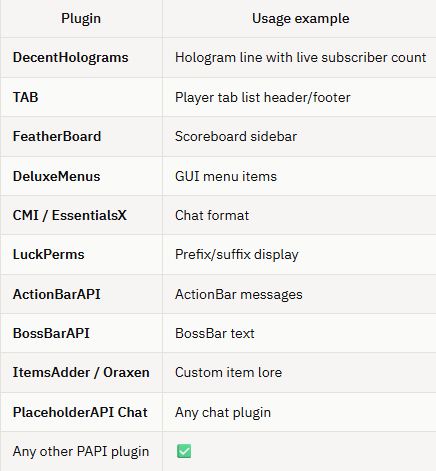
? 占位符
主要占位符:
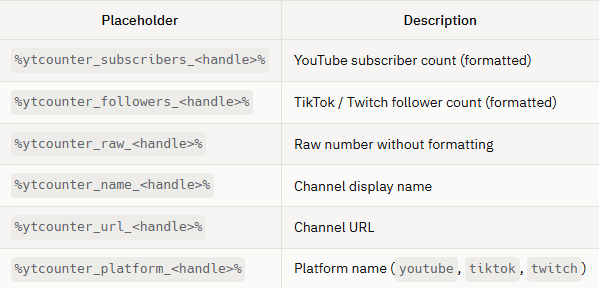
示例:
%ytcounter_subscribers_DragonMC% → 1.234.567
%ytcounter_followers_dragonmc% → 98.765
%ytcounter_name_DragonMC% → DragonMC
%ytcounter_url_DragonMC% →
%ytcounter_raw_DragonMC% → 1234567
? 命令
| 命令 |
描述 |
权限 |
| /counter youtube <url> |
注册 YouTube 频道 |
ytcounter.use |
| /counter tiktok <url> |
注册 TikTok 账号 |
ytcounter.use |
| /counter twitch <url> |
注册 Twitch 频道 |
ytcounter.use |
| /counter list |
列出所有已注册的频道 |
ytcounter.admin |
| /counter remove <platform> <handle> |
移除一个频道 |
ytcounter.admin |
| /counter reload |
重新加载配置而无需重启 |
ytcounter.reload |
| /counter info |
显示插件信息和状态 |
ytcounter.use |
| /counter help |
显示帮助信息 |
ytcounter.use |
别名:/ytcounter, /ytc
? 权限
| 权限 |
默认值 |
描述 |
| ytcounter.use |
OP |
使用 /counter 命令 |
| ytcounter.admin |
OP |
列出和移除频道 |
| ytcounter.reload |
OP |
重新加载插件 |
| ytcounter.bypass-cooldown |
OP |
跳过命令冷却时间 |
? 安装
第一步 —— 安装 PlaceholderAPI
YTCounter 需要 PlaceholderAPI。请从 SpigotMC 下载并将其放入 plugins/ 文件夹。
第二步 —— 安装 YTCounter
将 YTCounter-1.0.0.jar 放入服务器的 plugins/ 文件夹并重启服务器。
插件将创建以下目录结构:
plugins/
└── YTCounter/
    ├── config.yml
    └── messages.yml
第三步 —— 配置 API 密钥
打开 plugins/YTCounter/config.yml 并填入您的 API 密钥。
? 如何获取 API 密钥
? YouTube Data API v3
前往 Google Cloud Console
创建项目
启用 YouTube Data API v3
创建 API Key
将其粘贴到 config.yml 中:
youtube:
  api-key: "YOUR_KEY_HERE"
? 免费配额:每天 10,000 个单位
? Twitch Helix API
前往 Twitch Developer Console
创建应用
复制 Client ID 和 Secret
将其粘贴到 config.yml 中:
twitch:
  client-id: "your_client_id"
  client-secret: "your_client_secret"
? TikTok
无需 API 密钥(自动模式)
tiktok:
  api-key: ""
⚙️ config.yml
# ============================================================
#  YTCounter - 配置文件
# ============================================================
# 插件从 API 获取新数据的频率(秒)。
# 最小值:30 | 推荐值:60-300
update-interval: 60
# --- YouTube ---
youtube:
  api-key: "YOUR_YOUTUBE_API_KEY_HERE"
# --- Twitch ---
twitch:
  client-id: "YOUR_TWITCH_CLIENT_ID_HERE"
  client-secret: "YOUR_TWITCH_CLIENT_SECRET_HERE"
# --- TikTok ---
tiktok:
  api-key: ""   # 留空 —— 自动模式无需密钥即可工作
# --- 缓存 ---
cache:
  enabled: true
  ttl: 60   # 缓存值保持有效的时长(秒)
# --- 格式化 ---
format:
  use-locale-format: true   # true = 1.234.567 | false = 1234567
  locale: "it_IT"           # 可更改为 en_US, de_DE, fr_FR 等
  loading-text: "..."       # 首次获取数据时显示的内容
  error-text: "N/A"         # 如果 API 返回错误时显示的内容
# --- 日志记录 ---
logging:
  level: "INFO"             # INFO | FINE (详细调试) | WARNING
  log-requests: false       # true = 记录每次 HTTP 请求
? 快速入门
注册频道:
/counter youtube
/counter tiktok
/counter twitch
在 DecentHolograms 中使用:
/dh line add MyHologram 1 &6YouTube: &f%ytcounter_subscribers_DragonMC%
/dh line add MyHologram 2 &bTikTok: &f%ytcounter_followers_dragonmc%
/dh line add MyHologram 3 &9Twitch: &f%ytcounter_followers_dragonmc%
在 TAB 中使用:
header:
  - "&6我的服务器 | YouTube: %ytcounter_subscribers_DragonMC%"
在 FeatherBoard 中使用:
lines:
  - "&6YT: &f%ytcounter_subscribers_DragonMC%"
  - "&bTT: &f%ytcounter_followers_dragonmc%"
? 开发者 API
Plugin raw = Bukkit.getPluginManager().getPlugin("YTCounter");
if (raw instanceof YTCounterPlugin ytc) {
    YTCounterAPI api = ytc.getApi();
    // 获取缓存的计数
    long subs = api.getCount(Platform.YOUTUBE, "DragonMC");
    // 以编程方式注册频道
    api.registerChannel(Platform.TWITCH, "https://twitch.tv/dragonmc")
       .thenAccept(entry -> System.out.println("已注册: " + entry.getHandle()));
    // 强制立即刷新
    api.forceRefresh();
}
?️ 支持的平台
Paper 1.21.x — 支持
Spigot 1.21.x — 支持
Purpur 1.21.x — 支持
Pufferfish 1.21.x — 支持
Leaf 1.21.x — 支持
Folia 1.21.x — 支持
需要 Java 21+
需要 PlaceholderAPI 2.11+
? YTCounter — Social Media Counter for Minecraft
Display real-time YouTube subscribers, TikTok followers and Twitch followers directly in your Minecraft server — via PlaceholderAPI.
? What is YTCounter?
YTCounter is a lightweight, fully asynchronous Minecraft plugin that connects your server to the most popular social media platforms. It fetches live subscriber and follower counts from YouTube, TikTok and Twitch, and exposes them as PlaceholderAPI placeholders usable in any plugin that supports PAPI.
Whether you want to show your channel growth in a hologram, a scoreboard, a TAB list, or a chat message — YTCounter makes it effortless.
✨ Features
? Real-time counters — YouTube, TikTok, Twitch (more platforms coming)
⚡ 100% Asynchronous — zero lag, never blocks the main thread
? Auto-refresh — configurable update interval (default: 60 seconds)
? Smart cache — no HTTP request on every placeholder call
? Universal PlaceholderAPI support — works with any PAPI-compatible plugin
?️ Clickable links — clicking a counter value in chat opens the channel URL (Adventure/MiniMessage contexts)
? MiniMessage & RGB support — fully styled messages
?️ Folia compatible — works on Paper, Spigot, Purpur, Pufferfish, Leaf, Folia
? Permission system — granular control over commands
? Hot reload — /counter reload without restarting the server
? Internal API — other plugins can query YTCounter programmatically
? Expandable architecture — adding Instagram, Kick, Discord etc. requires zero changes to existing code
? Compatible plugins (PlaceholderAPI)
YTCounter placeholders work out of the box in:
? Placeholders
Main placeholders:
Examples:
%ytcounter_subscribers_DragonMC% → 1.234.567
%ytcounter_followers_dragonmc% → 98.765
%ytcounter_name_DragonMC% → DragonMC
%ytcounter_url_DragonMC% →
%ytcounter_raw_DragonMC% → 1234567
? Commands
| Command |
Description |
Permission |
| /counter youtube <url> |
Register a YouTube channel |
ytcounter.use |
| /counter tiktok <url> |
Register a TikTok profile |
ytcounter.use |
| /counter twitch <url> |
Register a Twitch channel |
ytcounter.use |
| /counter list |
List all registered channels |
ytcounter.admin |
| /counter remove <platform> <handle> |
Remove a channel |
ytcounter.admin |
| /counter reload |
Reload config without restart |
ytcounter.reload |
| /counter info |
Show plugin info and status |
ytcounter.use |
| /counter help |
Show help |
ytcounter.use |
Aliases: /ytcounter, /ytc
? Permissions
| Permission |
Default |
Description |
| ytcounter.use |
OP |
Use /counter commands |
| ytcounter.admin |
OP |
List and remove channels |
| ytcounter.reload |
OP |
Reload the plugin |
| ytcounter.bypass-cooldown |
OP |
Skip command cooldown |
? Installation
Step 1 — Install PlaceholderAPI
YTCounter requires PlaceholderAPI. Download it from SpigotMC and place it in your plugins/ folder.
Step 2 — Install YTCounter
Place YTCounter-1.0.0.jar in your server's plugins/ folder and restart the server.
The plugin will create:
plugins/
└── YTCounter/
    ├── config.yml
    └── messages.yml
Step 3 — Configure API Keys
Open plugins/YTCounter/config.yml and fill in your API keys.
? How to get API Keys
? YouTube Data API v3
Go to Google Cloud Console
Create a project
Enable YouTube Data API v3
Create API Key
Paste it in config.yml:
youtube:
  api-key: "YOUR_KEY_HERE"
? Free quota: 10,000 units/day
? Twitch Helix API
Go to Twitch Developer Console
Create app
Copy Client ID + Secret
Paste in config.yml:
twitch:
  client-id: "your_client_id"
  client-secret: "your_client_secret"
? TikTok
No API key required (automatic mode)
tiktok:
  api-key: ""
⚙️ config.yml
# ============================================================
#  YTCounter - Configuration
# ============================================================
# How often (in seconds) the plugin fetches fresh data from APIs.
# Minimum: 30 | Recommended: 60-300
update-interval: 60
# --- YouTube ---
youtube:
  api-key: "YOUR_YOUTUBE_API_KEY_HERE"
# --- Twitch ---
twitch:
  client-id: "YOUR_TWITCH_CLIENT_ID_HERE"
  client-secret: "YOUR_TWITCH_CLIENT_SECRET_HERE"
# --- TikTok ---
tiktok:
  api-key: ""   # leave empty — automatic mode works without a key
# --- Cache ---
cache:
  enabled: true
  ttl: 60   # how long (seconds) a cached value stays valid
# --- Formatting ---
format:
  use-locale-format: true   # true = 1.234.567 | false = 1234567
  locale: "it_IT"           # change to en_US, de_DE, fr_FR, etc.
  loading-text: "..."       # shown while first fetch is in progress
  error-text: "N/A"         # shown if the API returns an error
# --- Logging ---
logging:
  level: "INFO"             # INFO | FINE (verbose debug) | WARNING
  log-requests: false       # true = log every HTTP request
? Quick Start
Register channels:
/counter youtube
/counter tiktok
/counter twitch
Use in DecentHolograms:
/dh line add MyHologram 1 &6YouTube: &f%ytcounter_subscribers_DragonMC%
/dh line add MyHologram 2 &bTikTok: &f%ytcounter_followers_dragonmc%
/dh line add MyHologram 3 &9Twitch: &f%ytcounter_followers_dragonmc%
Use in TAB:
header:
  - "&6Il mio server | YouTube: %ytcounter_subscribers_DragonMC%"
Use in FeatherBoard:
lines:
  - "&6YT: &f%ytcounter_subscribers_DragonMC%"
  - "&bTT: &f%ytcounter_followers_dragonmc%"
? API for developers
Plugin raw = Bukkit.getPluginManager().getPlugin("YTCounter");
if (raw instanceof YTCounterPlugin ytc) {
    YTCounterAPI api = ytc.getApi();
    // Get cached count
    long subs = api.getCount(Platform.YOUTUBE, "DragonMC");
    // Register a channel programmatically
    api.registerChannel(Platform.TWITCH, "https://twitch.tv/dragonmc")
       .thenAccept(entry -> System.out.println("Registered: " + entry.getHandle()));
    // Force an immediate refresh
    api.forceRefresh();
}
?️ Supported Platforms
Paper 1.21.x — Supported
Spigot 1.21.x — Supported
Purpur 1.21.x — Supported
Pufferfish 1.21.x — Supported
Leaf 1.21.x — Supported
Folia 1.21.x — Supported
Java 21+ required
PlaceholderAPI 2.11+ required


 插件

 插件
 插件
 插件
 插件
 插件
评论 0
登录后参与评分
还没有评论,来抢沙发吧