
ZInvisItemFrames
允许玩家制作并放置隐形物品展示框。兼容 Folia 的隐形物品展示框插件。
功能
- 制作隐形物品展示框
- 可自定义合成配方。(可以选择任何物品作为配方材料)
- 空的隐形展示框可以拥有发光轮廓(可配置)
- 支持 MiniMessage 格式的所有文本格式化
兼容性
- Paper 1.20.1 -> 1.21.4
- 兼容 Folia
- Java 17+
依赖项
合成配方
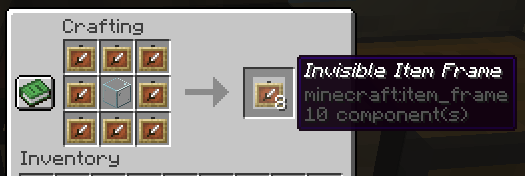
默认的合成配方是用 8 个 item_frame(或 glow_item_frame)围成一圈,中间放置一个自定义物品。
你可以使用 /ziif item 命令更改中间的物品。
你还可以配置该配方能合成的隐形物品展示框数量。
命令
/ziif help- 显示帮助信息/ziif item- 将手中的物品设置为配方核心物品/ziif reload- 重新加载配置文件/ziif give <player> <amount> [--glow]- 给予玩家隐形物品展示框
权限
zinvisitemframes.craft.item_frame- 允许制作隐形物品展示框zinvisitemframes.craft.glow_item_frame- 允许制作隐形发光物品展示框zinvisitemframes.place.item_frame- 允许放置隐形物品展示框zinvisitemframes.place.glow_item_frame- 允许放置隐形发光物品展示框zinvisitemframes.admin- 访问所有插件命令
安装
- 从 Modrinth 下载最新版本的 ZInvisItemFrames。
- 从 Modrinth 下载相应版本的 MCKotlin。
- 将下载的
.jar文件放入服务器的plugins/文件夹中。 - 重启服务器。
- 通过编辑
plugins/ZInvisItemFrames/文件夹中的.yml文件,按需配置插件。
配置
recipe:
  item: []  # 使用 `/ziif item` 命令设置
  quantity: 8  # 每次合成生成的展示框数量

check-permission: # 是否检查制作/放置隐形展示框的权限
  craft: false
  place: false

empty-frame:
  glow: true  # 空展示框是否发光
  visible: true # 空隐形展示框是否可见

name:
  invisible_item_frame: "<italic>Invisible Item Frame"
  invisible_glow_item_frame: "<italic>Invisible Glow Item Frame"
ZInvisItemFrames
Allow players to craft and place invisible item frames. Folia-compatible invisible item frame plugin.
Features
- Craft invisible item frames
- Customizable crafting recipe. (Can choose ANY ITEM for the recipe)
- Empty invisible frames can have a glowing outline (configurable)
- MiniMessage support for all text formatting
Compatibility
- Paper 1.20.1 -> 1.21.4
- Folia-compatible
- Java 17+
Dependencies
Crafting Recipe
The default crafting recipe is 8 item_frame (or glow_item_frame) in a circle with one custom item in the middle.
You can change the middle-item with /ziif item.
You can also configure how many invisible item frames are crafted from the recipe.
Commands
/ziif help- Show help information/ziif item- Set the recipe item to the item in your hand/ziif reload- Reload the configuration/ziif give <player> <amount> [--glow]- Give invisible item frames to a player
Permissions
zinvisitemframes.craft.item_frame- Allow crafting invisible item frameszinvisitemframes.craft.glow_item_frame- Allow crafting invisible glow item frameszinvisitemframes.place.item_frame- Allow placing invisible item frameszinvisitemframes.place.glow_item_frame- Allow placing invisible glow item frameszinvisitemframes.admin- Access to all plugin commands
Installation
- Download the latest version of ZInvisItemFrames from Modrinth.
- Download the appropriate version of MCKotlin from Modrinth
- Place the downloaded
.jarfiles into your server'splugins/folder. - Restart your server.
- Configure the plugin to your liking by editing the
.ymlfiles in theplugins/ZInvisItemFrames/folder.
Configuration
recipe:
  item: []  # Set with `/ziif item` command
  quantity: 8  # How many frames are crafted per recipe

check-permission: # Whether to check permissions for crafting/placing invis frames
  craft: false
  place: false

empty-frame:
  glow: true  # Whether empty frames should glow
  visible: true # Whether empty invis frames should be visible

name:
  invisible_item_frame: "<italic>Invisible Item Frame"
  invisible_glow_item_frame: "<italic>Invisible Glow Item Frame"

下载 ZInvisItemFrames
需要联机服务器吗?
稳定流畅、一键部署,几分钟即可和朋友联机开服
最低仅需 8 元/月 即可畅快联机
下载 ZInvisItemFrames
需要联机服务器吗?
稳定流畅、一键部署,几分钟即可和朋友联机开服
最低仅需 8 元/月 即可畅快联机
下载 ZInvisItemFrames
需要联机服务器吗?
稳定流畅、一键部署,几分钟即可和朋友联机开服
最低仅需 8 元/月 即可畅快联机
下载 ZInvisItemFrames
需要联机服务器吗?
稳定流畅、一键部署,几分钟即可和朋友联机开服
最低仅需 8 元/月 即可畅快联机
下载 ZInvisItemFrames
需要联机服务器吗?
稳定流畅、一键部署,几分钟即可和朋友联机开服
最低仅需 8 元/月 即可畅快联机
下载 ZInvisItemFrames
需要联机服务器吗?
稳定流畅、一键部署,几分钟即可和朋友联机开服
最低仅需 8 元/月 即可畅快联机
修复了一些错误。
关于这个资源的讨论、问题反馈与使用心得
还没有讨论,来发第一帖吧
你是这个资源的作者?登录后可认领此资源。
相似资源
 插件

PacketEvents 是一款专为 Minecraft Java 版打造的协议库,旨在简化数据包的处理与传输。
 插件

使床在所有维度中爆炸的模组
 插件
ExyliaPlugins 的库。
 插件
通过对话框或铁砧界面帮助你的 Anthme
 插件
自定义你的Minecraft头像!
 插件
重新定义服务器上的生物运输方式。使用高度可定制的口袋道具,安全地捕获、存储和释放任何实体。
评论 0
登录后参与评分
还没有评论,来抢沙发吧