? ZMenu:在游戏内构建和编辑自定义菜单
版本: 1.1.0
作者: sti_moi
平台: Spigot / Paper 1.21 → 1.21.x (Java 21)
类型: GUI 菜单创建与编辑器
ZMenu 让你无需触碰任何配置文件即可构建箱子菜单:
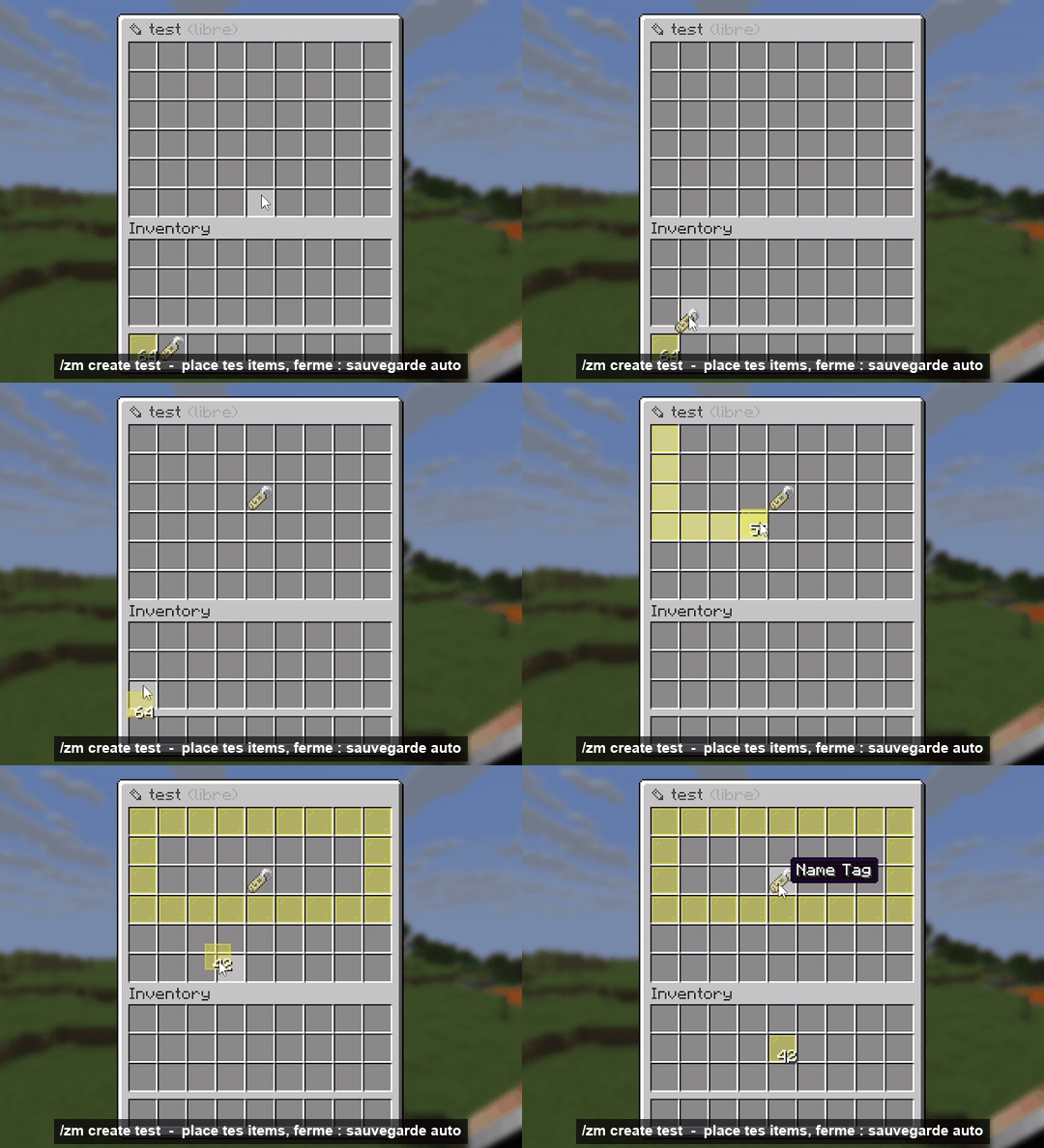
- 通过将物品放入箱子来创建菜单,系统会自动保存;
- 在游戏内编辑所有内容:名称、描述、物品、数量、发光效果、命令、权限等;
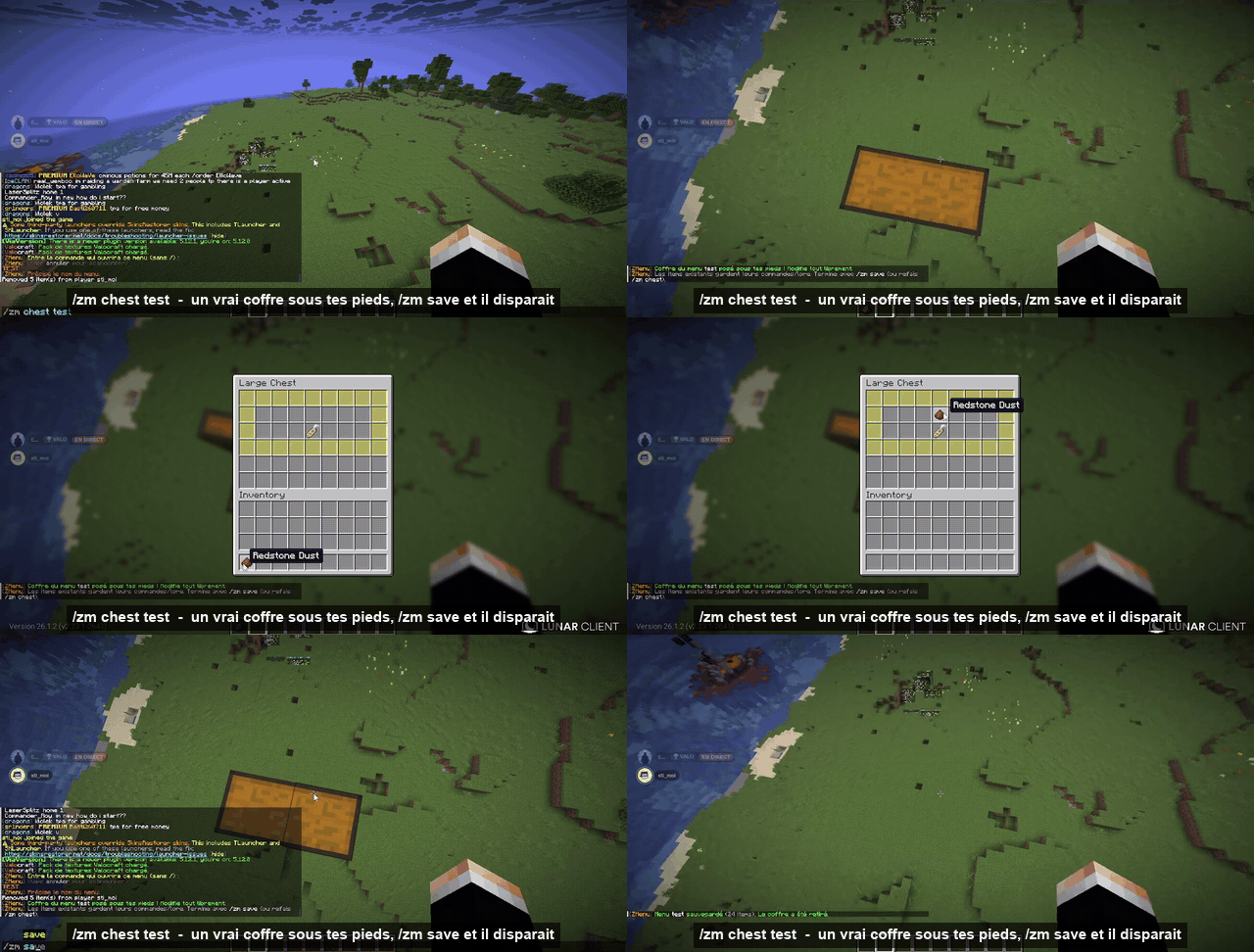
- 在你脚下的真实箱子中编辑菜单,然后使用一条命令保存;
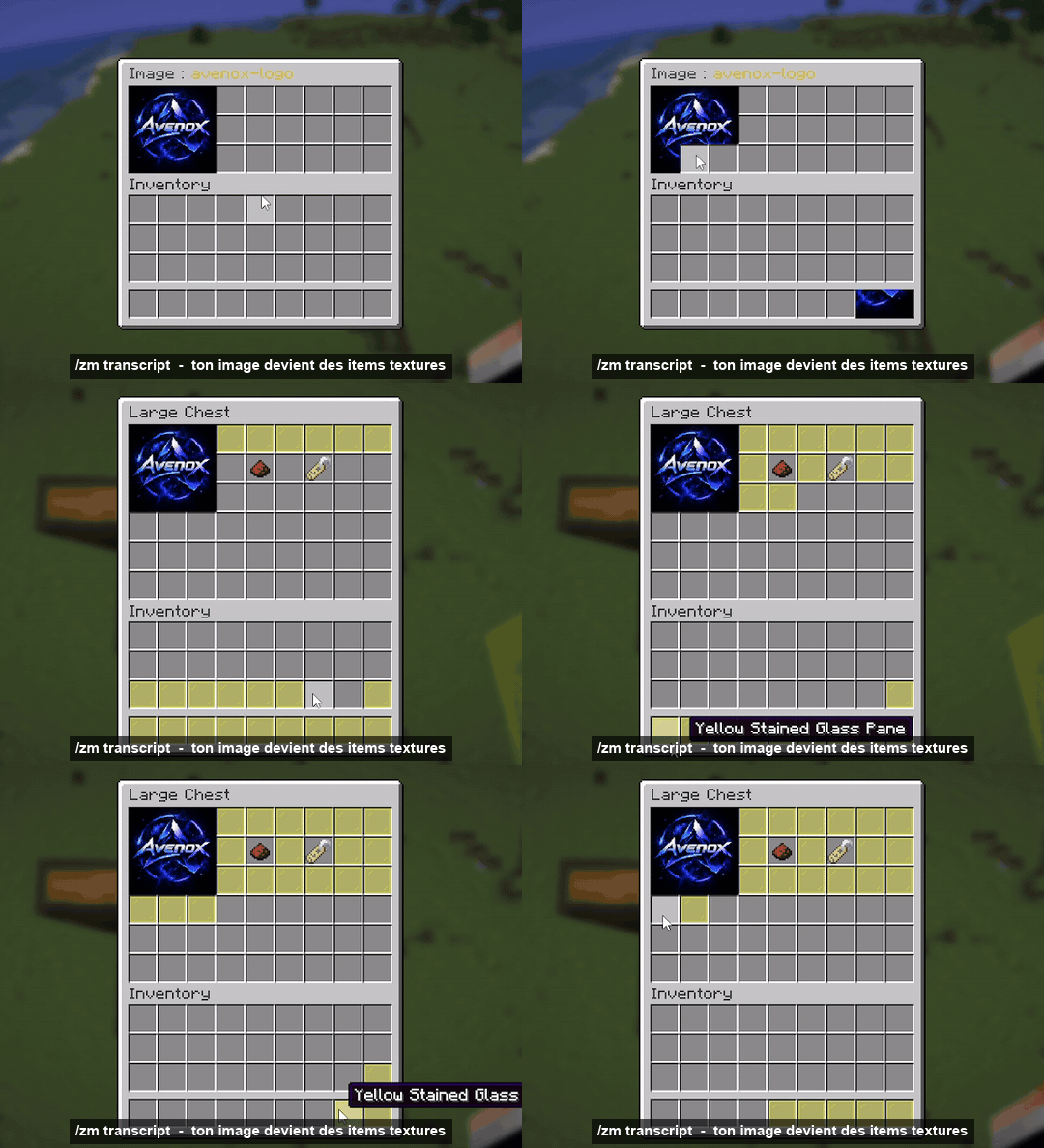
- 将你自己的图片转换为纹理物品(最大支持 9×6),资源包将由插件自动生成并托管。
✨ 在几秒钟内创建菜单
/zm create <name> [rows] 打开一个空箱子。放入你的物品,关闭箱子:菜单即被保存。
✏️ 在游戏内编辑所有内容
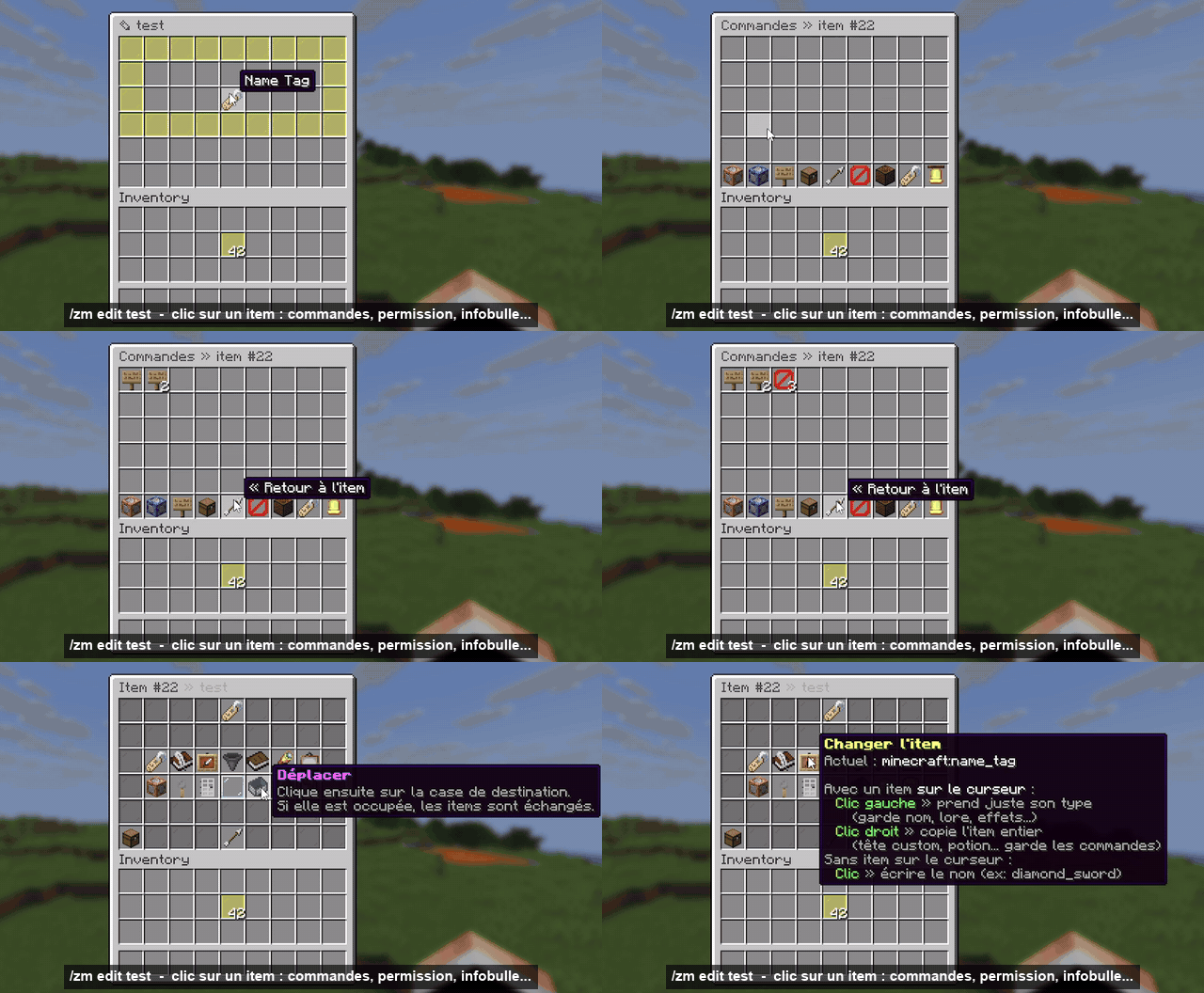
/zm edit <name> 打开完全相同的菜单。点击物品以打开其编辑器:
| 按钮 |
功能 |
| ?️ 重命名 |
支持 & 颜色代码和十六进制颜色 &#FF8800 |
| ? 描述 |
逐行添加、编辑、插入或删除文本 |
| ?️ 更改物品 |
使用鼠标光标上的物品点击:保留名称、描述和命令 |
| ? 数量 |
1 到 64 |
| ✨ 发光 / ? 隐藏信息 / ? 隐藏提示框 |
一键切换 |
| ? 模型 |
CustomModelData 或 item_model(自定义纹理) |
| ⚙️ 命令与操作 |
点击时发生的行为(见下文) |
| ? 权限 / ? 点击后关闭 |
针对每个按钮设置 |
| ↔️ 移动 / ? 复制 / ?️ 删除 |
重新排列你的菜单 |
快捷操作:鼠标光标上的物品 + 空格子 = 添加,背包中 Shift+点击 = 快速添加,对物品按 Q = 删除。
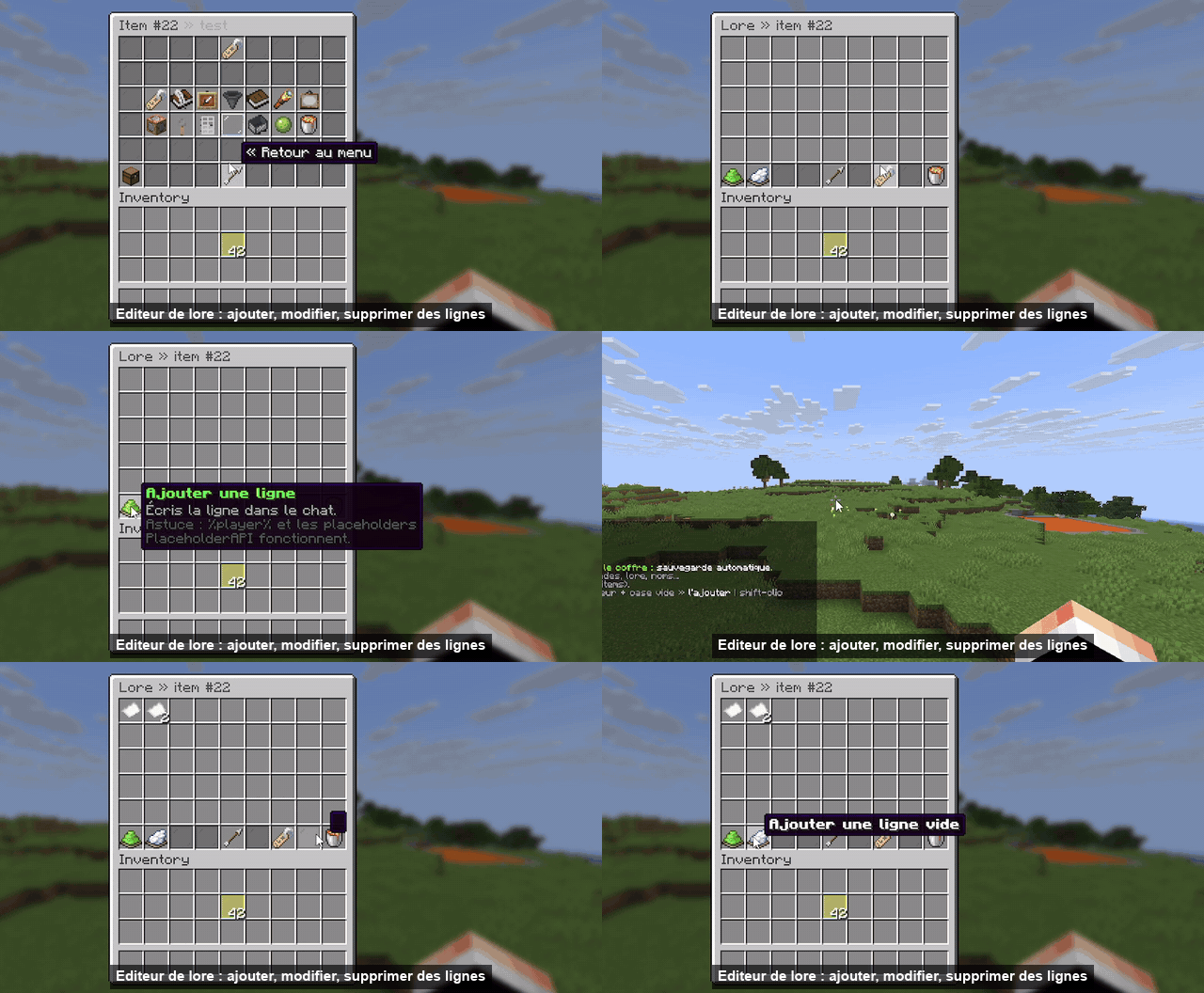
? 在真实箱子中编辑
/zm chest <name> 在你脚下放置一个真实箱子(4 行及以上为双人箱),并在正确的槽位中放入对应的物品。修改任意内容后,运行 /zm save(或再次运行 /zm chest):菜单被保存,箱子消失,原始方块恢复。
未更改的物品会保留其描述、名称、命令和选项,即使你移动了它们。编辑用箱子受到保护:无法被破坏,漏斗无法从中抽取物品,爆炸也不会影响它。
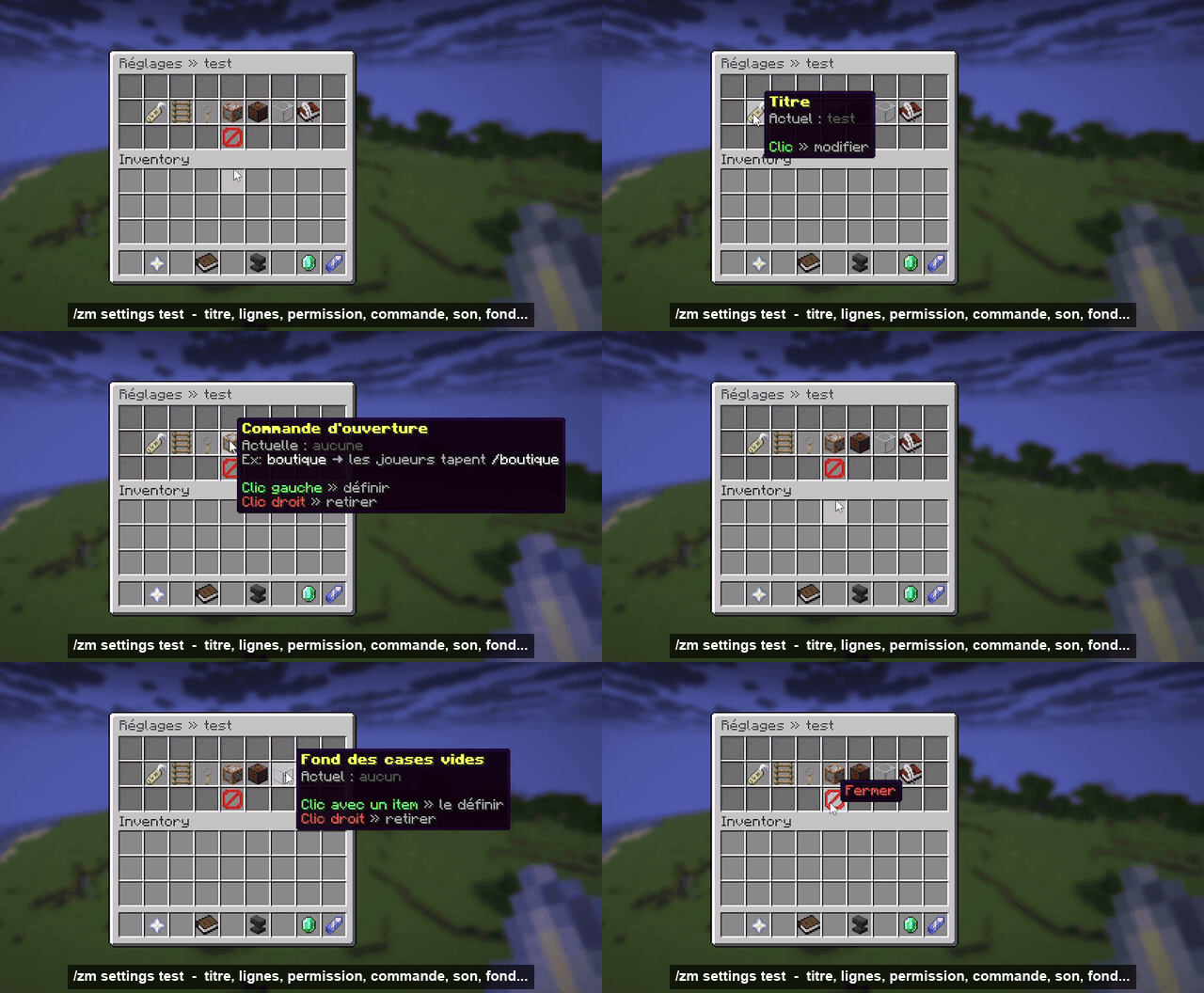
⚙️ 菜单设置
/zm settings <name>:标题、行数、打开权限、自定义打开命令(如 /shop)、打开音效,以及用于填充空槽位的背景物品。
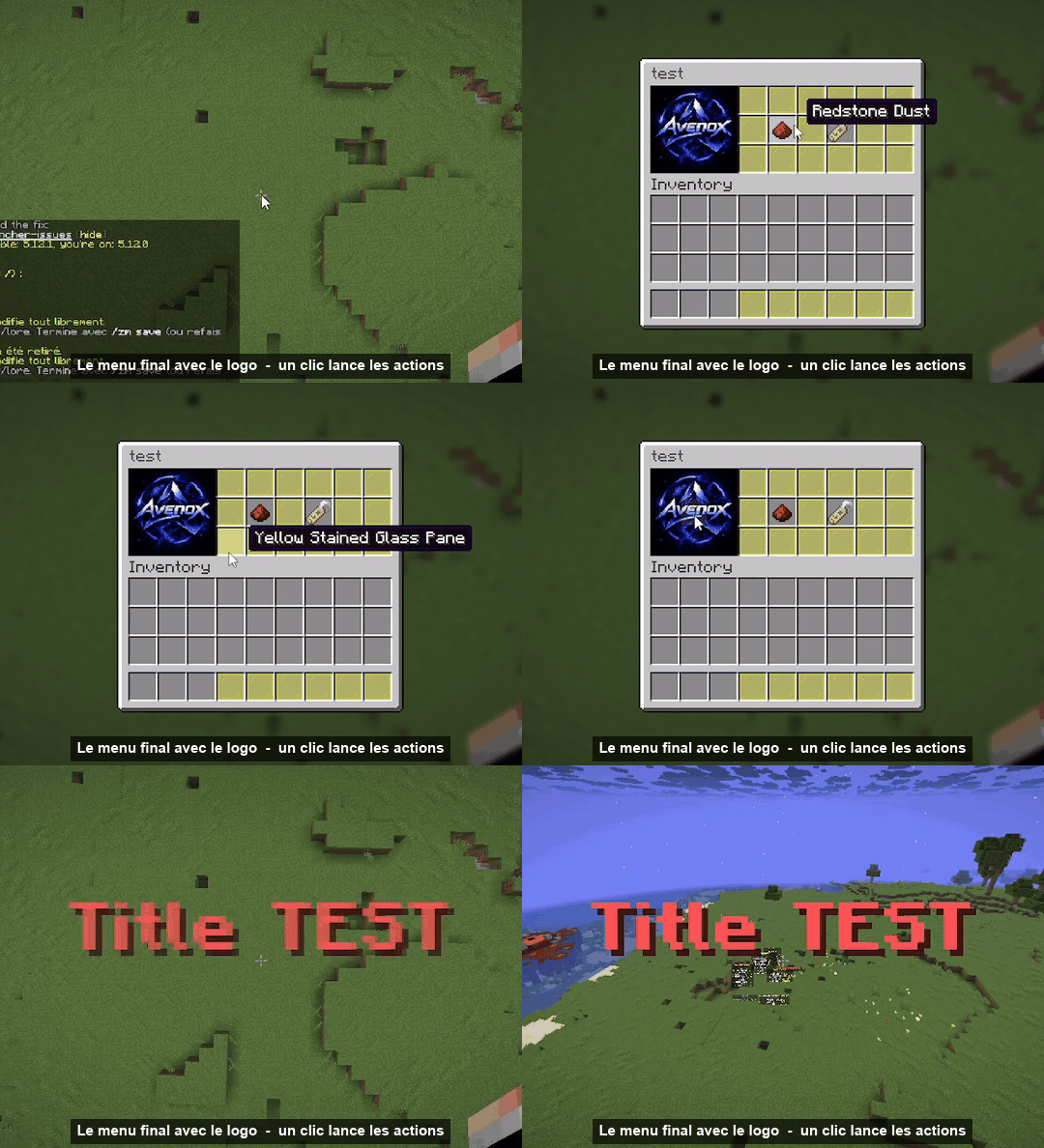
?️ 将图片作为物品
- 将 PNG 或 JPG 图片放入
plugins/ZMenu/images/ 目录。
- 执行
/zm transcript logo.png(自动调整大小)或 /zm transcript logo.png 9 6。
- ZMenu 将切割图像(最大 9×6,即完整的双人箱大小),构建资源包,发送给在线玩家,并打开一个按照图像布局排列物品的箱子。
- 取出这些物品,或使用
/zm image apply logo <menu> [slot] 将整个图像放入菜单中。
图块会被缩放以填满整个槽位,因此图像显示时没有网格线。
? 操作
每个按钮按其顺序执行其操作:
| 操作 |
示例 |
[player] |
[player] spawn |
[console] |
[console] give %player% diamond 5 |
[message] |
[message] &a欢迎 %player%! |
[broadcast] |
[broadcast] &6%player% 打开了商店 |
[open] |
[open] shop |
[close] |
[close] |
[sound] |
[sound] entity.experience_orb.pickup 1 1.5 |
[title] |
[title] &6你好;&7副标题 |
[actionbar] |
[actionbar] &e购买完成 |
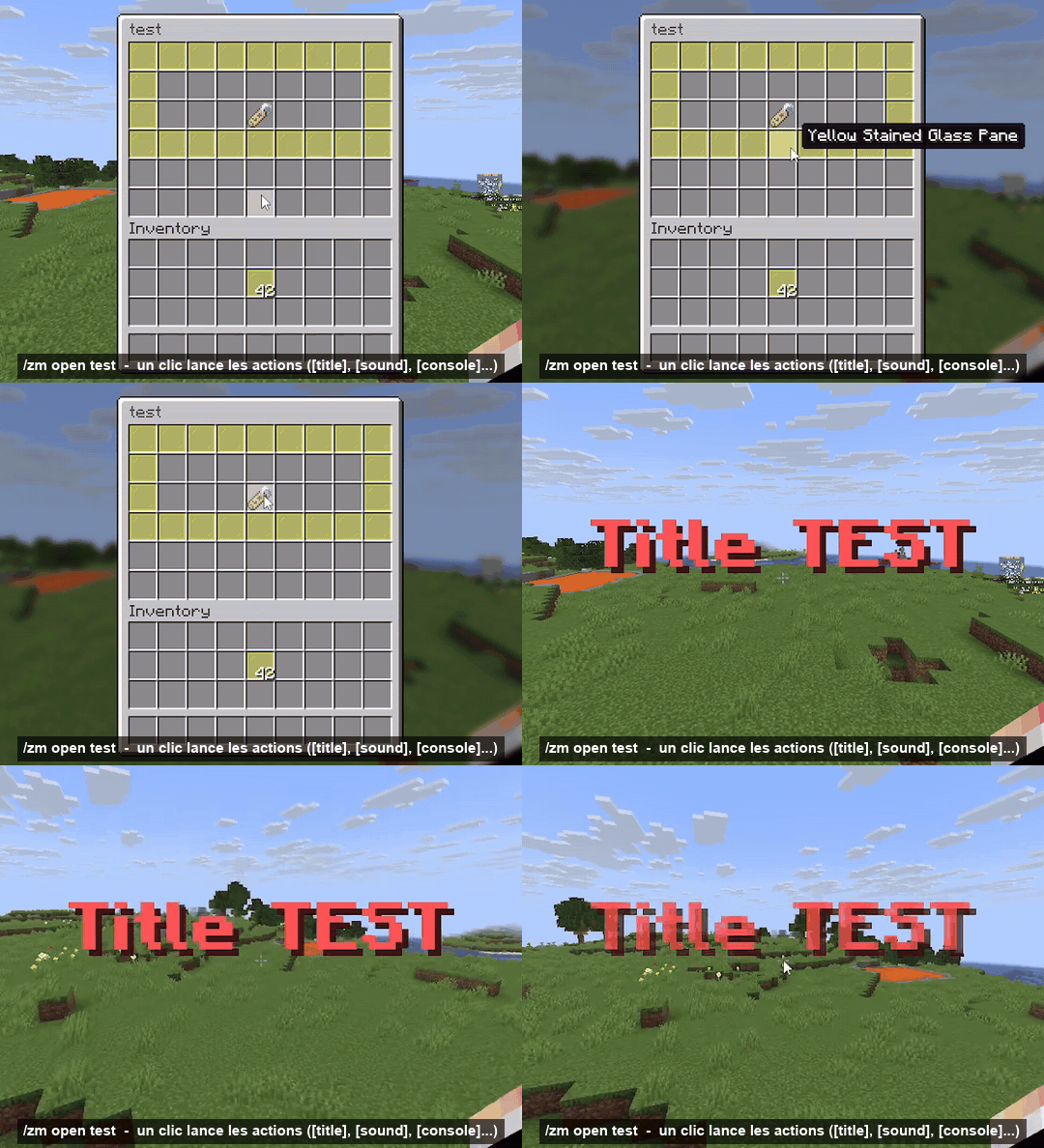
占位符:%player%、%uuid%、%world%,以及所有 PlaceholderAPI 占位符(标题、名称、描述和操作)。
? 命令
| 命令 |
描述 |
/zm create <name> [rows] |
创建菜单(免费箱子,自动保存) |
/zm edit <name> |
编辑精确匹配的菜单,点击物品进行配置 |
/zm chest <name> |
在你脚下生成真实箱子 |
/zm save |
保存箱子并将其移除 |
/zm layout <name> |
在空闲虚拟箱子中重新排列菜单 |
/zm settings <name> |
标题、行数、权限、命令、音效、背景 |
/zm open <name> [player] |
打开菜单 |
/zm list · delete · rename · copy · settitle · setrows |
管理菜单 |
/zm transcript <image> [cols rows] [name] |
图片 → 纹理物品 |
/zm image list · get · apply · delete |
已转换的图片 |
/zm pack info · send · rebuild |
资源包 |
/zm reload |
重载所有内容 |
权限: zmenu.admin(全部权限,包括 OP),zmenu.open(所有人),zmenu.open.others,zmenu.bypass。
✅ 依赖
- 服务器: Spigot 或 Paper 1.21 → 1.21.x
- Java: 21
- 依赖项: 无(独立运行)
- 可选: PlaceholderAPI
- 资源包: 由插件生成并托管。在 Paper 上,它通过 Minecraft 端口传输,因此无需打开或配置任何东西(适用于 Pterodactyl)。在 Spigot 上,请开放端口
8165 或设置 external-url。
? Valocraft 集成
自动检测并与 Valocraft 2.3.2+ 配合使用:
- 两个资源包会并列发送,使用相同的 Minecraft 端口,不会发生冲突;
- 比赛期间菜单和编辑功能会被锁定(可配置,权限节点
zmenu.bypass);
- Valocraft 大厅物品无法被复制到菜单中;
- 占位符:
%valocraft_rank%、%valocraft_radianite%、%valocraft_level%、%valocraft_kd%、%valocraft_winrate%...
- Valocraft 按钮:
[player] vc join、[player] vc shop、[player] vc pass...
? 问题、错误反馈或建议:加入 Discord。
? ZMenu: custom menus, built and edited in game
Version: 1.1.0
Author: sti_moi
Platform: Spigot / Paper 1.21 → 1.21.x (Java 21)
Type: GUI menu creator and editor
ZMenu lets you build chest menus without touching a single config file:
- create a menu by dropping items into a chest, saved automatically;
- edit everything in game: name, lore, item, amount, glow, commands, permission...;
- edit a menu inside a real chest placed under your feet, then save it with one command;
- turn your own images into textured items (up to 9×6), with the resource pack generated and hosted for you.
✨ Create a menu in seconds
/zm create <name> [rows] opens an empty chest. Drop your items in, close it: the menu is saved.
✏️ Edit everything in game
/zm edit <name> opens the exact menu. Click an item to open its editor:
| Button |
What it does |
| ?️ Rename |
& color codes and hex colors &#FF8800 |
| ? Lore |
Add, edit, insert or remove lines one by one |
| ?️ Change item |
Click with an item on your cursor: keeps the name, lore and commands |
| ? Amount |
1 to 64 |
| ✨ Glow / ? Hide info / ? Hide tooltip |
One click toggles |
| ? Model |
CustomModelData or item_model (custom textures) |
| ⚙️ Commands & actions |
What happens on click (see below) |
| ? Permission / ? Close on click |
Per button |
| ↔️ Move / ? Duplicate / ?️ Delete |
Rearrange your menu |
Shortcuts in the menu: item on cursor + empty slot = add, Shift-click in your inventory = quick add, Q on an item = delete.
? Edit inside a real chest
/zm chest <name> places a real chest (a double chest for 4+ rows) under your feet, with the right items in the right slots. Change anything, then run /zm save (or /zm chest again): the menu is saved, the chest disappears and the original blocks come back.
Items you didn't change keep their lore, name, commands and options, even if you moved them. The edit chest is protected: it can't be broken, hoppers can't pull from it, and explosions don't affect it.
⚙️ Menu settings
/zm settings <name>: title, rows, open permission, custom open command (/shop), open sound, and an item that fills empty slots.
?️ Your images as items
- Drop a PNG or JPG into
plugins/ZMenu/images/.
/zm transcript logo.png (auto size) or /zm transcript logo.png 9 6.- ZMenu cuts the image (up to 9×6, a full double chest), builds the resource pack, sends it to online players and opens a chest with the tiles laid out like the image.
- Take the items, or place the whole image into a menu with
/zm image apply logo <menu> [slot].
Tiles are scaled to fill the whole slot, so the image shows without grid lines.
? Actions
Each button runs its actions in order:
| Action |
Example |
[player] |
[player] spawn |
[console] |
[console] give %player% diamond 5 |
[message] |
[message] &aWelcome %player%! |
[broadcast] |
[broadcast] &6%player% opened the shop |
[open] |
[open] shop |
[close] |
[close] |
[sound] |
[sound] entity.experience_orb.pickup 1 1.5 |
[title] |
[title] &6Hello;&7subtitle |
[actionbar] |
[actionbar] &ePurchase complete |
Placeholders: %player%, %uuid%, %world%, plus every PlaceholderAPI placeholder (titles, names, lore and actions).
? Commands
| Command |
Description |
/zm create <name> [rows] |
Create a menu (free chest, auto save) |
/zm edit <name> |
Edit the exact menu, click an item to configure it |
/zm chest <name> |
Real chest under your feet |
/zm save |
Save the chest and remove it |
/zm layout <name> |
Rearrange the menu in a free virtual chest |
/zm settings <name> |
Title, rows, permission, command, sound, background |
/zm open <name> [player] |
Open a menu |
/zm list · delete · rename · copy · settitle · setrows |
Manage menus |
/zm transcript <image> [cols rows] [name] |
Image → textured items |
/zm image list · get · apply · delete |
Transcribed images |
/zm pack info · send · rebuild |
Resource pack |
/zm reload |
Reload everything |
Permissions: zmenu.admin (everything, op), zmenu.open (everyone), zmenu.open.others, zmenu.bypass.
✅ Requirements
- Server: Spigot or Paper 1.21 → 1.21.x
- Java: 21
- Dependencies: none (standalone)
- Optional: PlaceholderAPI
- Resource pack: generated and hosted by the plugin. On Paper it goes through the Minecraft port, so there is nothing to open or configure (works on Pterodactyl). On Spigot, open port
8165 or set an external-url.
? Valocraft integration
Detected automatically with Valocraft 2.3.2+:
- both resource packs are sent side by side, on the same Minecraft port, without conflicts;
- menus and editing are blocked during a match (configurable,
zmenu.bypass);
- Valocraft lobby items can't be copied into menus;
- placeholders:
%valocraft_rank%, %valocraft_radianite%, %valocraft_level%, %valocraft_kd%, %valocraft_winrate%...
- buttons to Valocraft:
[player] vc join, [player] vc shop, [player] vc pass...
? Questions, bugs, ideas: join the Discord.


 插件

 插件
 插件
 插件
 插件
 插件
评论 0
登录后参与评分
还没有评论,来抢沙发吧