专为 1080p Everyman 字体。终于来了。
坦白说,大多数玩家使用的是 1080p 显示器。无论是独立屏幕还是笔记本电脑内置屏幕,1080p 仍然是当今最常见的显示器分辨率,这在 Minecraft 中引发了一个有趣的问题。
任何在 Minecraft 的 Video Settings(视频设置)菜单上停留超过 5 秒的人都会遇到 GUI Scale(GUI 缩放)选项。正如我和朋友们可以作证的那样,任何拥有 1080p 显示器的明智用户都会同意:在 1080p 分辨率下,GUI Scale 为 3 时效果最佳。
GUI Scale 2 看起来太小了。GUI Scale 4 又太大,导致屏幕可用空间开始减少。但问题就在这里:如果 GUI Scale 3 是王者,为什么只有这么少 48x 的资源包?

(顺便说一句!如果你喜欢 3x Font 但正在升级到 1440p 显示器,请查看 4x Font!)
2 的幂次方 vs. 16 的倍数
长话短说,Minecraft 资源包创作者社区沉迷于 2 的幂次方。因此,很容易找到 8x、16x、32x、64x、128x 甚至更大的资源包。但是 Minecraft 的 GUI Scale 设置并不基于 2 的幂次方运行。它基于 16 的倍数运行。
Minecraft 默认的内置纹理是 16x16 像素,通常缩写为 16x。当你调整 GUI Scale 设置时,你实际上是在为所有 GUI 菜单、按钮和文本的显示比例选择一个 16x 的整数倍。
1 乘以 16 = 16x。 默认值,熟悉的体验。
2 乘以 16 = 32x。 默认分辨率的两倍!Faithful 是一个很好的长期存在的例子。
4 乘以 16 = 64x。 默认分辨率的四倍!!VanillaXBR 是我自己实际使用的例子。
但等等,我们漏掉了一些东西。我们不是 Valve。我们知道如何计数,对吧?
3 乘以 16 = 48x。 尽管这在游戏内完全可行,但 48x 获得的社区认可度极低。
确实,很少有人制作任何 48x 包。事实上,Modrinth 甚至没有 类别 用于 48x,使得推广此类包变得困难。 更新: 如果在 2022 年 12 月 8 日之后阅读此句子的任何人,您可能已经注意到这个包已被标记为 48x 分辨率标签。我要感谢 Modrinth Discord 上的 Emma (triphora) 迅速且友好地回应了我添加此新标签的请求。
截至同一日期,PlanetMinecraft 仍然没有 48x 类别。此外,PlanetMinecraft 仍然称它们为“Texture Packs”(纹理包)。这简直遍布他们的网站。显然,他们的工作人员全是白痴。它们被称为 RESOURCE PACKS(资源包)。自 Minecraft 1.6 发布以来,也就是早在 2013 年,它们就被称为资源包。你知道,我知道,而 Modrinth(谢天谢地)也知道。我再也不会在 PlanetMinecraft 上发布任何东西了。
为什么有人想要一个 48x 包?
那么,当你的资源包比例与 GUI Scale 设置不匹配时,Minecraft 会如何处理呢?几乎是他们能想到的最简单方法:最近邻图像缩放。
现在,Minecraft 默认的 16x 纹理可以根据 GUI Scale 轻松放大到 32x、48x 或 64x。毕竟,它们都是 16 的倍数。但是如果你安装了 32x 或 64x 包呢?那会发生什么?让我们来看看。
为什么 32x 包不起作用
这是 Faithful 在其原生 GUI Scale 2 下的样子:

这是再次出现的 Faithful,在 GUI Scale 3 下:

正如你所见,32x 纹理无法干净地放大到 48x。由于非整数变换,会出现伪影。
为什么 64x 包不起作用
这是 VanillaXBR 在其原生 GUI Scale 4 下的样子:

这是再次出现的 VanillaXBR,在 GUI Scale 3 下:

从 64x 到 48x 的转换更糟。为了执行最近邻缩小,必须_丢弃_像素,导致_可怕的_伪影。这些字符看起来像是被狗嚼过一样。
终于,一个 48x 字体
如果我试图创建一个完整的 48x 包,重做游戏中的每一个纹理,我可能会永远在这个项目上工作。而且那是_如果_我没有在这个过程中发疯的话。


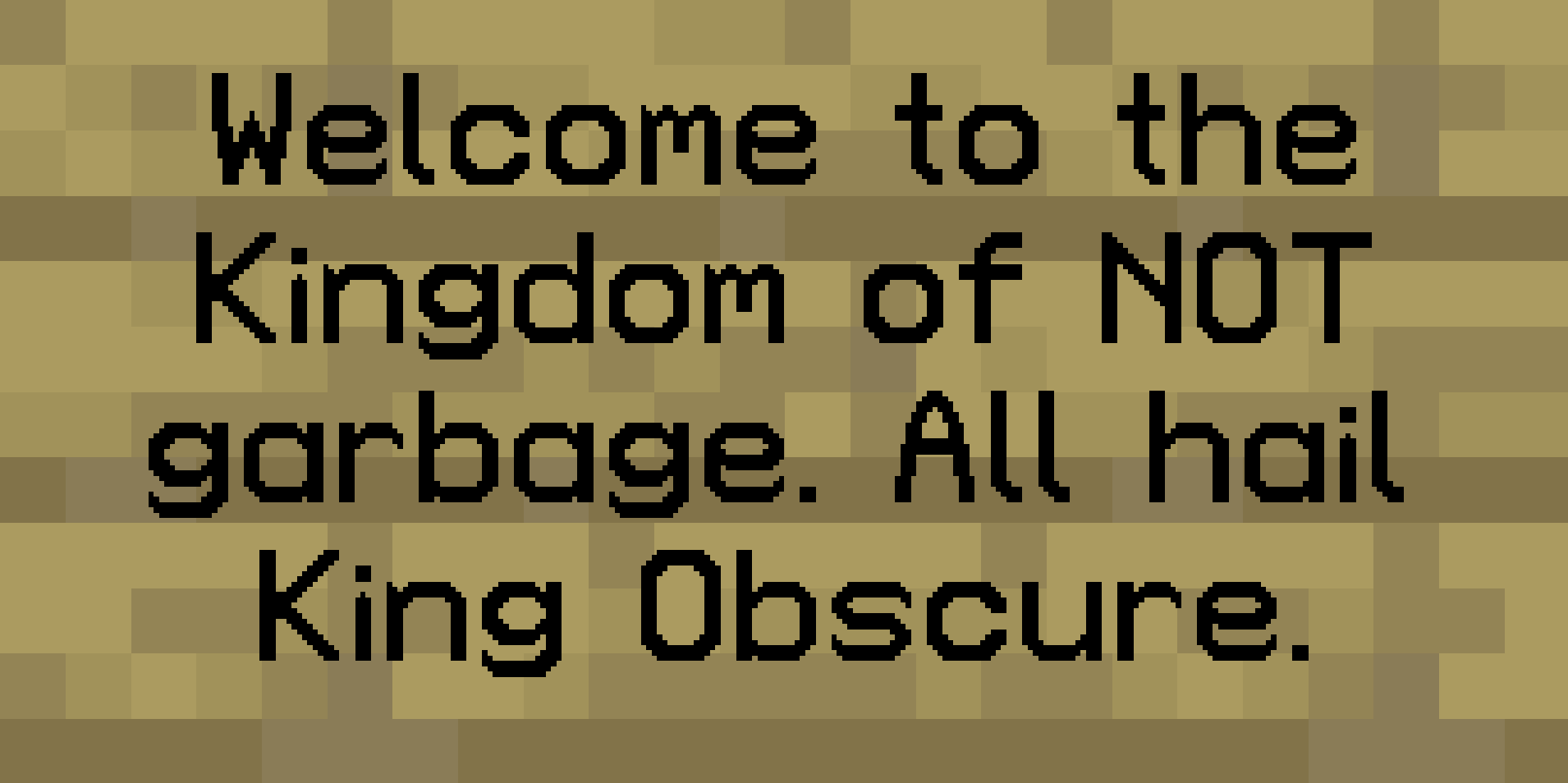
我已经决定通过创建一种新的、改进的字体来改善所有 GUI Scale 3 教会兄弟的生活,这种字体实际上是设计成在 GUI Scale 3 下看起来不错的。
这种字体不是 Vanilla 的模仿或诠释,而是根据我自己的品味进行的翻新。而且它在游戏里看起来真棒。

进展
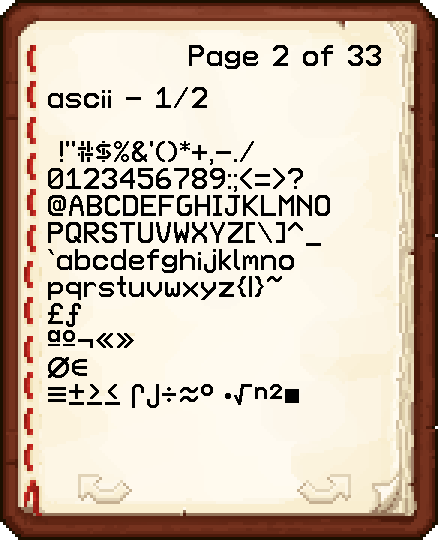
截至 1.1 版本,仅完成了基础 ASCII 字符的支持。未来版本将增加对带重音符号字符及非拉丁欧洲字符的支持。我还打算为了乐趣实现“用英文字符替换 SGA”的修改功能。
The font for the 1080p everyman. Finally.
Let's face it. Most gamers have 1080p monitors. Whether it's a standalone screen or it's built into your laptop, 1080p is still the most common monitor resolution today, and this creates an interesting issue in Minecraft.
Anyone who's looked at Minecraft's Video Settings menu for more than 5 seconds has come across the GUI Scale option. And as my friends and I can attest, any savvy user who has a 1080p monitor will agree: at 1080p, a GUI Scale of 3 looks the best.
GUI Scale 2 ends up looking too small. GUI Scale 4 ends up too big, and screen real estate begins to dwindle. But herein lies the issue: if GUI Scale 3 reigns supreme, why are there so few 48x resource packs?
(By the way! If you like 3x Font but are upgrading to a 1440p monitor, check out 4x Font!)
Powers of Two vs. Multiples of 16
To make a long story short, the community of people who create Minecraft resource packs got addicted to the Powers of Two. It is therefore easy to find resource packs that are 8x, 16x, 32x, 64x, 128x, or even larger. But Minecraft's GUI Scale setting doesn't operate on Powers of Two. It operates on Multiples of 16.
Minecraft's default, inbuilt textures are 16x16 pixels, commonly abbreviated to 16x. When you adjust the GUI Scale setting, you're actually selecting an integer multiple of 16x for the display scale of all GUI menus, buttons, and text.
1 times 16 = 16x. The default, the familiar.
2 times 16 = 32x. Double the resolution of the default! Faithful is a great longstanding example.
4 times 16 = 64x. Quadruple the resolution of the default!! VanillaXBR is an example I actually use myself.
But wait, we've skipped something. We're not Valve. We know how to count, right?
3 times 16 = 48x. Even though this totally works in-game, 48x gets extremely little community recognition.
It's true, very few folks make any 48x packs. Heck, Modrinth doesn't even have a category for 48x, making it difficult to advertise such a pack. UPDATE: If anyone is reading this sentence after December 8th, 2022, you might have noticed that this pack has been marked with the 48x resolution tag. I'd like to thank Emma (triphora) on the Modrinth Discord for responding quickly and amicably to my request that this new tag be added.
As of the same date, PlanetMinecraft still has no 48x category. Moreover, PlanetMinecraft still calls them "Texture Packs." It's literally all over their website. Obviously, they must be entirely staffed by idiots. They are called RESOURCE PACKS. They have been called Resource Packs since the launch of Minecraft 1.6, all the way back in 2013. You know it, I know it, and Modrinth (thank goodness) knows it. I'm never posting anything on PlanetMinecraft ever again.
Why would anyone want a 48x pack?
Well, how does Minecraft handle a mismatch between the scale of your resource pack and your GUI Scale setting? Pretty much the easiest way they could: nearest-neighbor image scaling.
Now, Minecraft's default 16x textures can be easily upscaled to 32x, 48x, or 64x as dictated by the GUI Scale. They're all multiples of 16, after all. But what if you have a 32x or 64x pack installed? What happens then? Let's take a look.
Why a 32x pack doesn't work
Here's Faithful at its native GUI Scale of 2:
Here's Faithful again, at GUI Scale 3:
As you can see, 32x textures cannot be cleanly upscaled to 48x. Artifacts appear due to the non-integer transformation.
Why a 64x pack doesn't work
Here's VanillaXBR at its native GUI Scale of 4:
Here's VanillaXBR again, at GUI Scale 3:
The transformation from 64x to 48x is even worse. Pixels have to be thrown out to perform nearest-neighbor downscaling, resulting in horrendous artifacts. These characters look like they were chewed up by a dog.
Finally, a 48x font
If I were to attempt to create an entire 48x pack, redoing every texture in the game, I'd likely end up working on the project forever. And that's if I don't go nuts in the process.
I have taken it upon myself to improve the lives of all brethren of the church of GUI Scale 3 by creating a new and improved font actually designed to look good at GUI Scale 3.
This font is not a Vanilla imitation or interpretation, but rather a revamp according to my own tastes. And boy does it look good in-game.
Progress
As of Version 1.1, only basic ASCII has been completed. Future versions will include support for accented characters and nonlatin European characters. I also plan to implement the "replace SGA with English characters" modification just for fun.

 资源包

 资源包

 资源包

 资源包

 资源包

 资源包

评论 0
登录后参与评分
还没有评论,来抢沙发吧