1.20+ 更新版本在 Modrinth 上:
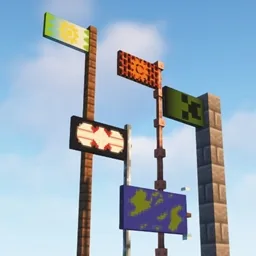
自旗帜(banners)加入游戏以来,我一直希望能像旗子一样将它们水平放置。现在,通过此数据包,我已实现了这一功能!
功能特色:
- 支持四个方向放置旗帜
- 显示你实际放置的旗帜图案
- 破坏其所在的方块即可移除旗帜并收回你的旗帜
- 可以在同一方块上放置多个旗帜!
- 兼容多人游戏与生存模式!
支持的方块:
- 栅栏
- 墙
- 玻璃板
- 铁栏杆
- 避雷针
- 锁链
使用方法:
蹲下 + 点击其中一个受支持方块上的旗帜,即可将旗帜作为旗子放置!破坏其所在的方块以将其移除。
请从正面进行破坏,因为背面是隐形盔甲架所在的位置,它们会阻挡你对方块的攻击。
更新说明:
如果你从 v1.2 或更低版本升级到 v1.3 或更高版本,则需要运行命令 /function bannerflags:update_flags,以更新之前在你周围及其他玩家周围放置的旗帜,使其不再具有碰撞箱!
卸载方法:
如果你不喜欢这个数据包,可以通过以下方式移除旗帜:
- 手动破坏每个放置了旗帜的方块,以便收回你的旗帜。
或者
- 输入命令 /function bannerflags:removeall(但你将无法收回你的旗帜)
如果你已经移除了该数据包,则可以使用以下命令,但你将无法收回你的旗帜:
/execute at @e run kill @e[type=minecraft:armor_stand,tag=Flag]
/execute at @e run kill @e[type=minecraft:armor_stand,tag=Flag2]
总结:
它们非常适合用于装饰和方向指示。
如有任何问题或建议,欢迎在此留言或通过 Discord 私聊我:Gurkis#5195
1.20+ UPDATED VERSIONS ON MODRINTH:
Ever since banners were added I've wanted to place them horizontally like flags. Now I have made it possible using this data pack!
FEATURES:
- Place flag in 4 directions
- Displays the banner you actually placed
- Break the block it is placed on to remove it and get your banner back
- Place multiple on the same block!
- Works on multiplayer & survival friendly!
SUPPORTED BLOCKS:
- fences
- walls
- glass panes
- iron bars
- lightning rod
- chain
HOW TO USE:
Crouch + click a banner on one of the supported blocks to place your banner as a flag! Break the block it is placed on to remove it.
Break it from the front, because on the back is where the invisible armor stands are located and they won't let you hit the block.
UPDATING:
If you updated from v1.2 or lower to v1.3 or higher then you will need to run the command /function bannerflags:update_flags to update the flags previously placed around you and other players to no longer have a hitbox!
UNINSTALLATION:
If you don't end up liking the pack here are the ways you can remove the flags:
- manually breaking each block that a flag has been placed on so you get the banners back.
or
- writing /function bannerflags:removeall (you wont get your banners back though)
If you already removed the pack then you can use these commands, but you won't get your banners back:
/execute at @e run kill @e[type=minecraft:armor_stand,tag=Flag]
/execute at @e run kill @e[type=minecraft:armor_stand,tag=Flag2]
SUMMARY:
They can be used well for decoration & direction pointers.
If you have any questions or suggestions you can write here or DM me on Discord Gurkis#5195
下载 Banner Flags
下载 Banner Flags
需要联机服务器吗?
稳定流畅、一键部署,几分钟即可和朋友联机开服
最低仅需 8 元/月 即可畅快联机
下载 Banner Flags
下载 Banner Flags
下载 Banner Flags
需要联机服务器吗?
稳定流畅、一键部署,几分钟即可和朋友联机开服
最低仅需 8 元/月 即可畅快联机
下载 Banner Flags
下载 Banner Flags
下载 Banner Flags
暂无更新日志
关于这个资源的讨论、问题反馈与使用心得
还没有讨论,来发第一帖吧
你是这个资源的作者?登录后可认领此资源。
相似资源
 资源包

John Smith Technician's Remix 是原版 John Smith 资源包的变体,专为搭配模组化 Minecraft 使用而设计。
 资源包

Golden Days 是一款 Minecraft 资源包,旨在重现早期版本(如 Beta)中的旧纹理、光照、名称和音效。需要启用内置的 Programmer Art 资源包。
 资源包

Doggy Talents 的 16x16 资源包
 资源包

带有独特纹理的功能性方块深色 GUI。80 个模组的深色模式
 资源包

这是 EMF Player Animation 资源包。它为玩家实体添加了精美的动画。兼容其他模组的动画,例如 Quark 的表情动作、Parcool 的技巧以及 Not Enough Animations。
 资源包

《基岩版》风格的极简 GUI 和 HUD
评论 0
登录后参与评分
还没有评论,来抢沙发吧