通过眨眼动画、发光效果和自定义颜色效果,提升你的 Minecraft 皮肤。
无需任何模组或客户端加载器(Forge、Fabric、Quilt)!
这只是一个标准的原版资源包,利用 Minecraft 自带的内置光影实现效果。压缩包内附带了一个小型网页编辑器(HTML),因此你无需手动编辑该光影所依赖的令人困惑的数据像素。
效果展示图片


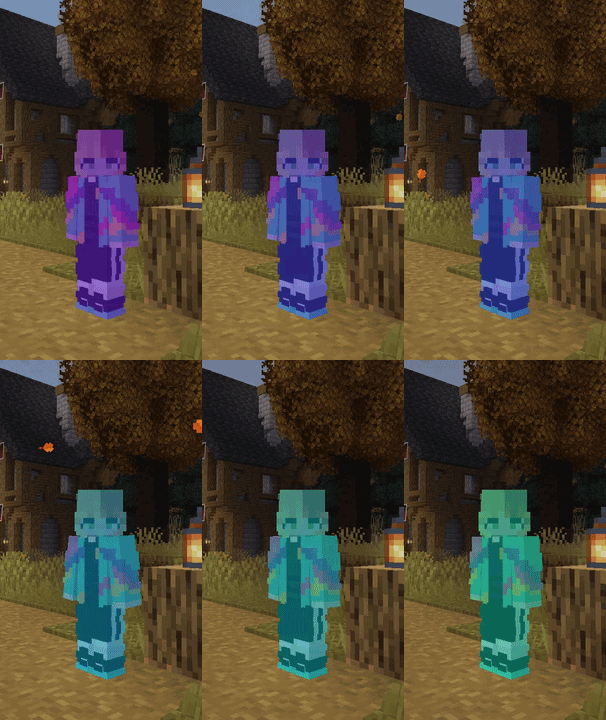
自定义受伤闪烁 自发光部分 眼睛眨眼动画 彩虹/Jeb_ 全色相染色
所有功能
眨眼动画: 为你的 Minecraft 皮肤添加自然的眨眼动画,并支持调整延迟时间。
**彩虹 效果 (Jeb_): 在 整个皮肤 上平滑循环彩虹色,或者仅在 内层 或 外层 上循环。
自定义受伤闪烁:受到伤害时,将默认的红色伤害闪烁替换为你想要的任何颜色。
发光像素: 选择皮肤上的特定像素(如眼睛、魔法符文或服装部件),使其在漆黑的洞穴中保持明亮,并可自定义发光强度。(它不会发出光线来照亮周围环境)
安装与使用指南
-
解压下载文件: 打开下载的 zip 文件夹。
-
打开网页编辑器: 双击包含的 skin-editor.html 文件,即可在 Web 浏览器中直接打开皮肤编辑器。(这允许你将此光影特有的功能添加或编辑到你的皮肤纹理文件中)
-
选择效果: 在编辑器步骤 1 中选择你的皮肤文件,开启你想要的功能,然后下载更新后的皮肤图片。
-
上传皮肤: 像往常一样,将保存的 PNG 文件上传至 Minecraft.net 或官方 Minecraft 启动器。
-
启用资源包: 将资源包复制到游戏内的资源包文件夹中,在游戏中激活它,即可大功告成!(HTML 文件可保留在文件夹中,以便日后调整)
补充信息
对其他玩家无故障: 如果其他玩家未使用此资源包,他们的视角下你的皮肤看起来完全正常,不会出现任何奇怪或损坏的像素。
标准 Java 版兼容: 适用于未安装模组的纯原版 Minecraft Java 版。
其他资源包用户可见: 其他使用该资源包的玩家将看到你设置的自定义皮肤效果,与你所见一致。
兼容性问题: 由于这是一个原版光影,Sodium/Iris 可能会覆盖此光影,导致其部分效果失效。若要配合 Iris 使用核心光影,需要额外的模组来解决此问题。(尚未测试 OptiFine)
Enhance your Minecraft Skin with bilking eyes animation, glow effects, and custom color effects.
No mods or client loaders (Forge, Fabric, Quilt) required!
This is just a standard Vanilla Resource Pack that uses Minecraft's own built in shaders. It comes with a small web editor (HTML) inside of the zip-file, so you don't have to worry about manually editing the confusing data pixels which this shader relies on.
Images of the effects in action
Custom Hurt Flashes Emissive Glowing Parts Eye blinking animation Rainbow/Jeb_ full tint
All the Features
Blinking Eyes: Give your Minecraft skin a natural eye-blink animation with adjustable delay.
Rainbow Effect (Jeb_): Cycles smooth thru the rainbow colors across your entire skin, or just your inner or outer layer.
Custom Hurt Flashes: Swap out the standard red damage flash for whatever color you want when taking damage.
Glowing Pixels: Pick specific pixels on your skin (like eyes, magic runes, or clothing parts) that will stay bright in pitch-black caves, with customizable glow strength. (It does not emmit lights to brighten your surroundings)
Install and usage guide
-
Unzip the Download: Open the downloaded zip folder.
-
Open the Web Editor: Double-click the included skin-editor.html file to open the skin editor right in your web browser. (This allows you to add or edit this shaders specific features to your skin texture file)
-
Pick Your Effects: Pick your skin file at step 1 in the editor, turn on the features you want, and download your updated skin image.
-
Upload Your Skin: Upload the saved PNG file on Minecraft.net or in the official Minecraft Launcher like you always do.
-
Turn On the Pack: Copy the resource pack in your game's resource pack folder, activate it in-game, and you're good to go! (The HTML can stay in the folder, for later adjustments)
Additional Infos
No Glitches for Others: If another player isn't using this resource pack, your skin will still look completely normal to them without any weird or broken pixels showing up.
Standard Java Compatibility: Works on unmodded, pure Vanilla Minecraft Java Edition.
Visible to Other Pack Users: Anyone else using this resource pack will see your custom skin effects exactly as you set them up.
Compatibility Issues: Since this is a vanilla shader, Sodium/Iris might overwrites this and renders some effects of it useless. To use core shaders with Iris, there are additional mods to fix that. (not yet tested with OptiFine)


 资源包

 资源包

 资源包

 资源包

 资源包

 资源包

评论 0
登录后参与评分
还没有评论,来抢沙发吧