欢迎来到旗帜包,一个专为旗学爱好者(无论是业余还是专业)打造的资源包!
此资源包为游戏添加了 CIT(自定义物品纹理)。这允许你通过重命名某些物品来更改其模型和纹理。在本资源包中,仅横幅(Banner)和羊毛(Wool)物品可被修改。这不会改变这些物品在世界中作为方块放置时的外观或行为。使用这些自定义物品的方法是将它们放入隐形物品展示框中。如果你愿意,你也可以直接拿在手里欣赏。
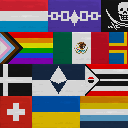
顾名思义,本包添加了各种旗帜!包括国家(法定事实存在及实际存在)、地区、民族、组织、虚构作品、杂项、骄傲标识以及纯色旗帜。
如果你的祖国未包含在此旗帜包中,别担心!我尚未收录所有国家。
此资源包包含的内容:
- 悬挂旗帜(重命名的白色羊毛)
- 飘扬旗帜(重命名的白色横幅)
- 不同尺寸的旗帜(非标准化的“表情符号”风格旗帜)
- 旗帜颜色与数字源文件的旗帜颜色 100% 准确匹配
- 每面旗帜都带有轻微的布料纹理
- 多种名称(旗帜在文件中以其英文名称列出,但也可以使用其母语名称进行重命名。(仅限拉丁字母))
- 替代纹理(部分旗帜拥有替代纹理。通过将旗帜名称应用于黑色横幅/羊毛而非白色,即可获得该替代纹理。)
- 致谢(在每个旗帜的
.properties 文件内部,我尽力标注了尽可能多的原始旗帜设计者及其设计年份。)
- 旗帜指南(资源包内包含一个名为 "Flag Guide.txt" 的文件,这是你可以随时使用的指南。其中包含了与此页面类似的说明,以及所有旗帜名称的列表。)
使用此资源包的理由:
- 装饰(将隐形物品展示框贴在铁栏杆、锁链或栅栏上,让你的旗帜垂下或飘扬!)
- 学习(你可能通过这个资源包学到一些东西,谁知道呢。)
- 夺旗(Minecraft 中每种颜色都有对应的旗帜,因此它非常适合用于这个小游戏。每个队伍甚至可以使用不同国家的旗帜,如果你愿意的话。)
- 其他团队游戏(这是为任何颜色队伍基地增添一点色彩的好方法。)
- 杂项(你可能还可以玩其他类型的小游戏,比如“猜旗帜”之类的,谁知道呢!)
问答环节:
问:“此资源包需要任何模组吗?”
答:是的。你需要一个 CIT 模组才能使此资源包生效。我推荐 CIT Resewn。我没有测试过其他模组,例如 OptiFine。
问:“我如何重命名物品?”
答:将其放入铁砧中。你可以在那里修改文本。你也可以使用命令重命名物品,但如果你知道如何使用这类命令,你可能就不会问这个问题了。
问:“我在哪里可以找到所有旗帜名称的列表?”
答:如上所述,旗帜指南位于资源包文件内部。
问:“我如何获得隐形物品展示框?”
答:如果你在服务器上,希望管理员已经提供了获取该物品的简便方法。如果没有,则必须使用以下命令获取:/give @s item_frame{EntityTag:{Invisible:1}};如果你想要发光隐形物品展示框,请使用以下命令:/give @s glow_item_frame{EntityTag:{Invisible:1}}
Welcome to the Flag Pack, a Resource Pack for Vexillology nerds, aspiring or professional!
This resource pack adds CITs (Custom Item Textures) to your game. This allows you to rename some items to change their model and texture. In the case of this pack, the Banner and Wool items are the only things alterable. This will NOT change how the item looks/behaves when placed in the world as a block. The way to use these custom items, is to place them into an Invisible Item Frame. You can also just admire them in your hand, if you desire.
As the name suggests, this pack adds Flags of all kinds! Nations (de jure and de facto), Regions, People, Organizations, Fictional, Misc., Pride, and Colors.
If your homeland isn't represented in this Flag Pack, don't fret! I haven't done every nation yet.
What this pack includes:
- Hanging Flags (Renamed White Wool)
- Waving Flags (Renamed White Banner)
- Differently Sized Flags (No standardized emoji-lookin' flags)
- Flag Colors 100% Accurate to the flag's digitally sourced file
- Each Flag has a bit of a cloth texture to it
- Multiple Names (Flags are listed in the files as their English name, but can also be renamed in their native language as well. (Latin script only))
- Alternate Textures (Some flags have an alternate texture. This can be obtained by using the flag's name on a Black Banner/Wool instead of White.)
- Credits (Inside each flag's .properties file, I did my best to credit as many original flag designers as I could, as well as state their year of being designed.)
- Flag Guide (Inside the pack, there is a file called "Flag Guide.txt", which is a guide you can use for this pack at any time. It contains instructions similar to what's on this page, as well as a list of All flag names.)
Reasons to Use this Pack:
- Decoration (Slap an Invisible Item Frame on an Iron Bar, Chain, or Fence and let your flag hang down or fly!)
- Learning (You might be able to learn something from this pack, who knows.)
- Capture the Flag (There's a flag for every color in Minecraft, so it would probably be great for this minigame. Each team could even be a different nation's flag, if you want.)
- Other Team Games (Pretty good way to add a little something to any color team's base.)
- Misc. (You could probably do other kinds of little games, like "Guess the Flag" or something, who knows!)
Questions and Answers:
Q: "Does this pack require any mods?"
A: Yes. You need a CIT mod in order for this pack to work. I recommend CIT Resewn. I haven't tested any other mods, such as OptiFine.
Q: "How do I rename an item?"
A: Put it in an Anvil. You can rename the text in there. You can also rename something with a command, but if you know how to use commands like that, you probably aren't the type to ask this question.
Q: "Where can I find a list of all the flag names?"
A: As stated above, the Flag Guide is inside the resource pack file.
Q: "How do I get an Invisible Item Frame?"
A: If you're on a server, hopefully the owner has made an easy way to obtain this item. If not, then you must get it with this command: /give @s item_frame{EntityTag:{Invisible:1}}, and if you want a Glowing Invisible Item Frame, you get it with this command instead: /give @s glow_item_frame{EntityTag:{Invisible:1}}

 资源包

 资源包

 资源包

 资源包

 资源包

 资源包

评论 0
登录后参与评分
还没有评论,来抢沙发吧