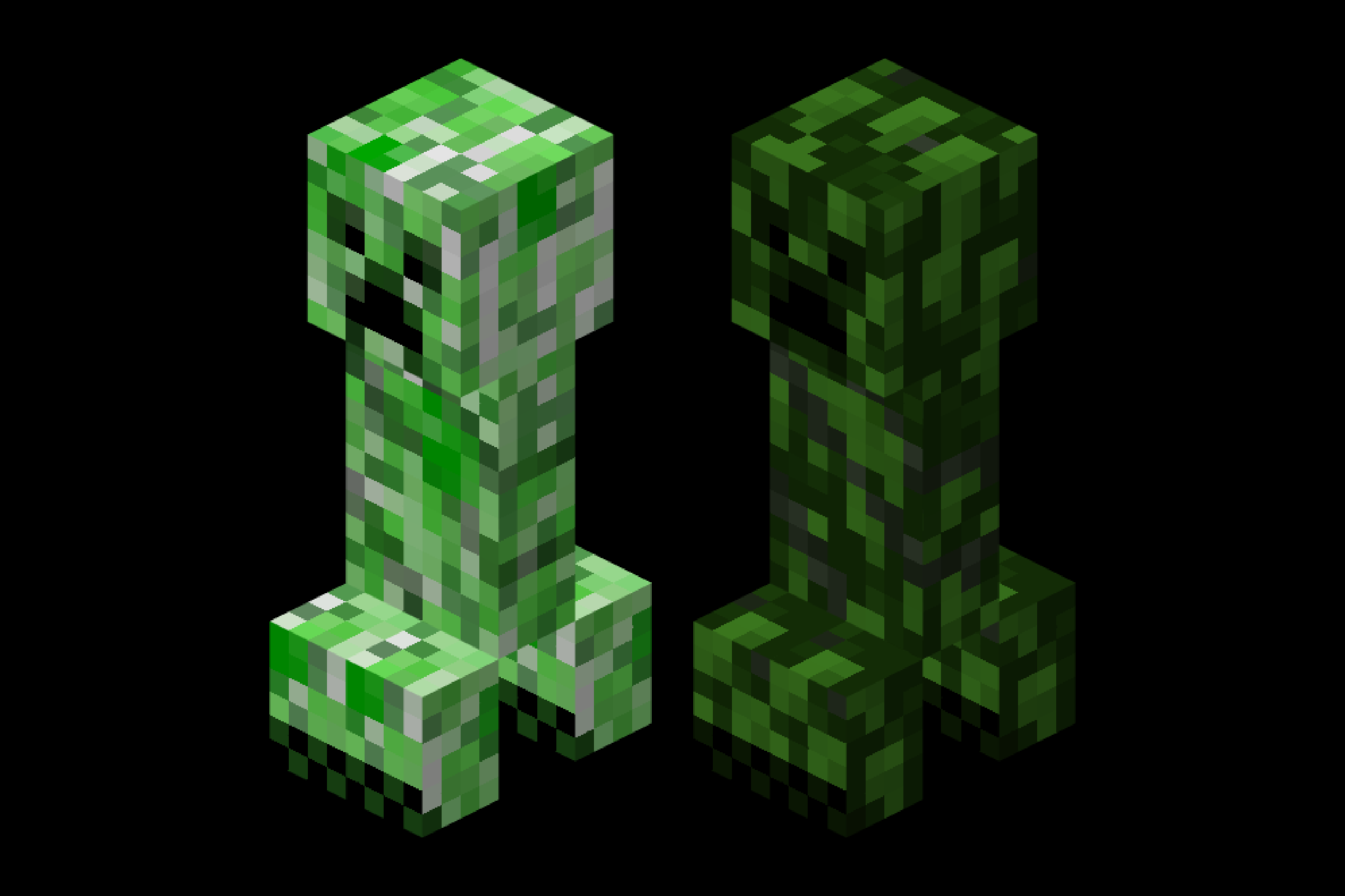
自 2009 年以来,苦力怕的纹理一直未变,因为它的形象已经深入人心。然而,和许多人一样,我认为它在现代《Minecraft》中显得格格不入。我希望为两个不同时期制作苦力怕的新纹理:一个是程序员艺术风格(1.8-1.13),谁知道如果 Notch 没有在那个时候把 Mojang 卖掉,他是否自己也会修改它呢;另一个则是适用于现代《Minecraft》的版本。
本页面展示的是程序员艺术风格的苦力怕纹理。此资源包不会改变刷怪蛋,因为程序员艺术风格的刷怪蛋纹理已经是不错的绿色。本资源包旨在叠加在程序员艺术纹理之上使用,同时也推荐搭配 Programmer Art Continuation Project 一起使用。
其他版本链接:
所有三个资源包也可在 Curseforge 上找到。
一些背景信息:
首先,我决定重制苦力怕的纹理,以便更好地理解 Notch 最初制作它时的思路。通过将 Alpha 树叶覆盖到白色苦力怕纹理上,并观察其与当前纹理之间的差异,我总结出了一些步骤,我认为 Notch 在制作时可能遵循了这些步骤:
- 将树叶纹理叠加到苦力怕基底上
- 用黑色添加面部和脚趾部分
- 在脚趾周围和脚部边缘添加深灰绿色
- 加深面部周围的一些特定像素
- 添加环绕主体的斜线标记
- 在斜线之间的某些区域以及其他几个特定位置添加额外的绿色高光
- 微调仍可见的部分基底纹理,使其看起来不那么单调
通过大致按照这些步骤,并使用调至森林生物群系色调的程序员艺术橡木树叶纹理进行操作,最终得到了本资源包中的纹理。希望你喜欢它,就像我喜欢它一样!
The creeper texture hasn’t been changed since 2009 because of how iconic it became. However, like many people I think it looks out of place in modern Minecraft. I wanted to make a creeper texture for both times I feel like the creeper texture should have changed: one in the programmer art/1.8-1.13 style (who knows, maybe Notch would’ve changed it himself if he hadn’t have sold Mojang right around then), and one for modern Minecraft.
This page is for the PROGRAMMER ART creeper texture. It does not change the spawn egg because the programmer art spawn egg texture is already a good shade of green. This resource pack is made to be used on top of the programmer art textures, and I'd also recommend using Programmer Art Continuation Project in the middle too.
Other version links:
All 3 resource packs are also available on Curseforge
Some background:
first, I decided to remake the creeper texture to gain a better understanding of what Notch originally did when he made it. After overlaying the alpha leaves onto a white creeper texture and looking at the discrepancies between that and the current texture, I came up with a set of steps that I think Notch probably followed when making it:
- Overlay the leaf texture onto the creeper base
- Add the face and toes in black
- Add the area around the toes and edges of feet in a dark greyish green
- Darken a few specific pixels around the face
- Add the slash marks that go around the main body
- Add some extra green highlights to a spot in between the slashes, and a few other specific spots
- Tweak a few parts of the base texture that are still visible so it doesn’t look too flat
After approximately following these steps using the programmer art Oak Leaves texture tinted to the forest biome, I ended up with the texture in this pack. I hope you like it as much as I do!
评论 0
登录后参与评分
还没有评论,来抢沙发吧