Dark GUI – 极简暗黑模式界面
版本:1.20+
分辨率:16x
分类:GUI / 界面
风格:暗黑模式、极简、原版兼容
描述
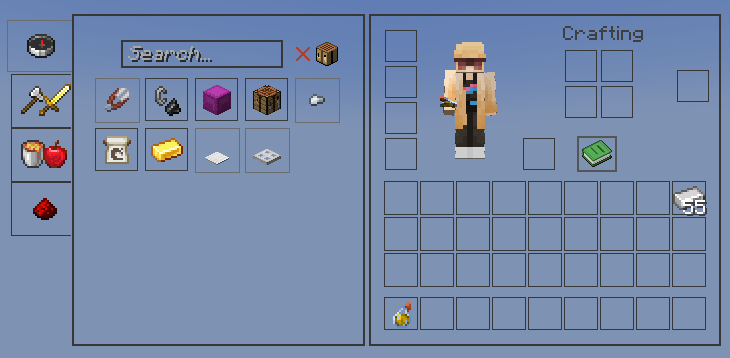
Dark GUI 将 Minecraft 原本明亮的默认菜单替换为干净现代的暗黑界面。该资源包在保留熟悉原版布局的同时,引入了极简的黑灰设计风格,提升了可读性并减轻了眼部疲劳。
它专为偏好深色美学但不希望改变 Minecraft 整体感觉的玩家设计。所有菜单、容器和界面元素均经过调整,以创建一致的深色主题,同时保持简洁实用。
Dark GUI 非常适合长时间游戏、夜间游玩、PvP、建造以及一般的生存世界。
特性
• 完整的深色 GUI 重构
• 深色的背包、合成、箱子及菜单界面
• 极简现代的设计,贴近原版风格
• 改进的图标对比度,提升可视性
• 支持 Minecraft 1.20+ 界面
• 兼容 OptiFine、Fabric、Sodium 及大多数模组
• 轻量级 16x 分辨率,无性能影响
为什么使用 Dark GUI
Minecraft 的默认界面非常明亮,尤其是在夜间游戏时。Dark GUI 提供了一种更暗的替代方案,对眼睛更友好,同时保持菜单清晰易读。
此资源包适合那些想要简单暗黑模式 UI,而不想更改纹理、物品或方块的玩家。
截图
安装方法
- 下载 .zip 文件
- 将文件移动到以下文件夹:
.minecraft/resourcepacks
- 打开 Minecraft
- 进入选项 → 资源包
- 启用 Dark GUI
兼容性
Minecraft 1.20+
OptiFine / Fabric / Forge / Sodium
与大多数资源包兼容
Dark GUI – Minimal Dark Mode Interface
Version: 1.20+
Resolution: 16x
Category: GUI / Interface
Style: Dark Mode, Minimal, Vanilla Friendly
Description
Dark GUI replaces Minecraft’s bright default menus with a clean and modern dark interface. The pack keeps the familiar vanilla layout while introducing a minimal black and dark gray design that improves readability and reduces eye strain.
It is designed for players who prefer a darker aesthetic without changing the overall feel of Minecraft. All menus, containers, and interface elements are adjusted to create a consistent dark theme while remaining simple and functional.
Dark GUI works well for long play sessions, night gameplay, PvP, building, and general survival worlds.
Features
• Complete dark GUI overhaul
• Dark inventory, crafting, chest, and menu interfaces
• Minimal and modern design that stays close to vanilla
• Improved icon contrast for better visibility
• Supports Minecraft 1.20+ interfaces
• Compatible with OptiFine, Fabric, Sodium, and most mods
• Lightweight 16x resolution with no performance impact
Why Use Dark GUI
Minecraft’s default interface is very bright, especially during nighttime gameplay. Dark GUI provides a darker alternative that is easier on the eyes while keeping menus clear and readable.
This pack is ideal for players who want a simple dark mode UI without changing textures, items, or blocks.
Screenshot

Installation
- Download the .zip file
- Move the file into the following folder:
.minecraft/resourcepacks
- Open Minecraft
- Go to Options → Resource Packs
- Enable Dark GUI
Compatibility
Minecraft 1.20+
OptiFine / Fabric / Forge / Sodium
Compatible with most resource packs
评论 0
登录后参与评分
还没有评论,来抢沙发吧