下载前请仔细阅读说明!
这是 Modern Font Pack 的标准版。如果您在寻找本项目的衍生版本,请前往 Modern Font Pack - Caxton Edition。
您是否厌倦了 Minecraft 默认字体那种粗壮且过大的外观?

即使启用了强制 Unicode 字体功能,在高分辨率屏幕上看起来依然粗糙。

此资源包将解决这些问题,让您在游玩 Minecraft 时看到更美观、现代且平滑的字体。
此资源包支持表情符号(emoji),您可以在游戏中直接使用。字体取自 Google 委托设计的 Noto Emoji 字体家族。

它还支持一些花式字符,您可以在游戏中使用。字体取自 Google 委托设计的 Noto Sans 字体家族、Noto Sans Math 字体家族以及 Noto Sans Symbols 字体家族。
要使用它们,您无需使用 /tellraw 或 /title 等命令。只需使用任何在线花式文本生成器,然后将生成的花式文本复制并粘贴到游戏中即可。

由于技术限制,您需要了解以下信息:
- 表情符号和花式字符仅支持 1.16 及以上版本。不支持 1.15.2 及以下版本。如果您尝试在1.15.2 或更低版本中使用表情符号和花式字符,它们将显示为乱码或完全不可见。
- 由于 Minecraft 不支持组合字符,某些表情符号仍无法正确显示,例如 "???" 可能会显示为 "???"。同样,某些花式文本如 "M҉i҉n҉e҉c҉r҉a҉f҉t҉"、"M҉͈͚̳͆̌ḯ̴̝̣̩̤̚n҈͖͍̬̤̆̈̌̈e̶͍͉̟͋͊̇̽c̵͖̥̬̮̐̉͊̄r̵͈̦͇̫͇̈ra҈̫͖̓̄͗̆f҉͓̰̪̉̔t̶͓̣̗͓͒̊̄̇̾" 等也无法正确显示。
- 为了使游戏着色后的表情符号仍能正常显示,仅制作了单色版本。不会制作彩色版本,以避免在游戏着色后出现变形或变成全黑的问题。
由于汉字在不同国家或地区有着不同的标准,以及不同的屏幕分辨率,我们特别设计了 15 个版本,即 HD-日语版、HD-韩语版、HD-中文版、HD-台湾版、HD-香港版、Basic-日语版、Basic-韩语版、Basic-中文版、Basic-台湾版、Basic-香港版、Supreme-日语版、Supreme-韩语版、Supreme-中文版、Supreme-台湾版 和 Supreme-香港版。
请仔细观察下图,您会发现部分汉字的写法存在差异:

(图片来自维基百科)
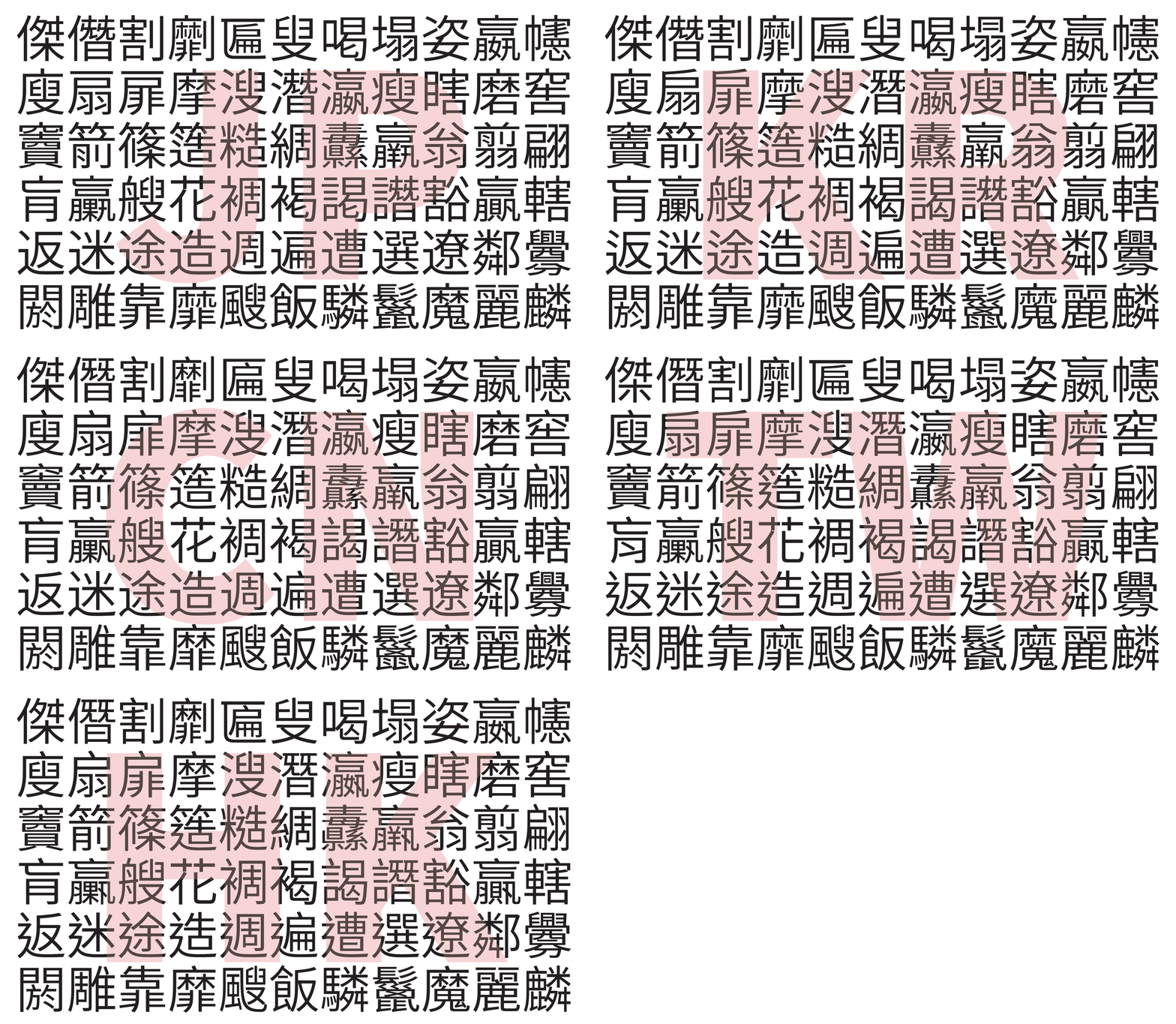 (图片来自 Adobe 博客)
由于屏幕分辨率不同,在不同情况下会有不同的显示效果。请参阅下图:

(点击 此处 查看原图。)
请根据实际情况选择安装 Basic 版或 HD 版。如果选错版本,界面字体可能会变得模糊或粗糙。
如果您的屏幕分辨率为 QHD (2560 × 1440)、4K UHD (3840 × 2160) 或更高,并且您正在使用 1.13 或更高版本 进行游戏,建议选择 Supreme 版并启用全屏以获得更好的效果。
如果您仍然不知道应该使用哪个版本,请点击以下链接查看各种分辨率下的显示效果:
资源包文件名的格式为 MFP-J[Smoothness]-[Version Category][Version Number][CJK Type].zip,其中:
[Smoothness]:
H 表示该资源包是 HD 版。B 表示该资源包是 Basic 版。S 表示该资源包是 Supreme 版。
[Version Category]:
00 表示该资源包适用于 1.5 (13w10a) 至 1.5.2 (13w23b) 版本。01 表示该资源包适用于 1.6.1 (13w24a) 至 1.8.9 版本。02 表示该资源包适用于 1.9 (15w31a) 至 1.10.2 版本。03 表示该资源包适用于 1.11 (16w32a) 至 1.12.2 (17w47b) 版本。04 表示该资源包适用于 1.13 (17w48a) 至 1.14.4 (19w46b) 版本。05 表示该资源包适用于 1.15 (1.15-pre1) 至 1.16.1 (1.16.2-pre3) 版本。06 表示该资源包适用于 1.16.2 (1.16.2-rc1) 至 1.16.5 版本。07 表示该资源包适用于 1.17 (20w45a) 至 1.17.1 (21w38a) 版本。08 表示该资源包适用于 1.18 (21w39a) 至 1.18.2 版本。09 表示该资源包适用于 1.19 (22w11a) 至 1.19.2 版本。10 表示该资源包适用于 1.19.3 (22w42a 至 23w07a) 版本。11 表示该资源包适用于 1.19.4 (1.19.4-pre1 至 23w13a) 版本。12 表示该资源包适用于 1.20 (23w14a) 至 1.20.1 版本。13 表示该资源包适用于 1.20.2 (23w31a) 至 1.20.4 (23w51b) 版本。14 表示该资源包适用于 1.20.5 (24w03a 及以上) 及更高版本。
[Version Number]: 从 00 开始。每次更新时,数字将增加 1。[CJK Type]:
J 表示中文字符是按照 日本 的中文字符标准设计的。K 表示中文字符是按照 韩国 的中文字符标准设计的。C 表示中文字符是按照 中国 的中文字符标准设计的。T 表示中文字符是按照 台湾 的中文字符标准设计的。H 表示中文字符是按照 香港 的中文字符标准设计的。
例如:
- 如果您想使用 HD 版 的资源包,可用于 版本 1.16.5,且 中文字符是按照 台湾 的中文字符标准设计 的,则需下载的文件为 "MFP-JH-0624T.zip"。
- 如果您想使用 HD 版 的资源包,可用于 版本 1.12.2,且 中文字符是按照 香港 的中文字符标准设计 的,则需下载的文件为 "MFP-JH-0324H.zip"。
- 如果您想使用 Basic 版 的资源包,可用于 版本 1.17.1,且 中文字符是按照 中国 的中文字符标准设计 的,则需下载的文件为 "MFP-JB-0724C.zip"。
- 如果您想使用 Supreme 版 的资源包,可用于 版本 1.15.2,且 中文字符是按照 韩国 的中文字符标准设计 的,则需下载的文件为 "MFP-JS-0524K.zip"。
如果您的国家或地区 不使用中文字符,您无需关注 [CJK Type] 字段中的 中文字符标准。您只需 关注 [Smoothness] 字段和 [Version Category] 字段 即可。
常见问题解答
点击折叠区域以查看。
常见问题解答
1. 不是已经有 Smooth Font Mod 或 Modern UI Mod 这类模组能提供类似效果吗?为什么还要制作这个字体资源包?
一些未安装模组的玩家,以及使用基岩版(Bedrock Edition)的玩家可以使用本资源包。此外,Smooth Font Mod 和 Modern UI Mod 支持的版本并不多,而 Modern Font Pack 支持从 Java 版 1.5 到最新版本 26.3,以及基岩版 1.2.0 到最新版本 26.52!以下是这三者的对比:
- Smooth Font Mod:
- 支持 Java 版 1.7.10、1.8.9、1.10.2、1.11.2、1.12.1、1.12.2。
- 需要 Forge 加载器。
- Modern UI Mod:
- 对于 Forge 加载器,支持 Java 版 1.15.2、1.16.1、1.16.2、1.16.3、1.16.4、1.16.5、1.17.1、1.18、1.18.1、1.18.2、1.19.2、1.19.4、1.20、1.20.1、1.20.2、1.20.4、1.20.6、1.21、1.21.1、1.21.3、1.21.4、1.21.6、1.21.7 和 1.21.8。对于 Fabric 加载器,支持 1.20、1.20.1、1.20.3、1.20.4、1.20.6、1.21、1.21.1、1.21.3、1.21.4、1.21.6、1.21.7 和 1.21.8。对于 NeoForge 加载器,支持 1.20.1、1.20.2、1.20.4、1.20.6、1.21、1.21.1、1.21.2、1.21.3、1.21.4、1.21.6、1.21.7 和 1.21.8。对于 Quilt 加载器,支持 1.20、1.20.1、1.20.2、1.20.4、1.20.6、1.21、1.21.1 和 1.21.3。
- 该模组的部分版本需要 Java 11。如果任何模组与 Java 11 不兼容,则无法运行。
- 此模组需要 OpenGL 4.3(适用于 1.15.2 - 1.16.5)或 4.5(适用于 1.17+)。如果显卡不支持,则无法运行。
- 如果有模组与该模组不兼容,则无法运行。
- Modern Font Pack:
- 支持所有 Java 版 1.5 至 26.3 的版本,以及所有基岩版 1.2.0 至 26.52 的版本。
- 无需任何模组加载器即可使用。
2. Basic(基础版)、HD(高清版)和 Supreme(至尊版)有什么区别?
由于屏幕分辨率不同,且 Minecraft 的字体渲染不会随 GUI 缩放比例(GUI Scale)的改变而重新采样,因此同一资源包在不同屏幕上会有不同的显示效果。Basic 版的平滑效果相对简单,在低分辨率屏幕或 GUI 缩放比例为 2 的情况下效果理想。HD 版采用普通平滑效果,在中高分辨率屏幕或 GUI 缩放比例为 3 及以上的情况下效果理想。Supreme 版具有超级平滑效果,在超高分辨率屏幕(如 4K)或 GUI 缩放比例为 6 及以上的情况下效果理想。详情请见 此处。
3. 为什么 Supreme 版仅支持 Java 版 1.13 及以上版本?
这是因为 Supreme 版的字体以 TTF 格式显示。自 Java 版 1.13 起,Minecraft 支持将字体文件嵌入资源包中以显示所需的字体。如果为 Java 版 1.12.2 及以下版本或基岩版创建来自 Basic 和 HD 版所用图像文件的超级平滑字体,每个字符可能需要放大至 256x256 或更大尺寸。这会导致资源包体积过大,并可能严重影响游戏性能。
4. CJK 字体类型中的 "jp"、"kr"、"cn"、"hk" 和 "tw" 有什么区别?
详见下图。你可以看到“返”字的五种不同写法:
这张图片展示了汉字的一些不同写法:
要了解有关汉字标准的更多信息,请阅读 此处(简体中文页面)。
5. 我可以同时应用多个资源包的不同版本吗?
不可以。如果这样做,只有最顶层的资源包内容才会生效。
6. 下载资源包并将其加载到游戏中后,游戏显示不兼容警告。我该怎么办?

如果你正在游玩 22w42a 至 22w44a 版本,而待应用的资源包是为 1.19.3 版本设计的,这是正常现象。这是因为从 22w45a 开始,pack.mcmeta 文件中的 pack_format 更改为 12,本资源包也对此更新做出了相同的更改。如果你正在游玩 23w14a 至 23w16a 版本,而待应用的资源包是为 1.20 版本设计的,这也是正常现象。这是因为从 23w17a 开始,pack.mcmeta 文件中的 pack_format 更改为 15,本资源包也对此更新做出了相同的更改。这不会影响资源包的运行,因此你可以忽略警告并直接应用。如果你游玩的版本不是 22w42a 至 22w44a 或 23w14a 至 23w16a,你可能下载了错误的版本。你应该返回下载页面,选择正确的版本并重新下载。请勿强行应用带有不兼容警告的资源包。否则,资源包可能无法正常工作。
7. 应用资源包后,界面字体显示异常。我该怎么办?

此问题将出现在 1.6.1 至 1.10.2 版本中。请重新启动游戏以修复此问题。有关此问题的详细信息,请参阅 MC-41270。
8. 应用资源包后,界面字体变得粗糙,该怎么办?

如果您使用的是资源包的 HD 版或 Supreme 版,当 GUI 比例低于推荐值时,界面字体会变得粗糙。请调整 GUI 比例或应用相应版本以获得理想的显示效果。详情请见 此处。
9. 应用资源包后,界面字体变得模糊,该怎么办?

如果您使用的是资源包的基础版,当 GUI 比例高于推荐值时,界面字体会变得模糊。请调整 GUI 比例或应用相应版本以获得理想的显示效果。详情请见 此处。
10. 居中对齐或右对齐的文本会向左偏移一点,该怎么办?

此问题将出现在 1.8.9 及更低版本中。要解决此问题,请不要开启“强制使用 Unicode 字体”。安装 OptiFine 可以修复此问题,但会导致另一个问题:某些文本有时会超出边框。详见第 14 问。有关此问题的详细信息,请参阅 MC-23952。
11. 粗体文本显示异常,看起来像是两个文本重叠在一起,该怎么办?

请安装 OptiFine,因为它可以修复粗体文本显示异常的问题。或者启用“强制使用 Unicode 字体”,但在 Java 版 1.13 至 1.19.4 中使用 HD 版,或在 Java 版 1.20 及以上版本中使用 HD 版或基础版时,此方法无效。如果您使用的是 Supreme 版,则无法修复此问题。
或者,您可以考虑使用衍生项目 Modern Font Pack – Caxton Edition,它也能修复粗体字体显示异常的问题,并具有与 Supreme 版相当的字体平滑效果。但是,它需要 Caxton Mod 才能工作(这需要 Fabric Loader 和 Fabric API,或者 Forge 或 NeoForge),并且仅支持 1.18.2、1.19.2、1.19.4、1.20、1.20.1、1.20.2、1.20.3、1.20.4、1.20.5、1.20.6、1.21、1.21.1、1.21.2、1.21.3、1.21.4、1.21.5、1.21.6、1.21.7、1.21.8、1.21.9 和 1.21.10。
12. 我在告示牌上使用发光墨囊,发现效果变得很奇怪,该怎么办?

此问题无法修复。如果您在启用“强制使用 Unicode 字体”的情况下使用资源包的基础版,该问题并不明显。
或者,您可以考虑使用衍生项目 Modern Font Pack – Caxton Edition,它也能修复发光文本效果怪异的问题,并具有与 Supreme 版相当的字体平滑效果。但是,它需要 Caxton Mod 才能工作(这需要 Fabric Loader 和 Fabric API,或者 Forge 或 NeoForge),并且仅支持 1.18.2、1.19.2、1.19.4、1.20、1.20.1、1.20.2、1.20.3、1.20.4、1.20.5、1.20.6、1.21、1.21.1、1.21.2、1.21.3、1.21.4、1.21.5、1.21.6、1.21.7、1.21.8、1.21.9、1.21.10、1.21.11、26.1、26.1.2 和 26.2。
13. 为什么游戏中某些位置(如物品提示框)的字体看起来很粗糙?

此问题将出现在 Java 版 1.14.4 及更低版本中。由于这是 Minecraft 本身的问题,因此无法修复。您可以查看 MC-154088 了解详情。不过,在资源包的 HD 版和 Supreme 版中,此问题并不明显。
14. 我安装了 OptiFine,发现界面字体有时会超出边框,该怎么办?

此问题将出现在 Java 版 1.12.2 及更低版本中。要解决此问题,请不要开启“强制使用 Unicode 字体”。然而,在不使用拉丁字母的语言(如中文、日文、韩文、希腊文和俄文)中,此问题无法修复。有关此问题的详细信息,请参阅 此处 和 此处。
15. 我安装了 OptiFine,发现 CJK 语言中的标点符号、汉字、日文假名和韩文字母不是全角宽度,而是被错误地渲染为不同的宽度,该怎么办?

在 1.13 及以上版本中使用高清版资源包时会出现此问题。这似乎是由 OptiFine 引起的,移除它可以解决问题。目前正在调查是否可以修复此问题。
16. 为什么我使用至尊版资源包时游戏会崩溃?
此问题出现在 Java 版 1.16.5 及以下版本且使用英特尔显卡的情况下。由于这是 Minecraft 自身的问题,无法修复。详情请查看 MC-180529。请暂时改用高清版资源包,它同样提供了良好的平滑效果。
17. 当我启用“强制 Unicode 字体”时,游戏的界面字体会变得模糊。该怎么办?

此问题出现在 Java 版 1.13 至 1.15.2 之间使用高清版或至尊版资源包时。由于这些版本未开放编辑 Unicode 字体的功能,它们会使用资源包中的回退字体,从而导致字体变得模糊。至于为什么每个 unicode_page_##.png 文件不直接使用高清版的字体,是因为存在一个被标记为“按预期工作(Work As Intended)”的问题 MC-133372,导致后续版本无法正常显示。因此,基本字体被用作回退字体。解决字体模糊的方法是在设置中关闭“强制 Unicode 字体”。如果问题仍未解决,请重启游戏。
18. 当我在 Java 版 1.15.x 中应用现代字体包时,我看到游戏日志输出了大量类似“Codepoint 'd83e' declared multiple times in minecraft:textures/font/symbol_smp5.png”的消息。该怎么办?
这是因为 Java 版 1.15 到 1.16.1 之间的版本共享相同的字体包格式。由于自 1.16 起支持 UTF-16 编码,并且为了确保在 1.16 和 1.16.1 版本中 Unicode 辅助多语言平面(SMP,U+10000 - U+1FFFF)中的字符(如表情符号、花体文字和 CJK 统一表意文字扩展)能正常使用,添加了这些字符。然而,1.15 至 1.15.2 仅支持 UTF-8,这导致加载资源包时游戏报错。但请放心,你使用的资源包不会受这些错误影响,应有的功能将继续存在。
19. 我尝试输入表情符号、花体文字、扩展汉字等,但游戏几乎从未正确显示这些字符。该怎么办?

此问题将出现在 1.15.2 及更低版本中。在这些版本中,可用的表情符号字符如下:
© ® ‼ ⁉ ⃣ ™ ℹ ↔ ↕ ↖ ↗ ↘ ↙ ↩ ↪ ⌚ ⌛ ⌨ ⏏ ⏩ ⏪ ⏫ ⏬ ⏭ ⏮ ⏯ ⏰ ⏱ ⏲ ⏳ ⏸ ⏹ ⏺ Ⓜ ▪ ▫ ▶ ◀ ◻ ◼ ◽ ◾ ☀ ☁ ☂ ☃ ☄ ☎ ☑ ☔ ☕ ☘ ☝ ☠ ☢ ☣ ☦ ☪ ☮ ☯ ☸ ☹ ☺ ♀ ♂ ♈ ♉ ♊ ♋ ♌ ♍ ♎ ♏ ♐ ♑ ♒ ♓ ♟ ♠ ♣ ♥ ♦ ♨ ♻ ♾ ♿ ⚒ ⚓ ⚔ ⚕ ⚖ ⚗ ⚙ ⚛ ⚜ ⚠ ⚡ ⚧ ⚪ ⚫ ⚰ ⚱ ⚽ ⚾ ⛄ ⛅ ⛈ ⛎ ⛏ ⛑ ⛓ ⛔ ⛩ ⛪ ⛰ ⛱ ⛲ ⛳ ⛴ ⛵ ⛷ ⛸ ⛹ ⛺ ⛽ ✂ ✅ ✈ ✉ ✊ ✋ ✌ ✍ ✏ ✒ ✔ ✖ ✝ ✡ ✨ ✳ ✴ ❄ ❇ ❌ ❎ ❓ ❔ ❕ ❗ ❣ ❤ ➕ ➖ ➗ ➡ ➰ ➿ ⤴ ⤵ ⬅ ⬆ ⬇ ⬛ ⬜ ⭐ ⭕ 〰 〽
至于其他表情符号字符、花体文字和扩展汉字等,由于技术限制,无法修复。你只能在 1.16 及以上版本中使用它们。
20. 彩色表情符号看起来更美观,但为什么你们只制作单色表情符号?
为了让游戏对这些字符着色并仍能正确显示,仅使用单色表情符号。如果使用彩色表情符号,只有当游戏将其着为白色时,这些字符才能正确显示。当游戏将这些字符着为其他颜色时,会导致变形甚至完全变黑。
21. 当此资源包与 DashLoader 模组一起使用时,会导致游戏加载变慢,并且 DashLoader 模组会显示错误消息“Internal crash. Please check logs or press ENTER”。该怎么办?
这可能是 DashLoader 本身的缺陷,高清版和至尊版均受影响。基础版不受此缺陷影响。这并不会阻止资源包正常运行,因此你可以选择忽略此错误。如果你厌倦了每次启动游戏时看到这个错误屏幕,可以考虑移除 DashLoader 模组。此缺陷已向 DashLoader 模组的作者报告,详情见 此处。如果你运行的是 1.16.5 版本且使用的是高清版或基础版资源包,则不受影响。如果你运行的是 1.17.1 版本且使用的是高清版资源包,则必须使用 2.0.1 或更低版本的 DashLoader 以避免此错误。
如果你使用的是至尊版资源包,它本来就不兼容 DashLoader。
22. 这个资源包太酷了。我可以把它的内容添加到我制作的资源包中并分享吗?
不建议这样做。由于屏幕分辨率不同,且 Minecraft 的字体渲染不会随 GUI 比例缩放而重新采样,同一资源包在不同屏幕上会有不同的显示效果。因此,建议将此资源包作为独立的资源包使用,而不是将其添加到你制作的资源包中进行分享。
23. 这个资源包太酷了。我可以重新托管这些文件以便某些人(例如中国大陆的玩家)更容易下载吗?
不推荐。由于资源包会根据功能请求、错误修复或游戏更新进行更新,建议使用本站提供的链接,以便玩家能够享受最新的内容版本。如果您因某些人无法访问该网站或其下载链接而必须重新托管这些资源包文件,请记得不时回来检查资源包是否已更新。
24. 这个资源包太酷了。我可以把它添加到任何整合包中吗?
可以。
后续开发
提供大量 Unicode 辅助多语言平面(SMP,U+10000 - U+1FFFF)中的字符。由于技术限制,此功能仅在 1.16 或更高版本中可用。
分享本资源包!
欢迎将本资源包分享给一些 Minecraft 社区!由于资源包会根据功能请求、错误修复或游戏更新进行更新,建议使用本站的链接,以便玩家能够享受最新的内容版本。如果因为某些人无法访问该网站或其下载链接而必须重新托管这些资源包文件,请记得时不时回来查看资源包是否已更新。建议加入我的 Discord 服务器,以确保在资源包更新时收到通知。
反馈
如果发现错误或希望提出功能请求,请先阅读常见问题解答(FAQ)。要报告错误或提出功能请求,建议前往 Issues 提交问题。也欢迎加入我的 Discord 服务器。
Discord
点击 这里 加入我的 Discord 服务器!
安装
下载前请注意:
- 本网站仅提供 Minecraft: Java Edition 的资源包。对于 Minecraft: Bedrock Edition,请点击 这里。
- 在下载之前,你应该阅读 常见问题解答(FAQ)。
如果你正在玩 Minecraft: Java Edition,请点击折叠部分并按照以下步骤安装资源包:
安装
1. 在 Versions 标签页或 Changelog 标签页下载本资源包。

2. 在左侧的 游戏版本下拉菜单 中选择你的游戏版本。如果你想快速找到你的游戏版本,可以在搜索框中输入游戏版本号。

3. HD 版本 标记为 Release(绿色圆圈中的字母 R),Basic 版本 标记为 Beta(黄色圆圈中的字母 B),Supreme 版本 标记为 Alpha(红色圆圈中的字母 A)。这 不代表它们的开发状态,而是用于 区分不同版本,以便你能够快速识别它们。找到你要下载的资源包后,点击右侧的下载按钮(如果你在 Versions 标签页,它是一个向下的箭头;当鼠标悬停时,它会变成绿色圆圈中的向下箭头,并出现 Download 提示)。

4. 将其放入 "<game directory>/resourcepacks"。例如,"%appdata%\.minecraft\resourcepacks"。如果你正在玩 1.5 到 1.5.2 版本,请将其放入 "<game directory>/texturepacks"。
5. 进入 Options -> Resource Packs(如果你玩的是 1.5 到 1.5.2 版本,则为 Texture Packs),然后应用它。如果收到 不兼容警告,意味着 你可能下载了错误的版本。如果你正在玩 22w42a 到 22w44a 版本,且要应用的资源包是为 1.19.3 版本设计的,或者正在玩 23w14a 到 23w16a 版本,且要应用的资源包是为 1.20 版本设计的,忽略此警告并继续应用。如果你 没有玩 22w42a 到 22w44a 或 23w14a 到 23w16a 版本,请返回本网站,选择正确的版本并下载。如果你将此资源包与 修改字体的资源包、添加了自定义字符的资源包 或 Patchouli Mod 一起使用,请将其放置在 那些资源包、Mod Resources 或 Fabric Mods 之上,以确保正常运行。如果你不确定如何排列,请将其放在最顶部。


6. 如果字体显示异常,请重启 Minecraft。
7. 如果应用资源包后发现界面字体变得 模糊 或 更粗糙,请 调整 GUI 缩放比例 或 切换到另一个版本(Basic -> HD 或 HD -> Basic 等)。
8. 如果你在 1.13 到 1.15.2 之间的版本中使用 HD 版本 或 Supreme 版本,请关闭 Force Unicode Font 以确保其正常工作。
Before downloading, please read the description carefully!
This is the Standard Edition of Modern Font Pack. If you are looking for derivative project of this project, go to Modern Font Pack - Caxton Edition.
Are you tired of Minecraft's thick and large default font?
Even if you enable Force Unicode Font, it will look rough on a high-resolution screen.
This resource pack will solve these problems so that you can see a more beautiful, modern and smooth font when you play Minecraft.
-
HD Version: There are 5 variants, JP, KR, CN, TW and HK. The font is taken from the Noto Sans font family commissioned by Google.
- JP: CJK font is Noto Sans Japanese.

- KR: CJK font is Noto Sans Korean.

- CN: CJK font is Noto Sans Simplified Chinese.

- TW: CJK font is Noto Sans Traditional Chinese.

- HK: CJK font is Noto Sans Hong Kong.

-
Basic Version: There are also 5 variants, JP, KR, CN, TW and HK. The font is also taken from the Noto Sans font family commissioned by Google. Since its content is basically the same as the HD version, it will not be repeated here. The difference is that the font uses a basic smoothing effect, designed for low-resolution screens or smaller GUI scales.

-
Supreme Version: There are also 5 variants, JP, KR, CN, TW and HK. The font is also taken from the Noto Sans font family commissioned by Google. Since its content is basically the same as the HD version, it will not be repeated here. The difference is that the smoothness of the font is very high. This version is suitable for screen resolutions of QHD (2560 × 1440), 4K UHD (3840 × 2160) or above. It only supports Minecraft 1.13 or above.

This resource pack supports emojis (emoticons), so you can use it in the game. The font is taken from the Noto Emoji font family commissioned by Google.
It also supports some fancy characters, so you can use it in the game. The font is taken from the Noto Sans font family, the Noto Sans Math font family, and the Noto Sans Symbols font family commissioned by Google.
To use them, you don't need to use commands such as /tellraw and /title. You just need to use any online fancy text generators, and then copy and paste the generated fancy text into the game.
Due to technical limitations, what you need to know is:
- Emojis and fancy characters only support version 1.16 and above. Version 1.15.2 and below are not supported. If you try to use emojis and fancy characters in version 1.15.2 or below, it will be displayed as garbled characters or nothing.
- Since Minecraft does not support combining characters, some emojis still cannot be displayed correctly, such as "???" may be displayed as "???". Similarly, some of the fancy text like "M҉i҉n҉e҉c҉r҉a҉f҉t҉", "M҉͈͚̳͆̌ḯ̴̝̣̩̤̚n҈͖͍̬̤̆̈̌̈e̶͍͉̟͋͊̇̽c̵͖̥̬̮̐̉͊̄r̵͈̦͇̫͇̈a҈̫͖̓̄͗̆f҉͓̰̪̉̔t̶͓̣̗͓͒̊̄̇̾", etc. cannot be displayed correctly.
- In order to make the emoji colored by the game still display normally, only a single color version was made. The colored version will not be made to avoid distortion or become completely black problems after being colored by the game.
As Chinese characters have different standards in different countries or regions, as well as different screen resolutions, 15 versions have been specially designed, namely HD-Japanese version, HD-Korean version, HD-Chinese version, HD-Taiwan version, HD-Hong Kong version, Basic-Japanese version, Basic-Korean version, Basic-Chinese version, Basic-Taiwan version, Basic-Hong Kong version, Supreme-Japanese version, Supreme-Korean version, Supreme-Chinese version, Supreme-Taiwan version and Supreme-Hong Kong version.
Please observe the following picture carefully, and you will find some differences in the writing of some characters:
(Image taken from Wikipedia)
(Image taken from Adobe's blog)
Due to different screen resolutions, there will be different display effects in different situations. Please see the picture below:
(Click HERE to see the original image.)
Please choose to install the Basic version or the HD version according to the actual situation. If you choose the wrong version, the interface font may become blurry or rougher.
If your screen resolution is QHD (2560 × 1440), 4K UHD (3840 × 2160) or higher, and you are playing with version 1.13 or above, it is recommended that you select Supreme version and enable full screen for better results.
If you still don't know which version you should use, click the link below to see the display effect in various resolutions:
The format of the resource pack file name is MFP-J[Smoothness]-[Version Category][Version Number][CJK Type].zip, where:
[Smoothness]:
H represents that the resource pack is the HD version.B represents that the resource pack is the Basic version.S represents that the resource pack is the Supreme version.
[Version Category]:
00 represents that the resource pack is suitable for versions 1.5 (13w10a) to 1.5.2 (13w23b).01 represents that the resource pack is suitable for versions 1.6.1 (13w24a) to 1.8.9.02 represents that the resource pack is suitable for versions 1.9 (15w31a) to 1.10.2.03 represents that the resource pack is suitable for versions 1.11 (16w32a) to 1.12.2 (17w47b).04 represents that the resource pack is suitable for versions 1.13 (17w48a) to 1.14.4 (19w46b).05 represents that the resource pack is suitable for versions 1.15 (1.15-pre1) to 1.16.1 (1.16.2-pre3).06 represents that the resource pack is suitable for versions 1.16.2 (1.16.2-rc1) to 1.16.5.07 represents that the resource pack is suitable for versions 1.17 (20w45a) to 1.17.1 (21w38a).08 represents that the resource pack is suitable for versions 1.18 (21w39a) to 1.18.2.09 represents that the resource pack is suitable for versions 1.19 (22w11a) to 1.19.2.10 represents that the resource pack is suitable for version 1.19.3 (22w42a to 23w07a).11 represents that the resource pack is suitable for version 1.19.4 (1.19.4-pre1 to 23w13a).12 represents that the resource pack is suitable for versions 1.20 (23w14a) to 1.20.1.13 represents that the resource pack is suitable for versions 1.20.2 (23w31a) to 1.20.4 (23w51b).14 represents that the resource pack is suitable for versions 1.20.5 (24w03a and above) and above.
[Version Number]: Start from 00. Every time it is updated, the number will increase by 1.[CJK Type]:
J represents that the Chinese characters are designed according to the Chinese character standard in Japan.K represents that the Chinese characters are designed according to the Chinese character standard in Korean.C represents that the Chinese characters are designed according to the Chinese character standard in China.T represents that the Chinese characters are designed according to the Chinese character standard in Taiwan.H represents that the Chinese characters are designed according to the Chinese character standard in Hong Kong.
For example:
- If you want to use the resource pack that is the HD version, can be used in version 1.16.5, and the Chinese characters are designed according to the Chinese character standard in Taiwan, the file to be downloaded is "MFP-JH-0624T.zip".
- If you want to use the resource pack that is the HD version, can be used in version 1.12.2, and the Chinese characters are designed according to the Chinese character standard in Hong Kong, the file to be downloaded is "MFP-JH-0324H.zip".
- If you want to use the resource pack that is the Basic version, can be used in version 1.17.1, and the Chinese characters are designed according to the Chinese character standard in China, the file to be downloaded is "MFP-JB-0724C.zip".
- If you want to use the resource pack that is the Supreme version, can be used in version 1.15.2, and the Chinese characters are designed according to the Chinese character standard in Korea, the file to be downloaded is "MFP-JS-0524K.zip".
If your country or region does not use Chinese characters, you do not need to pay attention to the Chinese character standard in the [CJK Type] field. You just need to pay attention to the [Smoothness] field and the [Version Category] field.
Frequently Asked Question
Click the spoiler to view.
Frequently Asked Question
1. Isn't there already a Smooth Font Mod or Modern UI Mod that provides a similar effect? Why would you even make a smooth font pack?
This can be used by some players who don't have the mod installed and in Bedrock Edition. In addition, there are not many versions supported by Smooth Font Mod and Modern UI Mod, while Modern Font Pack are supported from Java Edition 1.5 to the latest version 26.3, and Bedrock Edition 1.2.0 to the latest version 26.52! Here's a comparison of the three:
- Smooth Font Mod:
- Supports Java Edition 1.7.10, 1.8.9, 1.10.2, 1.11.2, 1.12.1, 1.12.2.
- Requires Forge loader.
- Modern UI Mod:
- For Forge loader, it supports Java Edition 1.15.2, 1.16.1, 1.16.2, 1.16.3, 1.16.4, 1.16.5, 1.17.1, 1.18, 1.18.1, 1.18.2, 1.19.2, 1.19.4, 1.20, 1.20.1, 1.20.2, 1.20.4, 1.20.6, 1.21, 1.21.1, 1.21.3, 1.21.4, 1.21.6, 1.21.7, and 1.21.8. For Fabric Loader, it supports 1.20, 1.20.1, 1.20.3, 1.20.4, 1.20.6, 1.21, 1.21.1, 1.21.3, 1.21.4, 1.21.6, 1.21.7, and 1.21.8. For NeoForge Loader, it supports 1.20.1, 1.20.2, 1.20.4, 1.20.6, 1.21, 1.21.1, 1.21.2, 1.21.3, 1.21.4, 1.21.6, 1.21.7, and 1.21.8. For Quilt Loader, it supports 1.20, 1.20.1, 1.20.2, 1.20.4, 1.20.6, 1.21, 1.21.1, and 1.21.3.
- Some versions of this mod require Java 11. If any mod is incompatible with Java 11, it will not work.
- This mod requires OpenGL 4.3 (1.15.2 - 1.16.5) or 4.5 (1.17+). If the graphics card is not supported, it will not work.
- If a mod is incompatible with it, it will not work.
- Modern Font Pack:
- Supports all versions of Java Edition 1.5 to 26.3, and all versions of Bedrock Edition 1.2.0 to 26.52.
- Does not require any mod loader to use.
2. What is the difference between the Basic version, the HD version and the Supreme version?
Due to the different screen resolutions, and the font rendering of Minecraft will not be resampled as the GUI Scale changes, the same resource pack will have different display effects on different screens. The smoothing effect of the Basic version is relatively simple, and it will have an ideal effect in the case of a low-resolution screen or a GUI Scale of 2. The HD version uses a normal smoothing effect, which will have an ideal effect in the case of medium and high resolution screens or GUI Scale of 3 or above. The Supreme version has a super smoothing effect, which will have an ideal effect in the case of super high-resolution screens (such as 4K) or GUI Scale of 6 or above. See HERE for details.
3. Why does the Supreme version only support Java Edition 1.13 or above?
This is because the Supreme version fonts are displayed in TTF form. Minecraft Java Edition since 1.13 supports embedding font files into resource packs to display the desired font. If a super-smooth font from the image files used in the Basic and HD versions is created to support Java Edition 1.12.2 or below or Bedrock Edition, each character may need to be enlarged to 256x256 or larger. This can make resource packs too bulky and can drastically affect the performance of the game.
4. What are the differences between CJK font types "jp", "kr", "cn", "hk", and "tw"?
For details, please see the picture below. You can see five different ways of writing the word "返":
And this picture illustrates some of the different ways of writing Chinese characters:
To learn more about the standard of Chinese characters, please read THIS (Simplified Chinese page).
5. Can I apply multiple versions of resource packs at the same time?
No. If you do this, only the content of the top-most resource pack will take effect.
6. After downloading the resource pack and loading it into the game, the game shows an incompatibility warning. What should I do?
This is normal if you are playing versions 22w42a to 22w44a and the resource pack to be applied was designed for version 1.19.3. This is because version 22w45a started to change pack_format to 12 in the pack.mcmeta file, and this resource pack has also made the same changes in response to this update. This is also normal if you are playing versions 23w14a to 23w16a and the resource pack to be applied was designed for version 1.20. This is because version 23w17a started to change pack_format to 15 in the pack.mcmeta file, and this resource pack has also made the same changes in response to this update. This will not affect the operation of the resource pack, so you can ignore the warning and apply it directly. If you are playing a version other than 22w42a to 22w44a or 23w14a to 23w16a, you may have downloaded the wrong version. You should go back to the download page, select the correct version and download again. Please do not forcefully apply a resource pack with an incompatibility warning. Otherwise, the resource pack may not work properly.
7. After applying the resource pack, the interface font displays abnormally. What should I do?
This problem will occur in version 1.6.1 to 1.10.2. Please restart the game to fix this problem. For this problem, see MC-41270.
8. After applying the resource pack, the interface font becomes rough. What should I do?
If you use the HD version or the Supreme version of the resource pack, the interface font will become rough when the GUI Scale is lower than the recommended GUI Scale. Please adjust the GUI Scale or apply the appropriate version to achieve the desired display effect. See HERE for details.
9. After applying the resource pack, the interface font becomes blurry. What should I do?
If you use the Basic version of the resource pack, the interface font will become blurry when the GUI Scale is higher than the recommended GUI Scale. Please adjust the GUI Scale or apply the appropriate version to achieve the desired display effect. See HERE for details.
10. The text that is aligned center or aligned right will shift to the left a bit. What should I do?
This problem will occur in version 1.8.9 and below. To solve this problem, please do not turn on "Force Unicode Font". Installing OptiFine can fix this problem, but causes another problem where some text sometimes exceeds the box. See Question 14 for details. For this problem, see MC-23952.
11. The bold text is displayed abnormally, and it looks like two texts overlap each other. What should I do?
Please install OptiFine because it can fix the problem of abnormal display of bold text. Or enable "Force Unicode Font", but this will not work if you are using the HD version in Java Edition 1.13 to 1.19.4, or using the HD version or Basic version in Java Edition 1.20 or above. If you are using the Supreme Edition, this problem cannot be fixed.
Alternatively, you can consider using the derivative project Modern Font Pack – Caxton Edition, which also fixes the problem of abnormal bold font display and has a font smoothing effect comparable to the Supreme version. However, it requires Caxton Mod to work (which requires Fabric Loader and Fabric API, or Forge or NeoForge), and only supports 1.18.2, 1.19.2, 1.19.4, 1.20, 1.20.1, 1.20.2, 1.20.3, 1.20.4, 1.20.5, 1.20.6, 1.21, 1.21.1, 1.21.2, 1.21.3, 1.21.4, 1.21.5, 1.21.6, 1.21.7, 1.21.8, 1.21.9, and 1.21.10.
12. I'm using a glow ink sac on a sign and I'm finding the effect is getting weird. What should I do?
This problem cannot be fixed. If you are using the Basic version of the resource pack with Force Unicode Font enabled, the problem is not apparent.
Alternatively, you can consider using the derivative project Modern Font Pack – Caxton Edition, which also fixes the problem of weird glowing text effect and has a font smoothing effect comparable to the Supreme version. However, it requires Caxton Mod to work (which requires Fabric Loader and Fabric API, or Forge or NeoForge), and only supports 1.18.2, 1.19.2, 1.19.4, 1.20, 1.20.1, 1.20.2, 1.20.3, 1.20.4, 1.20.5, 1.20.6, 1.21, 1.21.1, 1.21.2, 1.21.3, 1.21.4, 1.21.5, 1.21.6, 1.21.7, 1.21.8, 1.21.9, 1.21.10, 1.21.11, 26.1, 26.1.2, and 26.2.
13. Why are the fonts in some locations such as item tooltips in the game rough?
This problem will occur in Java Edition 1.14.4 and below. Since it is a problem of Minecraft itself, this problem cannot be fixed. You can see MC-154088 for details. However, this problem is not obvious in the HD version and the Supreme version of the resource pack.
14. I installed OptiFine and found that the interface font sometimes exceeds the box. What should I do?
This problem will occur in Java Edition 1.12.2 and below. To solve this problem, please do not turn on "Force Unicode font". However, this problem cannot be fixed in languages that do not use Latin letters, such as Chinese, Japanese, Korean, Greek, and Russian. For this problem, see HERE and HERE.
15. I installed OptiFine and found that punctuation, Chinese Characters, Japanese Kana and Hangul alphabets in CJK languages are not full-width, but are incorrectly rendered as different widths. What should I do?
This problem occurs when using the HD version of the resource pack in version 1.13 or above. It seems to be caused by OptiFine. You can remove it to fix the problem. It is currently investigating whether this problem can be fixed.
16. Why does the game crash when I use the Supreme version of the resource pack?
This problem occurs in Java Edition 1.16.5 and below and Intel graphics cards are used. Because it is a problem of Minecraft itself, this problem cannot be fixed. You can see MC-180529 for details. Please temporarily use the HD version of the resource pack, it also provides a good smoothing effect.
17. When I enable "Force Unicode font", the interface font of the game will become blurry. What should I do?
This problem occurs when using the HD version or the Supreme version of the resource pack in the Java Edition between 1.13 and 1.15.2. Since these versions do not open the function of editing Unicode fonts, they will use the fallback fonts in the resource pack and cause the fonts to become blurry. As for why each unicode_page_##.png file does not directly use the HD version of the font, this is because of an issue MC-133372 that is resolved as "Work As Intended", and the subsequent versions cannot be displayed correctly. Therefore, the basic font is used as a fallback font. The way to solve the problem of blurry fonts is to turn off "Force Unicode fonts". If the problem is still not resolved, please restart the game.
18. When I apply the modern font pack in Java Edition 1.15.x, I see the game log output a lot of messages like "Codepoint 'd83e' declared multiple times in minecraft:textures/font/symbol_smp5.png". What should I do?
This is because versions between Java Edition 1.15 to 1.16.1 share the same format of font packs. Since UTF-16 encoding has been supported since 1.16, and to ensure that characters in the Unicode Supplemental Multilingual Plane (SMP, U+10000 - U+1FFFF) such as emojis, fancy text and CJK Unified Ideographs Extension can be used normally in versions 1.16 and 1.16.1, these characters are added. However, 1.15 to 1.15.2 only supported UTF-8, which caused the game to get this error when loading resource packs. But don't worry, the resource packs you use will not be affected by these errors, and the functions that should be there will continue to exist.
19. I tried to type emojis, fancy texts, extended Chinese characters, etc., but the game almost never displays those characters properly. What should I do?
This problem will occur in version 1.15.2 and below. In those versions, the emoji characters available are as follows:
© ® ‼ ⁉ ⃣ ™ ℹ ↔ ↕ ↖ ↗ ↘ ↙ ↩ ↪ ⌚ ⌛ ⌨ ⏏ ⏩ ⏪ ⏫ ⏬ ⏭ ⏮ ⏯ ⏰ ⏱ ⏲ ⏳ ⏸ ⏹ ⏺ Ⓜ ▪ ▫ ▶ ◀ ◻ ◼ ◽ ◾ ☀ ☁ ☂ ☃ ☄ ☎ ☑ ☔ ☕ ☘ ☝ ☠ ☢ ☣ ☦ ☪ ☮ ☯ ☸ ☹ ☺ ♀ ♂ ♈ ♉ ♊ ♋ ♌ ♍ ♎ ♏ ♐ ♑ ♒ ♓ ♟ ♠ ♣ ♥ ♦ ♨ ♻ ♾ ♿ ⚒ ⚓ ⚔ ⚕ ⚖ ⚗ ⚙ ⚛ ⚜ ⚠ ⚡ ⚧ ⚪ ⚫ ⚰ ⚱ ⚽ ⚾ ⛄ ⛅ ⛈ ⛎ ⛏ ⛑ ⛓ ⛔ ⛩ ⛪ ⛰ ⛱ ⛲ ⛳ ⛴ ⛵ ⛷ ⛸ ⛹ ⛺ ⛽ ✂ ✅ ✈ ✉ ✊ ✋ ✌ ✍ ✏ ✒ ✔ ✖ ✝ ✡ ✨ ✳ ✴ ❄ ❇ ❌ ❎ ❓ ❔ ❕ ❗ ❣ ❤ ➕ ➖ ➗ ➡ ➰ ➿ ⤴ ⤵ ⬅ ⬆ ⬇ ⬛ ⬜ ⭐ ⭕ 〰 〽
As for other emoji characters, fancy text, and extended Chinese characters, etc, it is not possible to fix this due to technical limitations. You can only use them in version 1.16 and above.
20. Colored emoji characters are more aesthetically pleasing, but why do you only make emoji characters in a single color?
In order for the game to color these characters and still display them properly, only single-color emoji characters are used. If colored emoji characters are used, those characters will only display properly if they are colored white by the game. When these characters are colored by the game to other colors, it will cause distortion or even completely black.
21. When this resource pack is used with the DashLoader mod, it will cause the game to load slower and the DashLoader mod to display the error message "Internal crash. Please check logs or press ENTER". What should I do?
This may be a bug in DashLoader itself, both HD and Supreme versions are affected. The Basic version is not affected by this bug. This does not prevent the resource pack from functioning properly, so you can choose to ignore this error. If you're bored with this error screen every time you start the game, consider removing the DashLoader mod. This bug has been reported to the author of the DashLoader mod, details can be found HERE. This does not affect if you are playing version 1.16.5 and the resource pack you are using is HD version or Basic version. If you are playing version 1.17.1 and the resource pack you are using is HD version, you have to use DashLoader version 2.0.1 or below to avoid this error.
If the resource pack you are using is Supreme version, it's not compatible with DashLoader anyway.
22. This resource pack is so cool. Can I add its content into the resource pack I made and share it?
Not recommend. Due to the different screen resolutions, and the font rendering of Minecraft will not be resampled as the GUI Scale changes, the same resource pack will have different display effects on different screens. Therefore, it is recommended that this resource pack be used as a separate resource pack instead of being added into the resource pack you made and shared.
23. This resource pack is so cool. Can I rehost these files for easy download by some people (eg players in mainland China)?
Not recommend. As resource packs will be updated due to feature requests, bug fixes or game updates, it is recommended to use the links on this site so players can enjoy the latest version of the content. If you have to rehost these resource pack files because some people don't have access to the site or its download link, remember to check back from time to time to see if the resource pack has been updated.
24. This resource pack is so cool. Can I add it to any modpacks?
Yes.
Future Development
Provides tons of characters in the Unicode Supplementary Multilingual Plane (SMP, U+10000 - U+1FFFF). Due to technical limitations, this feature is only available in version 1.16 or above.
Share This Resource Pack!
Welcome to share this resource pack to some Minecraft communities! As resource packs will be updated due to feature requests, bug fixes or game updates, it is recommended to use the links on this site so players can enjoy the latest version of the content. If you have to rehost these resource pack files because some people don't have access to the site or its download link, remember to check back from time to time to see if the resource pack has been updated. It is recommended to join my Discord server to ensure that you are notified when resource packs are updated.
Feedback
If you find a bug or want to make a feature request, please read the FAQ first. To report a bug or make a feature request, it is recommended to go to Issues to submit an issue. You are also welcome to join my Discord server.
Discord
Click HERE to join my Discord server!
Installation
Before downloading, please note:
- This site only provides resource packs for Minecraft: Java Edition. For Minecraft: Bedrock Edition, click HERE.
- You should read the FAQ before downloading.
If you are playing Minecraft: Java Edition, please click the spoiler and follow the steps below to install the Resource Pack:
Installation
1. Download this Resource Pack in the Versions tab or Changelog tab.
2. Select your game version in the Game versions drop-down menu on the left. If you wish to quickly find your game version, you can enter the game version number in the Search box.
3. HD version is marked as Release (the letter R in the green circle), Basic version is marked as Beta (the letter B in the yellow circle), and Supreme version is marked as Alpha (the letter A in the red circle). This does not represent their development status, but is used to distinguish different versions so that you can quickly recognize them. After you find the resource pack you want to download, click the download button (A downward arrow if you are in the Versions tab. When the cursor hovers over it, it will turn into a downward arrow in a green circle and a Download tooltip will appear) on the right.
4. Place it in "<game directory>/resourcepacks". For example, "%appdata%\.minecraft\resourcepacks". If you are playing version 1.5 to 1.5.2, please place it in "<game directory>/texturepacks".
5. Go to Options -> Resource Packs (Texture Packs if you're playing version 1.5 to 1.5.2), and then apply it. If you receive an incompatibility warning, it means you may have downloaded the wrong version. If you are playing versions 22w42a to 22w44a and the resource pack to be applied is for version 1.19.3, or playing versions 23w14a to 23w16a and the resource pack to be applied is for version 1.20, ignore this warning and continue to apply. If you are not playing versions 22w42a to 22w44a or 23w14a to 23w16a, please return to this site, select the correct version and download it. If you are using this resource pack with resource packs that have modified fonts, resource packs that have added custom characters, or Patchouli Mod, please arrange on top of those resource packs, Mod Resources or Fabric Mods to ensure proper functioning. If you are not sure how to arrange it, please arrange it at the top.
6. If the font display is abnormal, restart Minecraft.
7. If you find that the interface font becomes blurry or rougher after applying the resource pack, please adjust the GUI Scale or change to another version (Basic -> HD or HD -> Basic, etc.).
8. If you are using the HD version or Supreme version in versions between 1.13 and 1.15.2, please turn off Force Unicode Font to ensure it works.


 资源包

 资源包

 资源包

 资源包

 资源包

 资源包

评论 0
登录后参与评分
还没有评论,来抢沙发吧