背景:本作品源于作者希望打造一款属于自己的《Minecraft》写实风格资源包的初衷。作者未使用任何受版权保护的材料(详见各文件内的许可证信息)。
英文:
MostlyTrue 专为那些热爱游戏与冒险,同时不愿放弃真实感的玩家而设计。 其目的是在视觉上替换由模组 “Biomes 'O Plenty” (BOP) 提供的内部纹理,从而营造真实的氛围,并使 Minecraft 的画面表现与 MostlyTrue 项目系列保持一致。该资源包不会以任何方式影响 BOP 或其他任何模组的功能;它仅在搭配 BOP 使用时,对《Minecraft: Java Edition》的外观进行纯视觉上的美化更改。
你是否发现了宝藏以及来自古代文明和其他世界的神秘痕迹?是的!?好吧,接下来会更痛苦……还没发现吗?好吧,接下来会更……更……丰富!
……远方也会有更多的光芒……
如果你喜欢这款资源包,但觉得需要更流畅的游戏体验……不必过度牺牲真实感,试试 FeelTrue x32 项目。这是一款独一无二的资源包——而且免费!
西班牙语:
MostlyTrue 是为那些享受游戏和冒险而不愿放弃真实感的玩家打造的。 目的是在视觉上替换由模组 “Biomes 'O Plenty” (BOP) 提供的内部纹理,以提供更具真实感的体验,并统一 Minecraft 的图形外观及 MostlyTrue 项目系列。该资源包完全不影响 BOP 或任何其他模组的功能;它仅在使用 BOP 时,对《Minecraft: Java Edition》的外观进行 cosmetic(视觉)更改。
你发现了宝藏以及来自古代文明和其他世界的神秘痕迹吗?是!?好了,现在会变得更痛苦……还没呢?好吧,现在会变得更……变得更……丰富!
……远处也会有更多光线……
如果你喜欢这个资源包但感觉需要更流畅的游戏体验……不要牺牲太多真实感,试试 FeelTrue x32 项目。这是一个独特的资源包——而且是免费的!
意大利语:
MostlyTrue 是为那些热爱享受游戏和冒险,同时不愿放弃真实感的玩家打造的。目标是视觉上替换由模组 “Biomes 'O Plenty” (BOP) 创建的内置纹理,以提供真实感并将 Minecraft 的图形外观与 MostlyTrue 项目系列统一起来。此纹理包绝不会以任何方式修改 BOP 或其他模组的功能;它仅在使用 BOP 时,改变《Minecraft: Java Edition》的美学和外观。
你发现了宝藏以及来自古代文明和其他世界的神秘痕迹吗?是的!?好,现在会更痛苦!... 还没呢?太好了,现在会变得更多……变得更多……夸张!
……底部也会有更多灯光……
如果你喜欢这个纹理包,但觉得需要更流畅的游戏体验……不要过多放弃真实感,试试 FeelTrue x32 项目。它是一个独特的包,而且是免费的!

以下是使用我的资源包游玩 Minecraft 以获得最佳体验所需的关键信息摘要:
_1 搭配 Fabric/Iris 光影使用的必备模组:
-
**_continuity_** - 添加大规模纹理平铺和随机化平铺功能,以营造逼真的游戏体验
-
**_entity_model_feature_fabric (EMF)_** - 添加可自定义实体模型功能,例如村民的手部模型
-
**_entity_texture_feature_fabric (ETF)_** - 添加可自定义实体纹理功能,例如僵尸的变种
-
**_fabric-api_** - 提供自定义支持和光影支持
-
**_fabric-language-kotlin_** - 用于解释某些模组代码
-
**_indium_** - 对于 Fabric 1.20.6 及以下版本是**必备**的,不适用于更高版本!也是避免 Minecraft 标题窗口字体问题的关键!
-
**_iris-fabric_** - Fabric 所需
-
**_lithium_** - Sodium 所需
-
**_sodium-fabric_** - Fabric 所需
_2 搭配 “Biomes O' Plenty” 模组使用的必备模组:
-
**_BiomesOPlenty_** - 添加生物群系和材质;警告!此模组会永久改变你的 Minecraft 世界,因此请在创建新世界之前安装它!
-
**_GlitchCore_** - BiomesOPlenty 模组所需
-
**_TerraBlender_** - BiomesOPlenty 模组所需
_3 搭配 “Better Nether” 和 “Better End” 模组使用的必备模组:
-
**_BetterNether_** - 为下界添加生物群系和材质;警告!此模组会永久改变你的 Minecraft 世界,因此请在创建新世界之前安装它!
-
**_BetterEnd_** - 为末地添加生物群系和材质;警告!此模组会永久改变你的 Minecraft 世界,因此请在创建新世界之前安装它!
-
**_Bclib_** - Better Nether 和 Better End 模组所需
-
**_Worldweaver_** - Better Nether 和 Better End 模组所需
-
**_Wunderlib_** - Better Nether 和 Better End 模组所需
_4 对于使用官方 Microsoft Launcher 的用户,正确的安装流程如下:
- 请勿启动启动器。
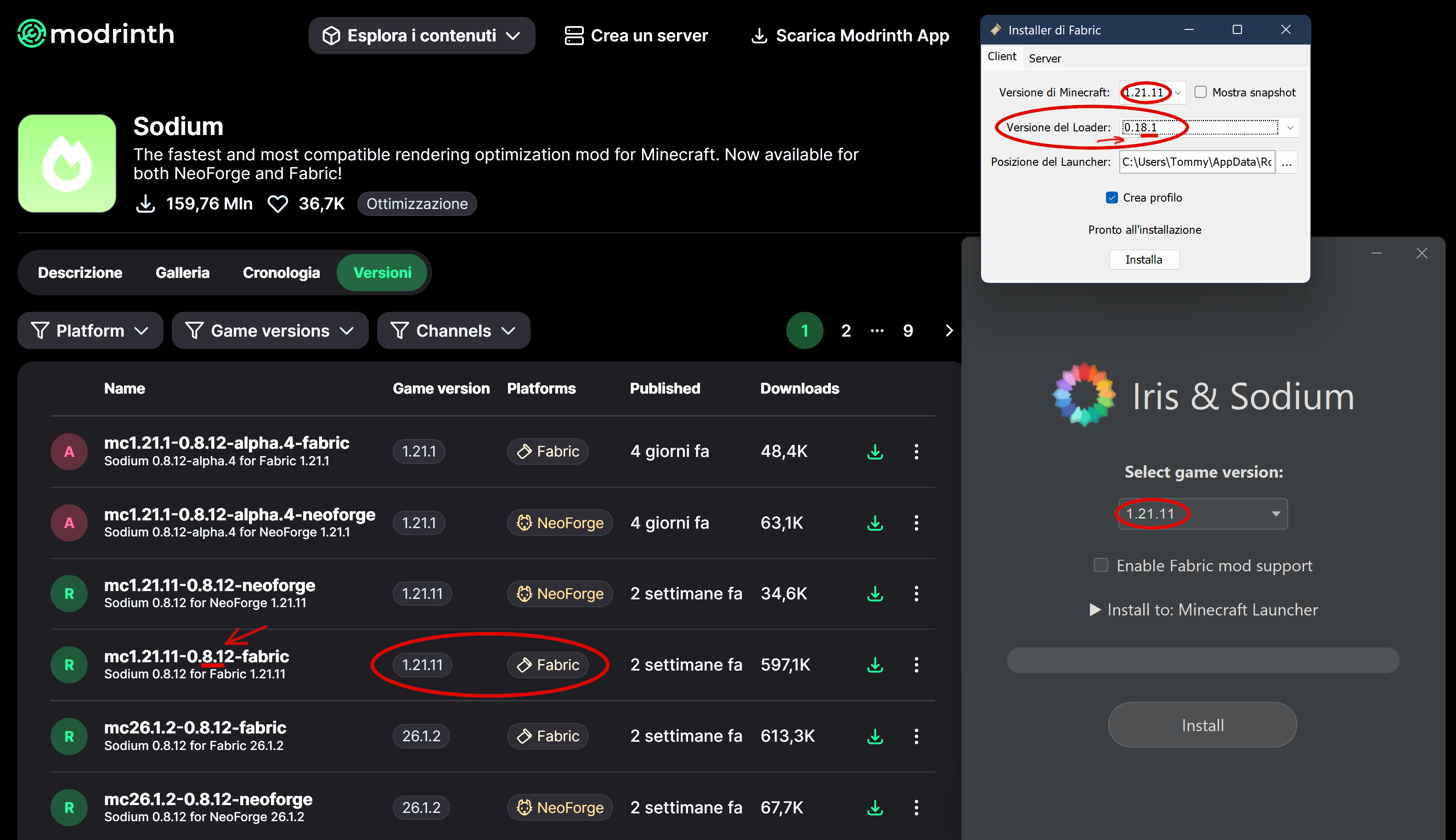
- 首先下载并运行 fabric-installer,然后运行 iris-installer;选择 1.21.11 版本,例如。
见下文如何选择加载器版本以匹配 Sodium 版本。在此示例中,最重要的数字是第一位,即 8,必须匹配。
注意:最近(2026年)最新的 Fabric 加载器(从 0.19.5 开始)修复了几个错误,现在甚至可以与旧版 Sodium 配合使用,但这仍处于测试阶段。
-
-
之后,检查路径(通常是 C:\Users\[用户名]\AppData\Roaming\.minecraft),并确保已创建文件夹 “iris-reserved” 和版本子文件夹 “1.21.11”;如果它们不存在,请手动创建。
-
将上述列出的所有模组粘贴到 VERSION 子文件夹中。
-
现在启动启动器,并确保已创建一个名为 “iris-fabric-loader-0.18.6-1.21.11” 之类的新安装配置。如果找不到,说明出错了,你需要重复此过程。
-
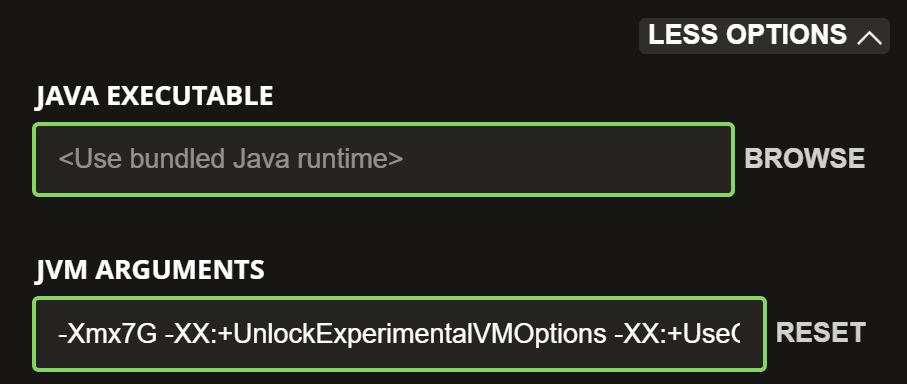
在启动游戏之前,建议检查分配的内存量。进入 Installations(安装)菜单并编辑你刚刚创建的配置文件。在底部 JVM Arguments(JVM 参数)字段中,如果你有最多 16 GB 的 RAM,请将第一个字符串 “-Xmx2G” 更改为 “-Xmx4G”;如果你有最多 32 GB 的 RAM,则更改为 “-Xmx7G”。
-
-
现在启动游戏……如果模组之间相互兼容,一切都会正常运行;否则,你需要检查哪个模组的版本不正确。
-
请记住:只有上述列出的模组组合才能保证不冲突。如果你添加其他模组,可能会出现崩溃。
-
注意:不幸的是,fabric-installer 已经有一段时间无法使用请求的加载器执行安装了,这会导致安装损坏。例如,如果你尝试为版本 26.3 安装 Fabric 并使用加载器 0.19.5,你最终得到的将是旧的加载器 0.14.24,它将无法工作。我通过明确选择加载器 0.14.24 解决了这个问题,结果神奇地得到了加载器 0.19.5。
PREMISE: this work was born from the author’s desire to create his own version of a realistic texture pack for Minecraft. The author has not used any copyrighted material (see the licenses inside each file for details).
English:
MostlyTrue is made for those who love enjoying the game and the adventure without giving up realism. The purpose is to visually replace the internal textures provided by the "Biomes 'O Plenty" (BOP) mod, in order to give a realistic feeling and unify the graphical appearance of Minecraft together with MostlyTrue projects. This texture pack does not affect the functionality of BOP or any other mod in any way; it solely provides a cosmetic change to the appearance of 'Minecraft: Java Edition' while using BOP.
Have you found treasures and mysterious traces of ancient civilizations and other worlds? Yes!? Ok, now will be more painfull... Not yet!? Ok, now will be more... will be more... Plenty!
... and there will be more light in the distance also…
If you liked the texture pack but feel the need for a smoother gameplay experience… don’t give up too much realism and try the FeelTrue x32 project. It’s a unique pack — and it’s free!
Español:
MostlyTrue está hecho para quienes disfrutan del juego y la aventura sin renunciar al realismo. El propósito es reemplazar visualmente las texturas internas proporcionadas por el mod "Biomes 'O Plenty" (BOP), con el fin de ofrecer una sensación más realista y unificar la apariencia gráfica de Minecraft junto con los proyectos MostlyTrue. Este paquete de texturas no afecta en absoluto la funcionalidad de BOP ni de ningún otro mod; únicamente realiza un cambio cosmético en la apariencia de 'Minecraft: Java Edition' mientras se usa BOP.
Has encontrado tesoros y huellas misteriosas de civilizaciones antiguas y otros mundos? Que sì? Sale, ahora pronto te iras a sufrir mas... Todavia no!? Bueno, ahora irà a ser mas... a ser mas... Abundante!
... y hay mas luzes allá al fondo tambièn...
Si te gustó el paquete de texturas pero sientes la necesidad de una experiencia de juego más fluida… no sacrifiques demasiado realismo y prueba el proyecto FeelTrue x32. ¡Es un paquete único y es gratis!
Italiano:
MostlyTrue è fatto per chi ama godersi il gioco e l'avventura, senza rinunciare al realismo. L'obiettivo è di rimpiazzare visivamente le textures interne create dalla mod "Biomes 'O Plenty" (BOP), al fine di offrire sensazioni realistiche e unificare l'aspetto grafico di Minecraft insieme ai progetti MostlyTrue. Questo pacchetto di textures non modifica in nessun modo le funzionalità di BOP nè di altre mod; si limita unicamente a cambiare l'estetica e l'apparenza di 'Minecraft: Java Edition' mentre si usa BOP.
Hai trovato tesori e tracce misteriose di civiltà antiche e di altri mondi? Sì!? Bene, ora sarà più doloroso di prima!... Non ancora!? Ottimo, ora diventerà più... diventerà più... Esagerato!
... e ci saranno pure più luci là in fondo...
Se il pacchetto di texture ti è piaciuto ma senti la necessità di un'esperienza di gioco più fluida… non rinunciare troppo al realismo e prova il progetto FeelTrue x32. E' un pacchetto unico ed è gratis!
Below is a summary of the key information you need to get the best experience when using Minecraft with my texture packs:
_1 ESSENTIAL MODS FOR USE WITH FABRIC/IRIS SHADERS:
- continuity - adds large scale texture tiling and randomization tiling feature to make a realistic gameplay experience
- entity_model_feature_fabric (EMF) - adds customizable entity model feature, like hands for villagers
- entity_texture_feature_fabric (ETF) - adds customizable entity texture feature, like zombie variations
- fabric-api - adds customization and shader supports
- fabric-language-kotlin - required to interpret certain Mod codes
- indium - ESSENTIAL by fabric up to version 1.20.6, not for later ones! ESSENTIAL to avoid font issues in Minecraft title window!
- iris-fabric - required by fabric
- lithium - required by sodium
- sodium-fabric - required by fabric
_2 ESSENTIAL MODS TO ADD FOR USE WITH "BIOMES O' PLENTY" MOD:
- BiomesOPlenty - adds biomes and materials; WARNING! This mod permanently alters your Minecraft world, so add it BEFORE creating a new world!
- GlitchCore - required by BiomesOPlenty Mod
- TerraBlender - required by BiomesOPlenty Mod
_3 ESSENTIAL MODS TO ADD FOR USE WITH "BETTER NETHER" AND "BETTER END" MODS:
- BetterNether - adds biomes and materials to Nether; WARNING! This mod permanently alters your Minecraft world, so add it BEFORE creating a new world!
- BetterEnd - adds biomes and materials to End; WARNING! This mod permanently alters your Minecraft world, so add it BEFORE creating a new world!
- Bclib - required by Better Nether and Better End Mods
- Worldweaver - required by Better Nether and Better End Mods
- Wunderlib - required by Better Nether and Better End Mods
_4 For those USING THE OFFICIAL MICROSOFT LAUNCHER, the correct installation procedure is:
- Do not start the launcher.
- First download and run fabric-installer, then iris-installer; choose 1.21.11 VERSION, for example.
See below how to choose loader version, matching Sodium version. In this example, the most significant digit is the first one, namely the 8, which must match.
NOTE: Recently (in 2026) the latest Fabric Loaders (from 0.19.5) have fixed several bugs and now work even with older Sodium versions, but this is yet on testing.
-
-
After that, check the path (usually C:\Users\ [username] \AppData\Roaming\ .minecraft) and make sure the folder "iris-reserved" and version subfolder "1.21.11" has been created; if they’re missing, create them manually.
-
Paste all the mods listed above into the VERSION subfolder.
-
Now start the launcher and make sure a new installation has been created with a name like "iris-fabric-loader-0.18.6-1.21.11". If it’s not there, something went wrong and you need to repeat the procedure.
-
Before launching the game, I recommend checking how much memory is allocated. Go to the Installations menu and edit the profile you just created. At the bottom, in the JVM Arguments field, change the first string "-Xmx2G" to "-Xmx4G" if you have up to 16 GB of RAM, or to "-Xmx7G" if you have up to 32 GB.
-
-
Now launch the game… if the mods are compatible with each other, everything will work fine; otherwise, you’ll need to check which mod has the wrong VERSION.
-
REMEMBER: only the group of mods listed above is guaranteed not to conflict. If you add other mods, you may experience crashes.
-
NOTE: Unfortunately, for quite some time now the fabric‑installer has no longer been able to perform installations using the requested loader, and this results in corrupted installations. For example, if you try to install Fabric for version 26.3 with loader 0.19.5, you will instead get the old loader 0.14.24, which will not work. I managed to fix it by explicitly selecting loader 0.14.24, and magically I ended up with loader 0.19.5.


 资源包

 资源包

 资源包

 资源包

 资源包

 资源包

评论 0
登录后参与评分
还没有评论,来抢沙发吧