使用任意原版染料为你的附魔光效上色。直接从锻造台自定义工具、盔甲和鞘翅的外观。
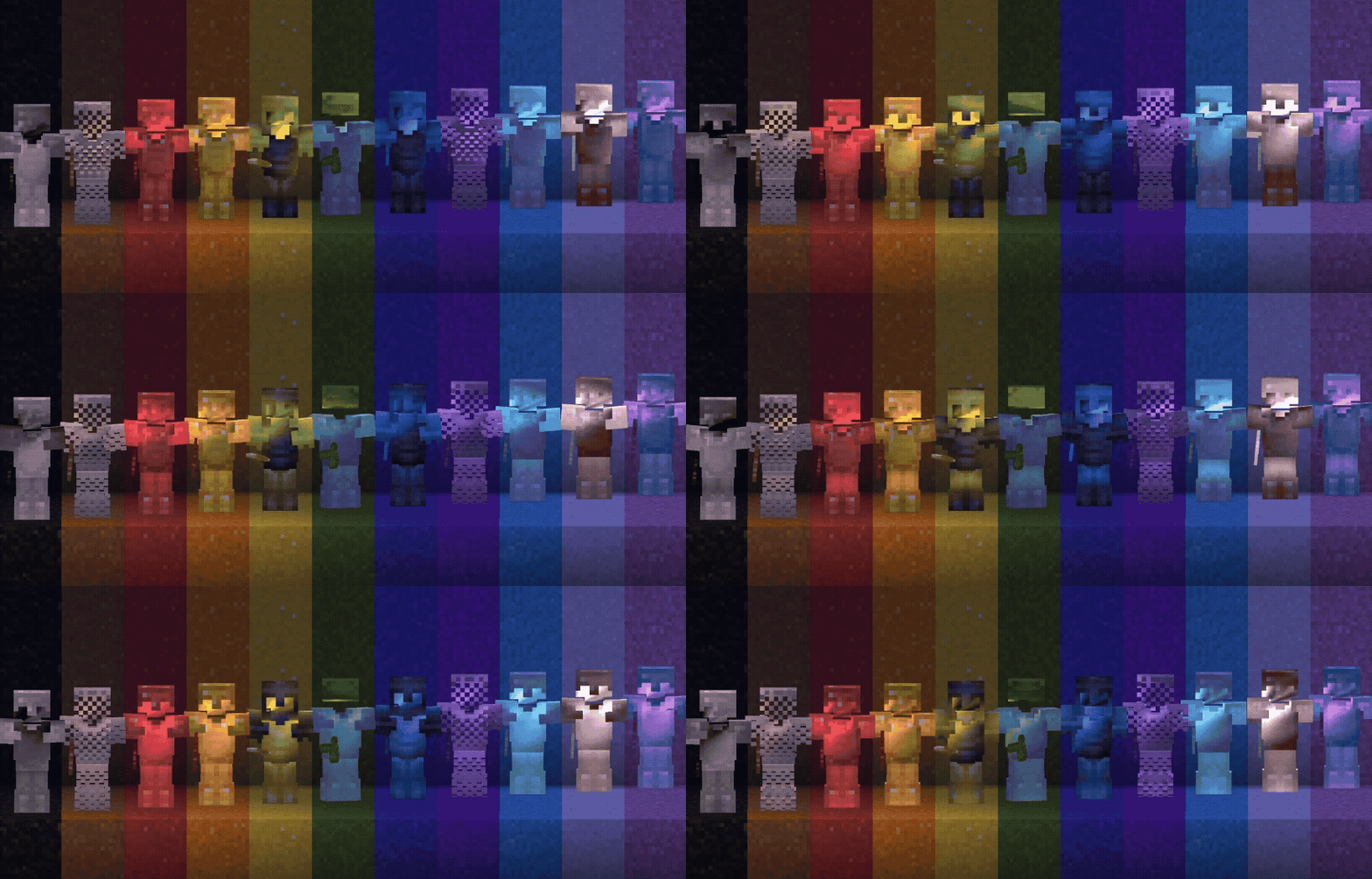
使用方法
在锻造台中放入物品、染料和蜂巢。
- 使用玻璃板代替染料可以移除彩色光效。
- 使用下界之星代替染料可获得彩虹光效。
被染色的三叉戟在手持和投掷时都会保留其光效(仅限模组)。

通过模组,任何可附魔的物品都可以获得彩色光效,包括皮革甲和其他模组的物品。数据包和资源包仅涵盖其自带模型的 vanilla 物品(尚不支持皮革甲,受限于物品组件功能)。
兼容性
本模组修改了物品和实体光影,因此无法与其他执行相同操作的光影包共存。
模组兼容 Iris 光影包:彩色光效绘制在光影包之上,因此仍能正常显示。不支持其他光影模组。
资源包可单独使用,但若没有数据包(或对应的模组/插件),你将无法获得合成配方。在这种情况下,自定义光效物品只能通过指令获取。指令文档即将推出。
支持 Minecraft 26.1+ 在 Vulkan 和 OpenGL 渲染器上运行。请根据你的游戏版本下载对应文件(26.1–26.2 或 26.3)。
Fabric / Quilt 模组还兼容 1.21.1 和 1.21.11。
你应该安装哪个版本?
单人游玩 — 原版 Minecraft
使用客户端文件:适用于你 Minecraft 版本的数据包和资源包。
将数据包放入世界的 datapacks 文件夹,将资源包放入 .minecraft/resourcepacks,然后启用它。
单人游玩 — 模组版 Minecraft
使用模组。这是最简单的安装方式。
多人服务器 — Paper / Purpur / Folia
在服务器上安装插件。它会向加入的玩家提供资源包,因此玩家无需自行安装。
多人服务器 — 模组版
在服务器和每位玩家的客户端上都安装模组。
服务器模组负责处理配方。客户端模组也是必需的,因为它包含了彩色光效的渲染代码。
欢迎加入 Discord,抢先预览即将推出的功能,或就资源包提出问题。
Color your enchantment glints with any vanilla dye. Personalize tools, armor, and elytra straight from a smithing table.
How to use
Place the item, a dye, and a honeycomb in a smithing table.
- Use a glass pane instead of a dye to remove a colored glint.
- Use a nether star instead of a dye for the rainbow glint.
Colored tridents keep their glint when held and when thrown (mod only).
With the mod, any enchantable item can get a colored glint, including leather armor and items from other mods. The datapack + resource pack only covers the vanilla items it ships models for (no leather armor yet, due to an item component limitation).
Compatibility
This modification modifies the item and entity shaders, so it will not work together with other packs that do the same.
The mod works with Iris shaderpacks: colored glints are drawn on top of the shaderpack, so they still show. Other shader mods aren't supported.
The resource pack can be used on its own, but without the datapack (or the matching mod / plugin) you will not get the recipes. In that case, custom glinted items can only be summoned with commands. Command docs are coming soon.
Supports Minecraft 26.1+ on both the Vulkan and OpenGL renderers. Download the files that match your game version (26.1–26.2 or 26.3).
The Fabric / Quilt mod also supports 1.21.1 and 1.21.11.
What version should you install?
Playing by yourself — Vanilla Minecraft
Use the client files: the datapack and the resource pack for your Minecraft version.
Put the datapack in your world's datapacks folder, and the resource pack in .minecraft/resourcepacks, then enable it.
Playing by yourself — Modded Minecraft
Use the mod. That's the easiest install.
Multiplayer server — Paper / Purpur / Folia
Use the plugin on the server. It serves the resource pack to joining players, so they don't need to install it themselves.
Multiplayer server — Modded
Use the mod on both the server and every player.
The server mod handles the recipes. The client mod is required too, because it includes the rendering code for colored glints.
You're welcome to join the Discord for sneak peeks at upcoming features, or just to ask questions about the pack.


 资源包

 资源包

 资源包

 资源包

 资源包

 资源包

评论 0
登录后参与评分
还没有评论,来抢沙发吧