
⚠️? 开发更新
?? 一个重大更新目前正在准备中,包括新的 PIDS 以及对系统的全面重构。由于我需要协调这个项目与完成学业及职业义务之间的关系,开发进度比预期稍慢一些。感谢大家在此创作阶段给予的耐心与支持。
?? A major update is currently in the works, featuring new PIDS and a complete system overhaul. Progress is taking a bit longer than expected as I balance this project with finishing my studies and my professional commitments. Thank you for your patience and support during this development phase.
NEWS (19th July): The update should be coming anytime soon!
For any help, you can find me on discord with the username: aca. on the Minecraft Transit Railway discord.
Utilisations - Uses
?? [FR] SNCF PIDS
Version actuelle : Bêta 0.2
Bienvenue sur la page de cet addon pour le mod Minecraft Transit Railway (accompagné de Joban Client Mod). Il ajoute une collection de PIDS (Panneaux d'Information Voyageurs) inspirés du réseau SNCF.
Ce guide explique comment utiliser les PIDS et configurer vos lignes de train. (Les bases du mod MTR ne sont pas détaillées.)
Guide Rapide
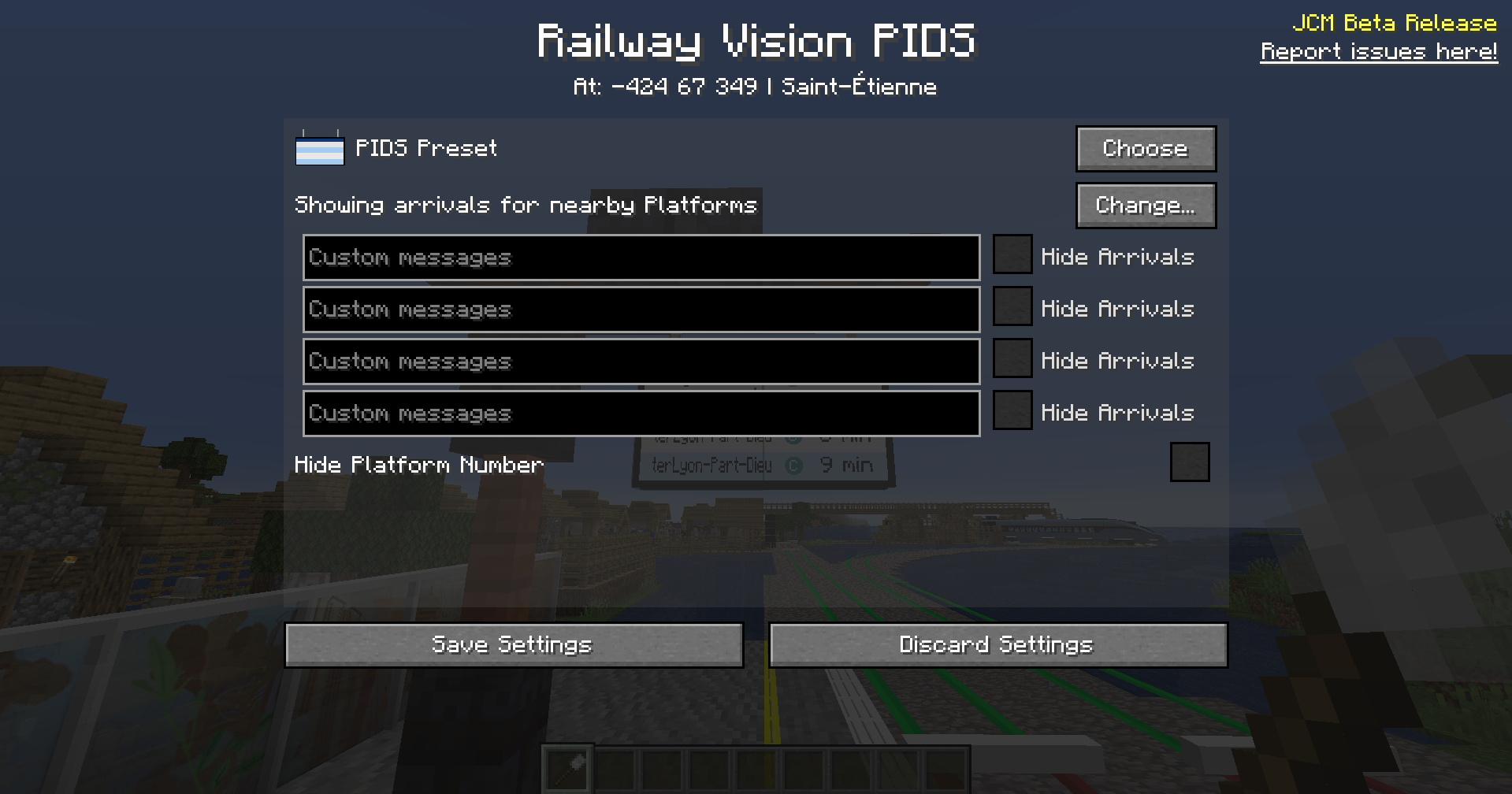
Étapes 1 & 2 : Placez un bloc PIDS du mod Joban Client Mod et faites un clic droit dessus avec le Brush du mod MTR.
Étapes 1 & 2
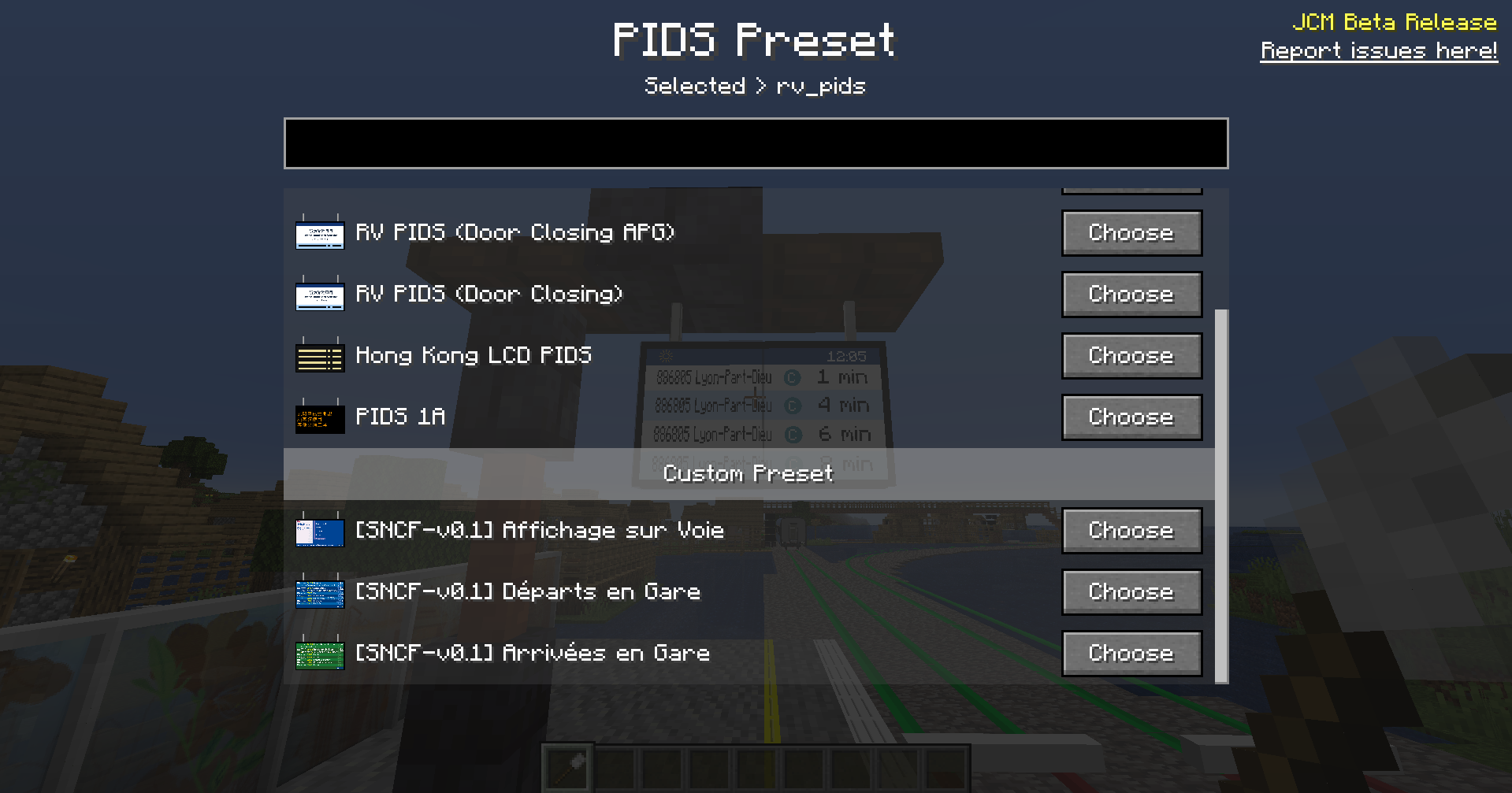
Étape 3 : Cliquez sur Choose à côté de "PIDS Preset" et descendez dans la catégorie "Custom Preset" pour trouver la liste des PIDS de ce pack (incluant les nouveaux affichages LED, Information, etc.). Sélectionnez celui de votre choix.
Étape 3
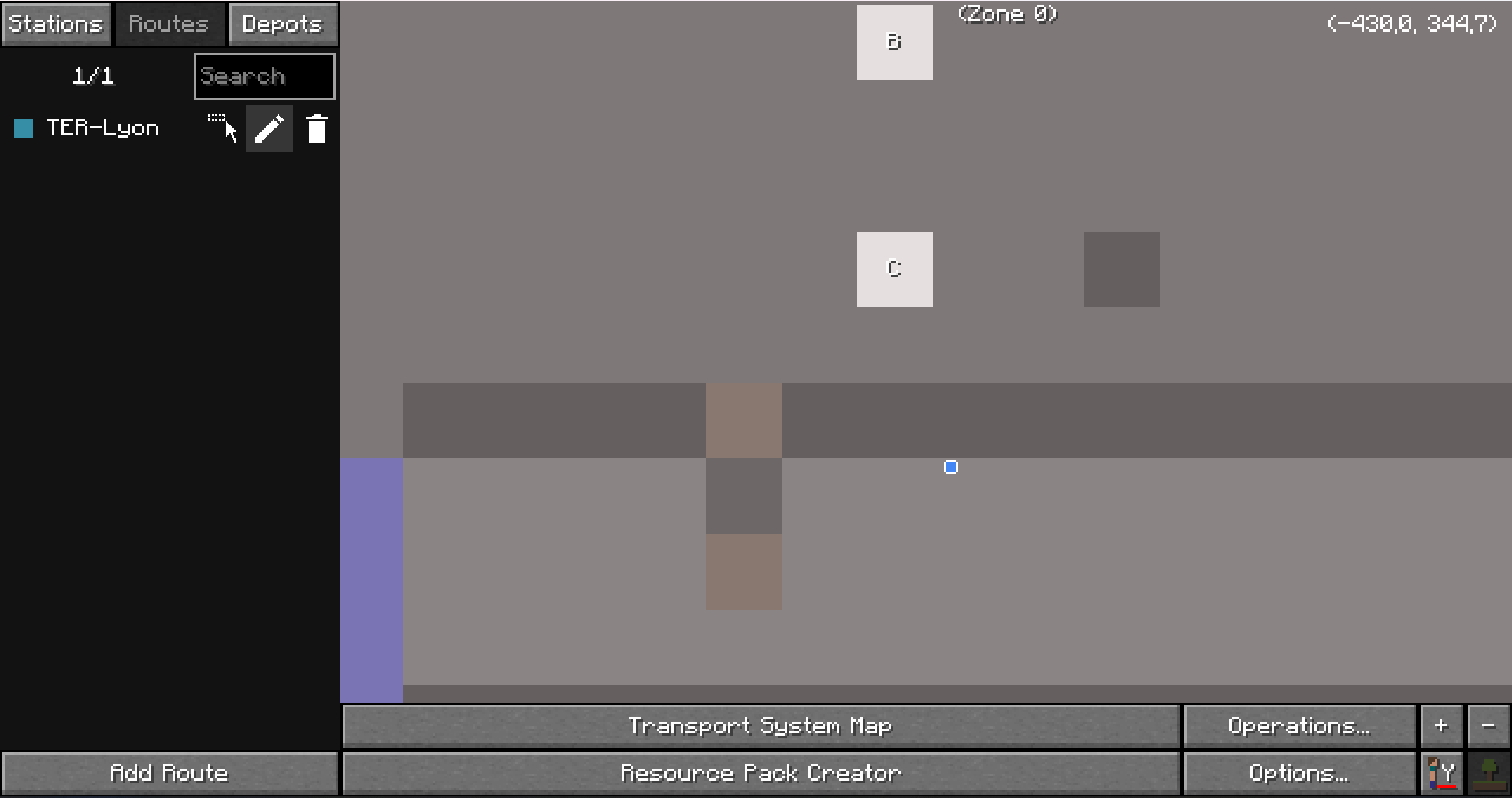
Étape 4 : Pour configurer vos trains, allez dans le "Railway Dashboard" sur l'onglet "Routes" et modifiez une ligne de train en cliquant sur le crayon. Le champ important est le "Route Number".
Onglet Routes
Formats pour le "Route Number"
Le champ Route Number accepte plusieurs formats :
- Format Standard :
<Type_de_Train>|<Numéro_de_Train> - Format Transilien :
<Type_de_Train>|<Numéro_de_Train>|<Ligne_Transilien (Optionnel)> - Format avec Incrémentation Automatique (Bêta) :
Utilisez
%pour indiquer les chiffres qui doivent s'incrémenter.- Exemple :
TGV|78%%générera les trains7800,7801,7802... - Exemple :
TER|8%%%générera les trains8000,8001,8002... - Exemple :
TRANSILIEN|132%%%|Lgénérera les trains132000,132001... avec comme nom de ligne :L
- Exemple :
Liste des Types de Trains et Alias (List of Train Types and their aliases)
- SNCF
- TGV
- INOUI (
TGVINOUI,TGV INOUI) - OUIGO (
TGVOUIGO,TGV OUIGO) - LYRIA (
TGVLYRIA,TGV LYRIA) - FRECCIAROSSA (
TGVFRECCIAROSSA,TGV FRECCIAROSSA) - TRENITALIA (
TGVTRENITALIA,TGV TRENITALIA) - THALYS (
TGVTHALYS,TGV THALYS) - RENFE (
TGVRENFE,TGV RENFE) - EUROSTAR (
TGVEUROSTAR,TGV EUROSTAR) - INTERCITIES (
IC,INTERCITY,INTERCITÉS,INTERCITÉ) - TER
- RER
- TRANSILIEN
- IDTGV (
ID TGV) - LER
- CAR (
AUTOCAR,BUS,BUS SNCF,CAR SNCF)
Si un type est inconnu, SNCF sera utilisé par défaut.
Fonctionnalités Avancées
- Arrêts multiples par quai : Pour définir plusieurs points d'arrêts sur une même voie (ex: pour trains courts/longs), nommez votre quai (
Platform) avec le format<Nom_Voie>|<Repère (Optionnel)>. - Affichage des retards : Les retards sont désormais gérés et affichés sur tous les PIDS.
- PIDS 'Numéro de Voie avec Repère' : Ce PIDS affiche la voie et son repère. Il le détecte automatiquement si le quai est nommé
<Voie>|<Repère>. Sinon, vous pouvez forcer l'affichage d'un repère manuel en utilisant le premier "Custom Message" du PIDS (avec le Brush) et en cochant la case "Hide Platform Number", le cas échéant, un "?" sera affiché si aucun repère n'est défini.
?? [EN] SNCF PIDS
Current version: Beta 0.2
Welcome to the page for this addon for the Minecraft Transit Railway mod (along with the Joban Client Mod). It adds a collection of PIDS (Passenger Information Display Systems) inspired by the French SNCF network.
This guide explains how to use the PIDS and configure your train routes. (Basic knowledge of the MTR mod is assumed.)
Quick Guide
Step 1 & 2: Place a PIDS block from the Joban Client Mod and right-click on it with the MTR mod's Brush.
Step 3: Click Choose next to "PIDS Preset" and scroll down to the "Custom Preset" category to find the list of PIDS from this pack (including the new LED displays, Information panels, etc.). Select the one you want.
Step 4: To configure your trains, go to the "Railway Dashboard" → "Routes" tab and edit a route by clicking on the pencil icon next to it. The important field is "Route Number".
"Route Number" Formats
The Route Number field accepts several formats:
- 标准格式:
<列车类型>|<列车编号> - Transilien 格式:
<列车类型>|<列车编号>|<Transilien线路> - 自动递增格式(Beta):
使用
%表示需要递增的位数。- 示例:
TGV|78%%将生成列车7800、7801、7802... - 示例:
TER|8%%%将生成列车8000、8001、8002... - 示例:
TRANSILIEN|132%%%|L将生成列车132000、132001...,线路名称为:L
- 示例:
列车类型与别名列表
(请参阅上方的法语列表以获取所有可用类型)
如果使用未识别的类型,默认将使用 SNCF。
高级功能
-
每个站台设置多个停靠点: 要在同一站台上定义多个停靠点(例如区分短编组/长编组列车),请使用
<Platform_Name>|<Marker (Optionnal)>格式命名你的Platform。- 延误显示: 延误信息现在会在所有 PIDS(乘客信息显示系统)上进行处理和显示。
-
“平台名称 + 标记” PIDS: 此 PIDS 会显示平台名称及其对应的标记。如果平台名称格式为
<Platform_Name>|<Marker>,系统将自动检测并识别该标记。此外,你也可以通过 PIDS 中的第一个“自定义消息”(使用画笔工具)并勾选“隐藏平台编号”复选框来强制显示手动指定的标记;若如此操作但未定义任何标记,则会显示一个 “?”。

你是这个资源的作者?登录后可认领此资源。
相似资源
 资源包

John Smith Technician's Remix 是原版 John Smith 资源包的变体,专为搭配模组化 Minecraft 使用而设计。
 资源包

Golden Days 是一款 Minecraft 资源包,旨在重现早期版本(如 Beta)中的旧纹理、光照、名称和音效。需要启用内置的 Programmer Art 资源包。
 资源包

Doggy Talents 的 16x16 资源包
 资源包

带有独特纹理的功能性方块深色 GUI。80 个模组的深色模式
 资源包

这是 EMF Player Animation 资源包。它为玩家实体添加了精美的动画。兼容其他模组的动画,例如 Quark 的表情动作、Parcool 的技巧以及 Not Enough Animations。
 资源包

《基岩版》风格的极简 GUI 和 HUD
评论 0
登录后参与评分
还没有评论,来抢沙发吧