? TinyBones
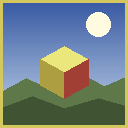
✨ 一款干净、扁平、卡通风格的资源包,其内核真正做到了“微小”
TinyBones 将 Minecraft 简化为纯粹、易读的色彩——没有像素噪点,没有浑浊的渐变,只有清晰的扁平形状,在地图各处都能清晰可见。?
但外观整洁只是其中一半。在表面之下,74% 的方块运行在 4×4 或 8×8 分辨率而非 16×16,这使得方块图集从 1024×1024 缩小到 512×512。保持完整的覆盖范围,却只占用极少的内存。?
? 专为: 低端笔记本电脑 ? · 集成显卡 ?️ · 大型整合包 ? · 超大渲染距离 ? · 以及任何喜欢这种干净外观的人 ?
? 亮点
|
|
| ? 完整覆盖 |
重新设计了每一个原版纹理——无一遗漏 |
| ? 混合分辨率 |
大多数方块为 4×4 或 8×8,关键细节得以保留 |
| ?️ 方块图集 |
1024×1024 → 512×512(减少 63% 像素) |
| ? 显存 |
比标准 16× 资源包少约 4 MB |
| ? 下载大小 |
小于 2 MB |
| ?️ 动画 |
所有动画纹理均已优化 |
| ⚙️ 要求 |
零 —— 无需 OptiFine,无需模组,无需光影 |
| ✅ 兼容 Sodium |
每个精灵都是干净的 2 的幂次方尺寸 |
? 视觉效果
? 扁平、鲜艳的色彩。 方块被简化为少数几种纯净色调。没有抖动,没有噪点——只有易于辨识的形状。
⛏️ 真正突出的矿石。 宝石斑点被提亮,而周围岩石变暗,因此钻石实际上会从洞穴墙壁上发光。?
? 各不相同的石块。 闪长岩、花岗岩、凝灰岩、玄武岩和深板岩得到了区分,让你一眼就能分辨它们。
? 繁茂的植被。 树叶、草、藤蔓和作物获得了更生动的绿色——它们是扁平化调色板中最 dull 的部分。
?️ 清晰的物品图标。 每个物品都加上了锐利的深色边框,使其在任何物品栏槽位中都清晰可读。
? 手工构建的天空与菜单
原版菜单全景图是一个 1024×1024 的照片风格洞穴场景——虽然美观,但其本身重达 2.47 MB,且与扁平艺术风格完全冲突。?️
TinyBones 将其替换为一个 完全生成的 256×256 天空盒,以匹配该资源包的风格——并且体积小了 74 倍:?
- ☀️ 带有柔和暖色光芒的太阳
- ☁️ 两层云——厚实的积云加上高空纤细的卷云
- ?️ 起伏的山丘,地平线上有树林线
- ?️ 陆地与天空交界处的大气薄雾
- ?️ 越靠近太阳的云层色调越暖
六个面通过 真实射线方向投影 生成,因此全景图在角落处旋转时 无缝可见接缝。?
还包括:重绘的太阳、所有 8 个月相 ????????(带陨石坑)、新的云朵以及更暗的星场末地天空。?
?️ 原版菜单面板是纯黑色的,一旦背景放置了全景图,就会看起来像灰色雾气。现在它们变成了深海军蓝,带有柔和的晕影和金色分隔线——依然完全可读,只是美观得多。✨
⚡ 性能
比起营销废话,我更喜欢给你真实的数据。?
✅ 你真正获得的提升
- ? 方块图集:减少 63% 像素
- ? 方块 + 物品图集的显存节省约 4 MB
- ? 实体叶片 = 无重叠绘制。 树叶平均有 22% 的透明孔洞。使用镂空渲染时,GPU 必须绘制每个孔洞后面的所有内容——密集森林会被多次重叠绘制。现在每个叶片纹理都是完全不透明的:没有 alpha 测试,没有重叠绘制,区块网格生成器可以剔除隐藏面。这正是原版 快速 图形设置所做的,现已内置。?
- ?️ 菜单全景图 2.47 MB → 34 KB,且每面尺寸从 1024×1024 降至 256×256
- ? 导能器风效 减半——它是资源包中最大的动画上传数据
- ? 全屏叠加层(晕影、恶心效果、南瓜模糊)从 256 降至 64——这些效果 每一帧 都会在整个屏幕上重绘
- ✨ 附魔光效 从 128 降至 32——这是对每个附魔物品的额外混合通道
⚠️ 你确实不会有的变化
? 如果你已经在游戏台式机上运行 300 FPS,你不会注意到任何区别。 标准的 16× 资源包已经几乎免费——几乎没有可优化的空间。
? 生物、GUI 和粒子大约占用 20 MB 显存,且 未 缩减。生物皮肤故意保持全分辨率(见下文),因此 ~4 MB 的节省仅占总纹理内存的 17%,而不是整个游戏的 60%。
? 真正的权衡: 因为最小的方块是 4×4,图集的 Mipmap 级别上限为 2 而非 4。非常遥远的方块可能会轻微闪烁。在视频设置中将 Mipmap Levels: 2 设置为最佳效果。?️
? 实体叶片意味着 你将不再透过树冠看到天空——就像 快速 图形一样。这是刻意为之的风格 + 速度选择。
TL;DR: ? 在弱硬件、受限显存和打包密集的整合包中收益巨大。在强 GPU 上,主要关乎 外观。
? 分辨率选择逻辑
在缩小之前,每个方块都经过自动化流水线测试:?
- ? 误差测量 —— 计算下采样后的实际像素误差
- ? 覆盖率测试 —— 细长的形状(铁轨、植物、栏杆、蜘蛛网)不得消失
- ? 结构测试 —— 如果砖缝或木板纹理会坍缩成扁平 blob,则该方块提升回上一级分辨率
- ? 硬性保护 —— 矿石、方块面和红石指示器始终保持 16×16
? 尝试、测试、回退
? 熔炉、 smoker、发射器和 crafting table 正面 回归 16×16 —— 在 8×8 时,熔炉的燃烧开口会消失,而你需要看清你的熔炉是否真的在工作。
? 64×64 的生物皮肤 不 进行下采样。 将它们减半会抹去眼睛和面部特征——苦力怕和僵尸变成了无定形的 blob。一个皮肤大约占用 16 KB 显存,因此节省下来的空间根本不值得。
? 完整覆盖
TinyBones 永远不是部分资源包。每次构建都会重新设计该版本 完整的原版纹理集 —— 包括方块、物品、生物、GUI、粒子、画作、装饰、状态效果、地图和环境。
新版本更新也包含在内,包括硫磺和朱砂方块家族、动态强效硫磺、硫磺尖刺以及硫磺立方体生物——所有文件名均取自原版客户端,因此不会出现静默回退到默认纹理的情况。?
? 安装方法
- ⬇️ 下载
.zip 文件 —— 请勿解压!
- ? 将其放入你的
resourcepacks 文件夹:
- ? Windows:
%appdata%\.minecraft\resourcepacks
- ? Linux:
~/.minecraft/resourcepacks
- ? macOS:
~/Library/Application Support/minecraft/resourcepacks
- ? 在游戏中:选项 → 资源包 → 将 TinyBones 移至右侧 → 完成
?️ 推荐设置
| 设置项 |
值 |
| ?️ 图形 |
快速 |
| ? 多级采样纹理级别 |
2 |
| ☁️ 云 |
关闭 |
| ✨ 粒子效果 |
减少 |
| ? 平滑光照 |
关闭 或 最低 |
? 专业提示: 最近的 Minecraft 版本附带了实验性的 Vulkan 渲染器 —— 它通常比 OpenGL 更快,值得一试!?
❓ 常见问题
? 这真的能提升我的帧率吗?
完全取决于你的硬件配置。在低端笔记本、集成显卡或显存不足的整合包上——是的,会有显著提升,尤其是在森林中。对于已经能跑 300+ FPS 的游戏台式机——几乎没有提升,甚至没有。我不会对此隐瞒。?
? 我需要 OptiFine、Sodium 或其他模组吗?
不需要!? 纯原版,零依赖。如果你使用 Sodium 和 Iris,它与它们配合得很好——每个精灵图都是整洁的 2 的幂次方尺寸,因此多级采样纹理永远不会出错。
?️ 为什么远处的方块有点闪烁?
这是 4×4 方块的多级采样权衡结果。在视频设置中将 多级采样纹理级别设置为 2,看起来会平滑得多。?️
? 为什么我看不到树叶后面的东西了?
这是刻意为之!实心树叶消除了过度绘制,这是本资源包最大的性能提升之一。它符合原版 快速 图形的视觉效果。?
? 为什么要替换主菜单全景图?
原版的全景图是一张 1024×1024 分辨率的洞穴摄影场景——看起来很漂亮,但与扁平艺术风格完全不搭,而且光它自己就占了 2.47 MB。替换版是根据本资源包风格生成的,体积小了 74 倍。?
? 在服务器和 Realms 中使用安全吗?
绝对安全。✅ 资源包仅影响客户端,不会改变任何游戏玩法。
? 支持哪些 Minecraft 版本?
请查看 文件 选项卡——每个下载链接都列出了其目标的确切版本。每个构建都声明了一个广泛的兼容范围,因此它通常也能在没有“不兼容的资源包”警告的情况下在近邻版本中运行。?
? 这些是手绘纹理吗?
不是,我想坦诚说明这一点。? 这些是对原版 Minecraft 纹理进行算法重制后的版本——颜色扁平化、调色板缩减和分辨率降低。天空、全景图和菜单面板是完全重新生成的。原始方块和物品 artwork 的所有权属于 Mojang。
? 鸣谢与许可
?? 由 MontSnacek 创作
? 永久免费。 你可以使用它、编辑它、并将其打包进整合包中——虽然注明出处会受到感谢,但并非必须。
⚠️ 这些纹理是基于原版 Minecraft 资产的 衍生作品,而非原创 artwork。源艺术品的一切权利仍归 Mojang AB / Microsoft 所有。正因如此,此资源包必须始终保持免费——不得置于付费墙后或通过广告链接获利。
? 非官方 Minecraft 产品。
未经 Mojang 或 Microsoft 批准或认可。
Minecraft 是 Mojang AB / Microsoft 的商标。 ?
? TinyBones
✨ A clean, flat, cartoony pack that's genuinely tiny under the hood
TinyBones strips Minecraft down to pure, readable colour — no pixel noise, no muddy gradients, just crisp flat shapes that pop from across the map. ?
But looking clean is only half of it. Under the surface, 74% of every block runs at 4×4 or 8×8 instead of 16×16, which shrinks the block atlas from 1024×1024 down to 512×512. Same complete coverage, a fraction of the memory. ?
? Built for: low-end laptops ? · integrated graphics ?️ · heavy modpacks ? · huge render distances ? · and anyone who just likes the clean look ?
? Highlights
|
|
| ? Complete |
Every single vanilla texture restyled — nothing left untouched |
| ? Mixed resolution |
Most blocks at 4×4 or 8×8, detail kept where it matters |
| ?️ Block atlas |
1024×1024 → 512×512 (−63% pixels) |
| ? VRAM |
~4 MB less than a standard 16× pack |
| ? Download |
Under 2 MB |
| ?️ Animations |
Every animated texture optimised |
| ⚙️ Requirements |
Zero — no OptiFine, no mods, no shaders |
| ✅ Sodium-safe |
Every sprite is a clean power of two |
? What it looks like
? Flat, vibrant colour. Blocks are reduced to a handful of clean tones. No dithering, no noise — just readable shapes.
⛏️ Ores that actually pop. Gem speckles are brightened while the surrounding rock is darkened, so diamonds practically glow at you from a cave wall. ?
? Stone that isn't all the same. Diorite, granite, tuff, basalt and deepslate get nudged apart so you can finally tell them apart at a glance.
? Lush foliage. Leaves, grass, vines and crops got livelier greens — they were the dullest part of the flattened palette.
?️ Crisp item icons. Every item gets a sharpened dark rim so it reads clearly against any inventory slot.
? Hand-built sky & menu
The vanilla menu panorama is a 1024×1024 photographic cave scene — beautiful, but it weighs 2.47 MB on its own and clashes completely with a flat art style. ?️
TinyBones replaces it with a fully generated 256×256 skybox that matches the pack — and it's 74× smaller: ?
- ☀️ A sun with a soft warm glow
- ☁️ Two cloud layers — chunky cumulus plus high wispy cirrus
- ?️ Rolling hills with a treeline on the horizon
- ?️ Atmospheric haze where land meets sky
- ?️ Clouds tinted warmer the closer they sit to the sun
The six faces are generated by true ray-direction projection, so the panorama rotates with zero visible seams at the corners. ?
Also included: a redrawn sun, all 8 moon phases ???????? with craters, new clouds, and a darker starfield End sky. ?
?️ Menu panels are flat black in vanilla, which reads as grey fog once a panorama sits behind it. They're now dark navy with a soft vignette and gold separator lines — still perfectly readable, just far nicer. ✨
⚡ Performance
I'd rather give you real numbers than marketing fluff. ?
✅ Where you genuinely gain
- ? Block atlas: −63% pixels
- ? ~4 MB less VRAM for the block + item atlases
- ? Solid leaves = no overdraw. Leaves averaged 22% transparent holes. With cutout rendering, the GPU has to draw whatever sits behind every hole — a dense forest gets drawn over itself several times. Every leaf texture is now fully opaque: no alpha testing, no overdraw, and the chunk mesher can cull hidden faces. This is what vanilla's Fast graphics does, baked right in. ?
- ?️ Menu panorama 2.47 MB → 34 KB, and 1024×1024 → 256×256 per face
- ? Conduit wind halved — it was the single biggest animated upload in the pack
- ? Fullscreen overlays (vignette, nausea, pumpkin blur) 256 → 64 — these redraw over your entire screen every frame
- ✨ Enchant glint 128 → 32 — an extra blended pass on every enchanted item
⚠️ Where you honestly won't
? If you already run 300 FPS on a gaming desktop, you will not notice a difference. Standard 16× packs are already basically free — there's very little to beat.
? Mobs, GUI and particles are roughly 20 MB of VRAM and are not reduced. Mob skins stay at full resolution on purpose (see below), so the ~4 MB saving is around 17% of total texture memory, not 60% of the whole game.
? The real trade-off: because the smallest blocks are 4×4, the atlas mipmap level caps at 2 instead of 4. Very distant blocks can shimmer slightly. Set Mipmap Levels: 2 in Video Settings for the smoothest result. ?️
? Solid leaves mean you won't see sky through the canopy any more — exactly like Fast graphics. It's a deliberate style + speed choice.
TL;DR: ? Big win on weak hardware, tight VRAM and packed modpacks. On a strong GPU it's mostly about the look.
? How resolutions were chosen
Every single block was tested by an automated pipeline before being shrunk: ?
- ? Error measurement — the real pixel error after downscaling is computed
- ? Coverage test — thin shapes (rails, plants, bars, cobwebs) must not vanish
- ? Structure test — if brick mortar or plank grain would collapse into a flat blob, the block is bumped back up a level
- ? Hard protections — ores, block faces and redstone indicators always stay 16×16
? Tried, tested, reverted
? Furnace, smoker, dispenser and crafting table fronts went back to 16×16 — at 8×8 the furnace's lit opening disappeared, and you need to see whether your furnace is actually running.
? 64×64 mob skins are NOT downscaled. Halving them erased eyes and facial features — creepers and zombies became shapeless blobs. One skin is roughly 16 KB of VRAM, so the saving was never worth it.
? Complete coverage
TinyBones is never a partial pack. Every build restyles the full vanilla texture set for that release — blocks, items, mobs, GUI, particles, paintings, trims, status effects, maps, and the environment.
Newer drops are covered too, including the sulfur and cinnabar block families, animated potent sulfur, sulfur spikes, and the Sulfur Cube mob — with the exact file names taken from the real client, so nothing silently falls back to a default texture. ?
? Installation
- ⬇️ Download the
.zip — do not unzip it!
- ? Drop it into your resourcepacks folder:
- ? Windows:
%appdata%\.minecraft\resourcepacks
- ? Linux:
~/.minecraft/resourcepacks
- ? macOS:
~/Library/Application Support/minecraft/resourcepacks
- ? In game: Options → Resource Packs → move TinyBones to the right → Done
?️ Recommended settings
| Setting |
Value |
| ?️ Graphics |
Fast |
| ? Mipmap Levels |
2 |
| ☁️ Clouds |
OFF |
| ✨ Particles |
Decreased |
| ? Smooth Lighting |
OFF or Minimum |
? Pro tip: recent Minecraft releases ship an experimental Vulkan renderer — it's often faster than OpenGL, so it's well worth a try! ?
❓ FAQ
? Will this actually boost my FPS?
Depends entirely on your hardware. On a low-end laptop, integrated graphics, or a VRAM-starved modpack — yes, noticeably, especially in forests. On a gaming desktop already pushing 300+ FPS — barely, if at all. I won't pretend otherwise. ?
? Do I need OptiFine, Sodium or any mods?
Nope! ? Pure vanilla, zero dependencies. It works great alongside Sodium and Iris if you use them — every sprite is a clean power of two, so mipmapping never breaks.
?️ Why do distant blocks shimmer a bit?
That's the mipmap trade-off from the 4×4 blocks. Set Mipmap Levels to 2 in Video Settings and it'll look much smoother. ?️
? Why can't I see through leaves any more?
Intentional! Solid leaves eliminate overdraw, which is one of the biggest performance wins in this pack. It matches vanilla's Fast graphics look. ?
? Why replace the menu panorama?
The vanilla one is a photographic cave scene at 1024×1024 — it looks great, but it doesn't match a flat art style at all, and it's 2.47 MB by itself. The replacement is generated to match the pack and is 74× smaller. ?
? Is it safe on servers and Realms?
Absolutely. ✅ Resource packs are client-side only and change nothing about gameplay.
? Which Minecraft versions are supported?
Check the Files tab — each download lists the exact versions it targets. Every build declares a wide compatible range, so it usually works on neighbouring releases without the "incompatible pack" warning too. ?
? Are these hand-drawn textures?
No, and I want to be upfront about it. ? These are algorithmically restyled versions of the original Minecraft textures — colour flattening, palette reduction, and resolution reduction. The sky, panorama and menu panels are generated from scratch. The original block and item artwork belongs to Mojang.
? Credits & License
?? Created by MontSnacek
? Free forever. Use it, edit it, bundle it into modpacks — a credit is appreciated but never required.
⚠️ These textures are derivative works based on the original Minecraft assets, not original artwork. All rights in the source art remain with Mojang AB / Microsoft. Because of that, this pack must always stay free — never behind a paywall or ad-link.
? NOT AN OFFICIAL MINECRAFT PRODUCT.
NOT APPROVED BY OR ASSOCIATED WITH MOJANG OR MICROSOFT.
Minecraft is a trademark of Mojang AB / Microsoft. ?

 资源包

 资源包

 资源包

 资源包

 资源包

 资源包

评论 0
登录后参与评分
还没有评论,来抢沙发吧