Uyghur Language Pack | ئۇيغۇرچە تىل قوشۇمچىسى
一份完整的 Minecraft 游戏内文本维吾尔语翻译——将完整的游戏界面支持至两种书写系统。
功能特性
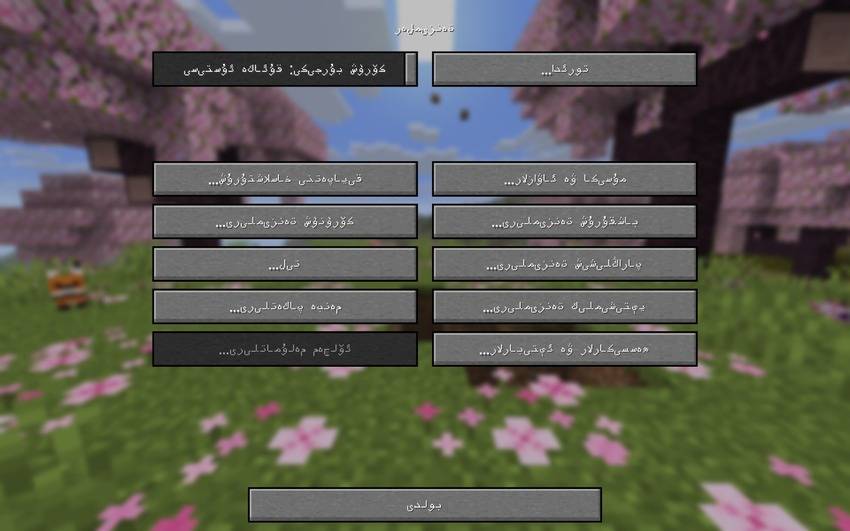
- 一个资源包包含两套完整翻译:
- Uyghurche (Latin) —
ug_lt,适用于习惯阅读拉丁字母拼写维吾尔语的玩家
- ئۇيغۇرچە (Arabic) —
ug_ar,传统的维吾尔语阿拉伯字母拼写,完全兼容从右向左的排版
- 全覆盖 — 游戏中的每个菜单、物品、方块、进度、字幕和消息均已翻译(每种语言超过 6,700 条条目)
- 仔细校对以确保一致性:键盘按键名称、画作标题以及专有名词(如生物名称)在整个资源包中遵循统一的规范
- 积极维护,并根据最新游戏更新进行校对
支持的 Minecraft 版本
本资源包针对 Minecraft 26.1、26.1.2 和 26.2 版本。
如果在不同版本的 Minecraft 中显示“此资源包可能无法正常工作”的警告,该资源包通常仍能加载并正常运行——该警告仅表示该版本未经过显式测试。
安装方法
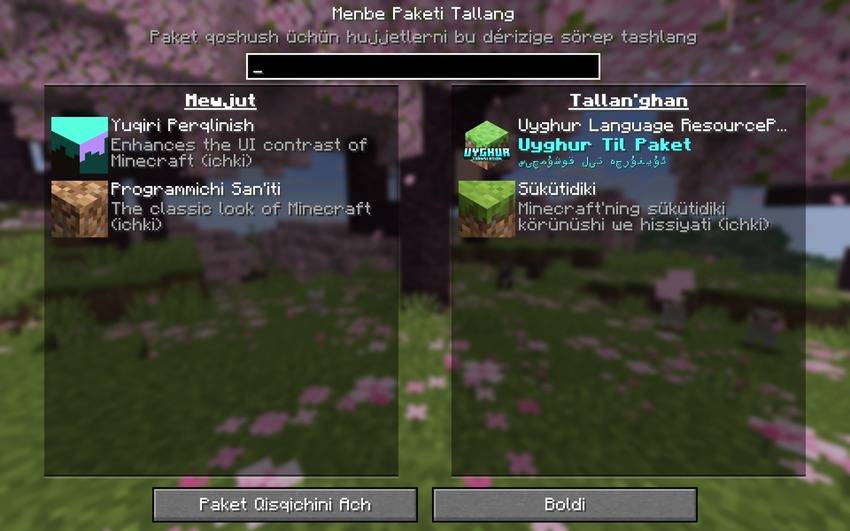
- 下载
.zip 文件——请勿解压
- 打开 Minecraft → 选项 → 资源包
- 点击 打开资源包文件夹 并将
.zip 文件拖入其中
- 返回 Minecraft,在 可用资源包 中选择该资源包并将其移至 已选资源包
- 进入游戏后,前往 选项 → 语言 并选择以下任一选项:
- Uyghurche(拉丁字母),或
- ئۇيغۇرچە(阿拉伯字母)
我该选择哪个版本?
| 书写系统 |
适用人群 |
| Uyghurche (Latin) |
更习惯阅读拉丁字母拼写维吾尔语的玩家 |
| ئۇيغۇرچە (Arabic) |
阅读传统维吾尔语阿拉伯字母拼写的玩家 |
两者均包含在同一下载文件中——只需在游戏内的语言菜单中随时切换即可。
本资源包由一名译者独立翻译完成,并借助翻译工具以提高效率。因此,部分文本可能存在细微错误或表达生硬之处——如果您发现此类问题,请留下包含相关文本的评论,以便我们进行修正。
Minecraft 是 Mojang Synergies AB 的商标。本资源包为非官方粉丝项目,与 Mojang 或 Microsoft 无关,也未获得其认可或背书。
Uyghur Language Pack | ئۇيغۇرچە تىل قوشۇمچىسى
A complete Uyghur translation of Minecraft's in-game text — bringing the full game interface to the Uyghur language, in both writing systems.
Features

- Two full translations in one pack:
- Uyghurche (Latin) —
ug_lt, for players who read Uyghur in Latin script
- ئۇيغۇرچە (Arabic) —
ug_ar, the traditional Uyghur Arabic script, fully right-to-left compatible
- Complete coverage — every menu, item, block, advancement, subtitle, and message in the game has been translated (6,700+ entries per language)
- Carefully checked for consistency: keyboard key names, painting titles, and proper nouns (like mob names) follow the same convention throughout the pack
- Actively maintained and checked against the latest game updates
Supported Minecraft Versions
This pack targets Minecraft 26.1, 26.1.2, and 26.2.
If Minecraft shows a "this pack may not work correctly" warning on a different version, the pack will usually still load and work — that warning just means the version wasn't explicitly tested.
Installation

- Download the
.zip file — do not unzip it
- Open Minecraft → Options → Resource Packs
- Click Open Pack Folder and drop the
.zip file in
- Back in Minecraft, select the pack from Available and move it to Selected
- Once in-game, go to Options → Language and choose either:
- Uyghurche (Latin script), or
- ئۇيغۇرچە (Arabic script)
Which version should I pick?
| Script |
Best for |
| Uyghurche (Latin) |
Players more comfortable reading Uyghur written with Latin letters |
| ئۇيغۇرچە (Arabic) |
Players who read the traditional Uyghur Arabic script |
Both are included in the same download — just switch between them anytime from the in-game language menu.
This pack was translated by a single translator, with the help of translation tools to speed up the process. Because of that, some lines may contain small errors or awkward phrasing — if you spot one, please leave a comment with the text so it can be corrected.
Minecraft is a trademark of Mojang Synergies AB. This resource pack is an unofficial, fan-made project and is not affiliated with or endorsed by Mojang or Microsoft.
评论 0
登录后参与评分
还没有评论,来抢沙发吧