
Energy Shaders [Java]
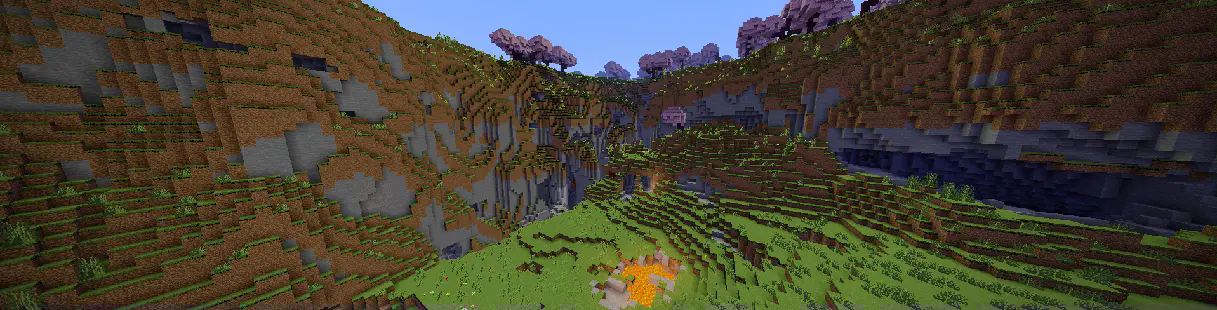
Energy Shaders 是一款光影/资源包,旨在提供更具色彩的原版体验。无需任何模组或帧率下降。
如果你喜欢这个资源包,请考虑通过赞助我来支持开发:
特性
建议查看 画廊 或直接尝试该光影资源包。以下是一些特性的列表:
- 自定义光照(白天、夜晚和洞穴中有所不同)
- 自定义雾气(白天、夜晚和洞穴中有所不同)
- 自定义下界
- 自定义末地
- 自定义火把光(白天、夜晚和洞穴中有所不同)
- 暗角效果
启用资源包
你可以直接将其作为资源包启用(将 .zip 文件复制到 resourcepacks 目录)。
如果你在 Minecraft 26.2 之前使用 Sodium,则需要安装 Sodium Core Shader Support 模组。
此资源包不支持 Optifine!
视频
自定义(自 v. 2.8.0 起)
Energy Shaders 还提供了大量的自定义选项。由于这是一个原版光影资源包,这些设置需要手动编辑。
开始自定义 Energy Shaders
首先下载 设置模板。
然后将下载的 zip 文件复制到你自己的资源包目录中。你可以在 Minecraft 的资源包选择界面按下 Open Pack Folder 找到它。接下来解压 zip 文件并删除它,只保留解压后的 ES Settings Java 目录。你可以随意重命名该目录。
现在使用你喜欢的文本编辑器打开 ES Settings Java/pack.mcmeta 并将 YOUR_NAME 改为你自己的名字或别名。
接下来你应该测试一切是否正常运行。激活 Energy Shaders \[Java] 和你刚刚创建的 ES Settings Java 资源包。确保 ES Settings Java 资源包位于 Energy Shaders \[Java] 之上。打开一个世界,Minecraft 不应崩溃。保持
现在你可以开始实际更改一些设置了。用你喜欢的文本编辑器打开 ES Settings Java/assets/minecraft/shaders/include/es-settings.glsl。
在那里你会发现很多以 // #define 开头的行。这些就是可以更改的设置。所有设置必须先启用(通过移除 //),然后才能更改其值。有些设置没有值,它们只是启用或禁用某个功能。
更改设置后回到游戏中并按下 F3 + T,这将重新加载所有资源包,从而应用你的更改。
示例 1
行
// #define DISABLE_SHADOW
可以更改为
#define DISABLE_SHADOW
这将禁用方块、树木等投射的阴影。
注意:如上所示,必须移除 //!
示例 2
行
// #define SATURATION 1.2
可以更改为
#define SATURATION 0.0
这将使游戏画面变为灰度。
注意:如上所示,必须移除 //!
如果你想切换回默认值,只需再次添加 //:
//#define SATURATION 0.0
我怎么知道哪个设置是做什么的?
某些设置在 es-settings.glsl 文件中有所解释。有些可能难以解释,你只能尝试一下来了解。通常来说,如果设置包含 VEC3(...),则它是一个具有三个值(红、绿、蓝)的设置。
当然,你也可以随时在我的 Discord 服务器寻求帮助:
为什么设置放在另一个包里而不是直接包含在 Energy Shaders 中
实际上,设置也包含在 Energy Shaders 中!但是将它们放在额外的包中要方便得多,因为这样你在更新 Energy Shaders 时不会丢失你的设置!
反馈
欢迎在我的 Discord 服务器 留下任何反馈。请理解,原版 Minecraft 的功能非常有限。
Energy Shaders [Java]
Energy Shaders is a shaderpack/resourcepack that provides a more colorful vanilla expierience. Without requiring any mods or a frame rate drop.
If you like this pack consider supporting the development by buying me a coffee:
Features
It is best to take a look at the gallery or to try the shaderpack out. Here is a list of some features:
- Custom lightning (different for day, night and in caves)
- Custom fog (different for day, night and in caves)
- Custom Nether
- Custom End
- Custom torch light (different for day, night and in caves)
- Vignette effect
Enabling the resourcepack
You can simply enable it as resourcepack (Copy the .zip into the resourcepack directory).
If you are using Sodium before minecraft 26.2, the Sodium Core Shader Support mod is required.
The pack does not work with Optifine!
Video
Customization (Since v. 2.8.0)
Energy Shaders also offers a lot of customization. Since this is a vanilla shader-pack, these settings have to be manually edited.
Getting started with customizing energy shaders
First download the settings template.
Then copy the downloaded zip file to your resourcepacks directory. You can find it by pressing Open Pack Folder in
Minecraft's Resourcepack selection screen. Next extract the zip file and delete it, so that only the extracted
directory ES Settings Java remains. You can rename the directory to your liking.
Now edit ES Settings Java/pack.mcmeta with a text editor of your choosing and change YOUR_NAME to your name or your alias.
Next you should test if everything works. Activate Energy Shaders \[Java] and the ES Settings Java pack you just created. Make
sure the ES Settings Java pack is above Energy Shaders \[Java]. Open a world and Minecraft should not crash. Keep the
Now you can start to actually change some settings. Open ES Settings Java/assets/minecraft/shaders/include/es-settings.glsl
in your favorite text editor.
In there you will find a lot of lines starting with // #define. These are the settings, which can be changed. All Settings
must be enabled first (by removing the //) before its value can be changed. Some settings do not have a value. These simply enable or disable
a feature.
After changing a setting go back in game and press F3 + T, which will reload all resourcepacks. Thus, applying your changes.
Example 1
The line
// #define DISABLE_SHADOW
can be changed to
#define DISABLE_SHADOW
which will disable shadows cast by blocks, trees, etc.
NOTE: The // must be removed as seen above!
Example 2
The line
// #define SATURATION 1.2
can be changed to
#define SATURATION 0.0
which will make the game look grayscale.
NOTE: The // must be removed as seen above!
If you want to switch back to the default value simple add the // again:
//#define SATURATION 0.0
How do I know which setting does what?
Some settings are explained in the es-settings.glsl. Some may be hard to explain, and you just have to try around
and find out. Generally, if a setting contains a VEC3(...), it is a setting with three values (red, green, blue).
Of course, you can always ask for help in my discord server:
Why are the settings in a different pack and not just contained in Energy Shaders directly
Actually, the settings are contained in Energy Shaders too! But it is much more convenient if the settings are in an additional pack, because you can update Energy Shaders without losing your settings!
Feedback
Feel free to leave any feedback on my Discord server. Please respect, that vanilla Minecraft is very limited.

下载 Energy Shaders Java
下载 Energy Shaders Java
下载 Energy Shaders Java
下载 Energy Shaders Java
下载 Energy Shaders Java
下载 Energy Shaders Java
下载 Energy Shaders Java
下载 Energy Shaders Java
下载 Energy Shaders Java
下载 Energy Shaders Java
- 更新到 mc 26.3
- 修复掉落物品问题
- 更新到 Sodium 0.9.2
关于这个资源的讨论、问题反馈与使用心得
还没有讨论,来发第一帖吧
你是这个资源的作者?登录后可认领此资源。
相似资源
 光影

以卓越的品质、细节和性能保留 Minecraft 的元素。
 光影

适用于 Minecraft: Java Edition 的光影包。明亮、色彩丰富且与众不同。
 光影

以卓越的品质、细节和性能改造 Minecraft 的视觉效果。
 光影

一款注重游戏体验、风格半写实的光影包
 光影

[WIP] 一款基于 complementary reimagined 的游戏玩法光影包,具有带锐利阴影的彩色方块光
 光影

将 Photon 光影体验提升至极致
评论 0
登录后参与评分
还没有评论,来抢沙发吧