展示
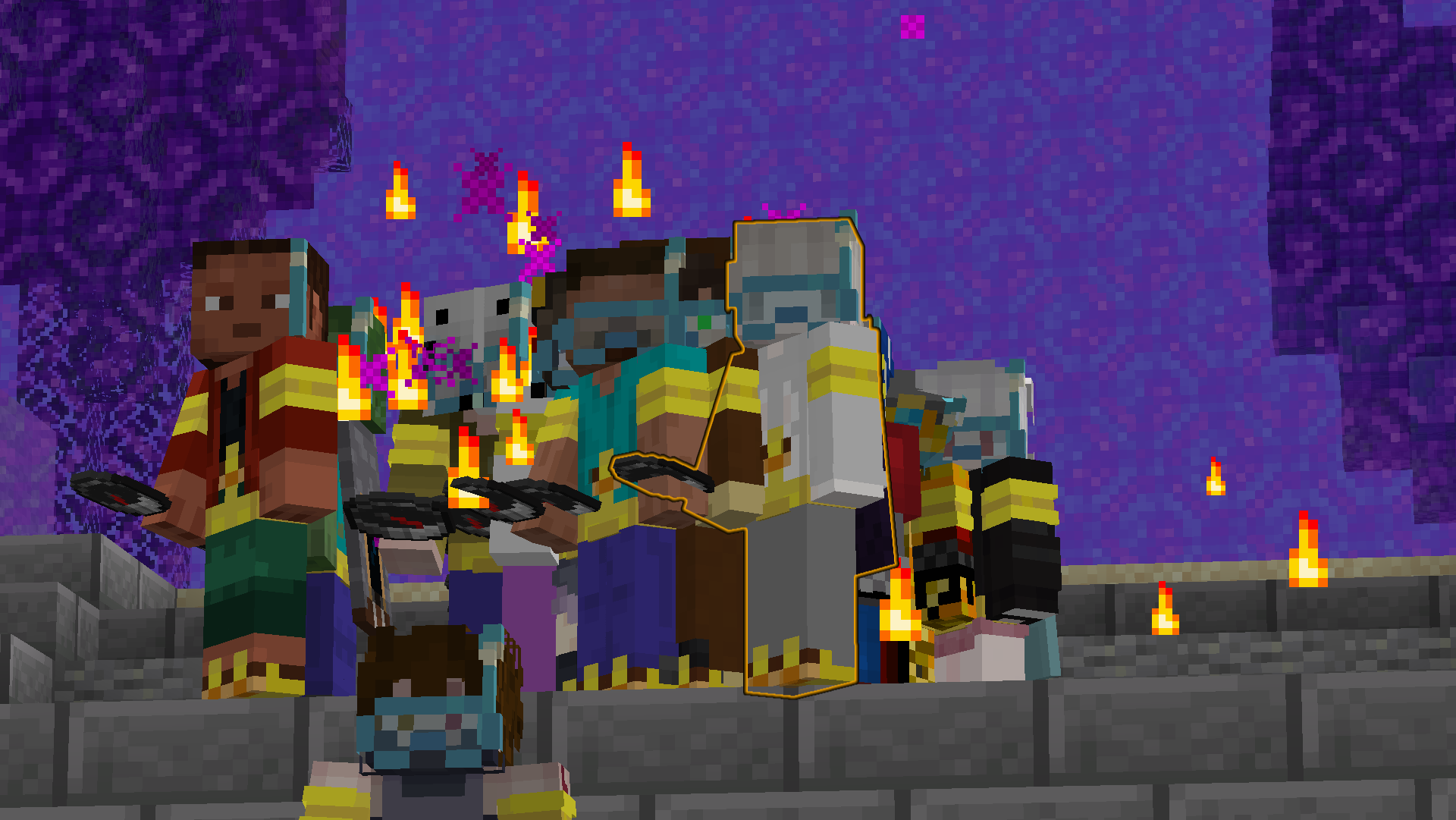
如你所见,每个玩家身上都有这个浮标。这一切都可以在原版 Minecraft 中实现,并且添加起来非常简单。想要查看更多其他玩家佩戴强制皮肤的效果预览,请务必查看 图库。
描述
这个资源包的作用是让所有玩家都穿戴特定的皮肤。你无法更改所有人使用的皮肤,我可能会在未来为这个资源包添加更多皮肤(或者将其转变为 API,以便其他人创建自己的附加组件)。目前,它会给每个人一个可爱的鸭子浮标,这是由 girlthatbites 专门为本资源包制作的(从某些细节你应该能看出来,我们本想赶在夏季高峰期发布这个资源包,但稍微晚了一些……)。资源包的图标也是由她制作的。
我第一次制作这个纹理包是在近一年前。然而,当时的版本基本上只是通过链接大量的 if 语句来实现的。这些 if 语句会检查当前实体上的坐标位置,然后将其设置为特定颜色。这会导致加载纹理包时性能极差,加载时间比平时长很多。另一个问题是它也对许多其他实体进行了同样的处理。这两个因素导致我没有上传该资源包。
现在的资源包是由一个大型 switch 语句构成的。由于不能使用 SSBO、VBO、上传的纹理或数组,必须使用 switch 语句或链式 if 语句才能使其正常工作。因此,加载时间可能仍会比平时稍长一些。不过,switch 语句已经过相当程度的优化,所以应该不会增加太多加载时间。
使用方法
- 非常简单,像往常一样应用该资源包即可。无需解压,只需将其放入你的
resourcepacks 文件夹,或直接拖入资源包界面。
- 如果资源包没有显示出来,很可能是因为你启用了递归资源,你需要点击左下角的“文件夹视图”,然后搜索该资源包(该资源包名为 "Summer ForceSkin")。
针对整合包制作者 (v2.0.0+)
首先,你必须创建你想要强制他人穿戴的皮肤。
- 这应该像创建普通皮肤一样进行制作。
- 如果你希望皮肤的某部分强制透明(而不是仅仅覆盖在他们的皮肤之上),则将该像素的颜色设置为 rgba(189, 89, 221, 89)。例如,当玩家的头发遮挡了你试图强制显示的口罩时,就需要这样做。
接下来,你需要修改资源包。
- 为此,你需要确保已安装 python。如果没有,请安装它。
- 如果你尚未下载并安装该资源包,请按正常方式下载并安装。然后,前往安装目录并解压该资源包。
- 打开解压后的文件夹,并将你创建的皮肤移入其中。
- 在你放置皮肤的同一目录下,应该有一个
Change Skin.py Python 脚本。如果找不到,请 从 Mega 网盘下载 并将其放入目录中。打开它,它会提示你输入皮肤名称(包括末尾的 .png)。之后,你可以在游戏中应用纹理包,你将看到所有人的皮肤都被强制替换为你设置的皮肤。
请注意,为了发布你新制作的资源包,你必须给予我署名并链接回本页面,同时确保遵守许可证(你可以在右侧找到许可证信息,仅限原始 Modrinth 页面可见)。
支持
加入 我的 Discord
- 报告错误
- 提出建议
- 投票决定未来的资源包
- 与社区互动
- 询问关于纹理包的问题
- 如果你想在自己的资源包中使用此资源包,请在此提问
查看 代码仓库
Showcase
As you can see, every player has the floatie on. This is all possible in Vanilla Minecraft, and is very easy to put on. For more previews of what the forced skin looks like on other players, make sure to check out the gallery
Description
What this pack does is it makes it so that everyone has a specific skin. You can't change the skin that everyone is using, and I may add more skins to the pack in the future (or turn this into an API to allow other people to create their own addons). Right now, it gives everyone a cute duck floatie, which was made by girlthatbites specifically for this pack (as you may be able to tell, we wanted to get this pack out in the peak of summer, but we were a bit late on that...) The icon of the pack was also made by her.
I first made this texture pack almost a year ago. However, it was basically just made by chaining a lot of if statements together. The if statement checked what coordinate it was on the current entity, and then just set it to a specific color. It was extremely horrible for loading the texture pack, and made it take a lot longer than usual. Another thing was that it also did it for a lot of other entities. These two factors made it so that I didn't upload the pack.
The pack is now made up of a big switch statement. I cannot use SSBOs, VBOs, an uploaded texture, or an array. It has to be either a switch or chained if statements in order for this to work. Due to this, it still may take a little bit longer than usual to load. However, the switch statement is very fairly optimized, so it shouldn't add too much time to the loading.
How to Use
- It's very simple, just apply the pack as normal. No need to unzip, just put it in your resourcepacks folder or drag it into the resourcepacks screen.
- If the pack doesn't show up, it's most likely because you have recursive resources, and you need to click "Folder View" in the bottom left and then search for the pack (the pack is called "Summer ForceSkin")
For Pack Creators (v2.0.0+)
First, you must create your skin you want people to be forced to wear.
- This should be created as any normal skin
- If there is a part of the skin that you would like to be forced to be transparent (rather than just overlaying on their skin), then make the color of that pixel set to rgba(189, 89, 221, 89). An example of when you would want this is if the player's hair is covering a mask you are trying to force the players to have.
Next, you need to modify the pack.
- For this, you need to make sure you have python installed. If you do not, then install it.
- Download and install the pack as normal if you have not already. Then, head to your files where it is installed and unzip the pack.
- Open the folder you unziped, and move the skin you created into it.
- In the same directory you placed your skin, there should be a
Change Skin.py python script. If it isn't there, download it from mega and place it in the directory. Open it, and it will prompt you to enter the name of your skin (including the .png at the end). After this, you can apply the texture pack ingame and you will see your skin forced on everyone.
Note that in order to post your newly made pack, you MUST give me credit and link back to the page, as well as making sure to follow the license (of which you can find to the right, only on the original Modrinth page)
Support
Join My Discord
- Report bugs
- Create suggestions
- Vote on future packs
- Interact with the community
- Ask for help with texture packs
- This is the place to ask if you can use this pack in your own pack
Check out The Repository
- Report bugs
- Create suggestions
- Contribute by creating a pull request


 光影

 光影

 光影

 光影

 光影

 光影
评论 0
登录后参与评分
还没有评论,来抢沙发吧